How Charges Trigger
Billing server communicates with Apple/Google approximately 24 hours pre-expiration. Process sequence:
- Server queries subscription status 24 hours before expiration
- Payment gateway validates stored credentials
- Authorization sent to bank/card issuer
- Successful charge extends subscription
- Confirmation sent to email
Regional pricing varies: Europeans pay €6.89-€51.69, Nigerians pay NGN 81,389.00 monthly.
VIP Types and Renewal Cycles
Multiple subscription structures exist:
- Monthly VIP: 400-500 coins for 30 days
- Quarterly VIP: 1,200-1,400 coins for 90 days
- Annual VIP: 4,500-5,000 coins for 365 days
Dual payment system: traditional auto-renew via payment methods, or coin-based purchases requiring manual renewal. Coin payments avoid automatic charges entirely—no payment authorization stored.
Why Timing Matters
Payment processors need advance notice to halt recurring authorizations. Once billing initiates within the final 24 hours, transactions become irreversible through standard cancellation. Missing the deadline by one hour means pursuing refunds through Apple/Google within 15 days instead of preventing charges.
Time zone calculations complicate timing. StarMaker servers operate on UTC or Pacific Time regardless of local timezone. A midnight expiration locally might trigger renewal hours earlier/later depending on server location.
The Last-24-Hours Rule: Technical Breakdown
What Is the Rule?
Cancel at least 24 hours before billing period ends to avoid next charge. If you subscribed January 1st at 3:00 PM for monthly service, renewal occurs February 1st at 3:00 PM. Cancel before January 31st at 3:00 PM—later falls within the prohibited window.
How Billing Processes Cancellations
Backend monitors subscription changes through API connections with Apple/Google. Cancellation sends a flag to StarMaker's database, updating status from active renewal to expires at period end.
This prevents renewal during the 24-hour pre-expiration check. But if cancellation occurs after processing began, the transaction completes because authorization already reached financial institutions.
Processing occurs near-real-time, though 15-30 minute delays happen during high traffic, creating risk for last-minute cancellations.
Time Zone Considerations
Server infrastructure uses fixed timezone reference, creating misalignment with local times. A subscription at 8:00 PM EST converts to 1:00 AM UTC next day. Calculate the 24-hour deadline using server timezone, not local clock.
Interfaces display renewal in local format, but underlying calculations use UTC/Pacific Time. February 1st might process January 31st evening for East Coast users.
Real Example: Missing by 1 Hour
User subscribes January 15th at 2:00 PM Pacific. Renewal shows February 15th. They cancel February 14th at 3:00 PM—seemingly 23 hours before. But if billing initiated at 2:01 PM February 14th (exactly 24 hours before), cancellation arrives too late. The $14.99 charge processes despite cancellation.
This happens because users calculate from midnight on renewal date rather than precise subscription hour.
Perfect Cancellation Timing Strategy
Find Your Exact Renewal Date
iOS: Settings > [Your Name] > Subscriptions > StarMaker shows renewal date and time.
Android: Google Play > Profile Icon > Payments & subscriptions > Subscriptions > StarMaker reveals details.
Screenshot immediately after subscribing. Add to calendar with multiple advance reminders.
Calculate Safe Window
For February 15th at 2:00 PM renewal:
- Ideal: 48-72 hours before (February 12th-13th)
- Safe minimum: 30 hours before (February 14th at 8:00 AM)
- Risky: 24-26 hours before (avoid)
- Too late: Less than 24 hours (charge processes)
Platform Timing Differences
iOS: Processes within 5-10 minutes. Confirmation states Your subscription will expire on [date].
Android: Similar timing but occasional 15-30 minute delays during peak hours. Shows You'll lose access on [date]. May need to force-close Google Play to see updated status.
Web: Email appsupport@starmakerstudios.com (520 Hampshire St. #202, San Francisco, 94110). Processing takes 24-48 hours—unsuitable for last-minute cancellations.
Set Reminder Alerts
Create recurring calendar event with staggered alerts:
- 5 days before: First warning
- 3 days before: Decision deadline
- 2 days before: Final action reminder
- 1 day after safe window: Verification check
Set as high-priority with audible alerts. Include exact renewal timestamp in description.
How Purchased Coins Affect Auto-Renew
Coin Balance vs. Subscription Billing
Two parallel payment systems operate independently: auto-renew through payment methods, and direct VIP purchases using coins. Active subscriptions ignore coin balance entirely. Billing server only checks payment method validity, never coin inventory.
For StarMaker VIP subscription last 24 hours rule management, BitTopup offers coin packages with up to 20% bonus rates enabling direct VIP purchases without auto-renew complications.
Does StarMaker Deduct Coins First?
No. Billing hierarchy never attempts coin deduction for App Store/Google Play renewals. A user with 10,000 coins and active $14.99 monthly subscription still receives the $14.99 charge, with coins untouched.
Apple and Google require subscription revenue through their systems to collect platform fees (15-30%). Coin-based renewal would violate app store policies.
Coin Purchase Priority Rules
Buy VIP directly: Profile > VIP > Select plan > Pay with Coins > Confirm. Transaction deducts required amount immediately (400-500 monthly, 1,200-1,400 quarterly, 4,500-5,000 annual).

Coin-based purchases create no recurring authorization. When VIP expires, account reverts to free tier without automatic renewal—complete billing control but requires active monitoring.
Case Study: 10,000+ Coins at Renewal
Users with large balances assume coins cover renewals automatically. This causes surprise charges when separate App Store/Google Play subscriptions renew.
Correct approach: Cancel auto-renew subscription, wait for expiration, then manually purchase VIP using coins. For 12,000 coins seeking annual VIP: cancel existing subscription 24+ hours before renewal, wait for expiration, use 4,500-5,000 coins for annual VIP.
Bonus Coins vs. VIP Billing
Can Bonus Coins Pay for VIP?
Yes. Bonus coins function identically to purchased coins for direct VIP purchases. Buying 3,000 coins with 450 bonus (15% rate) gives 3,450 total available for VIP without restriction.
But bonus coins provide zero protection against auto-renew charges—billing never checks coin balances before processing payment method charges.
Coin Type Classifications
- Purchased coins: Direct in-app purchases ($0.99 for 60 coins upward)
- Bonus coins: Auto-added at 8.3%-20% rates depending on package
- Promotional coins: Event/compensation distributions
- Earned coins: In-app activities/challenges
All function equivalently for VIP purchases. Bonus coins never expire per platform policy, making large purchases with high bonus rates economically attractive.
Common Misconception
I have enough coins, so I won't be charged is false. System deliberately separates coin and subscription billing to comply with app store policies. Solution: Cancel auto-renew, allow expiration, manually purchase VIP with coins.
Avoiding Unwanted Charges: Practical Tips
Enable Billing Notifications
Activate all billing notifications in app settings. Alerts typically arrive 24-48 hours before billing—often too late, but better than nothing.
iOS: Settings > Notifications > StarMaker—enable with Banners and Sounds.
Android: Settings > Apps > StarMaker > Notifications—enable all billing categories.
Verify registered email is current. Check spam filters don't block appsupport@starmakerstudios.com.
Create Calendar Events
Immediately after subscribing, create recurring event:
- Title: StarMaker Renewal - Cancel by [Date/Time]
- Date: Renewal date matching subscription hour
- Reminders: 5, 3, 2, 1 days before
- Recurrence: Match period (weekly/monthly/annual)
- Notes: Cancellation instructions and deadline
Use Bank Alerts
Configure transaction alerts via SMS/email through your financial institution for recurring charges. Provides post-billing awareness if pre-renewal notifications fail.
Some providers allow blocking specific merchants or setting subscription spending limits.
Forgot to Cancel?
Immediately cancel subscription to prevent future renewals. Pursue refunds:
iOS: Request within 15 days at reportaproblem.apple.com. Select charge, provide explanation. First-time requests generally approved.
Android: Request within 15 days through Google Play > Order History > [Charge] > Request refund. Automated processing within 24-48 hours.
Cancellation Process by Platform
iOS Steps
- Open Settings app
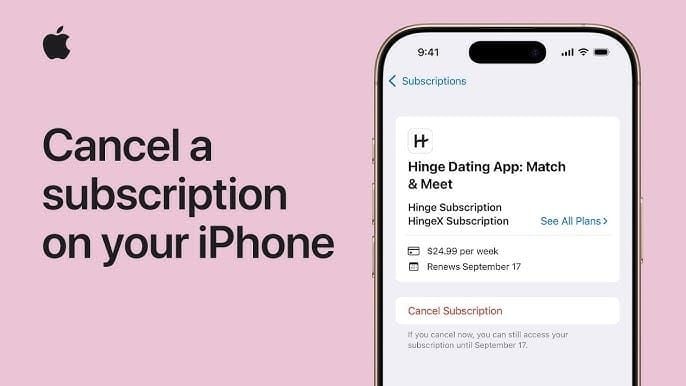
- Tap your name/Apple ID
- Select Subscriptions
- Tap StarMaker
- Tap Cancel Subscription
- Confirm cancellation
Confirmation shows Your subscription will expire on [date]. Screenshot immediately. Processes within 5-10 minutes.
Android Steps
- Open Google Play Store
- Tap profile icon (top-right)
- Select Payments & subscriptions
- Tap Subscriptions
- Select StarMaker
- Tap Cancel subscription
- Confirm
Shows You'll lose access on [date]. Force-close and reopen if status doesn't update within 30 minutes.
Web Management
Limited functionality. Mobile subscriptions must cancel through original platforms. Email appsupport@starmakerstudios.com as backup, but 24-48 hour processing makes it unsuitable for last-minute cancellations.
Verify Cancellation
Complete these checks:
- Platform shows Expires on [date] not Renews on [date]
- App displays end date without renewal
- Email confirmation received
- Calendar marked
- Screenshots saved
If conflicts appear, repeat cancellation and contact platform support immediately.
Troubleshooting Issues
Charged After Canceling
Review cancellation timestamp against original subscription time. If cancellation was definitely 24+ hours before renewal, request refunds within 15 days with screenshots as evidence.
For charges multiple cycles after cancellation, contact both platform and appsupport@starmakerstudios.com simultaneously.
Failed Payment Updates
Payment failures create ambiguous status. Check subscription immediately after failure notifications. Some platforms retry multiple times over days—explicitly cancel rather than assuming failure terminated subscription.
App vs. Billing Discrepancies
Trust platform subscription interface (iOS Settings/Google Play) over in-app displays—these are authoritative billing records. Force-close and reopen app to trigger sync. If conflicts persist 24+ hours, contact support with screenshots.
When to Contact Support
Platform support (Apple/Google) for:
- Refund requests
- Cancellation verification
- Payment method issues
- Status discrepancies
StarMaker support (appsupport@starmakerstudios.com) for:
- VIP feature access problems
- Coin balance issues
- Account questions
- Coin-based purchase technical issues
Dispute through bank/card only as final resort—can result in account suspension.
BitTopup: Smart Alternative Strategy
Better Control Over Spending
BitTopup eliminates auto-renew by providing coins for manual VIP activation. Control advantages:
- Zero surprise charges
- Flexible timing—activate only when needed
- Budget certainty
- No cancellation deadlines
- Competitive pricing
Secure processing with instant delivery enables immediate VIP activation.
Auto-Renew vs. Manual Top-Ups
Traditional $14.99 monthly Pro = $179.88 annually. Annual Pro = $59.99 ($119.89 savings).
BitTopup's coin approach with bonus rates:
- Monthly VIP: 400-500 coins (~$7-8 with bonuses)
- Quarterly VIP: 1,200-1,400 coins (~$20-23)
- Annual VIP: 4,500-5,000 coins (~$75-85)
10,000-coin package with 1,900 bonus (total 11,900) for ~$170 activates two annual VIP periods or 24-29 monthly periods. Cost-per-month: $5.83-$7.08 (51-61% savings vs. $14.99 monthly).
Using BitTopup Step-by-Step
- Cancel existing subscription 24+ hours before renewal
- Wait for subscription expiration
- Purchase coins via BitTopup
- Receive coin delivery
- Activate VIP: StarMaker > Profile > VIP > Select plan > Pay with Coins > Confirm
- Verify activation shows correct expiration
Eliminates auto-renew complications with superior cost efficiency through bonus rates.
2026 Updates
Policy Changes
Core 24-hour cancellation requirement unchanged as of 2026. Regional pricing varies: €6.89-€51.69 (Europe), NGN 81,389.00 monthly (Nigeria), reflecting currency and market conditions.
New Notification Features
iOS now provides renewal reminders 7 days and 1 day before billing. Android improved subscription interface with clearer dates and easier cancellation from notifications. Platform improvements reduce missed deadlines, but 24-hour rule remains.
Regional Differences
24-hour requirement applies universally. However, regional consumer protection laws affect refund policies. European users benefit from stronger protections potentially exceeding Apple/Google's 15-day windows.
FAQ
What is the last-24-hours rule?
Cancel at least 24 hours before billing period ends to prevent next charge. Cancellations within final 24 hours won't stop processing.
When exactly should I cancel?
Cancel 48-72 hours before renewal for safety. For February 15th at 2:00 PM renewal, absolute deadline is February 14th at 2:00 PM, but ideally cancel by February 13th at 2:00 PM.
Do coins affect billing?
No—coins don't prevent auto-renew charges. System ignores coin balances. To use coins, cancel auto-renew, let expire, then manually purchase VIP with coins.
Can bonus coins pay for VIP?
Yes for manual purchases through coin payment interface. But bonus coins don't protect against auto-renew charges. Must cancel subscription and manually purchase with coins.
What if I cancel 23 hours before?
Charge still processes—falls within prohibited window. Billing already initiated. Pursue refunds through Apple/Google within 15 days.
How do I check renewal date?
iOS: Settings > [Name] > Subscriptions > StarMaker. Android: Google Play > Profile > Payments & subscriptions > Subscriptions > StarMaker. Screenshot immediately.
Take control today! Visit BitTopup for flexible VIP top-ups without auto-renew. Better rates, instant delivery, complete control. Start saving now →