What Happens During a Payment Gateway Transaction
Your payment goes through four stages:
- Select coin package and payment method
- Payment gateway authenticates credentials and checks funds
- Bank debits amount and sends confirmation signal
- StarMaker's server receives confirmation and credits coins
Failure typically occurs between stages three and four. Your bank processes the debit within seconds, but confirmation signals may take 30 minutes to 24 hours to reach StarMaker. During peak events, this extends to 72 hours.
Gateway Timeout vs Payment Failure
True payment failure means your bank rejected the transaction—no money leaves your account. You'll see Payment Method Not Supported or Insufficient Funds immediately. Gateway timeout differs: your bank approved and processed payment, but confirmation didn't reach StarMaker within expected timeframe.
Gateway timeouts display as Session Expired - Please Try Again or show pending status without coin delivery. 90% of delayed top-ups resolve automatically without manual intervention.
Bank Authorization Hold vs Actual Debit
When you see money debited, it's initially an authorization hold—a temporary freeze on funds. Your bank reserves this amount for StarMaker but hasn't completed final settlement. This hold appears identical to completed transactions in bank statements.
For UPI payments, authorization holds convert to actual debits within minutes. Card payments maintain holds for 24-72 hours before final settlement. If StarMaker doesn't confirm within this window, your bank automatically releases the hold.
Common Causes of Recharge Failures
- Outdated app versions cause 12% of failures. StarMaker version 9.22.5 (released December 23rd) includes critical payment gateway updates
- Network instability during payment confirmation
- Switching between Wi-Fi and mobile data mid-transaction
- Server maintenance windows during off-peak hours
Immediate Actions: First 30 Minutes After Recharge Failure
First 30 minutes determine whether you'll receive automatic resolution or need manual intervention. Priority is documentation, not retrying payment. Don't attempt another purchase—multiple failed transactions create duplicate authorization holds.
Check your StarMaker coin balance: Profile > Wallet. Compare against bank statement or UPI transaction history. Note exact time of purchase attempt.
Do NOT Retry Payment Immediately
Attempting another recharge within 24 hours creates overlapping authorization holds. Each retry generates new transaction IDs, making it difficult for support to track which payment should credit coins.
Wait full 24-72 hour auto-credit window before considering another attempt. Automated reconciliation runs every 6 hours, checking for unmatched successful payments.
Check Transaction Status in StarMaker App
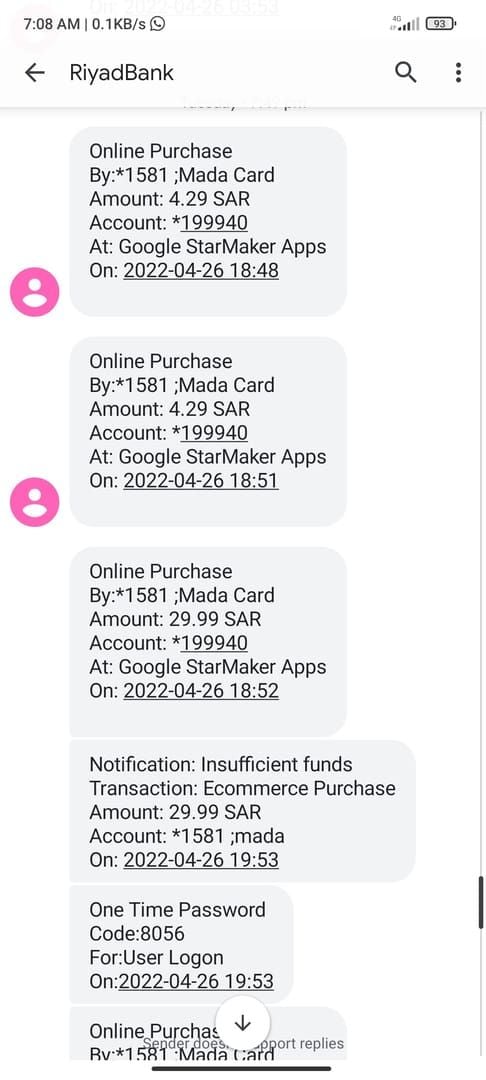
- Open StarMaker > Me tab (bottom-right)
- Note your StarMaker SID (10-digit number at bottom-right)
- Tap Settings > Purchase History or Transaction History
- Look for recent transaction attempt
Successful purchases show Completed with transaction ID. Failed attempts display Pending,Processing, or Failed. If you see Pending or Processing, your transaction is in auto-credit queue.
Verify Bank Statement vs App Balance
Access bank's mobile app or UPI app (Google Pay, PhonePe, Paytm) to verify debit. UPI transactions show instant confirmation with Transaction Reference Number (TRN). Note this TRN exactly—it's primary evidence for support claims.
For card payments, check bank statement for exact debited amount. Compare against coin package price to ensure they match.
Take Essential Screenshots
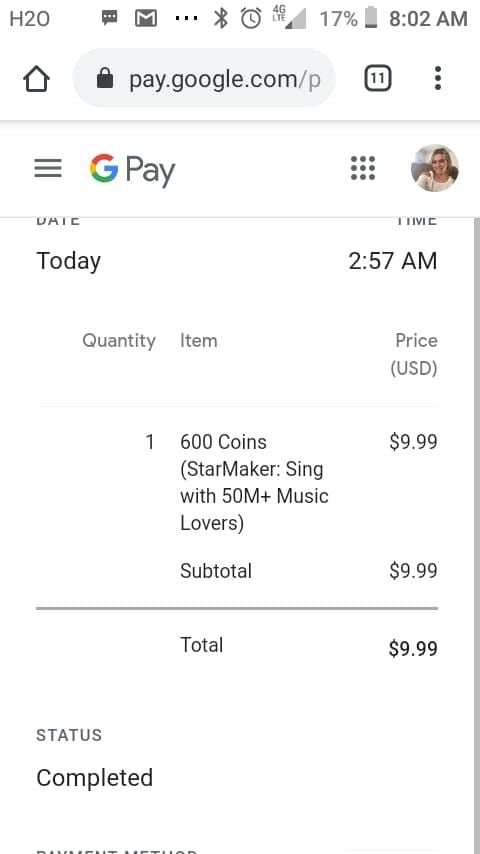
Capture four critical screenshots immediately:
- StarMaker purchase history showing failed transaction
- Bank statement showing debit
- Error message (if still visible)
- Current coin balance
For UPI: screenshot transaction details showing TRN, amount, date, time, merchant name
For cards: capture SMS confirmation from bank and pending transaction in banking app
Complete Recovery Process for UPI Payment Failures
UPI payment failures follow predictable recovery patterns. The 3-5 business day refund timeline begins from transaction date, not when you report the issue. NPCI guidelines require automatic reversal of failed transactions if StarMaker doesn't confirm receipt within 24 hours.
Step-by-Step UPI Refund Procedure (3-5 Days)
Day 0 (Transaction Day): Payment debited, coins not credited. Wait 24 hours for auto-credit.
Day 1: If no auto-credit, verify transaction in UPI app. Confirm Success status and note Transaction ID.
Day 2-3: Contact StarMaker support: Profile > Settings > Help & Support > Recharge/Payment Issue. Submit email/username, Transaction ID, payment screenshot with TRN, exact date and time.
Day 4-5: Refunds typically process. Money returns to same UPI account. You'll receive refund confirmation from UPI app, not StarMaker.
Check UPI Transaction ID and Status
Open UPI app > locate transaction in history > tap for full details. Transaction ID/TRN appears as 12-16 digit alphanumeric code.
Check status indicator. Success or Completed means bank processed payment successfully. If this shows success but no coins received, you're experiencing confirmation failure.
UPI Shows Success But Coins Not Credited
When UPI confirms successful payment but StarMaker shows no coin credit, you're in the 65% that resolve within 24 hours. Payment confirmation is traveling through gateway's reconciliation queue.
Force close StarMaker completely:
- iOS: double-tap home button or swipe up, swipe StarMaker away
- Android: Settings > Apps > StarMaker > Force Stop
Reopen app and check coin balance. This refresh sometimes triggers delayed credit delivery.
If 24 hours pass without credit, clear app cache:
- Android: Settings > Apps > StarMaker > Storage > Clear Cache
- iOS: Settings > General > iPhone Storage > StarMaker > Offload App, then reinstall
UPI-Specific Error Codes
Transaction Cannot Be Completed: Timeout between UPI app and StarMaker's payment gateway. Bank may have processed debit before timeout. Requires full 24-72 hour waiting period.
Payment Authorization Failed: Payment gateway rejected transaction before reaching bank. If money was still debited, it's a rare gateway glitch. Resolves through automatic refund within 3-5 days.
Card Payment Recovery: Debit & Credit Card Refund Process
Card payment failures involve more complex processing than UPI due to international payment networks. Credit and debit cards route through Visa, Mastercard, or RuPay networks, extending refund timelines to 5-7 business days.
Credit Card Refund Timeline (5-7 Business Days)
Days 1-2: Payment gateway identifies unconfirmed transaction and flags for reversal. Card statement shows charge as pending or posted.
Days 3-4: Reversal request reaches card issuer. Charge may disappear from pending but not yet appear as refund credit.
Days 5-7: Refund posts to account as credit transaction. Listed separately from original charge, often as Refund - StarMaker or payment gateway's name.
Debit Card Reversal Process
Debit card refunds return money directly to bank account balance. 5-7 business day timeline accounts for inter-bank settlement periods and fraud verification protocols.
Some banks process debit card refunds faster—completing reversals in 3-5 days. Public sector banks typically take full 7 days; private and digital banks often complete by day 5.
Understanding Temporary Authorization Holds
When you attempt card payment, bank immediately places authorization hold for purchase amount. This reduces available credit or account balance but isn't completed transaction. Hold remains active for 3-7 days depending on card type and bank policies.
If StarMaker doesn't capture this authorization, hold automatically expires. For credit cards, held amount returns to available credit. For debit cards, returns to account balance.
When to Contact Bank vs StarMaker Support
Contact StarMaker support first: Profile > Settings > Help & Support > Recharge/Payment Issue. Include card's last four digits (never full number), transaction date/time, exact amount charged, error messages.
Contact bank only if 7 business days pass without refund. Request transaction dispute or chargeback investigation. Provide Transaction ID, merchant name, evidence you didn't receive coins.
Documenting Your Failed Transaction: Evidence Collection
Proper documentation accelerates resolution from 7+ days to 3-5 days. Support teams prioritize tickets with complete evidence packages.
Essential Screenshots
- StarMaker purchase screen showing coin package and price
- Error message with exact text and timestamp
- Current StarMaker coin balance from profile wallet (include username/SID)
- Payment confirmation from bank/UPI app/card statement (amount, date, time, Transaction ID, merchant name)
Bank SMS and Email Confirmation
Payment confirmation SMS provides timestamped, third-party verification. Messages include transaction amount, merchant name, last four digits of payment method, date/time. Screenshot or forward to email for permanent records.
Email confirmations from payment gateways provide additional Transaction IDs and authorization codes. These contain technical details that help support trace transactions through backend systems.
Transaction ID vs Order ID
Transaction ID (TRN): Generated by bank or payment gateway. Proves money left your account. 12-16 digit alphanumeric code unique to payment attempt.
Order ID: Generated by StarMaker when you initiate purchase. Appears in purchase history. If transaction failed before reaching StarMaker's servers, you may not have Order ID—this is normal.
Support needs both IDs when available. If you only have Transaction ID, that's sufficient.
Complete Support Ticket Template
**Subject: Payment Debited But Coins Not Received - [Transaction ID]
Account Details:
- StarMaker Username: [username]
- StarMaker SID: [10-digit number]
- Registered Email: [email]
Transaction Details:
- Date and Time: [exact timestamp]
- Amount Debited: [exact amount with currency]
- Payment Method: [UPI/Credit Card/Debit Card]
- Transaction ID: [from bank/UPI app]
- Coin Package: [e.g., 100 Coins for ₹99]
Issue: Payment debited but coins not credited. Error message: [exact error text]
Attachments:
- Bank/UPI transaction screenshot
- StarMaker coin balance screenshot
- Error message screenshot
- Purchase history screenshot**
Contacting StarMaker Support: Effective Communication
StarMaker processes thousands of payment tickets daily. Tickets with complete information receive priority routing to payment specialists, reducing resolution time from 5-7 days to 2-3 days.
In-App Support vs Email
In-app support (Profile > Settings > Help & Support): Fastest response for payment issues. Automatically attaches account information, device type, app version, recent activity logs.
Use for: payment failures within last 7 days, missing coins after successful payment, error messages during purchase, refund status inquiries.
Email support: Better for issues older than 7 days, follow-up on existing tickets, formal refund requests after auto-credit window expires, cases requiring detailed explanation with multiple attachments.
Craft Support Request for Fastest Response
Subject line:Payment Debited But Coins Not Received - [Transaction Date] or Refund Request - Transaction ID [TRN]
First sentence:I purchased [coin package] on [date] at [time], payment of [amount] was debited from my [payment method], but coins were not credited.
Provide details in bullet points for easy scanning. Include every detail from evidence package: Transaction ID, exact amount, payment method, date/time, error messages.
Expected Response Times
- Initial automated response: 1-2 hours acknowledging receipt. Includes ticket number.
- First human response: 24-48 hours. Support confirms investigation or requests additional information.
- Resolution timeline: Simple cases (payment confirmed, coins not credited) resolve in 2-3 days. Complex cases (gateway disputes, missing records) take 5-7 days.
Escalation Process
If 7 business days pass without resolution, reply to existing ticket: This ticket has been open for [X] days without resolution. Please escalate to senior payment specialist for urgent review.
For cases exceeding 10 business days, request formal case number and escalation to management.
Consider using BitTopup for future recharges. When you buy StarMaker coins top up through BitTopup, you get guaranteed delivery within 5 minutes and dedicated support that resolves issues in hours, not days.
Refund Timeline Matrix by Payment Method
All timelines count business days (Monday-Friday), excluding weekends and bank holidays.
UPI Refunds: 3-5 Days
- Day 1: Payment debited, coins not credited. Wait 24 hours for auto-credit.
- Day 2: Verify transaction in UPI app. Submit support ticket if desired.
- Day 3: Payment gateway's automated reconciliation identifies unmatched transaction. Refund initiation sent to UPI network.
- Day 4: UPI network processes refund. Money typically returns by end of day.
- Day 5: Latest expected refund date. If money hasn't returned, contact support with Transaction ID.
Credit/Debit Cards: 5-7 Business Days
- Days 1-2: Authorization hold remains active. System attempts to match payment with coin delivery.
- Days 3-4: Payment gateway initiates reversal request. Enters card network's settlement queue.
- Days 5-6: Card network processes reversal. Most refunds complete during this window.
- Day 7: Maximum expected timeline. If refund hasn't posted, contact card issuer.
Digital Wallets: 1-3 Days
- Day 1: Transaction fails, wallet balance debited. Auto-credit window is 12-24 hours.
- Day 2: Wallet provider's system automatically initiates refund for unconfirmed transactions.
- Day 3: Refund posts to wallet balance. Notification from wallet app shows credit.
International Payment Methods: 7-14 Days
- Days 1-5: Authorization hold, failed confirmation, reversal initiation.
- Days 6-10: International payment networks process reversal. Currency conversion occurs.
- Days 11-14: Refund posts in local currency. Exchange rates may differ slightly from original transaction.
Common Misconceptions About Payment Failures
Myth: Refunds Are Instant
Digital payment systems require settlement periods for fraud prevention and financial reconciliation. Even automated refunds need 24-72 hours minimum to process through banking networks.
Debits and credits follow different processing paths. Debits are authorization holds that appear instant but settle later. Credits require completed settlement before processing.
StarMaker cannot bypass banking network timelines. The 3-5 day UPI and 5-7 day card timelines are industry standards.
Myth: Multiple Retry Attempts Speed Up Process
Each retry creates new, separate transaction with own authorization hold. Multiple failed attempts result in multiple debits, each requiring individual refund processing.
Automated reconciliation runs on fixed schedules (every 6 hours). Retrying doesn't trigger additional runs. It creates confusion in transaction matching.
Wait full 24-72 hour auto-credit window before any retry.
Myth: All Payment Failures Mean Lost Money
Banking regulations and payment gateway protocols include automatic reversal mechanisms for unconfirmed transactions. Your money is temporarily held in settlement system, not lost.
90% of delayed top-ups resolve automatically. Remaining 10% require support tickets but still result in coin delivery or full refund. Permanently lost money is extremely rare.
Truth: Bank Processing Times Are Beyond App Control
StarMaker cannot control banking network processing speeds. UPI transactions travel through NPCI's network. Card payments route through Visa, Mastercard, or RuPay networks. These networks operate on fixed settlement schedules merchants cannot accelerate.
Support teams cannot speed up refunds beyond initiating reversal request.
Prevention Strategies: Avoiding Future Failures
Simple precautions reduce failure risk from baseline 18-22% to under 5%.
Optimal Network Conditions
- Complete entire purchase on single, stable network connection
- Don't switch between Wi-Fi and mobile data during payment
- Use Wi-Fi when possible—more stable than mobile data
- Ensure full Wi-Fi signal strength before purchasing
- If using mobile data, verify 4G/5G connectivity with strong signal
- Avoid purchases in areas with connectivity issues (elevators, basements, rural areas)
Best Times to Recharge
Avoid: 2:00 AM - 5:00 AM (server maintenance), peak event periods (special promotions, new features, major holidays)
Optimal: 10:00 AM - 10:00 PM local time on regular weekdays
Payment Method Reliability
- UPI: 94-96% success rate (highest)
- Credit cards: 92-94% success rate
- Debit cards: 91-93% success rate
- Digital wallets (closed-loop): 93-95% success rate
- Wallet-linked cards: 88-90% success rate
- International payment methods: 85-88% success rate (lowest)
Use Verified Platforms Like BitTopup
Third-party recharge platforms eliminate direct payment gateway risks. BitTopup maintains 99%+ transaction success rate through dedicated payment infrastructure and real-time inventory management.
BitTopup advantages:
- Competitive pricing with regular discounts
- Guaranteed delivery within 5 minutes
- 24/7 customer support with live chat
- Instant refund processing for rare failed transactions
- Over 500,000 players use monthly to avoid payment failures
Advanced Troubleshooting: When Standard Recovery Fails
2-3% of cases don't resolve through standard refund timelines or support tickets.
Stuck Transactions Beyond 7 Days
If refund hasn't processed after 7 business days, transaction is stuck in reconciliation loop. This indicates mismatch between Transaction ID in bank's records and ID received by StarMaker's payment gateway.
- Verify with bank that debit is completed transaction, not authorization hold
- Request bank's transaction details including merchant ID and settlement status
- Contact StarMaker support with bank-verified information
- Request they check payment gateway's unmatched transactions queue for your Transaction ID
Bank Chargeback Process (Last Resort)
Initiate chargebacks only after 14 days without resolution and failed support escalation. Contact card issuer and request dispute for goods not received. Provide all documentation: transaction details, support ticket history, evidence coins weren't delivered.
Chargeback process takes 30-60 days. Card issuer investigates, contacts StarMaker's merchant account, reviews evidence from both parties.
Warning: Chargebacks can result in account restrictions or bans from StarMaker. Only pursue when all other resolution attempts have failed.
Legal Consumer Rights
Consumer protection laws in most jurisdictions require refunds for undelivered digital goods within 30 days. In India, Consumer Protection Act 2019 covers digital transactions.
For smaller amounts, banking ombudsman services offer free dispute resolution. File complaint if bank refuses legitimate refund request or merchant doesn't respond within 30 days.
Document for Formal Complaints
Create comprehensive timeline:
- Original transaction date and details
- Support ticket submission dates and responses
- Follow-up attempts with dates
- Bank contact dates and outcomes
- Escalation requests with dates
Save all email correspondence, support ticket screenshots, bank statements. Export chat logs if used in-app chat support.
Include clear statement of desired resolution: full refund of [amount] to [payment method], or delivery of [coin package] to account [StarMaker SID].
FAQ
Why did my StarMaker recharge fail but money got debited?
Payment succeeded at bank's end but confirmation signal didn't reach StarMaker's servers within expected timeframe, creating gateway timeout. This accounts for 18-22% of digital top-up issues. Money is held as authorization while system attempts to match payment with coin delivery. 65% resolve automatically within 24 hours.
How long does StarMaker refund take for failed transactions?
UPI: 3-5 business days. Credit/debit cards: 5-7 business days. Digital wallets: 1-3 days. International payment methods: 7-14 days. Timelines begin from transaction date and reflect banking network settlement schedules StarMaker cannot accelerate.
What should I do immediately after payment failure with money debited?
Don't retry payment for 24-72 hours. Take screenshots of StarMaker purchase history, current coin balance, error message, bank/UPI transaction confirmation. Note Transaction ID from payment app. Wait 24 hours for auto-credit—90% of delayed top-ups resolve automatically.
How do I contact StarMaker support for payment issues?
Profile > Settings > Help & Support > Recharge/Payment Issue. Submit email/username, StarMaker SID (10-digit number from Me tab), Transaction ID from bank/UPI app, payment screenshot, exact transaction date and time. In-app support routes payment issues directly to specialized teams.
Can I get instant refund for StarMaker payment failures?
No. Even automated refunds require minimum processing times: 3-5 days for UPI, 5-7 days for cards. Credits follow different processing paths through banking networks that StarMaker cannot bypass.
What are safest payment methods for StarMaker recharge?
UPI shows highest success rate at 94-96%. Alternatively, verified third-party platforms like BitTopup eliminate gateway timeout risks through dedicated merchant infrastructure, achieving 99%+ success rates with guaranteed 5-minute delivery and instant refund processing.
Tired of payment failures and refund hassles? Recharge your StarMaker account safely through BitTopup – guaranteed coin delivery within 5 minutes, 24/7 support, zero payment failure risks. Join 500,000+ satisfied players who recharge worry-free. Get your coins now with exclusive bonuses at competitive prices!