

LifeAfter Top Up Overview and In-Game Value
LifeAfter is NetEase's flagship post-apocalyptic open-world survival game where players build shelters, craft tactical gear, team up in camps, and defend against infected hordes. In this harsh environment, progression requires constant gathering, researching advanced formulas, and reinforcing your personal Manor.
LifeAfter Credits (often referred to as Fed Credits) serve as the primary premium currency in the game. Topping up Credits gives you immediate access to essential survival resources, elite weapon blueprints, character customization, and operational upgrades that cut down hours of grinding.
On BitTopup, you can complete your LifeAfter top up quickly using only your Player ID and Server selection. There is no need to share account passwords or log out of your session. Select your package, submit your character details, and your Credits will be added directly to your account.
How to Recharge LifeAfter Credits on BitTopup: Step-by-Step Guide
Recharging your balance on BitTopup takes less than a minute. Follow these simple steps to ensure your Credits arrive without delay:
- Select Credit Package: Choose the desired amount of LifeAfter Credits from the live catalog on this page.
- Enter Player ID: Type your numerical LifeAfter Player ID into the designated input box.
- Choose Your Server: Open the server dropdown and select the exact server where your character resides (for example, NancyCity (SEA) or MiskaTown (NA)).
- Check Out: Click Buy Now to move to the payment screen. View real-time pricing and select your local payment option.
- Receive Credits: Once payment confirms, the order processes automatically. Open LifeAfter on your device to see your updated Credit balance.
How to Locate Your LifeAfter Player ID and Region Server
To ensure your recharge reaches the correct character, verify your Player ID and Server name inside the game client.
- Launch LifeAfter on your mobile device or PC official client.
- In the top-left corner of the main survival screen, tap your Character Avatar.
- Your profile window will open. Look directly under your character name and Manor Level to find your Player ID (a series of numeric digits).
- Tap the small Copy icon next to the number to copy your ID to your clipboard.
- Check the top bar or your initial login screen to confirm your exact server name.
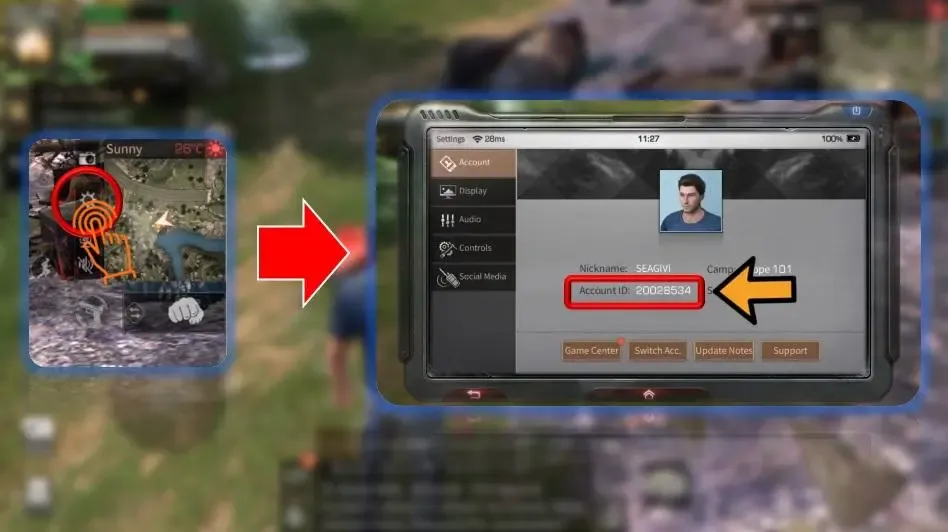
Make sure to double-check these numbers before submitting your order on BitTopup to avoid delivery delays.
Supported Global Servers: NA, SEA, EU, AU, and KR Server Guide
LifeAfter partitions players across multiple regional server clusters. Because characters cannot transfer balances across different clusters, selecting your exact server on BitTopup is critical.
| Region Cluster | Common Server Names |
|---|---|
| North America (NA) | MiskaTown, SandCastle, MouthSwamp, RedwoodTown, Obelisk, ChaosOutpost, IronStride, NewLand, CrystalthornSea, SimpleSurvival |
| Southeast Asia (SEA) | NancyCity, CharlesTown, SnowHighlands, Santopany, LevinCity, ChaosCity, TwinIslands, HopeWall, MileStone, LabyrinthSea, EasySurvival |
| Europe (EU) | FallForest, HopeValley, SandCastle, MountSnow, St.Rona, Oasis, SilentIsland, ArkCity |
| Australia (AU) | FallForest (AU), MountSnow (AU) |
| Korea (KR) | 파플래닛, 미스카대학, 희망의골짜기, 다베트설산, 가을빛산림, 스노우힐, 사막의요새 |
BitTopup supports direct delivery across all active global server environments. Check both the regional tag and the specific server name in your game launcher before selecting your server in the dropdown.
Why Player ID Top-Up Is Safe (No Password or Login Required)
Account safety is a top priority when purchasing in-game items. BitTopup uses direct API crediting via Player ID, providing superior security compared to account-sharing services:
- Zero Password Sharing: You never reveal your NetEase login, Google account, Apple ID, or social logins.
- No Account Handover: Your profile stays logged in on your personal device. You do not risk unauthorized access or security lockouts.
- No Risk of Third-Party Flagging: Direct Player ID crediting complies with standard publisher top-up protocols, keeping your account in good standing.
- Encrypted Transactions: All order data and payment details on BitTopup are handled over secure, encrypted payment gateways.
What to Buy with LifeAfter Credits: Best Packages and Uses in 2026
Allocating your LifeAfter Credits strategically helps you maximize combat ratings, camp defense, and overall progression:
1. Formula Shards & Modification
Formula research is central to top-tier firepower. Credits allow you to buy Formula Shards and R&D materials to roll for Collector's Edition weapon skins, advanced armor formulas, and weapon modification stats that give you an edge in PvP and high-level infected zones.
2. Manor Construction and Architecture Packs
Manor level dictates character stat caps and storage capacity. You can spend Credits on rare structure blueprints, exclusive wallpapers, modern furniture packs, and defensive systems to build a formidable stronghold.
3. Limited Outfits, Drones, and Vehicles
Seasonal gacha pools feature exclusive tactical outfits, combat drones, and transport vehicles. Having a ready reserve of Credits lets you participate in time-limited banner events to obtain rare mounts and cosmetics.
4. Hope Fund and Membership Privileges
If you have not activated the Hope Fund, using Credits to unlock it delivers substantial tiered rewards as your Manor reaches higher milestones, returning multiple times the initial investment in survival resources.
LifeAfter Top-Up Troubleshooting, Delivery Time, and Support
Fast Processing
Orders placed on BitTopup are processed automatically. Under normal network conditions, Credits reflect in your balance within moments of completed payment.
Verification Checklist if Credits Are Delayed
If your Credits do not appear immediately:1. Re-enter the Game: Log out of LifeAfter and restart the game client to refresh the server connection.2. Check In-Game Mail: Some promotional credits or bundled bonus items arrive via your in-game mailbox rather than direct numerical balance.3. Verify Your Server Selection: Review your BitTopup order receipt to confirm you did not select a different server with an identical name (such as SandCastle NA vs. SandCastle EU).
24/7 Dedicated Support
If you experience any issues with your order, contact the BitTopup customer support team through the live chat widget on the site. Have your Order Number and Player ID ready so our representatives can verify transaction status on the server and resolve discrepancies quickly.
Frequently Asked Questions
How do I find my LifeAfter Player ID and server name?
Open LifeAfter and tap your character profile avatar in the upper-left corner of the screen. Your numeric Player ID appears beneath your character name with a copy icon next to it. Your server name appears on the initial start screen when launching the game or inside your profile info.
Do I need to share my LifeAfter account login password to recharge?
No. BitTopup requires only your Player ID and Server name. You will never be asked for your password, email credentials, or verification codes.
What happens if I select the wrong server during LifeAfter top up?
Because LifeAfter balances are server-bound, entering a Player ID under the wrong server can cause the order to fail or credit an unintended account with the same ID in that region. Always double-check your server tag (NA, SEA, EU, AU, KR) before confirming payment. If an error occurs, contact BitTopup support immediately with your order details.
How long does it take for LifeAfter Credits to arrive in my account?
Most recharges process within minutes after payment confirmation. During peak game maintenance or publisher updates, processing may take slightly longer. You can track your order status directly in your BitTopup account dashboard.
Can I play LifeAfter on PC and top up using Player ID?
Yes. Whether you play on Android, iOS, or the official NetEase PC client, your Player ID connects directly to your global character profile. Topping up on BitTopup updates your balance across all devices linked to that character.
Which is better to play in 2026: LifeAfter, Undawn, or Once Human?
LifeAfter remains the premier choice for players focused on camp-based community survival, co-op Manor building, and deep crafting economies. Once Human focuses heavily on supernatural open-world combat and seasonal resets, while Undawn leans into realism-based survival metrics. LifeAfter continues to hold the most mature social camp infrastructure and long-term base progression.
What in-game items can I purchase with LifeAfter Credits?
Credits can be used in the Mall and Event screens to purchase Formula Shards, rare weapon formulas, Manor construction packs, limited-time outfits, vehicle gacha pulls, drone components, and character name change cards.