



Perfect World M TW Top Up: Fast, Safe, Direct UID Recharge
Perfect World M brings the classic MMORPG experience to mobile devices, offering massive guild wars, flight combat, deep class progression, and rich cultivation paths. Playing on the Taiwan (TW) server gives you access to specific regional events, active guilds, and localized content schedules.
To upgrade your gear, acquire rare flying mounts, bid on high-tier skill books in the auction house, or unlock exclusive seasonal cosmetics, having a steady balance of Ingots (元寶) is essential. BitTopup provides a direct, password-free channel to recharge your account using your Game ID, Character ID, and Server name. You get secure order fulfillment directly to your character without ever exposing your account credentials.
How to Recharge Perfect World M (TW) on BitTopup
Recharging your Taiwan server account takes only a few minutes. Follow these direct steps to complete your order:
- Select Your Desired Ingot Package: Review the available Ingot denominations and special bundles listed on the BitTopup product page. Live prices and active options are displayed on the checkout interface.
- Enter Your Account Details: Input your Game ID, Character ID, and Server accurately into the designated player fields.
- Select Your Payment Method: Pick from the available secure payment options suited for your region.
- Confirm and Pay: Review your character details to avoid typos, then proceed to complete the payment.
- Check Your In-Game Balance: Once the transaction completes, open the Perfect World M (TW) client. Your Ingots or items will be credited directly to your character balance or delivered via your in-game mailbox.
How to Find Your Game ID, Character ID, and Server Name
To ensure your recharge reaches the correct character on the Taiwan server, you must provide your exact Game ID, Character ID, and Server name. You can find all three directly inside the game client.
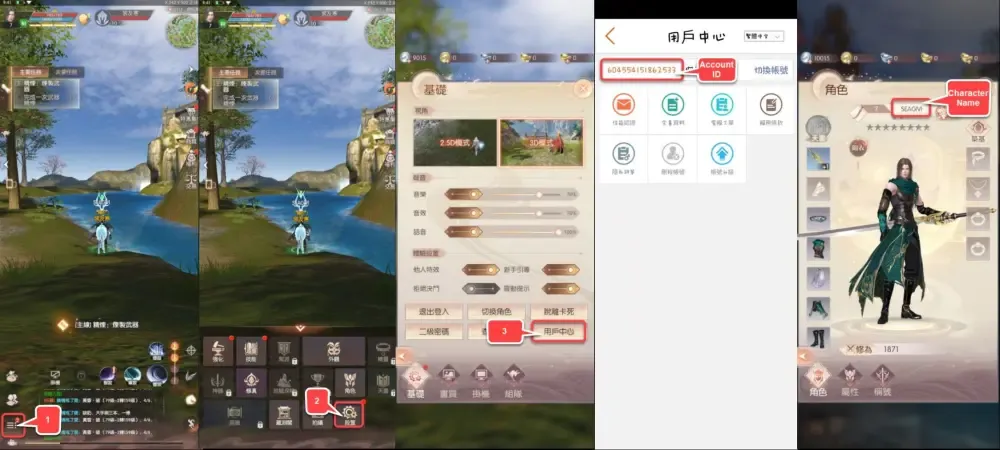
Step-by-Step ID Location Guide:
- Identify Your Server: Launch the game client. Before entering the game world, look at the server selection area on the title screen. Note down the exact Chinese name of your active server (e.g., specific TW regional server names).
- Open Your Character Profile: Enter the game world and tap on your character avatar located in the top-left corner of the main screen.
- Locate Your Character ID (Role ID): In the basic info overview window, your Character ID (角色ID) is displayed under or beside your character name. This is a unique numeric sequence specific to that individual hero.
- Find Your Game ID (Account ID): Tap the User Center or Account Settings tab within the game menu. Your main Game ID will be listed in the account management section.
- Copy the IDs: Carefully copy or write down the numbers. Do not include spaces or extra characters when pasting them into BitTopup.
Available Currencies and In-Game Packs for Perfect World M Taiwan
The Taiwan version of Perfect World M features distinct currency systems and package options. Recharging through BitTopup allows you to acquire the resources needed for competitive progression.
| Item / Currency Type | In-Game Utility | Fulfillment Method |
|---|---|---|
| Gold Ingots (元寶) | Premium tradeable currency used for auction house purchases, premium refinement items, and direct shop packs. | Direct UID Delivery to Character |
| Bound Ingots (綁定元寶) | Used for daily progression materials, skill training, and personal equipment cultivation. | Obtained via Ingot conversion/packs |
| Monthly Card / Pass | Grants daily Ingot claims, stamina boosts, and permanent passive perks during the active period. | Direct Account Activation |
| Growth Funds | High-yield rebate packs that reward bound Ingots as your character reaches level milestones. | Direct Account Activation |
| Special Event Bundles | Time-limited packs containing upgrade stones, rare eidolon materials, and cosmetic items. | Direct In-Game Mailbox / Inventory |
Note: Current pricing, bundle availability, and bonus Ingot tiers are maintained directly on the BitTopup checkout catalog.
Safe Direct ID Recharge: Why Password-Free Top-Up Matters
Account security is critical in MMORPGs where thousands of hours are invested into character progression, gear enhancement, and guild rankings. BitTopup uses direct ID-based fulfillment protocols, which fundamentally protect your gaming profile:
- Zero Password Exposure: You never have to share your game password, third-party social login (Facebook, Apple ID, Google), or two-factor authentication codes. Your account stays completely in your control.
- No Account Sharing Risks: Direct ID recharges do not trigger geographical login flags or suspicious IP warnings from game security systems.
- Clean Backend Delivery: Funds are credited using standard server-side delivery pipelines matching your numeric UID and server designation, keeping your account compliant with game rules.
- Data Confidentiality: Your payment information is encrypted and processed through verified payment gateways without storing sensitive billing details.
Troubleshooting Delivery Issues and Regional Server Checks
If you experience a delay or have questions about an active order, use the following troubleshooting checklist:
- Verify Taiwan (TW) Server Selection: Perfect World M has multiple regional versions (Taiwan/Hong Kong/Macau, Southeast Asia, Global, and Mainland China). BitTopup's Perfect World M (TW) top-up service applies exclusively to the Taiwan client servers. Ensure your account is registered on the TW server.
- Check In-Game Mail and Inventory: While Gold Ingots often reflect instantly in your top HUD currency display, certain bundle items or bonus rewards arrive via the in-game mailbox. Open your mailbox and claim all attachments.
- Restart the Client: If your balance does not update immediately after receiving the BitTopup payment confirmation, close the Perfect World M app completely and restart it to refresh your server data cache.
- Contact 24/7 Support: If your order status shows complete on BitTopup but your currency has not arrived after restarting, contact BitTopup customer support with your Order Number, Character ID, and Server Name for immediate verification.
Frequently Asked Questions for Perfect World M (TW) Top-Up
How do I find my Game ID and Character ID in Perfect World M (TW)?
Launch the Taiwan client and look at your title screen to verify your Server name. Once logged in, tap your character profile icon in the upper-left corner of the HUD. Your Character ID is displayed in the character information window. Your Game ID can be viewed under the User Center or Account Settings section.
Do I need to share my account password to recharge Perfect World M (TW)?
No. BitTopup only requires your Game ID, Character ID, and Server name. You will never be asked for your login password, verification codes, or personal social media login credentials.
Can I top up if I play on the Taiwan server from another country?
Yes. As long as your character is created on the official Perfect World M Taiwan (TW) server, you can place an order from any country using the available payment options on BitTopup.
What should I do if I entered the wrong server or Character ID?
If you realize you entered incorrect account details, contact BitTopup 24/7 customer support immediately with your order number. If the order has not yet been processed by the automated dispatch system, our team will assist in updating your details. Orders already fulfilled to a valid, existing ID cannot be reversed.
How long does it take for the recharged currency to arrive in my game account?
Most direct UID top-up orders are processed promptly after payment confirmation. In rare instances of regional server maintenance or network congestion, delivery may take slightly longer. You can track your real-time order status on your BitTopup account dashboard.
Which payment options are available for Perfect World M (TW) top up?
BitTopup supports a wide selection of international and regional payment methods tailored for your location. Check the live checkout page to view all payment channels currently available for your transaction.