




IDLE GOG Diamonds Top Up: Direct & Secure UID Delivery
IDLE GOG (Glory of Gods) combines tactical squad building, AFK resource accumulation, and cross-server battles. Diamonds serve as the core premium currency within the game. Having an ample Diamond balance allows you to recruit top-tier Mythic heroes, accelerate idle reward gains, purchase rare equipment in the market, and upgrade powerful Relics to overpower difficult campaign stages.
BitTopup provides a direct-to-account top-up service for IDLE GOG Diamonds across global servers. Recharging requires only your public game credentials—Character ID, Server, and Character Name. Your private account passwords and third-party login tokens are never requested, keeping your personal account completely secure.
How to Recharge IDLE GOG Diamonds on BitTopup
Recharging Diamonds to your IDLE GOG account takes just a few moments. Follow this simple guide to place your order:
- Select the Diamond Package: Choose the amount of IDLE GOG Diamonds you wish to purchase from the product catalog.
- Enter Your Account Information: * Character ID: Enter your numeric in-game UID. * Server: Input or select the exact server partition where your character lives (e.g., S12 or Server 45). * Character Name: Enter your exact in-game name as shown on your profile.
- Review Your Details: Double-check your Character ID and Server to ensure proper routing.
- Complete the Checkout: Select your preferred payment method on the live checkout screen and confirm the payment.
- Receive Your Diamonds: The Diamonds will be credited directly to your IDLE GOG account balance automatically.
| Order Step | Action Required | Verification Method |
|---|---|---|
| 1. Pack Selection | Pick Diamond denomination | Compare current live prices on BitTopup |
| 2. ID Input | Enter Character ID, Server, Name | Copy directly from player profile screen |
| 3. Checkout | Select payment method & submit | Review transaction confirmation |
| 4. Delivery | Open IDLE GOG client | Check Diamond balance on top HUD |
How to Find IDLE GOG Character ID, Server, and Character Name
To ensure your IDLE GOG Diamonds arrive without delay, you must provide the exact account identifiers from within the game client.
- Open the IDLE GOG app on your mobile device or emulator.
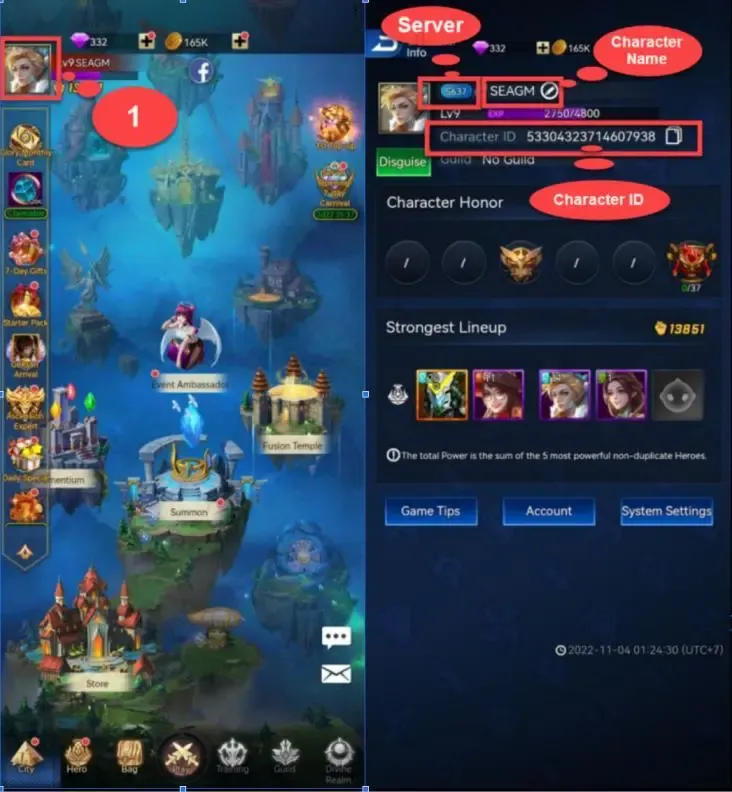
- In the main lobby screen, tap your Avatar icon located in the top-left corner.
- In the Player Info / User Profile window that opens, look for: * Character ID: A numeric identifier displayed next to your avatar. * Server: The server name and number assigned to your character. * Character Name: Your displayed username.
- Tap the copy icon next to your Character ID to paste it directly into the order field on BitTopup.
Best Uses for IDLE GOG Diamonds: Hero Summons, Relics, and Stamina
Managing your Diamonds effectively ensures steady progression through the Glory of Gods campaign, Tower trials, and competitive PvP Arenas. Here is how top players prioritize their Diamond expenditures:
1. Limited Hero Summons & Wish Banners
The most impactful use of Diamonds is pulling on rate-up banners for top-tier DPS and support heroes. Securing duplicates is necessary to ascend heroes through star tiers, unlocking their full skill kits and talent passives.
2. Relic & Artifact Refinement
Relics grant massive team-wide combat power (CP) bonuses and unique battle triggers. Diamonds can be used to acquire Relic upgrade materials and polish special stats that make the difference against high-level campaign bosses.
3. Fast Rewards & Daily Dungeon Sweeps
Purchasing additional daily Fast Rewards grants instant hours of idle gold, hero EXP, and advancement stones. Resetting daily challenge attempts in resource dungeons ensures your core roster stays max-leveled.
4. Lamp Boss & World Boss Extra Attempts
Spending Diamonds on extra challenge tokens against world bosses yields rare equipment chests, enchant stones, and guild contribution points needed to research passive combat trees.
| Diamond Expenditure Priority | Primary In-Game Benefit | Recommended Frequency |
|---|---|---|
| Hero Summons | Core team expansion & star ascension | Focus on limited-time event banners |
| Fast Rewards / Sweeps | Accelerated EXP, Gold, and breakthrough items | Daily (up to reasonable Diamond cost) |
| Relic Upgrades | Team-wide CP boost and unique perks | Priority during growth events |
| Market Items | Discounted summon scrolls & advancement stones | When available in daily resets |
Why Top Up IDLE GOG on BitTopup: Safe, Fast, and Password-Free
When buying premium currencies online, account safety, ease of purchase, and reliability are essential. BitTopup provides an optimized top-up experience built around player convenience:
- Zero Password Requirement: BitTopup only requires your Character ID, Server, and Character Name. We never ask for your account password, email credentials, or social logins.
- Live, Transparent Pricing: You can always check the exact prices and denominations directly on the live checkout page.
- Broad Global Payment Coverage: BitTopup supports localized and international payment solutions, making checkout simple regardless of your region.
- 24/7 Support: A dedicated customer support team is on standby to assist with order status tracking, data corrections, and payment inquiries.
IDLE GOG Diamonds Delivery Time and Status Tracking
Diamond recharges on BitTopup are processed automatically upon payment confirmation. Direct API routing delivers the currency directly to the target server profile.
Verifying Your Delivery
- Keep the IDLE GOG application open or restart it after completing checkout.
- Check your Diamond total displayed on the top resource bar of the main screen.
- In some promotional distributions, bonus items or packs may appear in your in-game mailbox.
Checking Order Status on BitTopup
You can track the progress of your transaction at any time by visiting your BitTopup profile order history. Your order will display real-time status updates from payment processing to successful fulfillment.
Troubleshooting Common IDLE GOG Top-Up Issues
If you experience an issue with your Diamond top-up, check the following common scenarios:
- Incorrect Server Entered: If you selected Server 10 instead of Server 12, the credit may be routed to an alternate character under that ID. Always double-check your server partition before submitting payment. If you notice an error immediately, contact BitTopup support before fulfillment starts.
- Typo in Character ID: A single mistyped number can cause order failure or delivery delays. Always use the in-game copy button to capture your exact UID.
- Delayed Balance Display: If your order shows completed on BitTopup but your in-game Diamonds have not updated, completely close the IDLE GOG app, clear the game cache, and restart to force the client to synchronize with the server.
- Contacting Support: If an issue persists, provide your BitTopup Order Number, Character ID, Server, and proof of payment to the 24/7 BitTopup support team for rapid resolution.
Frequently Asked Questions
How do I find my IDLE GOG Character ID, Server, and Character Name?
Launch IDLE GOG, tap your player Avatar in the top-left corner of the main lobby, and view your Player Profile. Your numeric Character ID, Server number, and Character Name are listed there. Tap the copy icon next to your ID to copy it cleanly.
Do I need to provide my IDLE GOG password for recharge?
No. BitTopup uses direct ID recharge. You only need to provide your public Character ID, Server, and Character Name. Never share your game login password or verification codes with anyone.
How quickly will the Diamonds appear in my IDLE GOG account?
Once your payment is confirmed on BitTopup, the system credits the Diamonds directly to your IDLE GOG account. After payment completes, refresh or relaunch your game client to see the updated balance.
What can I use IDLE GOG Diamonds for in-game?
IDLE GOG Diamonds can be used to perform hero summons on standard and limited banners, buy Fast Reward idle sweeps, reset daily material dungeons, upgrade Relics, buy discounted items in the mystery shop, and participate in competitive arena events.
What should I do if my IDLE GOG Diamonds order is delayed?
First, restart your IDLE GOG client to refresh server data. Next, verify your order status in your BitTopup account dashboard. If the order is marked complete but your balance has not updated, reach out to BitTopup 24/7 customer support with your Order ID and Character ID for immediate assistance.
Is recharging IDLE GOG Diamonds on BitTopup safe?
Yes. Recharging on BitTopup is safe because the process is entirely password-free. Transactions are handled via encrypted payment channels and sent directly through official character identifier routing.