



Amar Top Up: Step-by-Step Guide on BitTopup
Recharging your Amar account on BitTopup is direct and straightforward. Because the system uses direct Player ID delivery, you never need to share sensitive login credentials or link private social accounts to complete a purchase.
Follow these simple steps to complete your Amar recharge:
- Select Your Coin Package: Browse the available Amar Coins denominations on the BitTopup product page and pick the amount you want to add to your account.
- Enter Your Player ID: Type your numeric Amar Player ID into the designated field. Double-check the numbers to ensure the coins are sent to the correct account.
- Review Order Details: Confirm your selected package and verified Player ID. Live prices across supported currencies are displayed directly at checkout.
- Select a Payment Method: Choose your preferred payment option from the available regional and global channels.
- Complete Checkout: Authorize the transaction. Once payment confirmation clears, the Amar Coins are sent straight to your in-app balance.
- Check Your In-App Balance: Open or restart the Amar app to see your updated coin balance in your profile wallet.
What Are Amar Coins and What Can You Use Them For?
Amar Coins serve as the primary premium digital currency inside the Amar live streaming and voice chat platform. Having an active coin balance allows you to participate in community interactions, unlock premium social features, and show appreciation to creators.
Key Uses for Amar Coins:
- Sending Virtual Gifts: Reward your favorite live broadcasters, voice room hosts, and entertainers with animated gifts, luxury badges, and custom effects during live sessions.
- Accessing Exclusive Rooms: Join VIP voice chat rooms, interactive group lounges, and private party streams that require coin access or premium entry status.
- Unlocking VIP Perks & Badges: Display exclusive chat bubbles, entry effects, profile frames, and rank badges that highlight your status across the community.
- Participating in Events and Contests: Support room hosts during leaderboard battles, seasonal PK competitions, and community tournaments.
How to Find Your Amar Player ID Inside the App
Your Amar Player ID is a unique numeric identifier linked permanently to your account profile. Finding it takes just a few seconds:
- Launch the Amar app on your mobile device.
- Tap the Profile or Me icon located in the bottom-right corner of the main screen.
- Look directly beneath your avatar and display name on the profile dashboard.
- Locate the ID field. Tap the copy icon next to the number or write it down carefully.
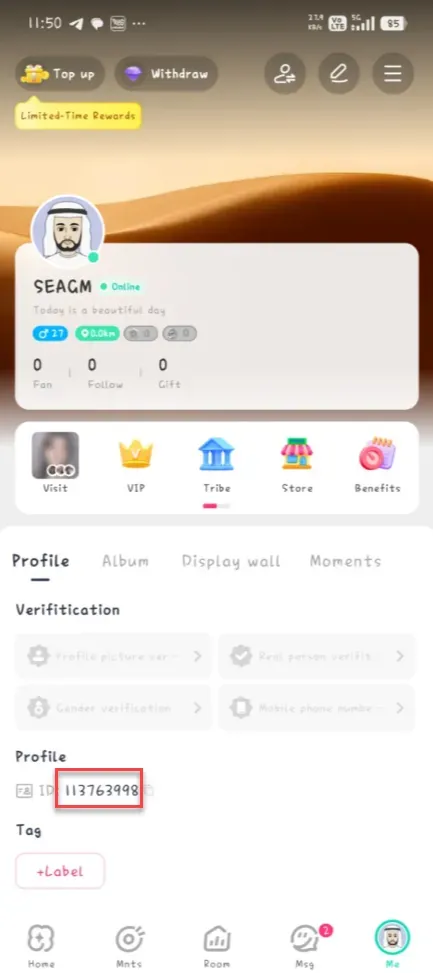
Always copy and paste your Player ID directly into the BitTopup order field to avoid manual typing mistakes.
Safety First: Why Password-Free Player ID Top-Up Is Essential
Account safety is a major priority when buying digital currencies online. Traditional top-up methods that ask for account logins, email verification codes, or social media passwords expose your personal data to security risks.
Why BitTopup Uses UID-Only Fulfillment:
- Zero Password Sharing: You only provide your public Player ID. Your private login details, linked phone numbers, and passwords stay strictly under your control.
- No Account Hijacking Risk: Third-party agents never log into your profile, eliminating the risk of unauthorized account changes, stolen items, or compromised chats.
- Direct System Delivery: Coins credit straight to the specified Player ID through standard direct-credit routing.
- Safe Gifting for Friends: Because only a Player ID is needed, you can send coin packages to friends, family, or streamers directly without needing their account access.
Amar In-App Purchase vs. BitTopup Online Recharge
Recharging online provides distinct benefits compared to standard in-app purchases.
| Feature | Standard In-App Purchase | BitTopup Online Recharge |
|---|---|---|
| Account Login Required | Yes (App store account login) | No (Only Player ID / UID needed) |
| Send Gifts to Friends | Difficult / Requires in-app transfers | Easy (Input friend's Player ID directly) |
| Payment Flexibility | Limited to mobile app store wallets | Broad range of local and global payment methods |
| Price Transparency | Standard app store pricing | Real-time pricing shown clearly at checkout |
| Device Independence | Must use the device with the app installed | Top up from any mobile or desktop web browser |
Troubleshooting Common Amar Top Up Delivery & Account Issues
If you experience a delay or have questions regarding your Amar Coins delivery, review these common solutions:
- Restart the Amar App: If coins do not show immediately after checkout, fully close the Amar application from your background apps and reopen it. This forces the app to refresh its server wallet balance.
- Verify Your Player ID: Check your BitTopup order receipt to ensure the Player ID submitted matches your in-app profile. Entering an incorrect ID may deliver coins to another user's profile.
- Check Transaction Status: Verify that your payment went through successfully on your bank or payment provider statement. Pending payments must complete before coins are dispatched.
- Network Latency: Weak Wi-Fi or mobile data connections can prevent the app from updating your wallet display in real time. Switch connections or restart your data.
- Contact Customer Support: If your payment cleared and your Player ID was entered correctly, but your balance has not updated, reach out to BitTopup 24/7 customer support with your order number and Player ID for swift assistance.
Frequently Asked Questions About Amar Recharge
How do I find my Amar Player ID for recharge?
Open the Amar app, tap the Me or Profile tab in the lower-right navigation bar, and check the ID number displayed right below your username. Copy this number directly into the Player ID box on BitTopup.
Do I need to share my Amar account password to top up coins?
No. BitTopup only requires your public Player ID to process your coin recharge. You should never share your account password, SMS verification codes, or private login credentials with anyone.
How long does it take for Amar Coins to arrive after recharge?
Orders are processed immediately once your payment is confirmed. In most cases, coins reflect in your Amar wallet shortly after completing checkout. A quick app restart helps refresh the balance.
Can I recharge Amar Coins for a friend using their Player ID?
Yes. Enter your friend's Amar Player ID in the Player ID field instead of your own. Once checkout is complete, the coins will go directly to their account.
What should I do if my Amar Coins do not appear after payment?
First, restart the Amar app to refresh your profile. If the balance still does not update, verify your payment confirmation and check that the submitted Player ID was accurate. Contact BitTopup 24/7 customer support with your order ID if you need further help.
What payment methods can I use to buy Amar Coins online?
BitTopup supports a wide variety of localized and international payment methods. Available payment options and real-time exchange rates are displayed dynamically at the checkout screen for your convenience.