

Cherry Credits CC Top Up: Global Digital Game Credits
Cherry Credits (CC) serves as a global virtual credit system designed to streamline micro-transactions across hundreds of online games, digital entertainment platforms, and web services. When you top up your Cherry Exchange account with CC, you gain immediate purchasing power across supported publishers without needing to link credit cards or personal banking details directly to individual game launchers.
BitTopup provides direct access to official Cherry Credits prepaid card codes. Buying digital CC vouchers lets you reload your wallet quickly, safely, and without sharing your personal login credentials.
What Is Cherry Credits CC and How Cherry Exchange Works
Cherry Credits is a unified gaming payment system created by Cherry Exchange. Instead of managing separate payment methods across multiple publishers, players convert cash into CC vouchers and store them inside their Cherry Exchange e-wallet.
Core Functions of the Cherry Exchange Wallet
- Unified Balance: Keep your funds in a single digital wallet that connects to multiple PC, browser, and mobile game titles.
- Prepaid Security: Prepaid Serial Numbers and PINs prevent unauthorized recurring charges on personal bank accounts.
- Direct In-Game Checkouts: Many titles integrate Cherry Exchange directly into their web shops or in-game cash malls, allowing 1-click purchases using stored CC balance.
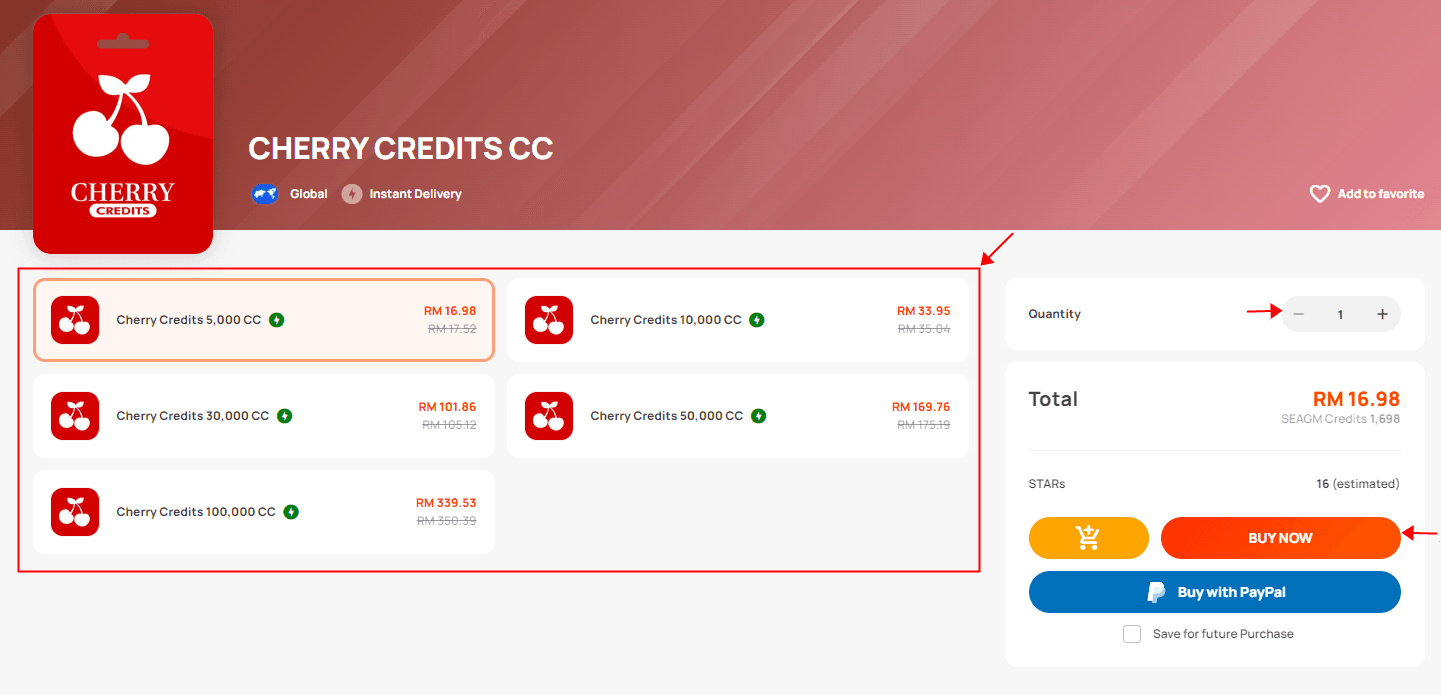
How to Recharge and Buy Cherry Credits CC on BitTopup
Acquiring digital CC cards through BitTopup takes only a few straightforward steps:
- Select Denomination: Choose the CC card amount that matches your gaming budget. Live pricing is displayed at checkout.
- Enter Contact Details: Provide your active email address where your digital Serial Number and Security PIN will be delivered.
- Complete Payment: Pick your preferred payment method from the available local and global options on the secure checkout screen.
- Receive Your Code: Once payment is confirmed, your Serial Number and PIN will be sent instantly to your order screen and email inbox.
Step-by-Step Redemption Guide for Cherry Credits Prepaid Codes
To apply your prepaid code to your CC balance, redeem your voucher directly on the official Cherry Exchange portal.
How to Redeem Your CC Prepaid Card PIN:
- Visit the official Cherry Exchange website (
cherrycredits.com) and log in to your account. - In your user dashboard, click on the CC Top-Up button located in the main menu.
- From the list of payment channels, select Cherry Credits Prepaid Card / e-PIN.
- Enter the Serial Number and Security PIN received from your BitTopup order.
- Click Submit. Your CC balance will update immediately.
Where to Find Your Cherry Account ID / Login Identifier
Your Cherry Credits account is tied to your registered email address and 6-digit Cherry Exchange Security PIN (set during account registration). When making purchases inside connected game shops, you will be prompted to log in using your Cherry Account credentials to authorize the deduction from your balance.
Supported Games and Digital Content Compatible with CC in 2026
Cherry Credits powers in-game micro-transactions for major titles, classic MMORPGs, and web portals across the global gaming ecosystem.
| Game / Service Type | Supported Titles & Platforms | CC Transaction Method |
|---|---|---|
| Online MMORPGs | Dragon Nest SEA, Atlantica Online, Ragnarok Online portals | Direct Web Mall / In-Game Exchange |
| Action & Casual Titles | SD Gundam Capsule portals, PlayPark integrated games | Cherry Exchange Login Integration |
| Web & Browser Services | Select third-party gaming hubs and virtual currency gateways | CC Voucher / Direct Wallet Transfer |
| Mobile Game Portals | Regional mobile game top-up stores accepting CC | Cherry Exchange Web Checkout |
Note: Available titles may change based on publisher agreements and regional availability. Always check the payment options in your specific game launcher to confirm CC integration.
Cherry Credits Expiration Policy and Wallet Balance Rules
Before loading funds into your account, keep the standard CC lifecycle rules in mind:
- Prepaid Code Validity: Unredeemed CC prepaid vouchers should be applied to your account as soon as possible after delivery.
- Balance Expiration (1-Year Rule): CC stored in your Cherry Exchange wallet has a standard validity period of 365 days (1 year) from the date of top-up or the last account transaction. Any remaining balance on accounts inactive for more than 12 months is subject to forfeiture under Cherry Exchange terms.
- Account Activity Check: You can view your exact CC expiration dates by logging into Cherry Exchange and checking your transaction history under the Account Balance tab.
Troubleshooting Failed Redemption Codes and Common Errors
If you run into issues while redeeming your prepaid code on Cherry Exchange, check these common causes and resolutions:
1. "Invalid Serial Number or Security PIN"
- Cause: Typing errors or accidental inclusion of spaces when copying and pasting.
- Fix: Manually type the Serial Number and PIN. Verify that uppercase letters and numbers (such as
0vsO,1vsI) are entered correctly.
2. "Card Already Redeemed"
- Cause: The code was already submitted, or your browser refreshed mid-transaction.
- Fix: Refresh your Cherry Exchange dashboard and check your CC transaction history. If the balance did not increase and you just purchased the code, reach out to BitTopup customer support with your order ID.
3. "Country / Region Restriction"
- Cause: Your Cherry Exchange account registration country does not match the regional permissions of the game server you are trying to fund.
- Fix: Ensure that both your game account and Cherry Exchange profile are set to the correct operating region.
Why Choose BitTopup for Instant and Secure Cherry Credits Recharge
- Zero Account Sharing: BitTopup delivers direct digital prepaid PINs. You never need to provide your Cherry Exchange account password or personal security codes.
- Instant Digital Delivery: Codes are generated and delivered immediately after successful checkout, so you can top up your balance and jump right back into your game.
- Secure Payment Processing: All transactions use encrypted payment channels with extensive local payment methods available at live checkout.
- Responsive Support: Dedicated customer service is on standby to assist you with order verification and redemption questions.
Frequently Asked Questions
What are Cherry Credits used for?
Cherry Credits (CC) is a virtual payment currency used to purchase in-game items, subscriptions, and virtual goods across hundreds of supported online games and digital content portals worldwide.
How does Cherry Credits recharge work?
When you buy a Cherry Credits prepaid card code, you receive a Serial Number and Security PIN. You redeem these details on the Cherry Exchange website to credit the equivalent CC amount to your personal wallet.
How do I redeem my Cherry Credits CC code on Cherry Exchange?
Log in to your account at cherrycredits.com, click CC Top-Up, select Cherry Credits Prepaid Card / e-PIN, enter your Serial Number and Security PIN, and click Submit.
Will my Cherry Credits balance expire?
Yes. Unused CC stored in your Cherry Exchange balance generally expires 365 days (1 year) from the top-up date or last wallet transaction. You can view your balance expiry schedule directly on your Cherry Exchange account dashboard.
Are Cherry Credits digital vouchers safe to buy?
Yes. BitTopup provides legitimate digital codes. Because you only receive a prepaid redemption code to enter yourself, your personal account remains completely secure.
Do I need to provide my Cherry Credits account password on BitTopup?
No. You do not need to share your Cherry Exchange password, username, or personal Security PIN on BitTopup. You only receive the prepaid voucher code to redeem on your own.
What games can I pay for using Cherry Credits CC in 2026?
Cherry Credits supports a wide catalog of PC and web games, including Dragon Nest SEA, Atlantica Online, and multiple MMORPGs and digital platforms integrated with the Cherry Exchange payment system. Check your game's cash shop payment menu for CC availability.