



ChillChat Top Up Guide: How to Recharge Online with Player ID
Recharging your ChillChat account online gives you instant access to in-app coins for gifting, supporting creators, and joining premium live-stream interactions. On BitTopup, the recharge process is built around direct Player ID fulfillment, eliminating unnecessary verification steps and keeping your account secure.
Follow these simple steps to complete your ChillChat top up:
- Select Your Coin Package: Choose the coin denomination that suits your live-streaming and gifting needs from the catalog above.
- Enter Your ChillChat Player ID: Type your numerical Player ID accurately into the required field. Double-check the numbers to prevent crediting the wrong profile.
- Choose Your Payment Method: Pick your preferred payment channel from the checkout options available for your country.
- Complete the Transaction: Finalize the payment. Once confirmed, the system processes your order and sends the coins directly to your ChillChat account.
- Check Your In-App Balance: Open ChillChat on your mobile device, refresh your wallet or profile screen, and confirm your updated coin total.
Where to Locate Your ChillChat Player ID in the App
Your ChillChat Player ID is a unique numerical identifier assigned to your profile upon registration. You do not need to share your email, phone number, or login credentials to recharge—only this ID number is required.
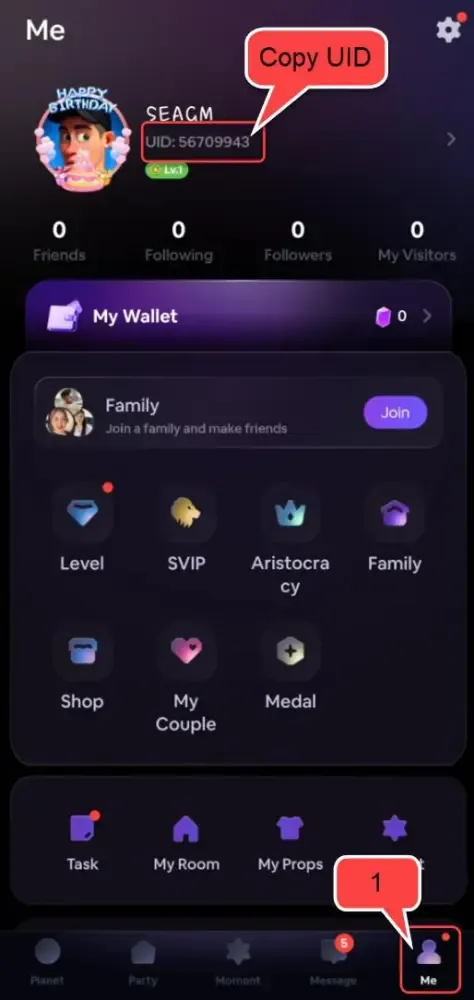
To find your Player ID quickly:
- Launch the ChillChat app on your phone or tablet.
- Tap the Profile or Me icon located in the bottom navigation bar.
- Look beneath your avatar and display name on the main profile screen.
- You will see ID: followed by a sequence of numbers.
- Tap the Copy icon next to your ID to copy it directly to your clipboard, or carefully write down the exact sequence before pasting it into the BitTopup order field.
ChillChat Top-Up Packages and Pricing Overview for 2026
ChillChat coins are the universal virtual currency across the platform. Users spend coins to send animated virtual gifts to live streamers, enter exclusive audio chat rooms, unlock profile badges, and boost creator rankings during live events in 2026.
BitTopup provides real-time pricing and direct digital fulfillment for all standard coin packs. Because international currency rates fluctuate, live pricing for every tier is displayed directly in the product selector above in your chosen currency.
| Top-Up Package Tier | Account Requirement | Credential Privacy | Delivery Channel |
|---|---|---|---|
| Starter Coin Packs | ChillChat Player ID | No Password Needed | Direct Server Credit |
| Creator Support Bundles | ChillChat Player ID | No Password Needed | Direct Server Credit |
| High-Tier Event Packs | ChillChat Player ID | No Password Needed | Direct Server Credit |
All orders are processed automatically once payment clears, ensuring you never miss a limited-time live broadcast or creator milestone.
Account Safety: Why BitTopup Never Asks for Your Password
Account safety is a major concern when purchasing digital currencies online. Unregulated agency groups and informal sellers often ask users to provide account login credentials, verification codes, or temporary passwords. This exposes your personal chat history, payment details, and private profile data to unauthorized access, and can result in account bans for violating platform security policies.
BitTopup uses a Player ID-only recharge method:
- Zero Password Exposure: You never provide your ChillChat password, social login token, or SMS verification code.
- Strict Data Privacy: Your transaction data and numerical ID are processed solely to route the coins to your account.
- Protected Account Standing: Direct system top-ups comply with standard digital balance fulfillment, keeping your profile in good standing.
Avoid any service or seller that requests remote login access to your ChillChat profile. Sticking to ID-only top-ups ensures complete control over your account at all times.
Supported Payment Methods for ChillChat Recharge
BitTopup supports a broad range of domestic and international payment methods, allowing users worldwide to buy ChillChat coins without regional payment barriers.
Depending on your country and region, available payment channels include:
- Major Credit and Debit Cards: Visa, Mastercard, and international bank cards.
- Digital Wallets and E-Wallets: Popular mobile payment solutions and regional wallet providers.
- Local Bank Transfers and Instant Online Banking: Direct debit and localized clearing systems.
- Convenience Store and Cash Vouchers: Available in selected international markets.
All transaction totals are converted transparently at checkout, displaying the exact amount charged with no hidden processing fees.
Troubleshooting ChillChat Delivery and Balance Refresh Issues
Top-ups on BitTopup are processed immediately after payment confirmation. In rare instances of network congestion or app caching delays, coins might not reflect instantly in your wallet. Use the following troubleshooting checklist to resolve balance display issues:
- Force Close and Restart the App: Exit ChillChat completely, clear the app from your recent apps switcher, and relaunch it. This forces the app to query the server for your newest balance.
- Check Your Network Connection: Switch between Wi-Fi and mobile data to ensure your device is receiving live data updates from ChillChat servers.
- Verify Your Submitted Player ID: Check your BitTopup order confirmation email to verify that the Player ID you entered matches your current profile ID exactly.
- Check BitTopup Order Status: Log into your BitTopup account and visit the order history tab to confirm that your transaction status shows Completed.
- Contact 24/7 Support: If your order shows completed but your balance remains unchanged after 15 minutes, reach out to BitTopup customer support with your Order Number and ChillChat Player ID for prompt resolution.
Frequently Asked Questions
What is ChillChat and what are in-app coins used for?
ChillChat is an interactive social live-streaming and voice chat platform. In-app coins are the virtual currency used to purchase dynamic gifts for hosts, participate in interactive live games, access VIP chat rooms, and unlock profile customization features.
How do I find my ChillChat Player ID?
Open the ChillChat app, tap your Profile tab in the bottom menu, and locate the ID field displayed below your username. Copy or note this numerical sequence for checkout.
Do I need to provide my ChillChat password to recharge?
No. BitTopup requires only your ChillChat Player ID. You should never share your account password, email login, or SMS codes with any top-up service.
How long does it take for ChillChat top-ups to arrive?
Most orders are processed automatically and credited to your ChillChat account within a few minutes after payment is successfully confirmed.
What should I do if my ChillChat balance does not update after payment?
First, restart the ChillChat app to refresh your profile wallet. If the coins do not appear, check your BitTopup order status to confirm the payment went through and verify the Player ID on your receipt. If you need assistance, contact BitTopup customer support with your Order ID.
Which payment options are supported for ChillChat top-up on BitTopup?
BitTopup supports major credit/debit cards, regional e-wallets, online banking, and local payment gateways tailored to your region. Available methods are shown at checkout.