

Eneba Gift Card AUD 5 AUD Top Up: What It Is and What You Can Buy
The Eneba Gift Card AUD 5 AUD top up adds 5 Australian Dollars directly to your personal Eneba wallet balance. This digital voucher provides a flexible payment method for acquiring thousands of digital gaming products without linking a bank account or credit card directly to your shopping profile.
Once the 5 AUD credit is added to your wallet, you can use it to purchase:
- Digital PC Games: Keys for major platforms including Steam, Epic Games Store, GOG, Ubisoft Connect, and the EA app.
- Console Games & Add-Ons: Digital game codes and expansion packs for PlayStation, Xbox, and Nintendo Switch.
- In-Game Currencies & Passes: Virtual credits, seasonal battle passes, and cosmetic packs across popular multiplayer titles.
- Digital Subscriptions: Membership access cards for services such as Xbox Game Pass, PlayStation Plus, and online gaming networks.
- Software & Utilities: Product keys for security suites, creative tools, and operating systems.
A 5 AUD voucher is especially suited for topping up a slight balance shortfall during checkout, securing discounted indie games, or purchasing small in-game microtransactions.
How to Find Your Eneba Account Details for Gift Card Redemption
To redeem your digital code successfully, make sure your Eneba account is active and set up to receive Australian Dollar funds. Follow these steps to locate your account profile and verify your wallet settings:
- Open your web browser and go to the official Eneba website.
- Sign in using your registered email address or linked social account.
- Click your profile avatar icon in the top-right corner of the page.
- Select My Profile or Wallet from the dropdown menu.
- Confirm that your display currency and region match AUD ($) so the voucher applies without currency mismatch prompts.
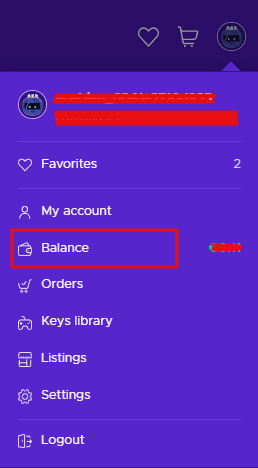
Step-by-Step Guide to Redeeming an Eneba 5 AUD Gift Card
Redeeming your digital code takes only a moment. You can add the funds directly to your wallet balance on either a desktop computer or a mobile device.
Redeeming on a PC / Desktop Browser
- Go to the Eneba website and log into your account.
- Click your user profile icon at the top-right corner of the screen.
- Select Redeem gift card from the navigation menu.
- Enter or paste the digital voucher code you received from BitTopup into the input field.
- Click the Apply button. The 5 AUD credit will appear in your Eneba wallet immediately.
Redeeming on a Mobile Browser or Smartphone
- Open your mobile browser and access the Eneba website.
- Tap the account menu icon and log in.
- Tap your profile icon and select the Wallet or Redeem Code option.
- Paste your digital code into the redemption box.
- Tap Apply or Confirm to complete the top-up.
Applying the Code Directly at Checkout
If you prefer not to top up your wallet beforehand, you can apply your code during checkout:1. Add your desired games or digital items to your shopping cart.2. Proceed to the checkout page.3. Under payment options, select Eneba Wallet / Gift Card.4. Enter your 5 AUD gift card code into the field and click Apply.5. The 5 AUD value will be deducted from your total order amount.
Australian Region Compatibility, Currency Rules, and Wallet Limits
Digital gift cards follow specific currency rules to ensure correct balance distribution.
| Parameter | Specification Details |
|---|---|
| Card Value & Currency | 5 AUD (Australian Dollars) |
| Region Lock | Australian Accounts / AUD Wallet Only |
| Code Expiry Date | No expiration date prior to redemption |
| Wallet Balance Expiry | Never expires once applied to your Eneba wallet |
| Usability | Storewide on eligible digital keys, DLCs, and subscriptions |
| Delivery Method | Digital code delivery via BitTopup |
Currency and Regional Restrictions
This voucher is denominated in Australian Dollars (AUD). It must be redeemed on an Eneba account configured for the AUD currency. Attempting to redeem an AUD code on an account set to a different base currency (such as USD, EUR, or GBP) will trigger a currency mismatch error. Always ensure your account region matches the voucher currency before applying it.
Balance and Transaction Limits
Eneba maintains standard compliance thresholds on wallet accumulations. Standard accounts have generous daily and monthly top-up allowances that easily accommodate 5 AUD cards. If you plan to redeem multiple vouchers in succession, ensure your account verification status supports the total balance amount. Once redeemed, your funds remain in your wallet indefinitely until spent.
Troubleshooting Eneba Gift Card Activation and Balance Issues
If you encounter a problem while applying your code, use these troubleshooting steps to resolve the issue:
- Code Input Errors: Double-check the characters. Avoid trailing or leading spaces when copy-pasting. Be careful not to confuse similar characters, such as the letter O with the number 0, or the capital letter I with the number 1.
- Currency or Region Mismatch: If the site states the code cannot be redeemed in your region, check your profile settings. Ensure your location is set to Australia and the currency is displayed as AUD.
- Code Already Redeemed: Refresh your browser and check your Wallet Balance or transaction history. Sometimes the system applies the balance even if the webpage shows a momentary processing delay.
- Temporary Server Glitch: If the site returns a server error, clear your browser cache, disable aggressive ad-blocking extensions, or try entering the code using private/incognito browsing mode.
Why Recharge Eneba Gift Cards via BitTopup
BitTopup provides a straightforward platform for acquiring digital gaming vouchers and wallet balances. Here is what you can expect when ordering your card:
- Instant Digital Code Delivery: Your digital code is generated and displayed right after your payment is confirmed, allowing you to top up your balance without delays.
- No Account Sharing Required: BitTopup never asks for your Eneba password or private login details. You receive an independent digital voucher code to redeem on your own terms.
- Clear Checkout Rates: Live pricing is displayed transparently at checkout with support for local payment methods.
- Dedicated 24/7 Customer Support: If you have questions about code delivery or need help with redemption steps, our support team is available around the clock.
Frequently Asked Questions
How do I redeem an Eneba gift card?
Log in to your Eneba account, click on your profile avatar at the top-right corner, select Redeem gift card, paste your digital code into the text field, and click Apply.
How to top up Eneba balance with an AUD gift card?
Ensure your account region and display currency are set to AUD. Navigate to the Redeem gift card section in your profile menu, enter your 5 AUD code, and confirm the redemption to deposit the funds into your wallet.
Can I use an Eneba 5 AUD gift card outside Australia?
Eneba AUD gift cards are currency-locked. They can only be redeemed on accounts that use AUD as their active wallet currency. If your account is registered in a region using another currency, you must use an account set to AUD.
Do Eneba gift cards have an expiration date?
Unredeemed Eneba gift card codes do not expire. Furthermore, once you redeem the 5 AUD voucher to your account balance, the wallet funds remain available until you decide to spend them.
Are there daily or monthly limits when redeeming Eneba gift cards?
Standard user accounts have daily and monthly wallet balance limits to maintain platform security. A single 5 AUD voucher is well within standard limits, but stacking a high volume of cards in a short period may require basic profile verification.
What should I do if my Eneba gift card code is not working?
First, verify that the code was typed accurately with no extra spaces. Next, check that your account currency is set to AUD. If the issue persists, refresh your wallet to verify if the credit was already applied, or contact customer support with your order details for assistance.