

Garena Free Fire Pins Global Top Up: Instant Digital Prepaid Codes
A Garena Free Fire Diamond PIN (Global) is an official prepaid digital voucher code that allows players to credit Free Fire Diamonds directly to their game accounts. Unlike direct recharges that process automatically to a specific player profile, digital PIN vouchers consist of unique alphanumeric or numeric serial codes that can be redeemed on official Garena web portals at any time.
Free Fire Diamonds serve as the primary premium currency in Garena Free Fire and Free Fire MAX. Acquiring diamonds through Global prepaid codes offers maximum privacy and flexibility. You do not need to share account passwords, provide social media logins, or enter your Player ID during the checkout process. Once purchased, the PIN is delivered immediately to your order screen, ready to be redeemed by you or sent to friends, guildmates, or tournament winners as a digital gift.
Global PIN Server Compatibility and Regional Restrictions
Before purchasing a Free Fire Global PIN, you must confirm your game account server location. Garena operates distinct server ecosystems with dedicated regional payment gateways. Global PINs are designed exclusively for international and global server accounts and cannot be redeemed on certain isolated regional servers.
| Game Server Region | Global PIN Compatibility | Redemption Channel |
|---|---|---|
| Global / International (Europe, North America, LATAM, etc.) | Fully Compatible | Official Garena Top-Up Portal (shop2game / redeem) |
| Indonesia (ID) | Incompatible | Regional Indonesian Vouchers / Direct ID Top-Up |
| India (IN) / Bangladesh | Incompatible | Dedicated Regional Channels |
| Thailand (TH) / Vietnam (VN) | Incompatible | Regional Garena Shells / Local Direct Top-Up |
| Brazil (BR) / MENA (Middle East & North Africa) | Incompatible | Regional Dedicated Payment Channels |
Attempting to redeem a Global voucher on an account registered to a restricted regional server will trigger a region mismatch error. Always check your account settings in-game to verify your server region before placing an order.
Free Fire Prepaid PIN vs. Direct UID Top-Up: Key Differences
Choosing between a digital prepaid PIN and a direct Player ID (UID) top-up depends on how you plan to use and manage your Free Fire Diamonds.
- Gifting and Distribution: Digital PIN codes require no recipient UID at checkout. This makes them ideal for gifting, organizing community giveaways, or rewarding guild members. Direct UID top-ups require the recipient's numeric ID upfront.
- Timing and Flexibility: Prepaid PINs can be stored safely in your inventory and redeemed during specific in-game events, such as top-up bonus events or collaboration releases. Direct top-ups credit immediately upon transaction completion.
- Account Security: Digital vouchers operate 100% externally from your game profile during purchase. You only enter your Player ID on the official Garena redemption website when you are ready to claim your diamonds.
How to Find Your Free Fire Player ID and Server Region
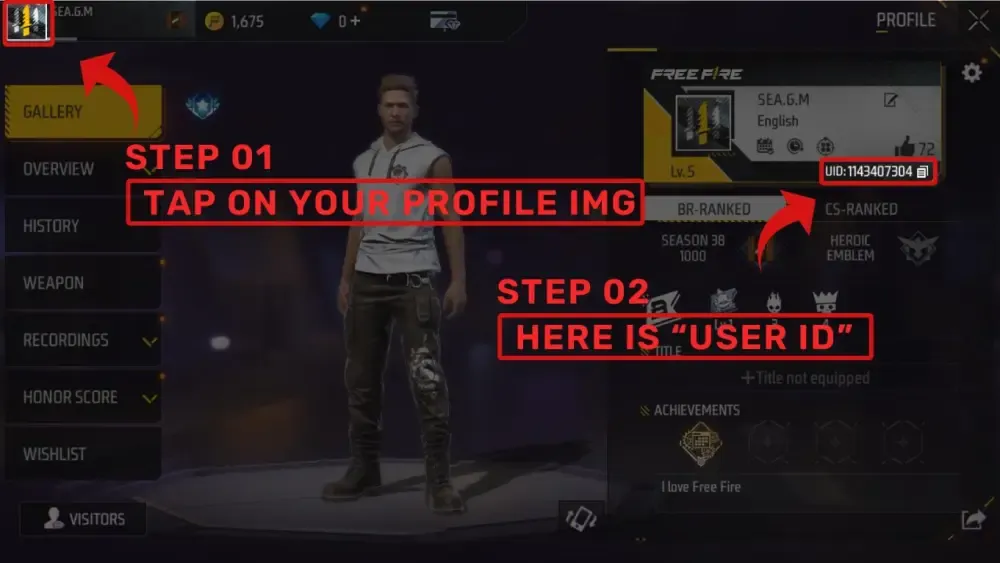
Locating your numeric User ID (UID) is necessary when redeeming your Global PIN on the official Garena portal.
- Launch Garena Free Fire or Free Fire MAX on your mobile device.
- Tap your profile banner (avatar) in the top-left corner of the main lobby screen.
- Stay on the Basic tab inside the player profile menu.
- Your numeric UID is displayed directly beneath your in-game nickname. Tap the copy icon beside the number to copy it to your clipboard.
- To verify your server region, open the in-game Settings menu (gear icon in the top-right corner) and check the region listed at the bottom-left of the screen.
Step-by-Step Guide: How to Redeem Free Fire PINs on Official Garena Portals
Redeeming your Global PIN code takes less than two minutes through official Garena platforms:
- Retrieve your digital voucher code from your BitTopup order confirmation page.
- Open your web browser and navigate to the official Garena redemption website (shop2game.com or ff.garena.com/redeem).
- Select Free Fire from the list of available games.
- Choose Player ID login and paste your numeric UID into the field, or log in using your linked social platform (Google, Facebook, VK, Twitter/X, Apple ID).
- Select Garena Prepaid Card or Garena Voucher as your payment redemption method.
- Enter the digital PIN code exactly as shown in your order details.
- Click Confirm. The corresponding diamonds will be added to your in-game balance immediately.
Available Free Fire Diamond PIN Denominations in 2026
Global PINs are issued in standard diamond increments to match in-game purchase tiers and event milestones:
- 100 + 10 Bonus Diamonds: Ideal for minor crate openings or daily discount spins.
- 210 + 21 Bonus Diamonds: Suitable for weekly membership subscriptions and discounted crates.
- 530 + 53 Bonus Diamonds: Popular for unlocking the seasonal Booyah Pass.
- 1080 + 108 Bonus Diamonds: Great for major Lucky Royale events and legendary character releases.
- 2200 + 220 Bonus Diamonds: Designed for complete collaboration bundles, weapon skin upgrades, and Evo Gun leveling.
Live real-time pricing and local currency conversions are displayed directly on the BitTopup checkout page.
Account Requirements: Why Bound Accounts Are Required
While the official Garena redemption portal allows logging in with a Player ID, using a bound game account is strongly recommended before redeeming digital vouchers.
Guest accounts store profile data locally on your device storage. If you clear your app cache, reinstall the game, or switch devices, a guest account can be permanently lost along with all redeemed diamonds. By linking your Free Fire profile to a permanent authentication method (Google, Facebook, VK, Twitter/X, or Apple ID), your diamond balance and inventory remain permanently backed up on Garena cloud servers.
In-Game Purchases: Maximizing Free Fire Diamonds in 2026
Acquiring diamonds with a Global PIN unlocks complete access to the Free Fire ecosystem in 2026:
- Booyah Pass Seasons: Unlock elite tier rewards, exclusive legendary outfits, themed vehicle skins, and weapon crates across monthly battle pass tracks.
- Luck Royale and Incubator: Spin for rare weapon blueprints, evolutionary character costumes, and limited-run Emote Royales.
- Evo Gun Upgrades: Purchase upgrade token boxes to level up Evo weapons, unlocking custom kill animations, firing effects, and exclusive hit sounds.
- Pets and Ability Enhancements: Unlock tactical companion pets and support abilities to optimize your battle royale loadout.
Troubleshooting Common PIN Redemption Issues and Error Codes
If you experience an issue while redeeming your voucher on the Garena portal, review the following troubleshooting steps:
- Invalid Code / Card Password Error: Double-check that no extra spaces were accidentally pasted before or after the code. Ensure all numbers and characters match your BitTopup order details exactly.
- Region Restriction Error: This occurs if your game account is registered to a server outside the Global network (such as ID, IN, BR, or VN). Global PINs cannot bypass regional server blocks.
- Code Already Used: Refresh your game client. If diamonds do not appear after five minutes, verify that the code was not already redeemed on a secondary account or by another user who had access to the PIN.
- Server Maintenance: If the Garena redemption site displays a connection error, wait 10 to 15 minutes and attempt redemption again after official server maintenance concludes.
Why Choose BitTopup for Garena Free Fire Global PIN Recharges
BitTopup delivers a secure, streamlined purchasing experience for Free Fire players worldwide:
- Instant Digital Code Delivery: Your Global PIN is generated immediately upon completed payment, allowing you to top up without waiting.
- Total Account Security: We never ask for your game password or login credentials. All redemptions happen directly on official Garena websites.
- Multi-Currency Support: Access transparent pricing with support for global and localized payment methods shown directly at checkout.
- Reliable Customer Assistance: Our 24/7 support team is available to assist you with order verification, redemption guidelines, and server compatibility inquiries.
Frequently Asked Questions
How do I redeem a Garena Free Fire Global PIN code in 2026?
Copy the digital code from your BitTopup order history, go to the official Garena top-up portal (shop2game.com or ff.garena.com/redeem), log in with your Free Fire Player ID, select the Garena Voucher option, enter your PIN, and click Confirm.
Can I use a Global Free Fire PIN on regional servers like Indonesia, India, or Thailand?
No. Free Fire Global PINs are restricted to accounts hosted on global/international servers. Accounts registered on regional servers such as Indonesia (ID), India (IN), Thailand (TH), Vietnam (VN), Brazil (BR), or MENA require regional-specific top-up options.
Do Garena Free Fire Diamond PIN codes have an expiration date?
Unused Garena voucher PINs typically remain valid for up to 12 months from the date of purchase. However, it is best practice to redeem your code immediately upon receipt to credit the diamonds safely to your account.
Can I redeem a Free Fire Diamond PIN on a Guest account?
You can technically log in via Player ID on the redemption website, but redeeming on a Guest account is not recommended. If you lose access to your device, your diamonds will be permanently lost. Bind your account to Google, Facebook, VK, Twitter/X, or Apple ID first.
What is the difference between a Free Fire PIN and a direct player ID recharge?
A direct player ID recharge automatically deposits diamonds into the specified account at checkout. A Free Fire PIN delivers a digital code that you can store, gift to another player, or redeem on the official portal at your convenience without providing a UID during purchase.
What in-game items can I buy with Free Fire Diamonds in 2026?
Diamonds allow you to purchase the seasonal Booyah Pass, participate in Luck Royale and Incubator draws, buy Evo Gun upgrade tokens, unlock characters and pets, purchase weapon skins, and acquire exclusive emotes and custom room cards.
What should I do if my Free Fire voucher code shows an invalid error?
First, ensure that there are no accidental spaces or typing mistakes in the code box. Second, confirm that you are logged into an account that belongs to the Global server region. If the issue persists, contact BitTopup 24/7 customer support with your order number for prompt assistance.