



Hoob Live Top Up: Coins for Voice Rooms and Live Streaming
Hoob Live is an interactive social streaming and audio chat platform where users join multi-guest voice rooms, watch live broadcasters, and participate in community activities. In-app coins serve as the core virtual currency across the entire Hoob Live platform, enabling users to interact directly with creators and friends across global and MENA communities.
When you top up Hoob Live coins, you gain access to premium interactive features that enhance your presence across voice parties and live streams. On BitTopup, you can recharge your account directly using only your Player ID, ensuring a smooth, secure transaction without sharing private login credentials.
What Are Hoob Live Coins Used For?
Hoob Live coins allow you to participate actively in community rooms, support creators, and personalize your profile. Key coin uses include:
- Virtual Gifting: Send animated 2D and 3D gifts to your favorite room hosts or broadcasters to show appreciation and climb the top supporter rankings.
- VIP Voice Seats: Reserve premium speaker seats in popular group audio rooms and broadcast your voice with priority audio channels.
- Profile Customization and Badges: Purchase exclusive entry banners, special avatar frames, chat bubbles, and dynamic ride animations that display whenever you enter a room.
- Interactive Games: Use coins to participate in community party games and mini-games hosted directly inside voice chat rooms.
| Hoob Live Feature | Coin Utility | Primary Benefit |
|---|---|---|
| Virtual Gifts | Send animated items to room hosts | Boost host ranking and earn supporter badges |
| Voice Party Seats | Reserve premium microphone spots | Host discussions and broadcast high-priority audio |
| Entry Effects & Frames | Buy custom visual effects | Stand out immediately upon joining any voice room |
| In-Room Mini-Games | Stake coins in social activities | Play with friends directly inside the chat interface |
How to Find Your Hoob Live Player ID
To complete a coin recharge on BitTopup, you only need to provide your unique numerical Player ID. You do not need to share your login email, phone number, or password.
Follow these quick steps to locate your Player ID inside the Hoob Live app:
- Open the Hoob Live app on your mobile device.
- Tap the Profile / My tab located in the bottom-right corner of the home screen.
- Locate your numerical Player ID displayed directly below your profile nickname and avatar.
- Tap the Copy icon next to your ID to save it to your clipboard for checkout.
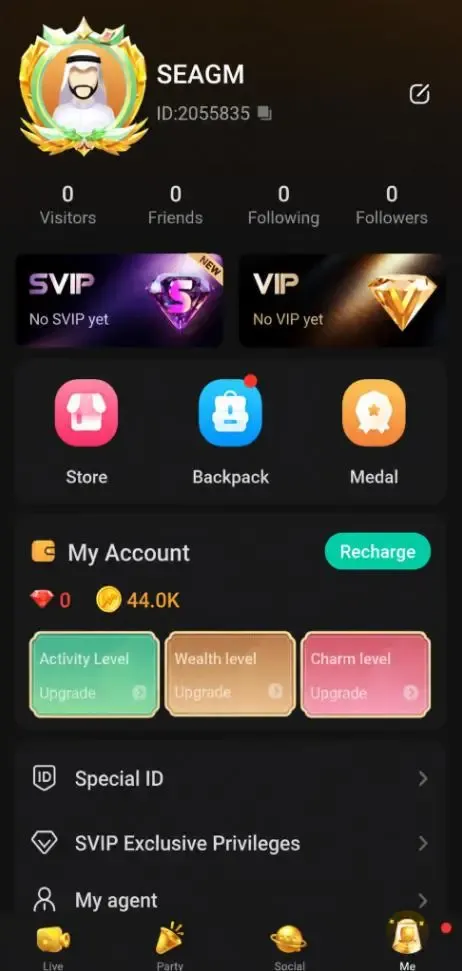
Double-check that you copy the exact digits to ensure your coin balance arrives in the correct account immediately after payment.
Step-by-Step Guide to Recharge Hoob Live Coins on BitTopup
Recharging Hoob Live coins on BitTopup is quick and straightforward. Follow these steps to complete your order:
- Select Your Coin Package: Browse the available Hoob Live coin packages on this page and choose the amount that fits your needs.
- Enter Your Player ID: Paste your numerical Hoob Live Player ID into the required account field. Check the numbers carefully.
- Click Buy Now: Proceed to the secure checkout screen.
- Select Your Preferred Payment Method: Pick from the available secure payment options shown directly on the payment page.
- Complete Checkout: Finalize your payment. The BitTopup automated system will process the order and credit your Hoob Live coin balance immediately.
Supported Payment Methods for Hoob Live Top Up
BitTopup provides a wide selection of payment options tailored to global and MENA users. All available payment channels, processing fees (if any), and real-time converted totals are presented transparently on the checkout page before you confirm payment.
You can pay using major international credit and debit cards, secure digital wallets, local banking transfer channels, and popular regional payment solutions. Every transaction goes through encrypted payment gateways to ensure your financial details remain protected at all times.
Safety Guarantee: ID-Only Direct Top-Up Without Password Sharing
Account safety is a top priority when purchasing in-app currency online. BitTopup uses a direct ID-based reload system that keeps your personal credentials completely safe.
- Zero Password Requirements: You will never be asked for your Hoob Live password, social media login details, or SMS verification codes.
- No Account Takeover Risk: Because our system only requires your public Player ID, your account security settings and private messages remain untouched.
- Secure Gateway Processing: All payment transactions are encrypted using modern security protocols to prevent data interception.
- Legitimate Direct Crediting: Coins are credited directly to your official game profile, keeping your account fully compliant with platform terms.
Hoob Live Coins Delivery Processing and Troubleshooting
BitTopup operates an automated processing system running 24 hours a day, 7 days a week. Unlike platforms that subject users to daily maintenance blackouts, BitTopup processes top-up orders continuously so you can get coins whenever your favorite voice room is active.
If Your Coins Have Not Appeared Yet:
- Restart the App: Close the Hoob Live application completely from your device's background task manager and relaunch it. Check your profile wallet balance.
- Verify Your Player ID: Confirm that the Player ID submitted during checkout matches the ID shown on your active Hoob Live profile.
- Check Payment Status: Make sure your payment transaction was successfully completed and debited by your bank or wallet provider.
- Contact 24/7 Support: If your balance does not update within a few minutes, reach out to BitTopup customer support with your Order ID. Our support team is ready around the clock to inspect and resolve your delivery.
Frequently Asked Questions
Where can I find my Hoob Live Player ID?
Open the Hoob Live app and go to the "My" or Profile section located in the bottom menu. Your numerical Player ID is visible directly underneath your profile picture and nickname. Tap the copy icon next to it to copy your ID.
Do I need to provide my Hoob Live account password to recharge?
No. BitTopup only requires your public Player ID to process your coin order. We will never ask for your password, recovery codes, or linked social media accounts.
What can I purchase with Hoob Live coins?
Hoob Live coins can be used across the app to send animated virtual gifts to live streamers, reserve premium voice party seats, purchase entrance effects and avatar frames, and join interactive in-room party games.
How long does it take for Hoob Live coins to reflect in my balance?
Orders are handled by an automated delivery system that operates 24/7. In most cases, your coins will reflect in your account balance within moments after your payment is confirmed.
Can I recharge Hoob Live coins for a friend using their Player ID?
Yes. Simply enter your friend's Hoob Live Player ID instead of your own during checkout. Once payment is confirmed, the coins will be delivered directly to their account.
What should I do if I entered the wrong Hoob Live Player ID during checkout?
Please contact BitTopup customer support immediately with your Order ID and the correct Player ID. If the order has not yet been processed by the automated system, our support staff can assist in correcting the details.