

Hopi Star Top Up: Coins for Voice Chat and Live Parties
Hopi Star is an interactive voice chat room and social entertainment platform where users join live audio parties, meet new friends, sing karaoke, and interact with room hosts. In-app coins serve as the central currency powering the social experience.
With Hopi Star coins, you can send animated virtual gifts to your favorite broadcasters, unlock special avatar frames, activate entry effects, and participate in community room activities. Topping up your coin balance ensures you never miss a moment to show support or celebrate during live party streams.
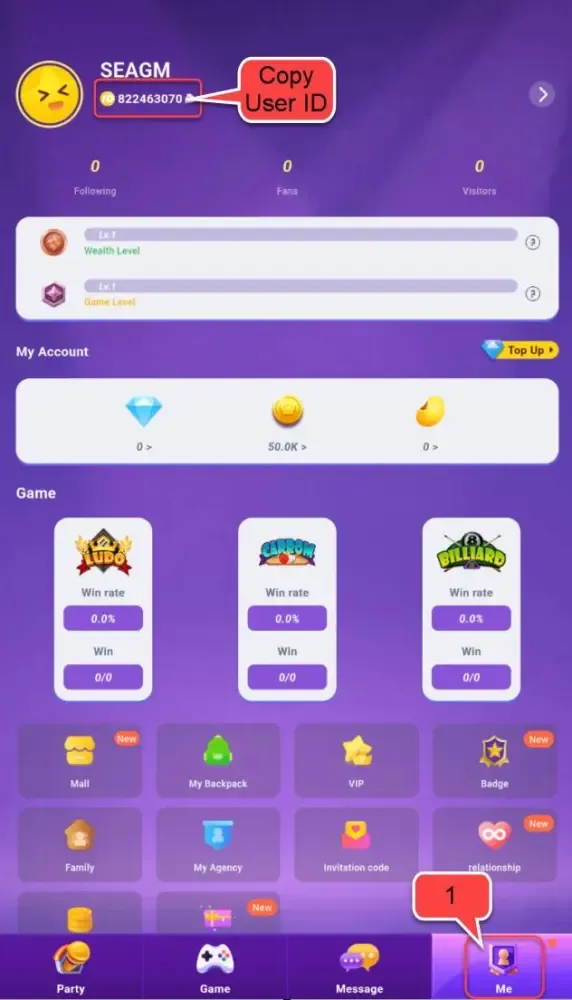
How to Find Your Hopi Star Player ID
To ensure your coins arrive directly to your account, you only need your numerical Player ID. You do not need to share passwords or login details.
Follow these steps to find your Hopi Star Player ID:
- Open the Hopi Star app on your mobile device.
- Tap the Profile (or Me) icon located at the bottom-right corner of the screen.
- Look directly beneath your profile picture and username.
- Locate the numerical Player ID (UID).
- Tap the Copy icon next to your ID to copy it to your clipboard.
Double-check that the ID is copied completely to avoid delays during checkout.
Step-by-Step Guide to Recharge Hopi Star Coins on BitTopup
Topping up your account through BitTopup takes less than two minutes. Follow this direct order process:
- Select Your Coin Package: Browse the available Hopi Star coin denominations on the product page and select the amount you wish to buy.
- Enter Your Player ID: Paste your numerical Hopi Star Player ID into the required field.
- Select Your Payment Method: Choose from the available local and global payment options displayed at checkout.
- Review and Confirm: Confirm your Player ID and package details, then proceed to finalize the payment.
- Receive Your Coins: Once payment processing finishes, the coins will be dispatched directly to your Hopi Star account balance.
Why Topping Up Hopi Star on Web Saves Platform Fees
When purchasing coins directly inside mobile applications, mobile app store systems impose high merchant commission fees—often up to 30%. These platform surcharges are routinely factored into the in-app price tags, reducing the number of coins you get for your money.
Buying your Hopi Star coins on BitTopup via web direct recharge avoids standard app store commission fees. This web checkout model allows for competitive base pricing, giving you more coins per transaction. Exact exchange rates, applicable local pricing, and available denominations are always clearly displayed on the live BitTopup checkout screen.
Hopi Star Virtual Gifts and Room Features Guide
Sending virtual gifts in Hopi Star is the primary way to interact with party hosts, climb room leaderboards, and highlight your profile. Different gifts carry unique visual effects and coin costs.
| Gift Tier | Popular Examples | Coin Range | Visual & Room Impact |
|---|---|---|---|
| Entry Tier | Rose, Cheers, Star Candy | 1 – 99 Coins | Chat stream notification and host appreciation point |
| Mid-Tier | Sports Car, DJ Booth, Lucky Ring | 100 – 999 Coins | On-screen pop-up animation and temporary room banner |
| Luxury Tier | Magic Castle, Rocket, Space Yacht | 1,000+ Coins | Full-screen 3D dynamic effect, audio cue, and top room ranking boost |
Beyond gifts, Hopi Star coins allow users to purchase premium room entrance vehicles, exclusive profile badges, and special chat bubbles that help you stand out across every voice room you enter.
Safe Top-Up Best Practices: Password-Free Player ID Checkout
Account safety is critical when purchasing virtual currencies online. Keep your Hopi Star account protected by following these essential security standards:
- Never Share Passwords: Legitimate direct top-up services require only your public Player ID. Never provide your password, SMS verification codes, or linked social media logins.
- Verify Your Player ID Before Paying: Coins are delivered automatically to the ID entered. Always copy and paste your UID directly from the app to avoid typos.
- Avoid Unverified APKs: Do not download modified game files or third-party coin generators promising free currency. These often lead to account bans or stolen credentials.
- Use Secure Connections: Always complete transactions over a secure personal internet connection rather than public Wi-Fi networks.
Supported Global and Local Payment Options
BitTopup supports an extensive selection of payment channels to accommodate Hopi Star community members worldwide. Depending on your region, you can complete your purchase using:
- Major credit and debit cards
- Regional e-wallets
- Direct online banking and instant transfer networks
- Convenient local payment systems
All real-time currency conversions, regional availability, and active payment channels are displayed dynamically on the live BitTopup order page during checkout.
Troubleshooting Hopi Star Recharge Delays and Order Issues
If your coins do not appear immediately after completing a transaction, work through these standard troubleshooting steps:
- Refresh the App: Close Hopi Star completely from your device app switcher and reopen it. Check your coin balance on your profile screen.
- Check Payment Status: Confirm that the transaction went through successfully with your bank or payment provider.
- Verify the Player ID Entered: Check your BitTopup order receipt to ensure the Player ID matches your in-app UID.
- Contact 24/7 Support: If your payment is completed but your balance has not updated within a few minutes, reach out to BitTopup customer service with your Order ID and Hopi Star Player ID for immediate assistance.
Frequently Asked Questions
How do I find my Hopi Star Player ID for a recharge?
Open Hopi Star, tap the Profile/Me tab at the bottom right, and find the numerical ID displayed beneath your avatar. Tap the copy icon next to it to copy the exact number.
Do I need to provide my Hopi Star account password to top up coins?
No. BitTopup uses direct Player ID top-ups. You never need to share your account password, email access, or verification codes.
How fast will the coins be credited to my Hopi Star account?
Coins are credited automatically to your account as soon as payment confirmation is received. In most cases, delivery occurs within minutes.
What can I use Hopi Star coins for in the app?
You can use coins to send animated gifts to room hosts, unlock exclusive entry effects and vehicle animations, buy customized avatar decorations, and join room events.
Why is web top up cheaper than buying inside the Hopi Star mobile app?
Web checkouts avoid the heavy platform commissions imposed by mobile app stores. This allows web storefronts like BitTopup to offer better value and lower prices directly to users.
What should I do if my Hopi Star coins do not appear after payment?
First, restart your Hopi Star app to refresh the balance. If the coins still do not reflect, check your order confirmation details and contact BitTopup 24/7 customer support with your Order ID for rapid verification.