




Walmart Gift Card (US) Top Up: How to Recharge and Redeem Online
A Walmart Gift Card (US) allows you to shop millions of items across electronics, groceries, home goods, apparel, and digital services on Walmart.com and inside the Walmart mobile application. Redeeming your digital code stores the dollar balance directly in your personal Walmart Wallet for fast, convenient checkout.
Step-by-Step Redemption on Walmart.com
- Visit the official Walmart website and log in to your account.
- Click on Account in the upper-right corner of the homepage.
- Select Wallet from the account menu options.
- Click Add a new payment method and choose Gift Card.
- Type in the 16-digit card number and the 4-digit PIN provided in your BitTopup order details.
- Click Save Card. The funds will immediately apply to your account balance.
Step-by-Step Redemption on the Walmart App
- Open the Walmart app on your iOS or Android mobile device.
- Tap the Account tab located at the bottom right corner.
- Scroll down and select Wallet under the Manage Account section.
- Tap Add payment method, then select Gift card.
- Enter your 16-digit gift card number and 4-digit security PIN.
- Tap Save to lock the balance to your Walmart profile.
Direct Application During Checkout
You do not have to save the card in advance. You can also apply your digital card at the final payment step:
- Add your desired products to the shopping cart and proceed to checkout.
- In the Payment Method section, select Apply Gift Card.
- Input the card number and security PIN, then click Apply.
- If the order total exceeds the gift card amount, you can pay the remaining balance using a secondary card or payment method.
Available Walmart Gift Card Denominations in 2026
BitTopup provides flexible digital denomination options suitable for routine groceries, household supplies, or major consumer electronics purchases. All values are issued in United States Dollars (USD).
| Denomination (USD) | Delivery Format | Region Compatibility | Expiration Policy |
|---|---|---|---|
| $10.00 USD | Digital Code + PIN | United States Only | No Expiration Date |
| $25.00 USD | Digital Code + PIN | United States Only | No Expiration Date |
| $50.00 USD | Digital Code + PIN | United States Only | No Expiration Date |
| $100.00 USD | Digital Code + PIN | United States Only | No Expiration Date |
| $200.00 USD | Digital Code + PIN | United States Only | No Expiration Date |
| $500.00 USD | Digital Code + PIN | United States Only | No Expiration Date |
Note: Exact pricing, currency conversion rates, and real-time inventory are displayed directly on the live checkout page on BitTopup.
Locating Your Code and Account Credentials
When completing an order for a digital code, you do not need to provide internal account IDs or passwords. You receive a unique 16-digit digital card number paired with a 4-digit PIN.
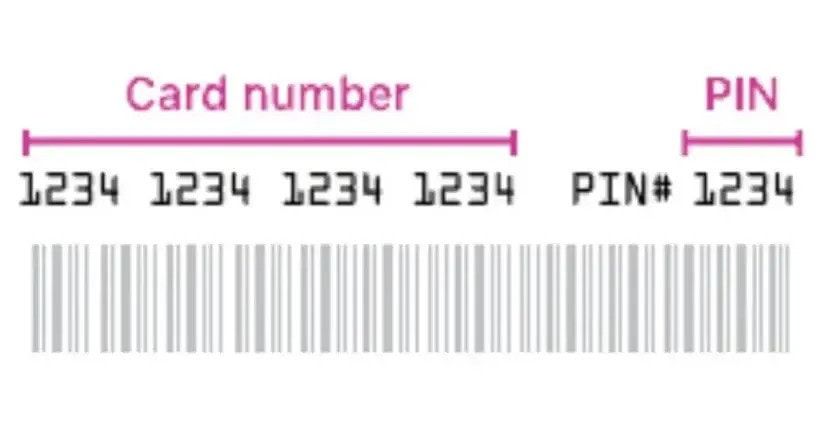
To view your digital card details after checkout:
- Go to your BitTopup user profile and open My Orders.
- Locate your completed Walmart Gift Card (US) purchase.
- View the revealed digital card code and the corresponding PIN.
- Copy and paste both fields directly into Walmart.com or the Walmart mobile app to avoid typographical mistakes.
United States Region-Lock Policy and Account Compatibility
Walmart gift cards sold under the United States catalog are region-locked to the US domestic storefront. Review these requirements before completing your order:
- Platform Restriction: US Walmart gift cards function exclusively on Walmart.com, the US Walmart app, and physical Walmart stores located within the United States and Puerto Rico.
- Currency Isolation: The card is issued in USD. It cannot be converted, transferred, or redeemed on regional international sites such as Walmart Canada or Walmart Mexico.
- Account Configuration: Your Walmart account profile must be configured with a valid US shipping or billing address to complete purchases using USD digital balances.
- Item Restrictions: Walmart gift cards cannot be used to purchase other third-party gift cards, open-loop prepaid cards (such as Visa or Mastercard gift cards), or select money transfer services.
How to Check and Manage Your Walmart Gift Card Balance
You can verify the available funds on your digital gift card at any time without having to place an order or redeem the card into an account.
Online Balance Check
- Go to the Walmart Gift Card Balance page (
walmart.com/account/giftcards/balance). - Enter the 16-digit card number.
- Enter the 4-digit PIN.
- Click Check Balance to view the remaining USD credit instantly.
Managing Multiple Cards in Walmart Wallet
If you redeem multiple digital gift cards, Walmart allows you to store up to five active gift cards in your account wallet simultaneously. When checking out online, the system automatically draws funds from your active gift card balances before charging any backup payment method.
Digital Code Delivery and Safe Checkout on BitTopup
BitTopup offers a straightforward, reliable channel for obtaining digital Walmart balance codes globally.
- Zero Account Sharing: We never request your Walmart password, login email, or private personal credentials. You receive raw digital redemption codes that you control and apply directly to your personal account.
- Instant Digital Fulfillment: Completed orders are processed through automated fulfillment systems, delivering your card number and PIN directly to your screen and registered email.
- Wide Selection of Payment Options: BitTopup supports international buyers with local and global payment gateways, enabling access to US digital gift cards regardless of your domestic banking system.
- 24/7 Dedicated Support: If you ever run into verification questions or delivery inquiries, the BitTopup customer support team is available around the clock to assist you.
Common Redemption Errors and Troubleshooting Solutions
1. "Invalid Card Number or PIN"
- Cause: Typing errors, accidental spaces before or after the code, or confusing similar characters (such as the number
0and letterO, or number1and letterI). - Solution: Copy and paste the 16-digit string and 4-digit PIN directly from your BitTopup order history. Ensure there are no trailing blank spaces in the text box.
2. "Card Balance Shows $0.00"
- Cause: The card was already applied to your Walmart Wallet in an earlier step or used during a previous checkout session.
- Solution: Check your Walmart Account Wallet. If the card was saved previously, the funds are already attached to your primary profile balance.
3. "Payment Method Not Allowed for This Item"
- Cause: Attempting to use a gift card balance on restricted merchandise (such as Visa prepaid cards, lottery items, or certain financial services).
- Solution: Remove the restricted item from your cart and use a credit or debit card for that specific portion of your order.
4. "Temporarily Blocked from Entering Codes"
- Cause: Multiple consecutive failed attempts to enter an incorrect PIN.
- Solution: Wait 15 to 30 minutes for the security hold to lift, verify your correct code details on BitTopup, and re-enter them carefully.
Frequently Asked Questions
Can I top up or recharge a Walmart gift card online?
Digital Walmart gift cards (eGift cards) cannot have additional balance added directly to the existing card number once issued. To top up your Walmart shopping balance, purchase a new digital gift card code on BitTopup and redeem it to your Walmart Wallet, which aggregates your total account balance.
How do I redeem my digital Walmart Gift Card (US) code?
Sign in to your account on Walmart.com or the Walmart app, open your Wallet, click Add a new payment method, select Gift Card, and type in the 16-digit card number and 4-digit PIN provided in your BitTopup order page.
Can I use a Walmart US gift card outside the United States?
No. Walmart US gift cards are restricted to the US platform. They can only be used on Walmart.com, the US mobile application, and physical retail stores in the United States and Puerto Rico. They are not valid on international Walmart portals.
Where can I buy Walmart gift cards besides Walmart?
You can purchase digital Walmart gift cards securely through authorized digital marketplaces like BitTopup. BitTopup provides instant delivery of valid codes with secure global payment processing and 24/7 customer assistance.
How do I check my Walmart gift card balance without making a purchase?
Visit the official balance checker at walmart.com/account/giftcards/balance. Type your 16-digit card number and 4-digit PIN into the form and click Check Balance to see your available funds without placing an order.
Can a digital Walmart eGift card be used in physical retail stores?
Yes. You can add the digital gift card to your Walmart app Wallet and use Walmart Pay at the store checkout register. Alternatively, you can present the barcode and numeric card code on your mobile screen for the cashier to scan at the point of sale.