




BitTopup Logohow to top-up in bittopup
ค้นหา
วิธีเติมเงิน Apple Gift Card (ES)

Apple Gift Card (ES)

Excellent
Trustpilot
SPAINSPAIN
Instant Deliveryจัดส่งทันที
Safe & Secure paymentชำระเงินปลอดภัยและมั่นใจได้

Instant Euro balance top up for your Spanish Apple ID with secure checkout at BitTopup.

เลือกมูลค่า

Apple Gift Card 2 EURO ES

฿ 69.94

ยอดรวม · x1

Apple Gift Card (ES) คู่มือการเติมเงิน

Apple Gift Card (ES) Top Up: Universal Spanish Digital Vouchers

An Apple Gift Card (ES) provides direct digital credit to your Spanish Apple Account balance. The unified Apple Gift Card applies toward everything Apple sells in the Spanish storefront. You can use your balance for digital services, app subscriptions, media, and physical hardware.

Once redeemed, your Euro (€) funds become available immediately across the entire Spanish Apple ecosystem:

  • App Store & In-App Purchases: Buy premium iOS, iPadOS, and macOS apps, mobile games, and digital items (gems, battle passes, cosmetics).
  • Apple Subscriptions: Pay for ongoing monthly or annual services including iCloud+, Apple Music, Apple TV+, Apple Arcade, Apple Fitness+, and Apple One bundles.
  • Digital Media: Purchase or rent movies, TV shows, audiobooks, and e-books via the Apple TV app and Apple Books.
  • Hardware & Accessories: Use your redeemed balance online at apple.com/es or inside the official Apple Store app in Spain to buy iPhones, iPads, MacBooks, AirPods, and official accessories.

Spain Region Lock Requirements and Currency Verification

Apple applies strict regional boundaries to all gift cards and account balances. An Apple Gift Card (ES) is minted strictly in Euros (€) for the Spanish region.

Critical Region Rules:

  1. Matching Country/Region: Your Apple ID country setting must be set to Spain. You cannot redeem a Spanish (€) Apple Gift Card on an account registered to the United States, United Kingdom, Germany, Mexico, or any other regional storefront.
  2. Storefront Currency: Prices in the Spanish App Store and online Apple Store are billed in Euros (€). The gift card credits match this exact currency.
  3. No Cross-Border Transfer: Balances redeemed on a Spanish Apple ID cannot be moved or transferred to an Apple ID in another territory.
Feature / AttributeSpain (ES) Apple Gift CardOther Regional Gift Cards
Card CurrencyEuro (€)Local territory currency (USD, GBP, etc.)
Account Region RequiredSpainMatching issuing country
Hardware PurchasesValid on apple.com/esValid only on local country web store
App Store CompatibilitySpain App Store catalog onlyLocal storefront catalog only
Expiration DateNone (funds never expire)Varies by local country regulations

Apple Gift Card vs. App Store & iTunes Card: Key Differences

Apple unified its voucher ecosystem into the all-in-one Apple Gift Card. If you previously used App Store & iTunes cards, here is how the universal card functions:

  • Legacy App Store & iTunes Cards: Limited strictly to digital software, games, media downloads, and cloud storage subscriptions.
  • Modern Apple Gift Card (ES): Combines digital purchases and hardware buying power into a single 16-digit code. You can apply the balance to an iCloud+ tier, spend it on in-game microtransactions, or combine multiple cards to buy a new iPad or Apple Watch.

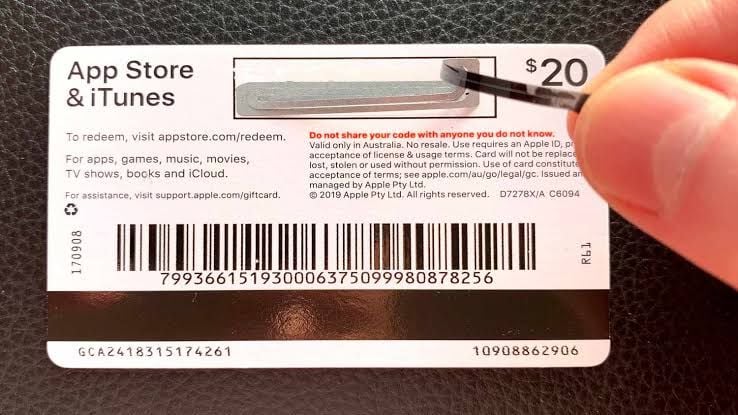
How to Recharge Apple Gift Card (ES) on BitTopup

Recharging your Spanish Apple Account balance through BitTopup is direct and fast:

  1. Select Denomination: Choose the Euro (€) value that matches your purchase requirements.
  2. Confirm Region: Verify that your target Apple Account is set to the Spain storefront.
  3. Enter Contact Details: Input your email address to receive order receipts and code delivery notifications.
  4. Complete Payment: Select your preferred secure payment method at checkout and finalize the transaction.
  5. Receive Your Code: Your 16-digit digital redemption code displays instantly on your order confirmation screen and delivers directly to your email inbox.

Step-by-Step Guide: Redeeming Your 16-Digit Code on iPhone, iPad, Mac, and PC

Apple codes feature a 16-digit alphanumeric string beginning with an "X". Follow these operating system guides to apply the code to your balance.

Redeeming on iPhone or iPad (iOS / iPadOS)

  1. Open the App Store app.
  2. Tap your profile icon or photo in the top-right corner of the screen.
  3. Tap Redeem Gift Card or Code.
  4. Tap Enter Code Manually (or scan the digital code with your camera).
  5. Type your 16-digit code and tap Redeem in the top-right corner.

Redeeming on Mac (macOS)

  1. Open the App Store on your Mac.
  2. Click your name or profile picture in the bottom-left sidebar.
  3. Click Redeem Gift Card in the upper-right corner.
  4. Sign in with your Apple Account password or Touch ID if prompted.
  5. Enter the 16-digit code and click Redeem.

Redeeming on a Windows PC

  1. Open the Apple Music app or Apple TV app (or iTunes for Windows).
  2. Click your name at the bottom of the sidebar, then select Redeem.
  3. Enter your 16-digit code and confirm redemption.

How to Check Your Apple Account Balance and Verify Your Account

Before making purchases, verify your updated Euro balance directly inside your device settings.
How to recharge Apple Gift Card (ES)

Checking Balance on iOS:

  1. Open the Settings app on your iPhone or iPad.
  2. Tap your Apple ID name banner at the top.
  3. Tap Payment & Shipping.
  4. Your current Apple Account Balance displays at the top of the payment methods list.

Checking Balance in the App Store:

Open the App Store and tap your profile icon. Your remaining Euro balance appears directly beneath your name and email address.


Security First: Safe Top Ups Without Password Sharing

BitTopup uses a direct digital code delivery model that protects your personal data:

  • Zero Credentials Required: You never need to provide your Apple ID email, password, two-factor authentication codes, or personal recovery keys.
  • Self-Redemption: You receive an unredeemed digital voucher code that you apply personally inside official Apple interfaces.
  • Protection Against Unauthorized Access: Because no third party logs into your device or account, your private iCloud data, photos, and messages remain completely secure.

Common Redemption Issues and Troubleshooting

If you run into an error when entering your code, use these solutions to resolve the issue:

1. "Code is not valid in this region"

  • Cause: Your Apple ID is registered to a country other than Spain.
  • Fix: Check your account settings. Go to Settings > [Your Name] > Media & Purchases > View Account > Country/Region. Ensure it is set to Spain. If it is set elsewhere, you must change your account region to Spain or create a dedicated Spanish Apple ID.

2. "Card has already been redeemed"

  • Cause: The code was already processed, or your device cached an outdated balance.
  • Fix: Sign out of the App Store, restart your device, and sign back in. Check your purchase history to confirm if the balance was already applied.

3. "Code is invalid or unrecognized"

  • Cause: Typing errors with lookalike characters.
  • Fix: Carefully verify characters. Common errors include mistaking 0 (zero) for O, 1 (one) for I or L, 5 for S, and 8 for B.

Frequently Asked Questions

Can I buy an Apple gift card in Spain online?

Yes. You can purchase official digital Apple Gift Cards (ES) online at BitTopup. You will receive an authentic 16-digit code redeemable on any Spanish Apple Account.

Can an Apple gift card (ES) be used with an Apple ID from another country?

No. Apple gift cards are region-locked. A Spain (€) gift card can only be redeemed on an Apple Account registered to the Spain storefront. It will not work on accounts set to the US, UK, France, Germany, or other regions.

How do I recharge my Apple Account balance with an ES gift card?

Open the App Store on your Apple device, tap your profile icon, select "Redeem Gift Card or Code," and enter the 16-digit digital code you received from BitTopup. The Euro balance applies immediately.

Can I convert an Apple gift card to cash or transfer it to a bank account?

No. Apple Gift Card funds cannot be redeemed for cash, refunded, or transferred to an external bank account or credit card, except where required by applicable local law.

What products and subscriptions can I buy with an Apple Gift Card (ES)?

You can purchase iOS/macOS apps, in-game currency, books, movies, and subscriptions like iCloud+, Apple Music, Apple Arcade, and Apple TV+. You can also use the balance for hardware and accessories on the official Spanish Apple Online Store.

What should I do if my Apple gift card code says it has already been redeemed?

Refresh your device by signing out and back into your Apple Account. Check your balance in Settings > [Your Name] > Payment & Shipping. If the balance did not increase, inspect your recent purchase history to confirm whether an active subscription renewal automatically used the funds.

Do Apple Gift Cards for Spain have an expiration date?

No. Apple Gift Cards and redeemed Apple Account balances in Spain do not expire. You can keep the balance in your account indefinitely until you choose to spend it.

Apple Gift Card (ES) ข่าวสารแนะนำ

สินค้าแนะนำ

Apple Gift Card (ES) คำถามที่พบบ่อยเกี่ยวกับการเติมเงิน

ใช้เวลานานเท่าใดกว่าที่คำสั่งซื้อจะเสร็จสมบูรณ์?
โดยปกติแล้ว คำสั่งซื้อจะเสร็จสมบูรณ์ภายในไม่กี่นาที หากมีความล่าช้าใดๆ โปรดติดต่อฝ่ายสนับสนุนลูกค้าของเรา
BitTopup คืออะไร?
BitTopup คือแพลตฟอร์มออนไลน์สำหรับเติมเกมและบริการต่าง ๆ ได้อย่างรวดเร็วและปลอดภัย
เวลาทำการของฝ่ายบริการลูกค้า?
ฝ่ายบริการลูกค้าของ BitTopup พร้อมให้บริการตลอด 24 ชั่วโมงทุกวัน
ฉันจะแลกรับโค้ด Apple Gift Card (ES) ได้อย่างไร?
ไปที่หน้าแลกรับอย่างเป็นทางการ กรอกโค้ดจากคำสั่งซื้อของคุณ จากนั้นยอดคงเหลือ/ไอเทมจะเข้าบัญชีทันที
Apple Gift Card (ES) รองรับภูมิภาคใดบ้าง?
สินค้านี้รองรับบัญชีภูมิภาค SPAIN โปรดตรวจสอบภูมิภาคบัญชีของคุณก่อนทำการสั่งซื้อ
ฉันสามารถชำระเงินด้วยคริปโตได้หรือไม่?
ได้ เรายอมรับ Bitcoin, ETH, USDT และคริปโตเคอร์เรนซียอดนิยมอื่นๆ พร้อมการยืนยันทันที
หากเติมเงินแล้วไม่เข้าต้องทำอย่างไร?
ติดต่อฝ่ายสนับสนุนลูกค้าตลอด 24 ชั่วโมงทุกวันพร้อมแจ้งหมายเลขคำสั่งซื้อของคุณ แล้วเราจะส่งรหัสให้ใหม่หรือคืนเงินให้ทันที

Apple Gift Card (ES) รีวิวจากลูกค้าเกี่ยวกับการเติมเงิน

รีวิวทั้งหมด: 918

คะแนนเฉลี่ย

how to top-up in bittopup

4.9

customer avatar
Eoi Hwh2026/09/30
ยอดเยี่ยม
customer avatar
Rethabile Jinx2026/09/30
ราคาประหยัดกว่าซื้อในแอป Poppo โดยตรง
customer avatar
Mira Joseph2026/09/30
ดีมากเลย ถูกกว่าที่เคยใช้ก่อนหน้านี้ แถมยังเร็วด้วย
customer avatar
Tito Dz2026/09/30
ยอดเยี่ยมมาก
customer avatar
Karlotia2026/09/27
บริการรวดเร็วและง่ายดาย
customer avatar
Kamel Mansour2026/09/30
เว็บไซต์นี้ดีมากจริงๆ
customer avatar
Алексей Зеелиг2026/09/30
เว็บที่ดีที่สุดสำหรับการเติมเงินแอปทุกประเภท
customer avatar
Zaza Hata2026/09/26
ดีงาม ราคาถูกด้วย
customer avatar
A almutairi2026/09/28
บริการดีมากครับ
customer avatar
A Jordi Cortez2026/09/28
วิธีเติมเงินที่ใช้กันมากที่สุดในประเทศของฉันคือผ่าน OXXO และต้องใช้เวลาถึง 48 ชั่วโมงกว่าจะได้รับเพชร
customer avatar
Rahim Software2026/09/26
แอปที่ดีที่สุด ชอบเว็บไซต์นี้มาก รวดเร็วทันใจ แถมคืนเงินให้ทันทีหากมีปัญหา
customer avatar
Amirul Coenej2026/09/28
ทุกอย่างราบรื่นมากและเติมเงินเสร็จภายในไม่กี่วินาที รวดเร็วและง่ายดายสุดๆ!
customer avatar
Елена Премудрая2026/09/28
แอปยอดเยี่ยมมาก รวดเร็วและสะดวกสบาย ชอบมากเลยครับ
customer avatar
Luco Tnayon2026/09/28
แอปดีมาก ทำรายการสำเร็จเรียบร้อย
customer avatar
WAS2026/09/26
เว็บไซต์ที่ดี
customer avatar
Aloosh2026/09/30
ยอดเยี่ยมมาก แนะนำเลยครับ
customer avatar
ZarGa2026/09/28
บริการรวดเร็วมาก ฉันมีปัญหานิดหน่อยกับรหัสแลกรับ แต่ปรากฏว่ารหัสถูกส่งมาแล้วและไปอยู่ในโฟลเดอร์สแปม หลังจากติดต่อฝ่ายสนับสนุน ปัญหาก็ได้รับการแก้ไขโดยมี Anna คอยให้คำแนะนำ
customer avatar
Gulilat Hunde2026/09/26
แพลตฟอร์มที่ดี
customer avatar
Mia Becca2026/09/26
รายการสั่งซื้อไม่สำเร็จแต่เงินถูกหักจากบัญชีไปแล้ว และฉันก็ไม่เคยได้รับอีเมลแจ้งเตือนว่าชำระเงินล้มเหลวหรืออีเมลยืนยันเลย ฝ่ายบริการลูกค้าก็ช่วยอะไรไม่ได้ และฉันคิดว่าเป็นบอทเพราะจู่ๆ ก็พูดภาษาจีนขึ้นมา
customer avatar
Octavine Bouka2026/09/27
พอใจกับแอปนี้มากสำหรับการเติมเหรียญ Poppo ราคาน่าสนใจมากและรู้สึกปลอดภัยตอนที่ซื้อ แนะนำให้ทุกคนเลย ขอบคุณมาก
Apple Gift Card (ES) รีวิวทั้งหมด

ทำไมต้องเลือกเรา?

ธุรกรรมปลอดภัย 100%

ทุกการเติมเงินได้รับการปกป้องด้วยระบบรักษาความปลอดภัยในการชำระเงินที่เข้ารหัสตามมาตรฐานอุตสาหกรรม ซึ่งจะรักษาข้อมูลส่วนตัวและข้อมูลการชำระเงินของคุณไว้เป็นความลับอย่างสมบูรณ์ ช้อปได้อย่างมั่นใจ ปลอดภัย 100% ทุกครั้ง

บริการลูกค้าตลอด 24 ชั่วโมงทุกวัน

ทีมสนับสนุนที่เป็นมิตรของเราพร้อมให้บริการตลอด 24 ชั่วโมงเพื่อช่วยเหลือคุณทั้งก่อน ระหว่าง และหลังการซื้อ รับความช่วยเหลือที่รวดเร็วและเชื่อถือได้ทุกเมื่อที่คุณต้องการ ไม่ว่าจะเป็นกลางวันหรือกลางคืน

รับประกันคืนเงินเต็มจำนวน

เพลิดเพลินกับราคาที่คุ้มค่าที่สุดพร้อมการจัดส่งที่รวดเร็วและเชื่อถือได้ หากคำสั่งซื้อของคุณไม่ได้รับการจัดส่งหรือไม่สามารถใช้งานได้ เรารับประกันการคืนเงิน 100% เงินของคุณจะได้รับการคุ้มครองเสมอ

ช่องทางการชำระเงินที่รองรับ

PM_PIX - ช่วยเหลือด้านการชำระเงิน | BitTopupWG_PIX - ช่วยเหลือด้านการชำระเงิน | BitTopupPMKakaoPay - ช่วยเหลือด้านการชำระเงิน | BitTopupPMTNG - ช่วยเหลือด้านการชำระเงิน | BitTopupWG_TNG - ช่วยเหลือด้านการชำระเงิน | BitTopupPMGCASH - ช่วยเหลือด้านการชำระเงิน | BitTopupPM_WALLET_NAVERPAY - ช่วยเหลือด้านการชำระเงิน | BitTopupPM_WALLET_PMPROMPTPAY - ช่วยเหลือด้านการชำระเงิน | BitTopupAlipay HK - ช่วยเหลือด้านการชำระเงิน | BitTopupDANA - ช่วยเหลือด้านการชำระเงิน | BitTopupAM_SBP - ช่วยเหลือด้านการชำระเงิน | BitTopupPM_OXXO - ช่วยเหลือด้านการชำระเงิน | BitTopupOVO - ช่วยเหลือด้านการชำระเงิน | BitTopupPMToss - ช่วยเหลือด้านการชำระเงิน | BitTopupWG_PAY_NOW - ช่วยเหลือด้านการชำระเงิน | BitTopupWG_BLIK - ช่วยเหลือด้านการชำระเงิน | BitTopupPM_CARD_SA - ช่วยเหลือด้านการชำระเงิน | BitTopupWG_PAYU - ช่วยเหลือด้านการชำระเงิน | BitTopupPM_WALLET_JKOPAY - ช่วยเหลือด้านการชำระเงิน | BitTopupWG_STCPAY - ช่วยเหลือด้านการชำระเงิน | BitTopupPM_WALLET_SAMSUNGPAY - ช่วยเหลือด้านการชำระเงิน | BitTopupPM_7_ELEVEN - ช่วยเหลือด้านการชำระเงิน | BitTopupPM_WALLET_WECHATPAYHK - ช่วยเหลือด้านการชำระเงิน | BitTopupPM_NET_BANKING_FPX - ช่วยเหลือด้านการชำระเงิน | BitTopupPM_WALLET_QRIS - ช่วยเหลือด้านการชำระเงิน | BitTopupAM_CARD_KZ - ช่วยเหลือด้านการชำระเงิน | BitTopupAM_CARD_BY - ช่วยเหลือด้านการชำระเงิน | BitTopupWG_SADAD - ช่วยเหลือด้านการชำระเงิน | BitTopupWG_MADA - ช่วยเหลือด้านการชำระเงิน | BitTopupAM_TBANK - ช่วยเหลือด้านการชำระเงิน | BitTopupAM_SBERPAY - ช่วยเหลือด้านการชำระเงิน | BitTopupPM_REALTIME_PAYMENT - ช่วยเหลือด้านการชำระเงิน | BitTopupPM_WALLET_GASH - ช่วยเหลือด้านการชำระเงิน | BitTopupPM_OKMART - ช่วยเหลือด้านการชำระเงิน | BitTopupPM_HILIFE - ช่วยเหลือด้านการชำระเงิน | BitTopupPM_FAMILYMART - ช่วยเหลือด้านการชำระเงิน | BitTopupPM_CARD_SA_CD - ช่วยเหลือด้านการชำระเงิน | BitTopupAM_CARD - ช่วยเหลือด้านการชำระเงิน | BitTopupPM_CARD_EU - ช่วยเหลือด้านการชำระเงิน | BitTopupPM_CARD_KNET - ช่วยเหลือด้านการชำระเงิน | BitTopupBIN_DO_PAY_ME - ช่วยเหลือด้านการชำระเงิน | BitTopupPM_CARD_JP - ช่วยเหลือด้านการชำระเงิน | BitTopupBIN_DO_OCTOPUS - ช่วยเหลือด้านการชำระเงิน | BitTopupPM_CARD_US - ช่วยเหลือด้านการชำระเงิน | BitTopupPM_CARD - ช่วยเหลือด้านการชำระเงิน | BitTopupPM_WALLET_SHOPEEPAY - ช่วยเหลือด้านการชำระเงิน | BitTopupPM_WALLET_PAOTANGPAY - ช่วยเหลือด้านการชำระเงิน | BitTopupPM_WALLET_LINEPAY - ช่วยเหลือด้านการชำระเงิน | BitTopupPM_WALLET_TRUEMONEY - ช่วยเหลือด้านการชำระเงิน | BitTopupD_LOCAL_MX_IO - ช่วยเหลือด้านการชำระเงิน | BitTopupD_LOCAL_MX_BQ - ช่วยเหลือด้านการชำระเงิน | BitTopupD_LOCAL_MX_SE - ช่วยเหลือด้านการชำระเงิน | BitTopupD_LOCAL_MX_SM - ช่วยเหลือด้านการชำระเงิน | BitTopupD_LOCAL_MX_BV - ช่วยเหลือด้านการชำระเงิน | BitTopupD_LOCAL_PK_HB - ช่วยเหลือด้านการชำระเงิน | BitTopupD_LOCAL_PK_JK - ช่วยเหลือด้านการชำระเงิน | BitTopupD_LOCAL_PK_ES - ช่วยเหลือด้านการชำระเงิน | BitTopupD_LOCAL_PK_IO - ช่วยเหลือด้านการชำระเงิน | BitTopupPMPayco - ช่วยเหลือด้านการชำระเงิน | BitTopupGOPAY - ช่วยเหลือด้านการชำระเงิน | BitTopupPMPAYMAYA - ช่วยเหลือด้านการชำระเงิน | BitTopupPMGRABPAYPH - ช่วยเหลือด้านการชำระเงิน | BitTopupPMGRABPAYMY - ช่วยเหลือด้านการชำระเงิน | BitTopupPMBOOST - ช่วยเหลือด้านการชำระเงิน | BitTopupWG_PAYTM - ช่วยเหลือด้านการชำระเงิน | BitTopupPM_BANK_TRANSFER_PSE - ช่วยเหลือด้านการชำระเงิน | BitTopupPM_BANK_TRANSFER_EFECTY - ช่วยเหลือด้านการชำระเงิน | BitTopupWG_BPI - ช่วยเหลือด้านการชำระเงิน | BitTopupWG_GCASH - ช่วยเหลือด้านการชำระเงิน | BitTopupWG_BANCOMAT_PAY - ช่วยเหลือด้านการชำระเงิน | BitTopupWG_iDEAL - ช่วยเหลือด้านการชำระเงิน | BitTopupWG_BANCONTACT - ช่วยเหลือด้านการชำระเงิน | BitTopupPM_CARD_APPLE_US - ช่วยเหลือด้านการชำระเงิน | BitTopupPM_APPLEPAY - ช่วยเหลือด้านการชำระเงิน | BitTopupD_LOCAL_PH_PM - ช่วยเหลือด้านการชำระเงิน | BitTopupD_LOCAL_PH_GY - ช่วยเหลือด้านการชำระเงิน | BitTopupWG_BHIM - ช่วยเหลือด้านการชำระเงิน | BitTopupPM_WALLET_STCPAY - ช่วยเหลือด้านการชำระเงิน | BitTopupPM_GOOGLEPAY_US - ช่วยเหลือด้านการชำระเงิน | BitTopupPM_GOOGLEPAY - ช่วยเหลือด้านการชำระเงิน | BitTopupD_LOCAL_TH_TK - ช่วยเหลือด้านการชำระเงิน | BitTopupGATE_IO_PAY - ช่วยเหลือด้านการชำระเงิน | BitTopupBINANCE_PAY - ช่วยเหลือด้านการชำระเงิน | BitTopupWG_PHONE_PE - ช่วยเหลือด้านการชำระเงิน | BitTopupPAY_LOCO_ESumLifeET - ช่วยเหลือด้านการชำระเงิน | BitTopupPAY_LOCO_ESumFamilyMart - ช่วยเหลือด้านการชำระเงิน | BitTopupPAY_LOCO_ESum711 - ช่วยเหลือด้านการชำระเงิน | BitTopupBIT_WALLET - ช่วยเหลือด้านการชำระเงิน | BitTopup

10 Years Trusted Game & Live Streaming Top-Up Platform

Since 2016 | 5,000,000+ Users Worldwide

KAMAGEN LIMITED

Registration No. 76888246

Room 1508, 15/F, Grand Plaza Office Tower II, 625 Nathan Road, Mong Kok, Kowloon, Hong Kong

BUSINESS COOPERATION: ibittopup@gmail.com

© 2016-2026 BitTopup. All Rights Reserved.

Trusted & Verified by

ScamAdviser review of BitTopupGridinsoft review of BitTopupTrustpilot review of BitTopup
customer service






























































































