




BitTopup Logohow to top-up in bittopup
ค้นหา
วิธีเติมเงิน Apple Gift Card (FI)

Apple Gift Card (FI)

Excellent
Trustpilot
FINLANDFINLAND
Instant Deliveryจัดส่งทันที
Safe & Secure paymentชำระเงินปลอดภัยและมั่นใจได้

Instantly add EUR balance to your Finnish Apple Account with BitTopup digital codes.

เลือกมูลค่า

Apple Gift Card 2 EURO FI

฿ 72.64

ยอดรวม · x1

Apple Gift Card (FI) คู่มือการเติมเงิน

Apple Gift Card FI Top Up: Direct Digital Delivery for Finland Apple IDs

An Apple Gift Card (FI) provides a secure, prepaid method to add Euro (€) funds directly to your Finland Apple Account. Designed specifically for the Finnish Apple ecosystem, this unified digital voucher replaces older App Store & iTunes cards, allowing users to spend their balance across all official Apple platforms in Finland.

Whether you want to buy premium iOS apps, renew monthly digital subscriptions, top up in-game currency, or purchase hardware products from Apple Finland, redeeming a digital code applies credit directly to your Apple balance without linking a personal credit card or bank account.

Can an Apple Gift Card Be Topped Up Directly?

A physical or digital Apple gift card voucher code is a single-use product with a fixed face value. You cannot recharge an existing physical card directly once its original value has been claimed. Instead, you perform an Apple Gift Card FI recharge by purchasing a new digital code on BitTopup and redeeming the 16-digit alphanumeric PIN to your personal Apple Account balance. Your account balance updates immediately and accumulates funds across multiple redeemed vouchers.


Important Region Restrictions: Finland Apple ID & EUR Compatibility

Apple enforces strict country and regional boundaries across its digital storefronts. Apple Gift Cards denominated in Euros (€) with the FI country code function exclusively on Apple IDs registered to the Finland region.

SpecificationDetails
Card RegionFinland (FI)
CurrencyEuro (€ / EUR)
Account CompatibilityFinland Apple Account only
Supported PlatformsiOS, iPadOS, macOS, visionOS, Windows PC (via Apple apps)
Code Format16-character alphanumeric digital code (starts with X)
Expiration PolicyNo expiration date after purchase

Critical Region-Lock Rules

  • Country Mismatch Errors: You cannot redeem an Apple Gift Card (FI) on an Apple ID set to Sweden, Germany, the United States, or any other country outside Finland, even if both countries use the Euro.
  • Currency Lock: All purchases, subscription billing, and wallet balances on Finnish Apple accounts process in EUR.
  • No Cross-Region Balance Transfers: Once credit is credited to a Finnish Apple ID, it cannot be transferred to an Apple ID in another territory.

How to Verify Your Apple ID Country Before Purchasing

Before you buy Apple Gift Card Finland digital codes, confirm that your Apple ID is assigned to the Finland storefront.
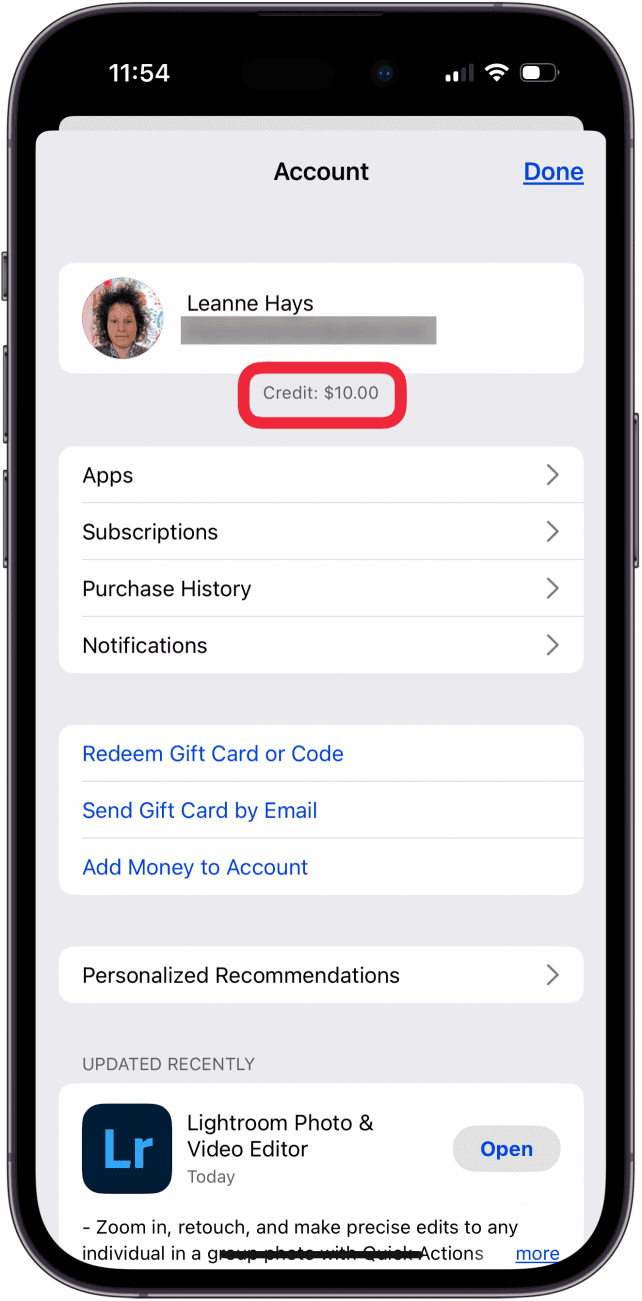
How to recharge Apple Gift Card (FI)

Steps to check your Apple Account region on iPhone or iPad:

  1. Open the Settings app on your device.
  2. Tap your Name / Apple ID profile banner at the top.
  3. Select Media & Purchases, then tap View Account.
  4. Tap Country/Region to verify that Finland is active.
  5. If your storefront shows Finland, your account is fully compatible with FI digital gift codes.

Device Redemption Walkthrough

Redeeming your 16-character digital code is straightforward across any supported Apple hardware. Once entered, the funds transfer instantly to your unified Apple Account balance.

On iPhone, iPad, or iPod touch

  1. Open the App Store app.
  2. Tap your profile picture or the sign-in button at the top of the screen.
  3. Tap Redeem Gift Card or Code.
  4. Select Enter Code Manually.
  5. Type the 16-character digital code delivered by BitTopup and tap Redeem.

On Mac (macOS)

  1. Open the App Store on your Mac.
  2. Click your name or the sign-in button at the bottom of the sidebar.
  3. Click Redeem Gift Card in the upper-right corner.
  4. Enter the 16-digit digital code and confirm redemption.

On Apple Vision Pro (visionOS)

  1. Open the App Store in your workspace.
  2. Select your account icon.
  3. Choose Redeem Gift Card or Code and enter the digital code manually.

On Windows PC

  1. Open the Apple Music or Apple TV app for Windows (or open iTunes).
  2. Click your account name at the bottom of the sidebar, then select Redeem.
  3. Enter the digital code and confirm your Apple ID password if prompted.

What You Can Buy with Finland Apple Account Credit

A single balance covers digital and physical purchases across the Finnish Apple ecosystem:

  • App Store & In-App Purchases: Buy mobile games, productivity tools, creative software, and top up microtransactions in popular games.
  • Apple Subscriptions: Pay your recurring monthly or annual fees for iCloud+ storage, Apple One bundles, Apple Music, Apple TV+, and Apple Arcade.
  • Entertainment Content: Rent or buy movies and TV shows through the Apple TV app, or purchase digital books and audiobooks in Apple Books.
  • Hardware & Accessories: Apply your Apple Account balance toward purchasing iPhones, iPads, Macs, Apple Watches, and official accessories directly on apple.com/fi or inside the Apple Store app in Finland.

Why Buy Apple Gift Card FI Recharge on BitTopup

  • Zero Password Sharing: BitTopup delivers genuine digital codes directly to your screen and order history. You never share your Apple ID password, two-factor authentication codes, or personal account credentials.
  • Instant Digital Code Access: Receive your 16-character PIN immediately after transaction confirmation so you can recharge without delay.
  • Clear Pricing & Payment Options: View live final pricing at checkout with multiple secure local and international payment methods.
  • Dedicated Support Assistance: Access reliable customer support to assist you with order tracking or code redemption steps whenever needed.

Troubleshooting Common Apple Gift Card Redemption Issues

1. Code Is Invalid or Not Recognized

Apple digital gift card codes are 16 characters long and typically begin with an "X". Make sure you are not entering spaces or hyphens. Double-check confusing characters:* Letter O versus number 0* Letter I versus number 1* Letter S versus number 5* Letter B versus number 8

2. Code Has Already Been Redeemed

If the store states the code was used, sign out of the App Store and sign back in to refresh your cached wallet balance. Check your purchase history under Settings > Apple ID > Media & Purchases > View Account > Purchase History to verify if a pending subscription or order automatically consumed the redeemed balance.

3. Region Mismatch Error

If you see a message stating "This code must be redeemed in the Finnish storefront", your Apple Account country does not match Finland. You must switch your Apple ID region to Finland (which requires clearing existing subscriptions and store balances) or redeem the voucher on an Apple ID originally created for the Finnish region.

4. Card Not Activated

If a code returns an inactive notification, contact BitTopup customer support with your order number for quick verification.


Frequently Asked Questions

Can an Apple Gift Card (FI) be used outside of Finland?

No. Apple Gift Cards purchased for the Finland region (FI) are strictly region-locked to Apple IDs registered in Finland with Euro (€) currency settings. They will not work on accounts registered to other countries.

How do I recharge my Apple Account balance using an Apple Gift Card code?

Open the App Store on your Apple device, tap your profile icon, select Redeem Gift Card or Code, enter your 16-character digital code manually, and tap Redeem. The Euro value is credited to your Apple Account balance immediately.

Can an Apple Gift Card be reloaded with funds or topped up again?

No. Individual digital codes cannot be reloaded once redeemed. To add more funds to your Apple Account, purchase an additional Apple Gift Card (FI) on BitTopup and redeem the new code to your account.

Can I convert my Apple Gift Card balance to cash or Apple Pay?

No. Apple Account balances cannot be redeemed for cash, refunded, or transferred to Apple Pay Cash balances. Funds can only be spent on authorized Apple products, digital content, and services.

What should I do if my Apple Gift Card code shows a region mismatch error?

Verify your account settings by going to Settings > Apple ID > Media & Purchases > View Account > Country/Region. Ensure the storefront is set to Finland. If your account is registered to another region, you must switch your country to Finland or use an account configured for Finland.

Do Apple Gift Cards (FI) have an expiration date?

No. Apple Gift Card digital codes and redeemed account balances in Finland do not expire. You can keep the balance in your account and spend it whenever you choose.

Apple Gift Card (FI) ข่าวสารแนะนำ

สินค้าแนะนำ

Apple Gift Card (FI) คำถามที่พบบ่อยเกี่ยวกับการเติมเงิน

ใช้เวลานานเท่าใดกว่าที่คำสั่งซื้อจะเสร็จสมบูรณ์?
โดยปกติแล้ว คำสั่งซื้อจะเสร็จสมบูรณ์ภายในไม่กี่นาที หากมีความล่าช้าใดๆ โปรดติดต่อฝ่ายสนับสนุนลูกค้าของเรา
BitTopup คืออะไร?
BitTopup คือแพลตฟอร์มออนไลน์สำหรับเติมเกมและบริการต่าง ๆ ได้อย่างรวดเร็วและปลอดภัย
เวลาทำการของฝ่ายบริการลูกค้า?
ฝ่ายบริการลูกค้าของ BitTopup พร้อมให้บริการตลอด 24 ชั่วโมงทุกวัน
ฉันจะแลกรับโค้ด Apple Gift Card (FI) ได้อย่างไร?
ไปที่หน้าแลกรับอย่างเป็นทางการ กรอกโค้ดจากคำสั่งซื้อของคุณ จากนั้นยอดคงเหลือ/ไอเทมจะเข้าบัญชีทันที
Apple Gift Card (FI) รองรับภูมิภาคใดบ้าง?
สินค้านี้รองรับบัญชีภูมิภาค FINLAND โปรดตรวจสอบภูมิภาคบัญชีของคุณก่อนทำการสั่งซื้อ
ฉันสามารถชำระเงินด้วยคริปโตได้หรือไม่?
ได้ เรายอมรับ Bitcoin, ETH, USDT และคริปโตเคอร์เรนซียอดนิยมอื่นๆ พร้อมการยืนยันทันที
หากเติมเงินแล้วไม่เข้าต้องทำอย่างไร?
ติดต่อฝ่ายสนับสนุนลูกค้าตลอด 24 ชั่วโมงทุกวันพร้อมแจ้งหมายเลขคำสั่งซื้อของคุณ แล้วเราจะส่งรหัสให้ใหม่หรือคืนเงินให้ทันที

Apple Gift Card (FI) รีวิวจากลูกค้าเกี่ยวกับการเติมเงิน

รีวิวทั้งหมด: 523

คะแนนเฉลี่ย

how to top-up in bittopup

4.3

customer avatar
Gamezy2026/10/01
ดี รวดเร็ว และน่าเชื่อถือ
customer avatar
Pablo Egioto2026/09/28
ดีมาก แนะนำเลยครับ
customer avatar
Jahan zaib2026/09/27
บริการดีมาก
customer avatar
Jewel2026/10/01
ชอบแอปนี้มากเพราะใช้งานง่ายและเหรียญเข้าทันทีโดยไม่ต้องรอนาน ขอบคุณสำหรับแอปนี้!
customer avatar
magdy amir2026/09/28
ดีมาก บริการยอดเยี่ยม
customer avatar
Michael Z2026/10/01
ทำรายการได้ดีและราบรื่นมาก
customer avatar
Yobeisis Rafezca2026/09/28
แอปยอดเยี่ยม มีประสิทธิภาพและรวดเร็ว
customer avatar
Bili Tali2026/09/27
ไม่มีปัญหาอะไรเลย
customer avatar
Rosaria Queta2026/09/30
แอปดีมาก ช่วยให้เราซื้อสกุลเงินในเกมได้ง่ายขึ้นเยอะเลย
customer avatar
Mhabe2026/09/29
ดีมาก เว็บไซต์ที่ดีที่สุดเท่าที่เคยมีมา
customer avatar
zoopry2026/09/28
BitTopup ให้เรทราคาที่คุ้มค่าที่สุดเท่าที่เคยเห็นมาเลย เว็บไซต์ใช้งานง่ายและมีช่องทางการชำระเงินให้เลือกเยอะมาก ทุกอย่างราบรื่นดีมาก กลับมาใช้บริการอีกแน่นอนครับ!
customer avatar
Ellie Harcus2026/09/30
อยากได้เพชร Bigo ไปเปย์สตรีมเพื่อนแล้วมาเจอเว็บนี้ ชำระเงินราบรื่นดีและเพชรก็เข้าทันทีเลย
customer avatar
Malik nasir2026/09/27
แพลตฟอร์มที่น่าเชื่อถือสำหรับการซื้อของ
customer avatar
Samsung As G2026/09/29
ประสบการณ์การใช้งานที่นี่ดีมาก เติมเงินง่ายและไม่เคยเจอความล่าช้าเลย บริการยอดเยี่ยมมาก รักษามาตรฐานนี้ไว้ต่อไปนะ
customer avatar
Tito Dz2026/09/28
ยอดเยี่ยมมาก
customer avatar
Leung Kendlz2026/10/01
คำสั่งซื้อของฉันเสร็จสิ้นแทบจะในทันที ไม่มีอะไรจะง่ายไปกว่านี้อีกแล้ว
customer avatar
Dustin Wesley2026/09/28
บริการดีมากและราคาดีเลยทีเดียว จะกลับมาใช้บริการอีกแน่นอน
customer avatar
Fatema Habibi2026/09/29
ดีครับ พอใจกับเว็บไซต์นี้มาก
customer avatar
Adolfo Davila2026/09/28
ชอบมากเลยค่ะ เป็นช่องทางเติมเงินเข้าแอปที่ปลอดภัย ไม่มีขั้นตอนยุ่งยากหรือล่าช้า และมั่นใจได้เลยว่าจะไม่โดนโกง
customer avatar
Rachel Taft2026/09/28
การเติมเงิน Bigo Diamonds รวดเร็วสุดๆ ไม่มีปัญหาอะไรเลย และฉันได้รับตรงตามที่ต้องการเป๊ะ
Apple Gift Card (FI) รีวิวทั้งหมด

ทำไมต้องเลือกเรา?

ธุรกรรมปลอดภัย 100%

ทุกการเติมเงินได้รับการปกป้องด้วยระบบรักษาความปลอดภัยในการชำระเงินที่เข้ารหัสตามมาตรฐานอุตสาหกรรม ซึ่งจะรักษาข้อมูลส่วนตัวและข้อมูลการชำระเงินของคุณไว้เป็นความลับอย่างสมบูรณ์ ช้อปได้อย่างมั่นใจ ปลอดภัย 100% ทุกครั้ง

บริการลูกค้าตลอด 24 ชั่วโมงทุกวัน

ทีมสนับสนุนที่เป็นมิตรของเราพร้อมให้บริการตลอด 24 ชั่วโมงเพื่อช่วยเหลือคุณทั้งก่อน ระหว่าง และหลังการซื้อ รับความช่วยเหลือที่รวดเร็วและเชื่อถือได้ทุกเมื่อที่คุณต้องการ ไม่ว่าจะเป็นกลางวันหรือกลางคืน

รับประกันคืนเงินเต็มจำนวน

เพลิดเพลินกับราคาที่คุ้มค่าที่สุดพร้อมการจัดส่งที่รวดเร็วและเชื่อถือได้ หากคำสั่งซื้อของคุณไม่ได้รับการจัดส่งหรือไม่สามารถใช้งานได้ เรารับประกันการคืนเงิน 100% เงินของคุณจะได้รับการคุ้มครองเสมอ

ช่องทางการชำระเงินที่รองรับ

PM_PIX - ช่วยเหลือด้านการชำระเงิน | BitTopupWG_PIX - ช่วยเหลือด้านการชำระเงิน | BitTopupPMKakaoPay - ช่วยเหลือด้านการชำระเงิน | BitTopupPMTNG - ช่วยเหลือด้านการชำระเงิน | BitTopupWG_TNG - ช่วยเหลือด้านการชำระเงิน | BitTopupPMGCASH - ช่วยเหลือด้านการชำระเงิน | BitTopupPM_WALLET_NAVERPAY - ช่วยเหลือด้านการชำระเงิน | BitTopupPM_WALLET_PMPROMPTPAY - ช่วยเหลือด้านการชำระเงิน | BitTopupAlipay HK - ช่วยเหลือด้านการชำระเงิน | BitTopupDANA - ช่วยเหลือด้านการชำระเงิน | BitTopupAM_SBP - ช่วยเหลือด้านการชำระเงิน | BitTopupPM_OXXO - ช่วยเหลือด้านการชำระเงิน | BitTopupOVO - ช่วยเหลือด้านการชำระเงิน | BitTopupPMToss - ช่วยเหลือด้านการชำระเงิน | BitTopupWG_PAY_NOW - ช่วยเหลือด้านการชำระเงิน | BitTopupWG_BLIK - ช่วยเหลือด้านการชำระเงิน | BitTopupPM_CARD_SA - ช่วยเหลือด้านการชำระเงิน | BitTopupWG_PAYU - ช่วยเหลือด้านการชำระเงิน | BitTopupPM_WALLET_JKOPAY - ช่วยเหลือด้านการชำระเงิน | BitTopupWG_STCPAY - ช่วยเหลือด้านการชำระเงิน | BitTopupPM_WALLET_SAMSUNGPAY - ช่วยเหลือด้านการชำระเงิน | BitTopupPM_7_ELEVEN - ช่วยเหลือด้านการชำระเงิน | BitTopupPM_WALLET_WECHATPAYHK - ช่วยเหลือด้านการชำระเงิน | BitTopupPM_NET_BANKING_FPX - ช่วยเหลือด้านการชำระเงิน | BitTopupPM_WALLET_QRIS - ช่วยเหลือด้านการชำระเงิน | BitTopupAM_CARD_KZ - ช่วยเหลือด้านการชำระเงิน | BitTopupAM_CARD_BY - ช่วยเหลือด้านการชำระเงิน | BitTopupWG_SADAD - ช่วยเหลือด้านการชำระเงิน | BitTopupWG_MADA - ช่วยเหลือด้านการชำระเงิน | BitTopupAM_TBANK - ช่วยเหลือด้านการชำระเงิน | BitTopupAM_SBERPAY - ช่วยเหลือด้านการชำระเงิน | BitTopupPM_REALTIME_PAYMENT - ช่วยเหลือด้านการชำระเงิน | BitTopupPM_WALLET_GASH - ช่วยเหลือด้านการชำระเงิน | BitTopupPM_OKMART - ช่วยเหลือด้านการชำระเงิน | BitTopupPM_HILIFE - ช่วยเหลือด้านการชำระเงิน | BitTopupPM_FAMILYMART - ช่วยเหลือด้านการชำระเงิน | BitTopupPM_CARD_SA_CD - ช่วยเหลือด้านการชำระเงิน | BitTopupAM_CARD - ช่วยเหลือด้านการชำระเงิน | BitTopupPM_CARD_EU - ช่วยเหลือด้านการชำระเงิน | BitTopupPM_CARD_KNET - ช่วยเหลือด้านการชำระเงิน | BitTopupBIN_DO_PAY_ME - ช่วยเหลือด้านการชำระเงิน | BitTopupPM_CARD_JP - ช่วยเหลือด้านการชำระเงิน | BitTopupBIN_DO_OCTOPUS - ช่วยเหลือด้านการชำระเงิน | BitTopupPM_CARD_US - ช่วยเหลือด้านการชำระเงิน | BitTopupPM_CARD - ช่วยเหลือด้านการชำระเงิน | BitTopupPM_WALLET_SHOPEEPAY - ช่วยเหลือด้านการชำระเงิน | BitTopupPM_WALLET_PAOTANGPAY - ช่วยเหลือด้านการชำระเงิน | BitTopupPM_WALLET_LINEPAY - ช่วยเหลือด้านการชำระเงิน | BitTopupPM_WALLET_TRUEMONEY - ช่วยเหลือด้านการชำระเงิน | BitTopupD_LOCAL_MX_IO - ช่วยเหลือด้านการชำระเงิน | BitTopupD_LOCAL_MX_BQ - ช่วยเหลือด้านการชำระเงิน | BitTopupD_LOCAL_MX_SE - ช่วยเหลือด้านการชำระเงิน | BitTopupD_LOCAL_MX_SM - ช่วยเหลือด้านการชำระเงิน | BitTopupD_LOCAL_MX_BV - ช่วยเหลือด้านการชำระเงิน | BitTopupD_LOCAL_PK_HB - ช่วยเหลือด้านการชำระเงิน | BitTopupD_LOCAL_PK_JK - ช่วยเหลือด้านการชำระเงิน | BitTopupD_LOCAL_PK_ES - ช่วยเหลือด้านการชำระเงิน | BitTopupD_LOCAL_PK_IO - ช่วยเหลือด้านการชำระเงิน | BitTopupPMPayco - ช่วยเหลือด้านการชำระเงิน | BitTopupGOPAY - ช่วยเหลือด้านการชำระเงิน | BitTopupPMPAYMAYA - ช่วยเหลือด้านการชำระเงิน | BitTopupPMGRABPAYPH - ช่วยเหลือด้านการชำระเงิน | BitTopupPMGRABPAYMY - ช่วยเหลือด้านการชำระเงิน | BitTopupPMBOOST - ช่วยเหลือด้านการชำระเงิน | BitTopupWG_PAYTM - ช่วยเหลือด้านการชำระเงิน | BitTopupPM_BANK_TRANSFER_PSE - ช่วยเหลือด้านการชำระเงิน | BitTopupPM_BANK_TRANSFER_EFECTY - ช่วยเหลือด้านการชำระเงิน | BitTopupWG_BPI - ช่วยเหลือด้านการชำระเงิน | BitTopupWG_GCASH - ช่วยเหลือด้านการชำระเงิน | BitTopupWG_BANCOMAT_PAY - ช่วยเหลือด้านการชำระเงิน | BitTopupWG_iDEAL - ช่วยเหลือด้านการชำระเงิน | BitTopupWG_BANCONTACT - ช่วยเหลือด้านการชำระเงิน | BitTopupPM_CARD_APPLE_US - ช่วยเหลือด้านการชำระเงิน | BitTopupPM_APPLEPAY - ช่วยเหลือด้านการชำระเงิน | BitTopupD_LOCAL_PH_PM - ช่วยเหลือด้านการชำระเงิน | BitTopupD_LOCAL_PH_GY - ช่วยเหลือด้านการชำระเงิน | BitTopupWG_BHIM - ช่วยเหลือด้านการชำระเงิน | BitTopupPM_WALLET_STCPAY - ช่วยเหลือด้านการชำระเงิน | BitTopupPM_GOOGLEPAY_US - ช่วยเหลือด้านการชำระเงิน | BitTopupPM_GOOGLEPAY - ช่วยเหลือด้านการชำระเงิน | BitTopupD_LOCAL_TH_TK - ช่วยเหลือด้านการชำระเงิน | BitTopupGATE_IO_PAY - ช่วยเหลือด้านการชำระเงิน | BitTopupBINANCE_PAY - ช่วยเหลือด้านการชำระเงิน | BitTopupWG_PHONE_PE - ช่วยเหลือด้านการชำระเงิน | BitTopupPAY_LOCO_ESumLifeET - ช่วยเหลือด้านการชำระเงิน | BitTopupPAY_LOCO_ESumFamilyMart - ช่วยเหลือด้านการชำระเงิน | BitTopupPAY_LOCO_ESum711 - ช่วยเหลือด้านการชำระเงิน | BitTopupBIT_WALLET - ช่วยเหลือด้านการชำระเงิน | BitTopup

10 Years Trusted Game & Live Streaming Top-Up Platform

Since 2016 | 5,000,000+ Users Worldwide

KAMAGEN LIMITED

Registration No. 76888246

Room 1508, 15/F, Grand Plaza Office Tower II, 625 Nathan Road, Mong Kok, Kowloon, Hong Kong

BUSINESS COOPERATION: ibittopup@gmail.com

© 2016-2026 BitTopup. All Rights Reserved.

Trusted & Verified by

ScamAdviser review of BitTopupGridinsoft review of BitTopupTrustpilot review of BitTopup
customer service































































































