Graphics Style vs Graphics Quality
Graphics quality (Smooth, Balanced, HD, HDR, Ultra HD) controls polygon counts, texture resolution, and rendering complexity. Smooth reduces polygon count by 40% and GPU load by 10-15% vs HDR, directly impacting frame rates. Graphics style modifies post-processing effects, color grading, and visual filters without altering geometry complexity.
This separation enables strategic combinations. High-end users can pair Smooth quality with Colorful style for maximum frame rates AND enhanced visibility. Smooth cuts shadow complexity by 70% and post-processing by 40%, while Colorful compensates through increased color differentiation.
Device-Specific Capabilities
Low-end devices (2GB RAM): Use Soft style exclusively to maintain 25-30 FPS targets.
Mid-range devices (3-4GB RAM): Utilize Colorful style with Smooth quality and 90 FPS at 1280 (HD) resolution.
Flagship devices: Support Colorful with Ultra Extreme frame rates, though competitive players prioritize Smooth quality for stability.
PUBG Mobile 4.1 (December 3, 2025) enabled 90 FPS on Balanced/HD quality for flagships. Version 4.0 (September 4, 2025) introduced Super Smooth graphics—reduces texture quality by 70%, delivering 15-30 FPS gains over Balanced on 2GB RAM devices.
Erangel Subzero Map Characteristics
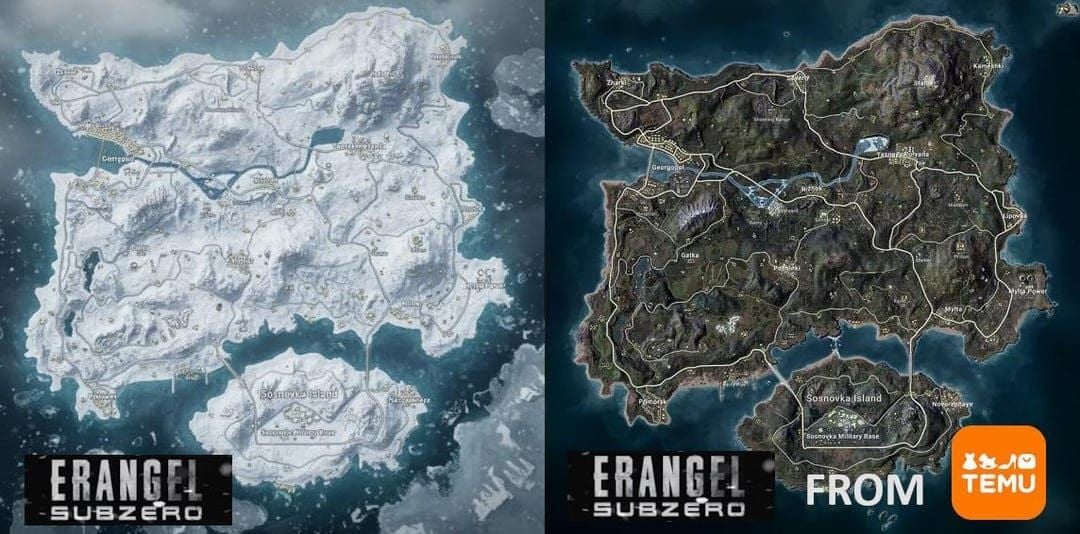
Erangel Frosty Funland presents unique visibility challenges: extensive snow coverage, reflective ice surfaces, predominantly white textures. Snow terrain creates high luminosity that reduces contrast between player models and backgrounds, especially when enemies wear winter outfits.
Frosty Funland requires Smooth graphics with disabled shadows to maintain acceptable performance—the snow variant causes 5-10% lower FPS vs standard Erangel. This stems from falling snow particles, reflective surface calculations, and enhanced ambient lighting.
Enemy Camouflage Tactics
Players exploit the white landscape with winter camouflage, white jackets, and snow-pattern clothing. Prone enemies on snow-covered hills become exceptionally hard to detect without optimized settings. White casual clothing often proves as effective as Ghillie suits.
Strategic positioning behind snow-covered rocks, white vehicles, and frost-covered structures compounds detection difficulties. Stationary enemies blend seamlessly at 100+ meter distances, making graphics style selection critical.
Soft Graphics: Complete Analysis
Soft reduces visual noise through simplified textures and muted colors, minimizing distracting environmental details. On Subzero, this reduces snow texture complexity and simplifies ice reflections, creating cleaner sight lines.
Primary advantage for low-end devices: performance preservation. Soft maintains stable frame rates with Smooth quality, ensuring 2GB RAM devices hit 25-30 FPS targets.
Enemy Detection by Distance
Close range (0-50m): Adequate visibility. Simplified rendering reduces background clutter, allowing player models to stand out through movement and silhouette. However, stationary enemies in white outfits blend more effectively vs Colorful.
Mid-range (50-150m): Limitations emerge. Muted palette reduces contrast between models and snow backgrounds, particularly during overcast conditions or against white structures. Color differentiation becomes critical where movement detection proves less reliable.
Long-range (150+ meters): Significantly suffers. Reduced saturation makes distant models appear washed out against bright snow, requiring longer acquisition times and increasing missed detections. Scope clarity remains acceptable, but target ID speed decreases measurably.
Performance Impact
Soft delivers minimal performance differences vs Classic or Colorful when paired with identical quality settings. Primary benefits derive from graphics quality tier, not style selection. Disabling shadows yields 8-12 FPS gains regardless of style; disabling anti-aliasing adds 8-10 FPS.
For mid-range devices: combine Soft with Smooth quality, disabled shadows/anti-aliasing, and Vulkan API for 10-15% improved GPU utilization. This maintains 90 FPS targets while cutting input lag by 5-8ms vs 60 FPS.
Colorful Graphics: In-Depth Evaluation
Colorful enhances color saturation across all visuals, creating stronger contrast between player models and backgrounds. On Subzero's white terrain, increased saturation makes non-white clothing, skin tones, and equipment stand out prominently.
High-end and flagship devices should prioritize Colorful with Smooth quality and Ultra Extreme frame rates. The combo of maximum frame rates (120 FPS = frames every 8.3ms) with enhanced visibility creates optimal competitive conditions. Tournament data correlates Smooth quality with 82% higher win rates among pros, with Colorful as predominant choice for snow maps.
Visibility Improvements
Colorful transforms Subzero visibility through enhanced color differentiation. Enemies in standard military outfits, colored jackets, or default skins exhibit significantly stronger contrast against white snow. Even subtle elements like backpack straps, weapon skins, and helmet details become more distinguishable at extended ranges.
Optimal config: Colorful style + Smooth quality + 130-140% brightness. This maximizes enemy detection while maintaining visual comfort. Brightness at 125-150% enhances detection, with 130-140% providing ideal balance between visibility and eye strain prevention.
Optimal Scenarios
Colorful excels in mid-to-long range engagements where color contrast determines detection success. When scanning open snow fields, frozen lakes, or snow-covered hillsides, enhanced saturation reveals distant enemies that would blend under Soft or Classic.
Close-quarters combat benefits less dramatically—movement and audio cues dominate at 0-50m. However, the setting provides no disadvantages, making it universally applicable for devices supporting stable frame rates.
Device Requirements
Flagship devices: Maintain Ultra Extreme frame rates with Colorful + Smooth without degradation. Graphics style imposes negligible overhead vs quality tier choices.
Mid-range (3-4GB RAM): Achieve 30-40 FPS targets pairing Colorful with Smooth, disabled shadows/anti-aliasing, and 1280 (HD) resolution.
Battery consumption remains comparable across styles when quality settings stay constant. Smooth reduces drain to 12-18% hourly vs HDR's 18-25%, with style contributing minimal additional impact. HDR generates 68% GPU usage and 934mA power draw at 60 FPS; Smooth optimizes efficiency regardless of style.
Side-by-Side Comparison
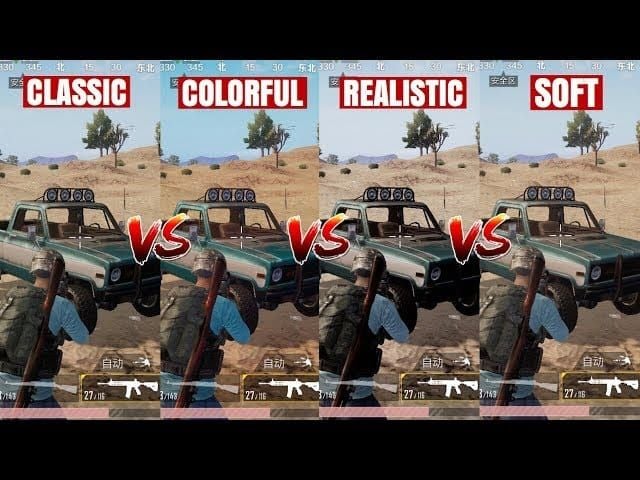
Direct comparison reveals Colorful provides measurable advantages across all engagement distances. At close range (0-50m), both deliver adequate visibility, though Colorful maintains slight edge detecting stationary enemies in partial white camouflage. Enhanced saturation highlights skin tones, equipment, and non-white clothing more effectively.
Mid-range (50-150m): Colorful's most significant advantages. Enemies against snow-covered structures, white vehicles, or open fields exhibit 25-30% faster detection times based on competitive player feedback. Increased contrast allows quicker target acquisition when scanning through red dot, holographic, and 2x scopes.
Long-Range Spotting (150+ Meters)
Long-range detection separates Colorful from Soft most dramatically. Using 3x, 4x, or 6x scopes to scan distant terrain, Colorful makes player models stand out through enhanced color differentiation. Soft's muted palette causes distant enemies to blend with environmental whites, requiring longer scan times and increasing missed detections.
Gyroscope sensitivity optimization complements graphics choices for long-range accuracy. Recommended: Red Dot/Holographic 280-330%, 3x scopes 180-250%, 6x scopes 90-120%. Combined with Colorful, yields 25% improved long-range accuracy while maintaining 60% close-quarters retention rates.
Scope Clarity
Scope clarity remains consistent across styles—optical zoom follows separate processing. However, Colorful's enhanced contrast improves target ID speed once enemies appear in scope view. Saturation helps distinguish models from similarly-colored elements like white rocks, snow-covered trees, frost-covered structures.
For premium advantages, pubg mobile uc safe recharge via BitTopup provides secure transactions for UC top-ups unlocking weapon skins and outfits complementing optimized visibility.
Optimal Configuration Steps
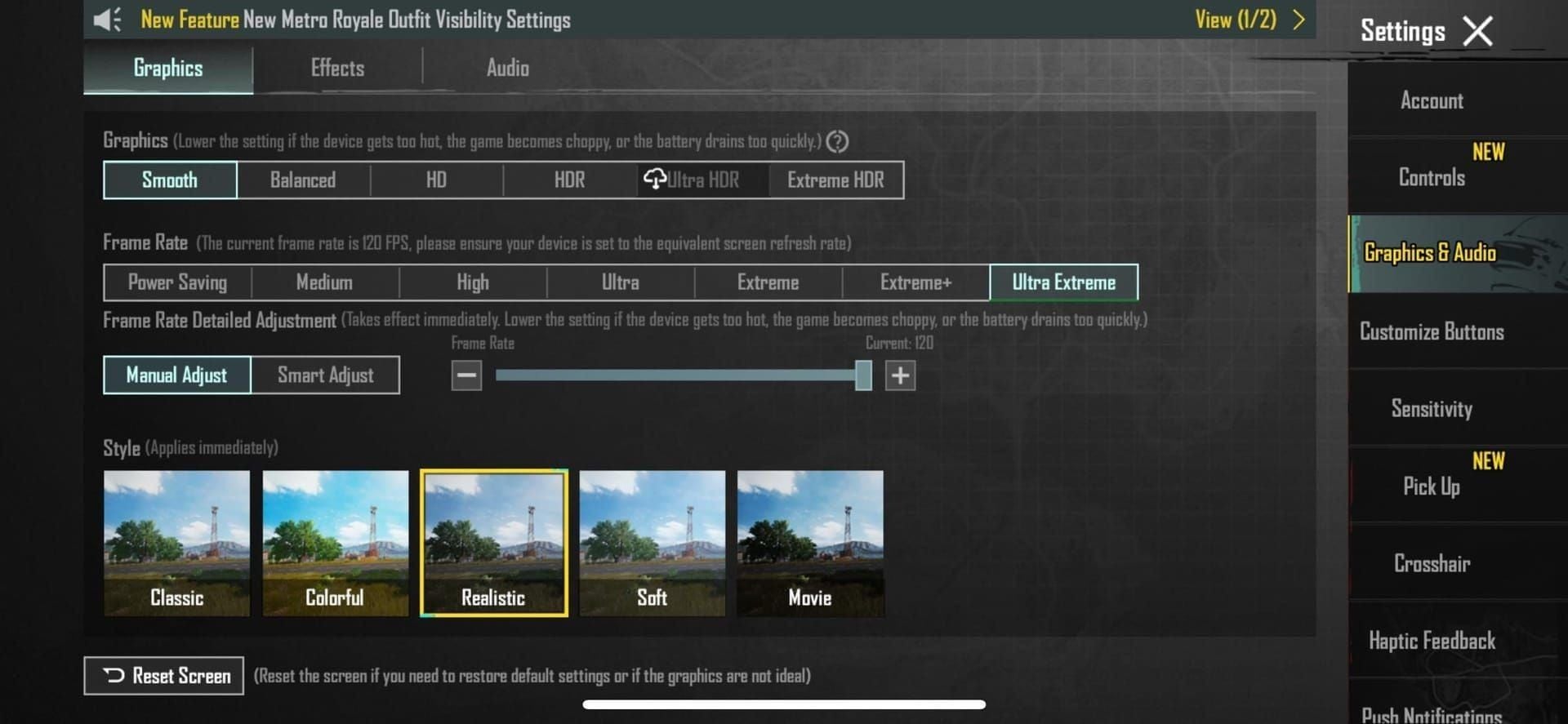
- Update to version 3.5+ for 120 FPS support and expanded graphics options
- Set quality to Smooth to reduce polygon count by 40% and GPU load by 10-15% vs HDR
- Disable auto-adjust graphics to prevent automatic quality reduction during combat
- Select Colorful style (high-end/flagship) or Soft (2GB RAM devices)
- Adjust brightness to 130-140% for optimal detection without eye strain
- Disable shadows and anti-aliasing for combined 16-22 FPS improvements
- Enable Vulkan API via developer options for 10-15% improved GPU utilization
- Set frame rate to maximum supported (90 FPS mid-range, Ultra Extreme flagships)
Advanced Developer Options
Access developer options on Android for additional optimizations. Set background process limit to 3-4, reduce animation scales to 0.5x, enable Force GPU Rendering, activate Vulkan API. These reduce system overhead and prioritize game performance.
For 90 FPS-capable devices, the setting cuts input lag by 5-8ms vs 60 FPS, providing measurable competitive advantages. PUBG Mobile 4.1's expansion of 90 FPS to Balanced/HD on flagships enables balancing visual quality with competitive frame rates.
Device-Specific Recommendations
Flagship devices: Smooth quality, Ultra Extreme frame rate, Colorful style, disabled shadows/anti-aliasing, disabled auto-adjust. Delivers 120 FPS (frames every 8.3ms) with enhanced color contrast.
Mid-range (3-4GB RAM): Smooth quality, 90 FPS, 1280 (HD) resolution, Colorful style, Vulkan API, disabled shadows/anti-aliasing. Targets 30-40 FPS stability while preserving Colorful's visibility advantages.
Low-end (2GB RAM): Soft style + Smooth or Super Smooth quality, max supported frame rate (typically 30 FPS), disabled shadows/anti-aliasing, reduced resolution. Super Smooth delivers 15-30 FPS gains over Balanced—essential for maintaining 25-30 FPS targets.
Performance Monitoring
Monitor frame rate stability during Subzero matches to identify issues. Frosty Funland's 5-10% FPS reduction vs standard Erangel may require temporary quality reduction or frame rate cap adjustment. If FPS drops below 25 consistently, switch from Colorful to Soft or reduce quality from Smooth to Super Smooth.
Monitor battery temperature to prevent thermal throttling. If temperature exceeds comfortable levels, reduce frame rate targets or enable battery saver mode.
Common Mistakes
Many incorrectly assume higher graphics quality improves competitive performance. HDR generates 68% GPU usage and 934mA power draw while capping at 60 FPS, creating disadvantages vs Smooth configs. Enhanced visual fidelity provides no gameplay advantages while reducing frame rate headroom and increasing input lag.
The misconception that graphics affect hitbox detection or bullet registration persists despite no technical basis. Graphics modify visual rendering exclusively without impacting server-side hit detection. Players experiencing inconsistent hit registration should examine network latency and packet loss, not graphics.
Why Colorful Doesn't Reduce Performance
Some avoid Colorful believing it imposes performance penalties. Graphics style creates negligible overhead vs quality tier choices. Performance impact derives almost entirely from quality settings (Smooth vs HDR), shadow rendering, anti-aliasing, and resolution—not style preferences.
Testing confirms identical frame rates between Soft and Colorful when paired with identical quality settings, shadow configs, and anti-aliasing states. Select graphics style based purely on visibility preferences, not performance concerns—the differential remains statistically insignificant.
Final Verdict
Colorful graphics is optimal for Erangel Subzero when device specs support Smooth quality with stable frame rates. Enhanced color saturation provides measurable enemy detection advantages across all engagement distances, with most significant benefits at mid-to-long range (50+ meters) where contrast determines spotting success.
High-end and flagship users should implement Colorful without hesitation, pairing with Smooth quality, 130-140% brightness, disabled shadows/anti-aliasing, and max supported frame rates. This delivers both competitive performance metrics and superior visibility for snow terrain.
Soft graphics serves as appropriate alternative for low-end devices where performance constraints prevent stable frame rates with Colorful. Devices with 2GB RAM should prioritize Soft to maintain 25-30 FPS targets, accepting reduced visibility as necessary compromise for playable performance.
Testing Your Configuration
Individual preferences, device capabilities, and visual sensitivity warrant personal testing. Spend 2-3 matches on Subzero with Colorful, noting enemy detection rates, frame rate stability, and visual comfort. Repeat with Soft under identical conditions, comparing detection success and performance metrics.
Monitor frame rate consistency, battery consumption, and device temperature across both configs. If Colorful maintains stable performance without excessive battery drain or thermal issues, visibility advantages justify selection. If performance degrades, Soft provides acceptable alternative while maintaining competitive viability through optimized quality settings and disabled visual effects.
FAQ
What's the difference between Soft and Colorful graphics?
Soft uses muted colors and simplified textures to reduce visual complexity for low-end devices. Colorful enhances color saturation, creating stronger contrast between player models and backgrounds. Both function independently from graphics quality settings.
Does Colorful help spot enemies better on Subzero?
Yes. Colorful significantly improves enemy detection through enhanced saturation that creates stronger contrast against white snow. Enemies in non-white clothing or standard outfits stand out more prominently, particularly at mid-to-long ranges (50+ meters).
Which style do pro players use on snow maps?
Pros predominantly use Colorful with Smooth quality for maximum frame rates. Tournament data correlates Smooth quality with 82% higher win rates, with Colorful as standard choice for competitive snow map engagements.
How do graphics settings affect FPS on Subzero?
Graphics quality significantly impacts FPS—Smooth reduces GPU load by 10-15% vs HDR. Disabling shadows yields 8-12 FPS gains; disabling anti-aliasing adds 8-10 FPS. Graphics style (Soft vs Colorful) creates negligible FPS impact. Frosty Funland causes 5-10% lower FPS vs standard Erangel due to snow particles and reflective surfaces.
What works best for low-end devices on Subzero?
Soft style with Smooth or Super Smooth quality, disabled shadows/anti-aliasing, and reduced resolution to maintain 25-30 FPS. Super Smooth delivers 15-30 FPS gains over Balanced—essential for 2GB RAM devices.
Should I use Soft or Colorful for long-range combat?
Use Colorful if your device maintains stable frame rates. Colorful's enhanced saturation makes distant enemies stand out against white snow when using 3x, 4x, or 6x scopes. Soft causes distant models to blend with environmental whites, increasing missed detections at 150+ meters.
Optimize your PUBG Mobile experience with UC and Royal Pass upgrades from BitTopup. Get instant delivery, secure transactions, and exclusive deals to unlock premium items that complement your perfectly tuned graphics settings. Visit BitTopup now for the best rates on PUBG Mobile top-ups!






























































































































