


Bigo Live Payment Not Available: 7 Fixes for Travelers
Hitting Payment Not Available in Your Region on Bigo Live while traveling? This guide reveals 7 tested solutions to bypass regional payment blocks in 30+ countries including the US, EU, and Canada, with success rates up to 90%.


What 'Payment Not Available in Your Region' Means
Bigo Live blocks payment processing in 30+ countries: United States, Canada, and most EU nations (Austria, Belgium, Bulgaria, Cyprus, Czech Republic, Denmark, Estonia, Finland, France, Germany, Greece, Croatia, Hungary, Ireland, Italy, Lithuania, Luxembourg, Latvia, Malta, Netherlands, Poland, Portugal, Romania, Sweden, Slovenia, Slovakia).
Restrictions vary by method:
- Credit/debit cards: Blocked in Turkey, Cyprus, India, EU, US, UK, Canada
- Web gift cards: Unavailable in Austria, Belgium, Germany, France, Spain, Italy, Netherlands, Poland, US, Canada
- Traditional gift cards: Cannot redeem in EU countries or USA
For uninterrupted access, platforms like BitTopup offer cheap bigo diamonds recharge that bypass regional limitations.
How Bigo Live Detects Your Location
Bigo Live uses multiple detection methods:
- GPS data: Required on Android 5.0+ and iOS 11+
- IP address: Cross-referenced against regional databases
- Account region: Checked during Me > Wallet > Recharge attempts
The system monitors up to 15 devices per account. Any mismatch between GPS, IP, and account settings triggers payment restrictions.
Why Payment Restrictions Exist
Regional blocks stem from:
- Licensing agreements varying by country
- Local financial regulations compliance
- Digital payment processing requirements
- Cross-border transaction laws
India banned Bigo Live entirely since 2020. China, UAE, parts of Indonesia, Pakistan, North Korea, and Syria face complete service restrictions. Meanwhile, 150+ countries including UK, Singapore, Thailand, and Philippines maintain unrestricted access.
Common Regions Affected
Most restricted: 26 EU member states experience extensive payment limitations.
US contradiction: Listed among 150+ unrestricted nations for app access, yet payment processing is blocked.
Canada: Cannot process credit cards or redeem web gift cards.
Asian markets: Singapore, Thailand, Philippines maintain full payment access—making them ideal for travelers needing recharges.
Why Holiday Travelers Face Payment Errors
IP Address Changes Trigger Security
When you travel internationally, your IP address shifts to the destination country. Bigo's security flags sudden geographic changes as potential account compromise. A New York-to-Paris shift in one day triggers fraud prevention protocols that block payments.
Currency Mismatch Issues
US accounts configured for USD encounter errors when payment gateways detect European IPs expecting EUR. The platform lacks seamless currency conversion across restricted regions, causing transaction failures.
Banking Restrictions
Your bank monitors international transactions separately. Credit cards working domestically may auto-reject foreign gateway charges. 3D Secure authentication fails in 20-30% of international attempts due to network latency and protocol incompatibility.
Real Case: US Traveler in France
US user (Bigo ID 901216366) travels to France. Upon connecting to Paris hotel Wi-Fi, standard recharge fails with Payment Not Available in Your Region. US credit card declines despite sufficient funds. Three attempts within 30 minutes trigger 24-hour payment hold. Vacation streaming plans disrupted until discovering alternative methods.
7 Proven Solutions to Fix Payment Errors
Solution 1: Use BitTopup for Region-Independent Recharges
BitTopup processes purchases independently of Bigo's regional restrictions through its own payment infrastructure.
Process:
- Visit BitTopup platform
- Select Bigo Live
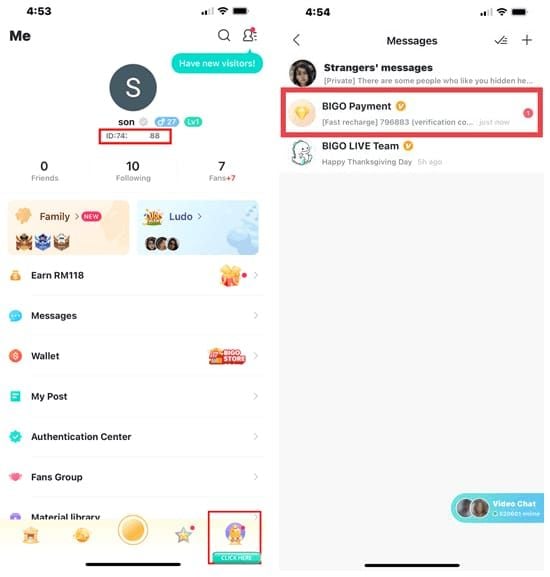
- Enter your Bigo ID (found in profile)
- Choose diamond package
- Complete payment (credit/debit/PayPal accepted)
- Diamonds delivered within minutes
Success rate: 90%+ across all regions. For Canadian users, access buy bigo live diamonds Canada without geographic limitations.
Solution 2: Update Account Region Settings

Android: Profile > Edit > Country/Region > Select > Confirm
iOS: Profile > Settings > Edit > Hometown > Country/Region dropdown > Sure
Success rate: 60-70% when changing to unrestricted country where you're physically located.
Best practice: US traveler in Singapore should update region to Singapore, leveraging unrestricted payment status.
Limitation: May affect content feed and Explore page customization.
Solution 3: Contact Payment Provider for Travel Notifications
Before traveling:
- Register travel notification with bank/credit card issuer
- Specify destination countries and dates
- Request digital entertainment purchases authorization
- Enable international transaction capabilities
- Confirm 3D Secure will function abroad
If payment fails after notification, call bank's international support immediately to whitelist Bigo Live transactions.
Solution 4: Clear App Cache and Data
Outdated app data causes 50% of wallet refresh failures.
Android: Settings > Apps > Bigo Live > Storage > Clear Cache > Clear Data
iOS: Settings > General > iPhone Storage > Bigo Live > Offload App or Delete App
After clearing, restart device completely before reopening app. Test with small packages ($1-5) first.
Solution 5: Switch Payment Methods
Try this sequence:
- PayPal (if available)
- Apple Pay (iOS) or Google Play (Android)
- Alternative credit cards from different issuers
Space attempts 5-10 minutes apart. Exceeding three retries per 24 hours triggers payment hold.
Solution 6: Wait for Automatic Region Detection Reset
Bigo's geolocation systems refresh within 24-48 hours of arriving in new locations. During this period:
- Use same Wi-Fi network or mobile carrier
- Avoid toggling between networks
- Don't use VPNs or network modification tools
- Open app multiple times daily
Works best for extended trips (one week+) rather than short visits.
Solution 7: Pre-Purchase Diamonds Before Traveling
Calculate expected usage during travel, add 20-30% buffer, and purchase 48 hours before departure.
Pre-travel checklist:
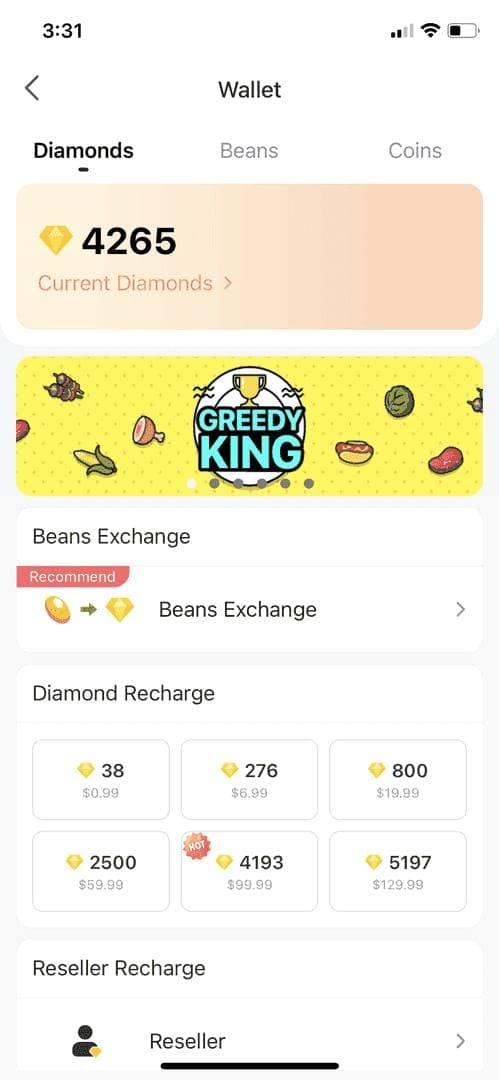
- Verify diamonds appear in Me > Wallet
- Take screenshot of balance
- Maintain minimum two-week reserve for frequent travelers
BitTopup: The Reliable Alternative for Travelers
How BitTopup Bypasses Restrictions
BitTopup operates as digital goods retailer, not direct Bigo gateway. You're buying from BitTopup's inventory, which they deliver to your account—circumventing location-based restrictions in Bigo's native system.
Success rates remain consistent across restricted and unrestricted regions. Users in Germany, US, Canada report identical transaction success (5-10 minutes payment-to-delivery) as users in Singapore or Thailand.
Step-by-Step Recharge Guide
- Locate Bigo ID: Found in profile (format: 901216366)
- Navigate to BitTopup: Select Bigo Live from games list
- Select package: Choose desired diamond quantity
- Enter Bigo ID: Double-check accuracy
- Choose payment: Credit/debit cards, PayPal, regional systems
- Complete checkout: Secure encrypted payment
- Receive diamonds: Auto-delivery within minutes
Refresh wallet: Me section > pull down to update balance. If diamonds don't appear within 10 minutes, contact 24/7 support with transaction reference.
Payment Methods Accepted
- Major credit cards: Visa, Mastercard, American Express (international-enabled)
- Debit cards: With online purchase authorization
- PayPal: Handles currency conversion automatically
- Regional systems: Bank transfers, mobile payments, digital wallets (varies by location)
Security and Speed Advantages
Security protocols:
- SSL encryption for data transmission
- PCI DSS compliance
- Tokenization (no stored card details)
- Transaction monitoring and dispute resolution
Transaction speed: 5-15 minutes vs. hours/days troubleshooting official app issues.
VPN Usage: Facts vs Myths
Does VPN Solve Payment Restrictions?
Success rate: Only 20-40%.
Why VPNs fail: Bigo cross-references IP with GPS data. Even if VPN shows Singapore IP, your phone's GPS still reports actual location (Germany/US). This mismatch triggers fraud prevention more aggressively than standard restrictions.
Many VPN IPs are flagged in commercial databases. Payment processors auto-decline transactions from known VPN server ranges.
Risks of Using VPN
- Account suspension: Terms of service prohibit bypassing regional restrictions
- Financial security: VPN servers may expose payment data
- Payment limits: Failed VPN attempts consume daily retry quota (3 max)
- 24-hour lockout: Three failures trigger payment hold
Why VPN Triggers Security Blocks
Modern fraud detection uses device fingerprinting beyond IP addresses: browser characteristics, device identifiers, screen resolution, fonts, time zone. VPN creates inconsistencies—Singapore IP with New York time zone and device profile.
Safer Alternatives
- Update account region to match current location (60-70% success)
- Use BitTopup (90%+ success, no circumvention)
- Separate VPN usage from payments: browse with VPN, disconnect before transactions
Pre-Travel Checklist
2 Weeks Before: Verify Account Region
- Audit profile settings for current country/region
- Test small purchase ($1-5) to confirm payment works
- Document Bigo ID, email, phone number in secure location
- Save support contacts: cs@bigo.tv, +65 63519330
Add Multiple Payment Methods
Link at least three sources:
- Primary credit card
- Backup debit card (different issuer)
- PayPal
Verify international transaction capabilities with each issuer. Confirm billing addresses match bank records.
Purchase Diamonds in Advance
Calculate weekly usage × travel weeks + 25-30% buffer. Complete purchase 48-72 hours before departure. Confirm delivery in Me > Wallet before leaving home country.
Enable Two-Factor Authentication
Me > Settings > Security > Enable 2FA (SMS or authenticator app)
2FA achieves 80% success for resolving payment issues by demonstrating legitimate account control. Test functionality before traveling.
Save BitTopup for Emergencies
- Bookmark website in browser
- Save URL in notes app
- Write down in travel notebook
- Document recharge steps with your Bigo ID
- Save customer service contacts
Regional Payment Policy Differences
US Regulations
US appears among 150+ unrestricted nations for app access, yet payment processing faces near-complete restrictions. Credit/debit cards blocked, web gift cards unavailable, traditional gift cards can't redeem.
Why: Complex state-level money transmitter licensing, federal AML compliance, payment processor risk assessments. Bigo restricts payments rather than navigate 50-state regulatory complexity.
Workarounds: Apple Pay (iOS) or Google Play (Android) sometimes function through platform infrastructure.
EU GDPR Requirements
26 EU countries face comprehensive restrictions due to:
- GDPR data protection requirements
- Payment Services Directive 2 (PSD2) Strong Customer Authentication
- Data server jurisdiction mandates
- Transaction transparency requirements
Bigo chose to avoid EU payment processing entirely rather than invest in compliance infrastructure.
Asian Market Flexibility
Singapore, Thailand, Philippines, Southeast Asia: Unrestricted access to all payment methods.
Advantages:
- Integration with local mobile payments and digital wallets
- Regional currency processing without conversion issues
- 90%+ transaction success rates
Impact on Travelers
Double restrictions: US user in Germany faces blocks from both countries—no payment gateway access.
Potential access: Canadian in Thailand can update region to Thailand (60-70% success).
Worst scenario: Multi-country trips in one week lack sustained presence for automatic detection reset. Pre-purchase or BitTopup becomes essential.
Troubleshooting Persistent Errors
When to Contact Support
Contact cs@bigo.tv, feedback@bigo.tv, or call +65 63519330 / +852 65834871 when:
- Payment fails after 24+ hours
- Diamonds missing 30+ minutes post-payment
- Account restrictions prevent all attempts
- Error messages don't match standard regional notifications
What to include:
- Bigo ID (example: 901216366)
- Exact error messages (screenshots)
- Payment method attempted
- Transaction date/time and amount
- Current location if traveling
- Troubleshooting steps already completed
Payment Declined vs Payment Not Available
Payment Declined: Your payment method rejected—bank issue, insufficient funds, incorrect details. Solution: Contact bank, verify card info, try alternative methods.
Payment Not Available in Your Region: Geographic restrictions block gateway access. Solution: Change region settings, use BitTopup, wait for location detection update.
Recovery Timeline
24-hour hold: From excessive retries (3+ attempts). Resets automatically.
48-72 hour review: Account-level restrictions from security flags. Requires automatic review or support intervention.
Permanent restrictions: Rare for legitimate users. Immediate support contact essential. Resolution: 1 week to 1 month.
Long-Term Solutions for Frequent Travelers
Multi-Region Payment Capabilities
- Establish banking in multiple countries (e.g., US + Singapore)
- Singapore-issued cards process successfully from any location
- Use international digital wallets (PayPal across 200+ countries)
- Set account region to unrestricted country where you spend significant time
BitTopup as Primary Method
- Create account, save Bigo ID in profile
- Bookmark preferred packages (sub-2-minute recharges)
- Schedule monthly/bi-weekly purchases
- Maintain consistent availability, prevent urgent situations
Digital Wallet Options
PayPal: 200+ countries, 25+ currencies, buyer protection
Regional wallets: Better exchange rates in specific markets (Asia)
Cryptocurrency: Emerging option—borderless, no conversion fees, eliminates restrictions
Travel-Ready Account Strategy
Maintain reserves: Minimum 2-week diamond buffer
Document configuration: Region, payment methods, contacts, 2FA settings in cloud storage
Pre-travel routine (1 week before):
- Verify diamond balance, recharge if low
- Confirm payment methods active with international capabilities
- Test 2FA functionality
- Bookmark BitTopup
FAQ
Why does payment not work even though the app works?
Bigo separates content delivery from payment processing due to varying financial regulations. App functions in 150+ countries, but payment gateways face restrictions in 30+ countries. Use BitTopup for alternative recharge.
Can I change account region to bypass restrictions?
Yes, 60-70% success. Profile > Edit > Select new country/region. Works best when physically located in unrestricted country (GPS/IP match new region).
How fast does BitTopup deliver diamonds?
5-15 minutes after payment. Refresh Me > Wallet. If not delivered within 30 minutes, contact support with transaction reference.
Will VPN help buy diamonds while traveling?
Only 20-40% success. VPN masks IP but not GPS data—mismatch triggers fraud prevention. Risks account restrictions. BitTopup more reliable.
What if I exceed three payment retries?
Wait 24 hours from last attempt for automatic reset. Prepare alternatives: contact bank, update region, set up BitTopup. After reset, test with small packages first.
How to prepare account before international travel?
1-2 weeks before: Purchase diamonds (trip duration + 30% buffer), verify region settings, enable 2FA, add multiple payment methods, register bank travel notifications, save BitTopup access, document Bigo ID.
Traveling soon? Don't let regional restrictions interrupt your Bigo Live experience. Recharge diamonds instantly with BitTopup—trusted worldwide payment solution. Instant delivery, secure transactions, 24/7 support. Start hassle-free recharge now!
Recommended News





Recommend products


Table of Contents
- Understanding Bigo Live Regional Payment Restrictions
- What 'Payment Not Available in Your Region' Means
- How Bigo Live Detects Your Location
- Why Payment Restrictions Exist
- Common Regions Affected
- Why Holiday Travelers Face Payment Errors
- IP Address Changes Trigger Security
- Currency Mismatch Issues
- Banking Restrictions
- Real Case: US Traveler in France
- 7 Proven Solutions to Fix Payment Errors
- Solution 1: Use BitTopup for Region-Independent Recharges
- Solution 2: Update Account Region Settings
- Solution 3: Contact Payment Provider for Travel Notifications
- Solution 4: Clear App Cache and Data
- Solution 5: Switch Payment Methods
- Solution 6: Wait for Automatic Region Detection Reset
- Solution 7: Pre-Purchase Diamonds Before Traveling
- BitTopup: The Reliable Alternative for Travelers
- How BitTopup Bypasses Restrictions
- Step-by-Step Recharge Guide
- Payment Methods Accepted
- Security and Speed Advantages
- VPN Usage: Facts vs Myths
- Does VPN Solve Payment Restrictions?
- Risks of Using VPN
- Why VPN Triggers Security Blocks
- Safer Alternatives
- Pre-Travel Checklist
- 2 Weeks Before: Verify Account Region
- Add Multiple Payment Methods
- Purchase Diamonds in Advance
- Enable Two-Factor Authentication
- Save BitTopup for Emergencies
- Regional Payment Policy Differences
- US Regulations
- EU GDPR Requirements
- Asian Market Flexibility
- Impact on Travelers
- Troubleshooting Persistent Errors
- When to Contact Support
- Payment Declined vs Payment Not Available
- Recovery Timeline
- Long-Term Solutions for Frequent Travelers
- Multi-Region Payment Capabilities
- BitTopup as Primary Method
- Digital Wallet Options
- Travel-Ready Account Strategy
- FAQ
Recommend products


Recommended News
Xena Live Safety Check (October 2026): A Fair Scorecard, the Scams to Avoid and How to Use the App Without Getting Burned
Bigo Live VIP and SVIP in October 2026: What Bigo's Own Terms Say vs What Sellers Claim

Xena Live Coins in October 2026: Real Prices by Channel, Missing-Coin Fixes and the Rules That Matter
Bigo Live Money Guide, October 2026: What 100 Diamonds Really Cost and How Beans Turn Into Cash

Genshin Impact Stygian Onslaught 7.0 Teams | August 2026

Alyosha Best Build, Teams & C6 Guide | August 2026

Cheap StarMaker Coins for SupernovaX 2026 Auditions (12-23% Off)

MICO Live Coins MENA After v5.2: Cheapest Deals 2026




























































































