Buy Poppo Coins Without Family Sharing Approval (2025)
Apple Family Sharing's Payment Not Authorized error blocks Poppo Coins when the Family Organizer restricts in-app spending through Ask to Buy. Third-party platforms like BitTopup bypass these restrictions by delivering coins directly to your Poppo User ID without App Store authorization—completing purchases in 10-60 seconds while saving 14-70% versus official prices.


What Triggers Authorization Blocks
The Payment Not Authorized error appears when your Apple ID attempts in-app purchases under Family Sharing restrictions. Apple intercepts transactions before processing payment, blocking all Poppo Coins packages from the 1,000-coin bundle ($0.19) to the 4,450,000-coin package ($823.68).
The error targets in-app purchases made through iOS payment systems. When you tap any coin package in Poppo Live, the transaction routes through Apple's gateway, which checks your account against Family Sharing policies. Accounts under 18 or added to Family Sharing groups automatically trigger this verification.
For immediate solutions, Poppo coins iOS top up through BitTopup eliminates authorization checks by processing payments outside Apple's ecosystem, delivering coins directly to your 7-10 digit Poppo User ID without organizer approval.
How Apple Family Sharing Controls Purchases
Family Sharing implements hierarchical permissions where the Family Organizer controls all purchase authorization. Every in-app purchase generates a notification to the organizer's device, requiring explicit approval before completion. This applies universally to App Store content, including Poppo Coins.
The control operates at Apple ID level, not device-specific. Even using multiple iOS devices with the same Apple ID, restrictions follow your account across all hardware. Organizers see real-time purchase requests showing item name, price, and requesting account.
Apple charges 30% commission on all in-app purchases. For $100 monthly Poppo spending, that's $30 in fees monthly or $360 annually—costs third-party platforms avoid by bypassing App Store infrastructure.
Ask to Buy Feature Explained
Ask to Buy requires organizer approval for purchases by family members under 18 or specifically configured accounts. When buying Poppo Coins with Ask to Buy enabled, transactions enter pending state until the organizer approves or denies through their device.
The feature operates through push notifications displaying exact coin package, price, and app name. Organizers can approve, decline, or ignore requests. Ignored requests expire after a set period.
This creates delays even when organizers intend to approve. During limited-time Poppo events or live-streaming moments, these delays cause missed opportunities.
Why Family Sharing Blocks Poppo Purchases
Family Organizer Permission Requirements
Organizers maintain complete veto power over in-app purchases for restricted accounts. The system prioritizes organizer control over your purchase intent. Organizers receive detailed transaction information before making approval decisions.
Permission requirements apply regardless of payment method. Even with your own credit card added to your Apple ID, Family Sharing restrictions override individual payment preferences. The system checks authorization before evaluating payment methods.
Organizers configure different permission levels for different members. Settings persist until manually changed or members are removed from Family Sharing.
Age Restrictions and Limitations
Apple automatically applies Ask to Buy to all accounts under 18 within Family Sharing. This age-based restriction can't be disabled by account holders—only organizers can modify settings. The system verifies age through birthdate on your Apple ID.
Accounts aged 13-17 face strictest limitations. These can't make any in-app purchases without organizer approval, regardless of amount. Even the 1,000-coin package at $0.19 triggers authorization.
When you turn 18, automatic Ask to Buy doesn't immediately lift. Organizers must manually adjust settings or you must leave Family Sharing to gain independence.
Common Rejection Scenarios
Rejections occur most during high-traffic periods when users rush to purchase coins for popular streamers or limited events. Organizers may not respond quickly enough, resulting in missed opportunities.
Organizers traveling across time zones create another scenario. When organizers sleep or lack internet, purchase requests go unanswered for hours. Poppo's live-streaming nature makes these delays particularly problematic.
Some organizers implement blanket denial policies, automatically rejecting all requests regardless of amount or context. Users in these situations face complete purchasing blocks through official channels.
Method 1: Using BitTopup for Independent Purchase
Why BitTopup Works for Restricted Accounts
BitTopup operates independently of Apple's payment ecosystem, eliminating Family Sharing authorization entirely. The platform delivers coins using your User ID, bypassing App Store infrastructure. No organizer approval, no Ask to Buy notifications, no authorization errors.
Cost savings versus official prices:
- 10,000 coins: $1.10 vs $1.87 in-app (41% savings, $0.77 saved)
- 430,000 coins: $46.82 vs $79.59 (70% savings, $32.77 saved)
- 4,450,000 coins: $484.52 vs $823.68 ($339.16 saved)
Delivery speed matches or exceeds App Store. BitTopup completes 98% of orders within 10-60 seconds with 99% success rate.
BitTopup Registration Process
- Visit BitTopup and locate registration
- Create account using email and secure password
- Complete verification based on purchase amount
- Add preferred payment method (credit cards, debit cards, digital payment services)
The platform doesn't request Apple ID credentials or Family Sharing status, maintaining complete separation from iOS systems.
How to Purchase Poppo Coins Through BitTopup
Find your Poppo User ID:
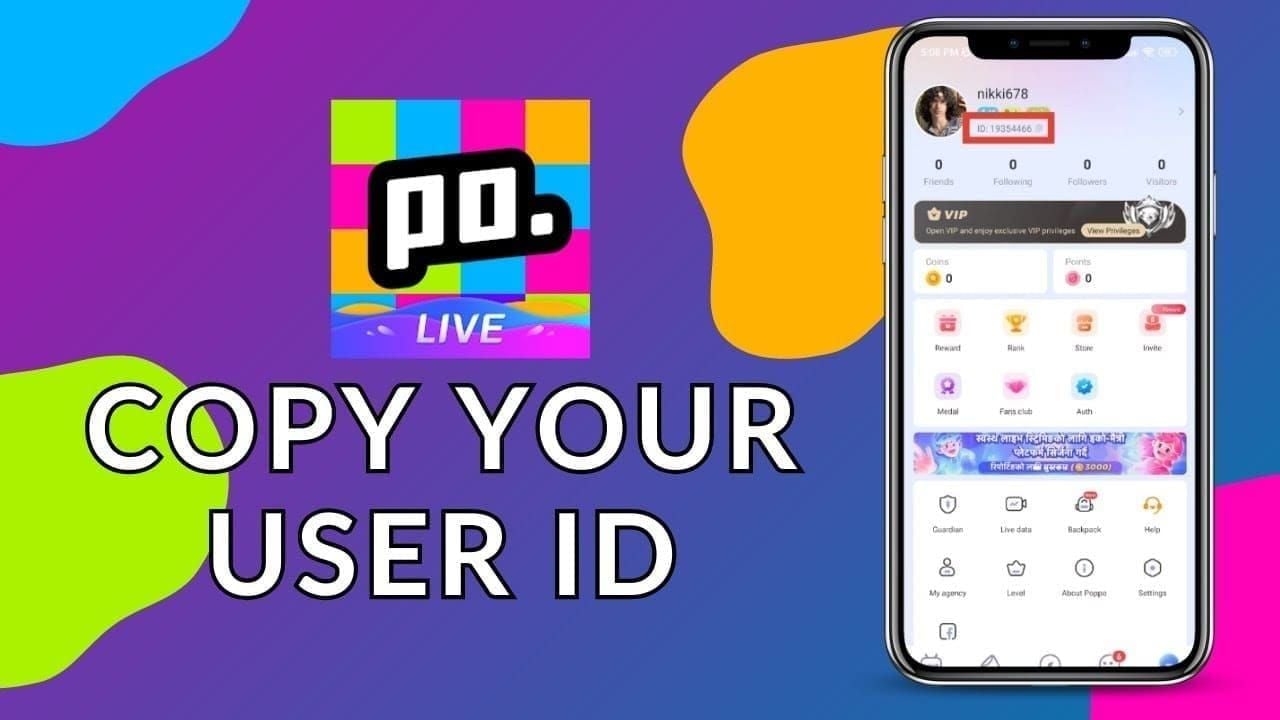
- Open Poppo Live, tap profile icon (top-right)
- User ID appears below nickname as 7-10 digit numeric string in gray font
- Long-press to copy, paste into text editor to verify all digits
Complete purchase:
- Navigate to BitTopup's Poppo Coins section
- Select desired package (1,000 coins at $0.11 to 4,450,000 at $484.52)
- For large volumes, bulk buy Poppo coins to maximize savings
- Enter verified Poppo User ID (double-check all digits match)
- Complete payment using selected method
Transactions process outside Apple's systems—no authorization requests reach your organizer. Purchases remain private, appearing only in BitTopup transaction history.
Delivery Time and Crediting
After payment confirmation, BitTopup initiates delivery. Automated systems process most orders within 10-60 seconds (98% of transactions). Remaining 2% may take up to 5 minutes.
Monitor your Poppo balance during delivery. Open Poppo Live, navigate to profile where coin balance displays. Refresh if coins don't appear immediately. Coins integrate seamlessly with existing balance.
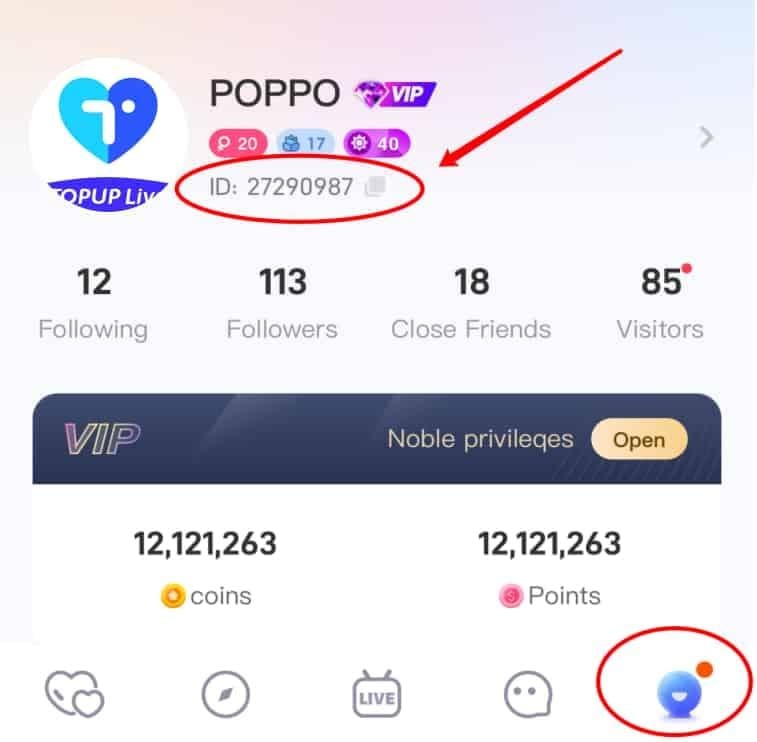
If coins don't appear within 5 minutes, verify User ID accuracy. Contact BitTopup customer service with order number if delays persist beyond standard timeframe.
Method 2: Adjusting Family Sharing Settings
Request Removal from Family Sharing
Leaving Family Sharing requires organizer coordination—members can't remove themselves. Approach organizer explaining your need for purchase independence.
Organizer must access Settings > [their name] > Family Sharing, select your account, choose Remove [your name] from Family. This immediately terminates all restrictions including Ask to Buy.
Consequences:
- Lose access to shared subscriptions, purchased apps, media
- iCloud storage reverts to free 5GB tier
- Trade-offs may outweigh benefits for some users
Disable Ask to Buy (With Organizer Access)
Request organizer disable Ask to Buy for your account while maintaining Family Sharing membership. Organizer navigates to Settings > [their name] > Family Sharing, selects your account, toggles off Ask to Buy.
This preserves Family Sharing benefits while granting purchase independence. Organizer retains ability to re-enable Ask to Buy anytime.
This only works if organizer agrees. Many implement Ask to Buy for budget control or spending oversight and may decline to disable it.
Create Separate Adult Apple ID
Users 18+ can create independent Apple ID outside Family Sharing. Visit Apple's account creation page, register using different email than current Apple ID.
Configure new ID with your own payment method. Add credit card, debit card, or payment option you control independently.
Sign out of family-linked Apple ID, sign in with new independent ID. This affects all Apple services. Download Poppo Live using new ID and configure account.
Method 3: Alternative Payment Configuration
Add Independent Payment Method
Navigate to Settings > [your name] > Payment & Shipping, select Add Payment Method. Enter credit card, debit card, or PayPal information.
Added payment method doesn't bypass Family Sharing authorization—organizer still receives purchase requests. However, it establishes financial independence for eventual Family Sharing exit.
Some banks impose $300-500 daily limits on international transactions, resetting at midnight Eastern Time. Verify bank policies before large purchases.
Use Gift Cards
Apple Gift Cards add credit directly to Apple ID balance. Purchase from retail stores or online, redeem via Settings > [your name] > Media & Purchases > Redeem Gift Card or Code.
Gift card credit applies before charging payment methods. However, Ask to Buy restrictions still apply—organizer must approve even when using gift card funds.
Works best for users whose organizers approve most requests but want to avoid linking personal payment methods.
Set Payment Preferences
Configure payment preferences at Settings > [your name] > Payment & Shipping. Drag desired payment method to top of list. iOS charges methods in order from top to bottom.
This matters when you have multiple payment methods. Prioritizing personal method ensures purchases charge your account rather than shared family options.
Payment prioritization doesn't affect Ask to Buy requirements. Organizer still sees requests regardless of which method processes the transaction.
Comparing Payment Methods: App Store vs BitTopup
Privacy Comparison
App Store: Creates detailed transaction records visible to Family Organizer. Every request displays app name, item description, exact price. Zero purchase privacy.
BitTopup: Transactions occur outside Apple's ecosystem. Organizer receives no notifications, sees no requests, has no visibility. Coins appear identically to officially purchased coins.
BitTopup maintains separate transaction records accessible only through your account, which you control exclusively.
Cost Efficiency
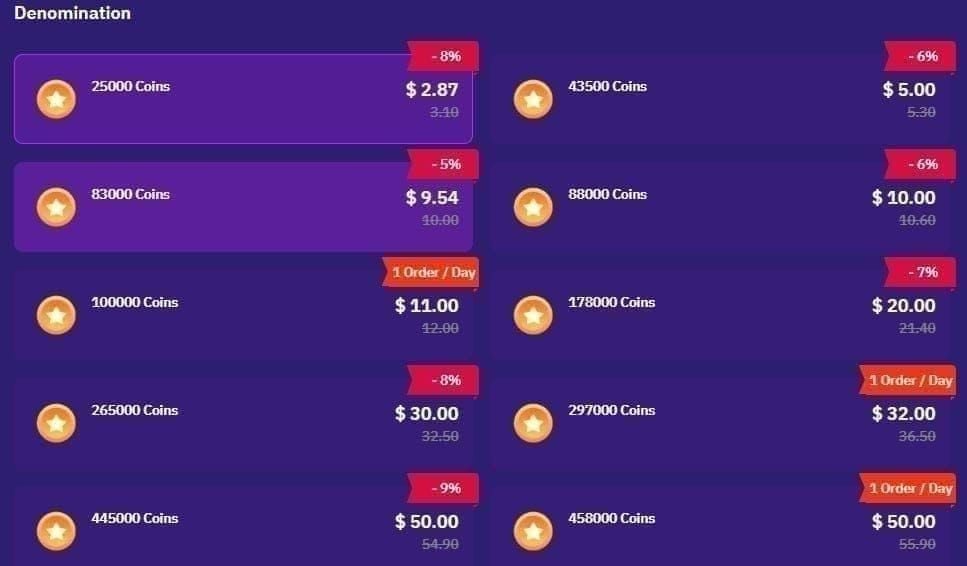
Official App Store pricing includes Apple's 30% commission, inflating costs significantly:
- 7,000 coins: $0.99 vs $0.85 BitTopup (14% savings)
- 210,000 coins: $29.99 vs $22.86 ($7.13 saved)
- 870,000 coins: $161.03 vs $94.73 ($66.30 saved)
- 1,780,000 coins: $329.47 vs $193.81 ($135.66 saved)
- 4,450,000 coins: $823.68 vs $484.52 ($339.16 saved)
New users often receive additional 5-10% discounts on BitTopup. App Store never offers promotional discounts.
Transaction Speed
App Store: Depends entirely on organizer response time. Delays occur due to notification lag, device unavailability, or oversight. Critical during live-streaming events.
BitTopup: 98% of orders complete within 10-60 seconds. Automated delivery credits coins almost instantaneously after payment confirmation.
BitTopup operates 24/7 without requiring third-party approval. Purchase anytime regardless of organizer availability.
Security Considerations
App Store: Benefits from Apple's robust security—two-factor authentication, fraud protection, purchase verification, clear dispute resolution.
BitTopup: Implements account verification, secure payment processing, fraud detection. Recommends enabling two-factor authentication for additional protection.
Poppo account safety remains consistent regardless of purchase method. Coins integrate identically with no account flagging or security concerns.
Common Mistakes When Bypassing Blocks
Misconception: Leaving Family Sharing Deletes Data
Many fear leaving Family Sharing deletes photos, contacts, messages, or app data. This prevents users from pursuing independence.
Reality: Leaving only affects shared services, not personal data on your device or personal iCloud account. Photos, messages, contacts, app data remain intact.
You'll lose access to apps, media, subscriptions purchased by other family members. Evaluate which shared content you use before leaving.
Mistake: Unauthorized Account Sharing
Some attempt bypassing restrictions by logging into friends' or relatives' Apple IDs. This violates Apple's terms and creates security risks—exposing personal information, payment methods, account access.
Account sharing creates confusion around purchase ownership. You may lose access to purchased content without warning if the owner changes passwords or enables two-factor authentication.
BitTopup provides authorized alternatives without credential sharing or terms violations.
Error: Ignoring Poppo Terms of Service
While BitTopup is legitimate, fraudulent sites offering free coins or coin generators violate Poppo's terms and can result in account suspension or bans.
Legitimate platforms purchase coins through official channels and deliver using your User ID. This complies with Poppo's systems without triggering security flags.
Always verify platform legitimacy. Legitimate platforms maintain clear contact information, customer service, transparent pricing. They never request your Poppo password—only your publicly visible User ID.
Troubleshooting Persistent Errors
When Authorization Fails After Settings Changes
If Payment Not Authorized persists after organizers disable Ask to Buy:
- Force-close App Store (swipe up from app switcher)
- Restart device to clear cached authorization states
- Sign out of Apple ID completely (Settings > [your name] > Sign Out)
- Wait 30 seconds, sign back in to refresh account status
Error 1001 indicates insufficient funds or payment method issues. Ensure payment method has 10% buffer beyond purchase price to cover 2-4% processing fees. For $100 purchase, maintain at least $104 available.
Contact Apple Support
When self-troubleshooting fails, contact Apple Support through Support app or website. Explain payment authorization errors for in-app purchases despite appropriate permissions. Provide specific error messages, app name, Family Sharing status.
Apple Support verifies account authorization status server-side and identifies configuration issues not visible through device settings.
Be prepared to verify identity through security questions, two-factor authentication codes, or account recovery.
Verify Poppo Account Status
Sometimes errors stem from Poppo account issues rather than Apple restrictions. Verify Poppo account is properly linked by checking Settings > Account Management in Poppo Live.
Ensure account hasn't been flagged for security reviews. New accounts or accounts with unusual activity may face temporary purchase restrictions while Poppo verifies legitimacy. These typically resolve within 24-48 hours.
Check you're using correct Poppo User ID—7-10 digit numeric string on profile page. Verify number matches exactly when entering into BitTopup.
Maintaining Account Security
BitTopup Account Protection
- Create strong, unique password different from Apple ID, Poppo, email passwords
- Use uppercase, lowercase, numbers, special characters
- Enable two-factor authentication if available
- Monitor transaction history weekly for unauthorized purchases
- Report suspicious activity immediately
Recognize Legitimate vs Fraudulent Platforms
Legitimate platforms:
- Display clear contact information (email, support tickets, live chat)
- Maintain professional websites with secure HTTPS connections (padlock icon)
- Accumulate positive reviews from real users over time
Red flags:
- No contact information or security features
- Exclusively positive reviews or no reviews
- Request your Poppo password (legitimate services only need User ID)
Keep Poppo Account Safe
- Only share Poppo User ID, never login credentials
- User ID is publicly visible and designed for sharing
- Verify coin delivery immediately after purchase
- Contact platform customer service within 24 hours if discrepancies occur
- Avoid suspicious links claiming free coins or account upgrades
- Always access Poppo through official App Store app
Long-Term Payment Independence Strategies
Plan for Autonomy at Age 18
Prepare financial infrastructure:
- Open bank account in your name
- Obtain debit card linked to account
- Create separate Apple ID using own email several months before turning 18
- Configure new ID with personal payment method
- Make small test purchases to ensure functionality
Communicate with Family Organizer about transition timeline, shared subscription impacts, data transfer needs.
Build Payment Ecosystem
- Diversify payment options beyond single card
- Establish digital payment service accounts with buyer protection
- Set monthly coin budgets based on entertainment spending capacity
- Track purchases to stay within limits
- BitTopup's lower prices allow more coins within same budget
Time large purchases to coincide with platform promotions or new user discounts (5-10% additional savings).
Maximize Coin Value
Analyze typical usage patterns to identify optimal purchase timing and package sizes. Purchase coins in advance during promotional periods rather than at full price during live streams.
Larger packages offer better per-coin value. The 4,450,000-coin package provides best value ratio. Calculate monthly consumption and consider purchasing larger packages less frequently.
Track total savings using BitTopup versus App Store. Users regularly purchasing large packages can save hundreds annually.
FAQ
Why does my Poppo purchase say payment not authorized? Apple Family Sharing's Ask to Buy feature requires Family Organizer approval for all in-app purchases. This applies to all Poppo Coins packages regardless of amount. Use BitTopup to bypass Apple's authorization system entirely—no organizer approval needed.
Can I buy Poppo Coins without Family Sharing approval? Yes. BitTopup delivers coins directly to your Poppo User ID without Apple authorization, offering 14-70% savings versus in-app prices. 98% of transactions complete within 10-60 seconds.
How do I find my Poppo User ID? Open Poppo Live, tap profile icon (top-right). User ID appears below nickname as 7-10 digit gray numeric string. Long-press to copy, paste into text editor to verify all digits before entering into BitTopup.
Is it safe to buy from third-party platforms? Legitimate platforms like BitTopup safely deliver coins through Poppo's official systems using your User ID. They never request your password and deliver coins identically to App Store purchases. Enable two-factor authentication and verify platform legitimacy through customer service availability and HTTPS connections.
Will buying outside App Store ban my account? No. Purchasing through legitimate platforms like BitTopup complies with Poppo's systems and doesn't trigger flags or bans. Avoid fraudulent sites offering free coins or requesting passwords—these violate terms of service.
How much cheaper is BitTopup versus App Store? BitTopup offers 14-70% savings. Examples: 10,000 coins costs $1.10 vs $1.87 (41% savings); 430,000 coins costs $46.82 vs $79.59 (70% savings); 4,450,000 coins saves $339.16 per purchase ($484.52 vs $823.68). Additional 5-10% new user discounts available.
Ready to buy Poppo Coins without restrictions? Visit BitTopup now for instant, private purchases with no Family Sharing approval needed. Get coins in minutes with complete payment independence!
Recommended News








Recommend products



Table of Contents
- Understanding Payment Not Authorized Error in Poppo
- What Triggers Authorization Blocks
- How Apple Family Sharing Controls Purchases
- Ask to Buy Feature Explained
- Why Family Sharing Blocks Poppo Purchases
- Family Organizer Permission Requirements
- Age Restrictions and Limitations
- Common Rejection Scenarios
- Method 1: Using BitTopup for Independent Purchase
- Why BitTopup Works for Restricted Accounts
- BitTopup Registration Process
- How to Purchase Poppo Coins Through BitTopup
- Delivery Time and Crediting
- Method 2: Adjusting Family Sharing Settings
- Request Removal from Family Sharing
- Disable Ask to Buy (With Organizer Access)
- Create Separate Adult Apple ID
- Method 3: Alternative Payment Configuration
- Add Independent Payment Method
- Use Gift Cards
- Set Payment Preferences
- Comparing Payment Methods: App Store vs BitTopup
- Privacy Comparison
- Cost Efficiency
- Transaction Speed
- Security Considerations
- Common Mistakes When Bypassing Blocks
- Misconception: Leaving Family Sharing Deletes Data
- Mistake: Unauthorized Account Sharing
- Error: Ignoring Poppo Terms of Service
- Troubleshooting Persistent Errors
- When Authorization Fails After Settings Changes
- Contact Apple Support
- Verify Poppo Account Status
- Maintaining Account Security
- BitTopup Account Protection
- Recognize Legitimate vs Fraudulent Platforms
- Keep Poppo Account Safe
- Long-Term Payment Independence Strategies
- Plan for Autonomy at Age 18
- Build Payment Ecosystem
- Maximize Coin Value
- FAQ
Recommend products



Recommended News

PSN Card Malaysia Code Redeemed but Balance Not Showing? Fix It

How to Farm Rare Skin Fragments in MLBB | August 2026

Genshin Impact Stygian Onslaught 7.0 Teams | August 2026

Alyosha Best Build, Teams & C6 Guide | August 2026

Cheap StarMaker Coins for SupernovaX 2026 Auditions (12-23% Off)

MICO Live Coins MENA After v5.2: Cheapest Deals 2026

How to Redeem NCRCKYT8EF Code for Free Eggy Coins (Aug 2026)

Taka Live 1.2.11 Draining Battery Fast After the July 2026 Update? Causes and Fixes