Common Scenarios
Temporary Sync Delays: 95% resolve in 5-30 minutes without action. Normal processing time, not actual failure.
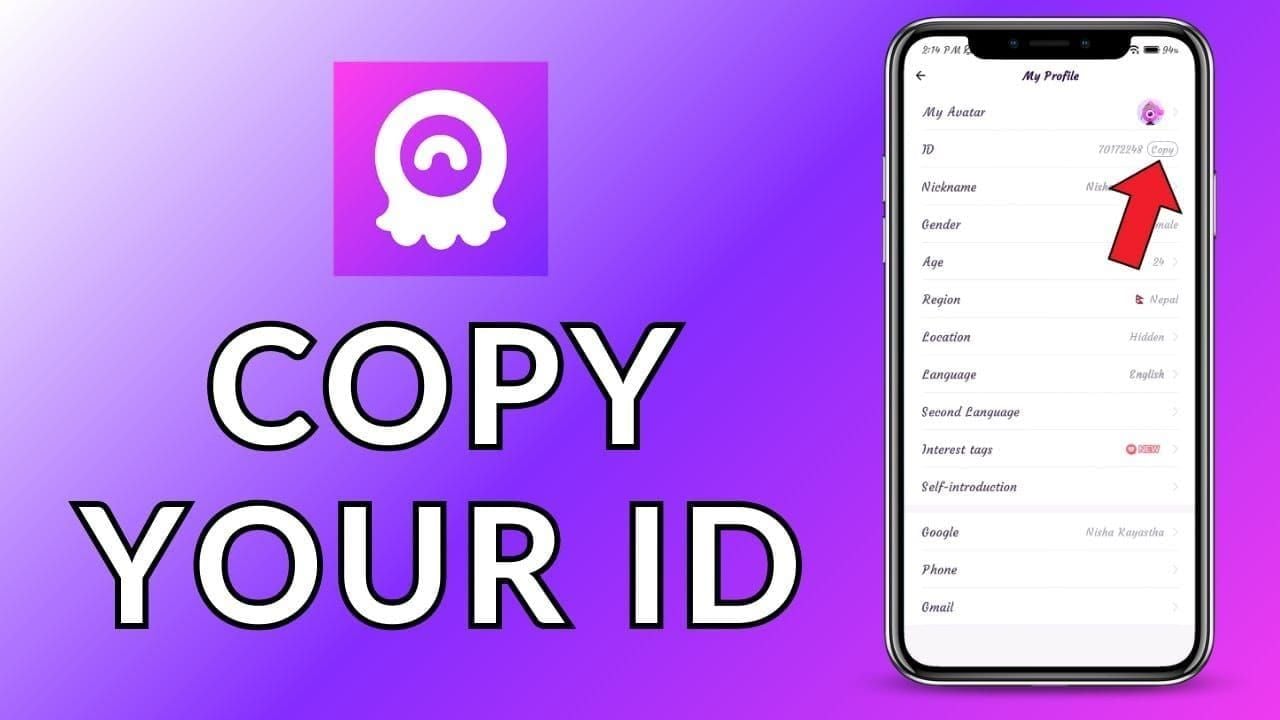
Account Mismatch: Wrong User ID (even one digit off) sends purchases to incorrect accounts. Find your 8-12 digit ID in Profile > My Profile.
Network Interruption: Connection drops between payment and delivery create incomplete transactions. Bank charged, app store recorded, but Chamet never received confirmation.
Server Errors: Maintenance, high traffic, or technical glitches prevent crediting despite successful payment.
Payment vs. Delivery Gap
App stores process payments instantly—receipts arrive in seconds. But Chamet's system receives delivery instructions separately.
Google Play order numbers (GPA.####-####-####-#####) confirm payment, not delivery. Apple's confirmation emails verify charges, not in-game crediting.
Check balance in Me > Wallet within Chamet—not app store history. Only your Chamet balance proves successful delivery.

Delivery Timeframes
Apple App Store: 5-15 minutes typical. iOS verification adds 3-5 minutes vs. direct purchases.
Google Play: 3-10 minutes average. Faster API connections than Apple.
Network Variables: Minimum 3 Mbps required. Slower connections extend to 20-30 minutes. VPN adds 5-15 minutes.
Wait 30 minutes before troubleshooting or requesting refunds.
Immediate Actions: First 5 Minutes
Force Refresh Balance
- Force-quit Chamet (iOS: swipe up and away; Android: Recent Apps > close)
- Wait 10-15 seconds
- Relaunch and check Me > Wallet
- If unchanged, log out completely (Profile > Settings > Log Out)
- Wait 15-20 seconds, log back in
Fixes 60% of cases by clearing cache and forcing fresh data retrieval.
Check Payment Confirmation
Apple: Settings > [Your Name] > Media & Purchases > Purchase History. Verify Completed status. Screenshot transaction ID, amount, timestamp.
Google Play: Play Store > Profile > Payments & Subscriptions > Budget & History. Confirm Payment Complete status. Note GPA order number.
Payment confirmation proves financial transaction succeeded—critical for refund requests.
Verify Network and Server
Switch between Wi-Fi and mobile data. Disable VPN completely—causes 15-20% of delays.
Test connection speed (minimum 3 Mbps). Check if other Chamet features load properly.
Restart Sequence
Android: Settings > Apps > Chamet > Storage > Clear Cache. Resolves 60-90% of sync issues. Then restart device.
iOS: Uninstall and reinstall Chamet. iOS requires app removal for cache clearing. Fixes 60% of sync cases.
After restart, wait 2-3 minutes before opening Chamet.
Proof Checklist: Required Documents
Documentation quality determines refund success. Collect immediately—platforms archive details after 48-72 hours.
Screenshot Requirements
- Pre-Purchase Balance: Me > Wallet showing User ID and current Diamonds with timestamp
- Payment Confirmation: App store confirmation with transaction amount, date/time, order ID
- Post-Purchase Balance: Me > Wallet after 30-minute wait, proving no crediting
- User ID Verification: Profile > My Profile showing complete 8-12 digit ID
- Purchase History: App store history showing Chamet transaction with status
Support accepts up to 5 files, 10MB total. Compress if needed but maintain readability.
Essential Transaction Details
- Transaction ID/Order Number (GPA format for Google Play)
- Purchase amount (exact currency charged)
- Purchase date and time with timezone
- Diamond package details (e.g., 1000 Diamonds)
- Payment method (card last 4 digits, PayPal email)
- Chamet User ID (exact 8-12 digits)
Missing any element extends processing 24-48 hours.
Order ID Locations
Apple: Confirmation emails to Apple ID email (subject: Your receipt from Apple) or reportaproblem.apple.com > Purchase History.
Google Play: Play Store > Profile > Payments & Subscriptions > Budget & History. GPA.####-####-####-##### format.
Copy-paste order IDs—don't type manually.
Email Confirmations
Apple: Check iCloud email. Search receipt from Apple by date.
Google Play: Gmail linked to Play Store. Search Google Play + Order receipt.
Payment Platforms: PayPal, credit cards send independent confirmations. Check online banking within 24 hours.
Save as PDFs or screenshots—platforms archive old messages.
Apple Refund Process
Access Purchase History
Method 1 - Device: Settings > [Your Name] > Media & Purchases > Purchase History
Method 2 - App Store: App Store > Profile Icon > Purchased > Search Chamet
Method 3 - Web: reportaproblem.apple.com (most comprehensive)
Submit Refund Request
- Visit reportaproblem.apple.com, sign in
- Locate Chamet purchase, click Report a Problem
- Select I didn't receive this item
- Describe: Completed payment but Diamonds never appeared. User ID: [your ID]. Waited 30+ minutes, restarted app/device. Balance unchanged.
- Attach screenshots if allowed
- Submit and note case reference number
Apple responds within 48 hours for standard cases.
Required Information
- Purchase legitimacy verification
- Item non-delivery evidence (post-purchase screenshots)
- Troubleshooting attempts (mention restarts, waiting)
- Timeline compliance (within 90 days)
- Account standing (refund history affects approval)
Response Timeline
- Initial Response: 24-48 hours automated acknowledgment
- Investigation: 2-5 business days
- Resolution: Email with approval/denial
- Refund Credit: 3-5 business days to original payment method
If Denied: Reply with additional evidence. Appeals reviewed in 3-7 days.
Google Play Refund Process
Find Order Number
Mobile: Play Store > Profile > Payments & subscriptions > Budget & history > Tap transaction
Desktop: play.google.com/store/account > Order history
Gmail: Search Google Play Order by date
Screenshot order details showing GPA number, amount, date, status.
Initiate Refund
Within 48 Hours:
- Play Store > Profile > Payments & subscriptions > Budget & history
- Tap Chamet transaction
- Select Request a refund
- Choose Item not received
- Provide brief description
- Submit
Processes within 24-48 hours with minimal investigation.
After 48 Hours:
- Visit support.google.com/googleplay/contact/play_request_refund_apps
- Fill form with order number, date, detailed explanation
- Attach screenshots (up to 5 files)
- Submit and save confirmation
Requires manual review, 3-7 business days.
Refund Policy
Automatic Eligibility: Within 48 hours, streamlined processing.
Extended Window: 48 hours to 90 days requires evidence-based review. Approval depends on clear non-delivery proof and account history.
Developer Contact: Purchases over 48 hours often require contacting Chamet first. If unresolved in 3-5 days, Google reconsiders with evidence.
Status Tracking
Check Status: Payments & subscriptions > Budget & history > Tap transaction. Shows Refund requested,Under review,Approved, or Denied.
Email Updates: Gmail receives confirmation, investigation updates every 2-3 days, final decision.
Processing Time:
- Credit/Debit: 3-5 business days
- Google Play Balance: Immediate
- PayPal: 2-3 business days
- Carrier Billing: 5-10 business days
Contacting Chamet Support
Direct contact often resolves faster than app store refunds.
In-App Support
- Profile > Settings > Help Center

- Payment Issues > Diamonds Not Credited
- Contact Support/Submit Ticket
- Attach 5 screenshots (10MB limit)
- Write: Purchased [X Diamonds] on [date] at [time] via [Apple/Google]. Payment confirmed, transaction ID [number]. Diamonds not credited to User ID [your ID]. Waited 30+ minutes, restarted app/device. Request immediate crediting or refund guidance.
Response: 24-48 hours from payment specialists.
Email Support
Contact: chamet.feedback@gmail.com
Subject:Missing Diamonds - User ID [your ID] - Order [transaction ID]
Body:
**Purchased [X Diamonds] on [date] at [time] through [Apple/Google]. Payment processed (transaction ID: [number]), but Diamonds not credited to User ID [your ID].
Waited 30+ minutes, force-quit app, restarted device, verified network. Balance unchanged at [X Diamonds].
Request investigation and crediting or refund instructions. Complete documentation attached.**
Attachments: All 5 screenshots
Response: 24-48 hours; complex cases 3-5 days.
Response Times
In-App Tickets:
- Acknowledgment: 1 hour
- Initial Response: 24-48 hours
- Resolution: 2-5 business days
Email:
- Acknowledgment: 12-24 hours
- Initial Response: 24-48 hours
- Resolution: 3-5 business days
Priority: In-app ticket (fastest) > Phone > Email
Escalation Steps
Triggers: No response in 5 days, generic responses, repeated info requests, unexplained denial.
- Follow-Up: Reply with Following up on case [number] from [date]. No resolution received. Involves [amount] for undelivered Diamonds. Escalate to senior support.
- Alternative Channel: If email failed, try in-app ticket (or vice versa)
- Document Timeline: Create timeline of purchase date, contact dates, responses
- App Store Intervention: Update refund request: Contacted developer on [dates]. No resolution after [X] days. Request platform intervention.
Technical Troubleshooting
Account Sync Fixes
Forced Refresh:
- Log out completely
- Force-quit app
- Wait 15-20 seconds
- Restart device
- Relaunch, log in
- Check Me > Wallet immediately
Multi-Device Check: If using multiple devices, check balance on alternate device. One may show cached data while other displays current info.
Account Re-verification: Profile > Settings > Account Security. Verify phone/email. Complete pending verifications, wait 10-15 minutes.
Cache Clearing
Android:
- Exit Chamet
- Settings > Apps > Chamet > Storage
- Clear Cache (NOT Clear Data)
- Restart device
- Relaunch Chamet
Removes 60-90% of sync issues.
iOS:
- Screenshot User ID
- Delete Chamet app
- Restart iPhone
- Reinstall from App Store
- Log in, check balance
Fixes 60% of iOS sync cases.
Server Delays: Wait vs. Act
Wait 30 minutes if:
- Payment confirmed within 1-2 minutes
- No error messages
- Network stable throughout
- Other Chamet features loading normally
Act immediately if:
- Error message appeared
- Network disconnected during transaction
- App crashed during payment
- Payment charged but no app store confirmation
Peak Hours: Evenings (6 PM-12 AM), weekends, promotional events cause 15-30 minute delays. Wait 45 minutes during peak times.
VPN and Network Impact
VPN: Triggers fraud detection, adds 10-20 minutes delay or causes failures. Disable before purchasing.
Network Switching: Don't switch between Wi-Fi and mobile data mid-transaction. Causes communication failure.
Firewall/Security: Temporarily disable during purchase. Re-enable after delivery.
DNS/Proxy: Reset to automatic:
- Android: Settings > Network & Internet > Advanced > Private DNS > Automatic
- iOS: Settings > Wi-Fi > [Network] > Configure DNS > Automatic
Common Refund Mistakes
Incomplete Documentation
Rejected Claims:
- Missing transaction IDs (adds 2-3 days)
- Blurry/cropped screenshots
- Wrong User ID provided
- No pre-purchase balance proof
- Screenshots taken days later
Capture all evidence within 1-2 hours of failed delivery.
Timing Errors
Too Soon: Requesting refunds within 5-10 minutes, before normal processing completes. If Diamonds arrive during refund, triggers fraud flags.
Optimal: Wait 30 minutes after purchase.
Too Late:
- Google Play: After 48 hours loses automatic processing
- Apple: After 90 days faces higher rejection
- Chamet: Beyond 7 days requires extensive verification
Best Practice: Capture evidence immediately, wait 30 minutes before submitting.
Wrong Contact Sequence
Mistake: Starting with app store instead of Chamet. Delays resolution 3-5 days.
Optimal Sequence:
- Wait 30 minutes
- Contact Chamet support first
- Wait 48 hours for response
- If unresolved, initiate app store refund
Avoid: Multiple simultaneous requests to Chamet, Apple, Google, bank. Creates conflicting resolutions and potential fraud investigations.
Refund Misconceptions
Myth: App stores automatically refund non-delivered items.
Reality: Manual requests required.
Myth: Chamet auto-detects delivery failures.
Reality: You must report issues.
Myth: Waiting longer improves refund chances.
Reality: Immediate reporting (after 30 minutes) yields highest approval.
Myth: Multiple requests increase approval.
Reality: Duplicates flag account for abuse.
Prevention Strategies
Pre-Purchase Checklist
☑ Verify User ID:
- Profile > My Profile
- Copy 8-12 digit ID
- Paste during checkout (don't type)
- Verify match
Eliminates 40% of cases from incorrect ID.
☑ Network Stability:
- Confirm full Wi-Fi signal or 4G/LTE
- Test by loading video
- Disable VPN
- Close bandwidth-heavy apps
- Ensure 3+ Mbps speed
☑ Screenshot Pre-Purchase Balance:
Me > Wallet showing current Diamonds and User ID. Save to Chamet Purchases folder.
☑ Verify Payment Method:
Sufficient funds, not expired, billing address matches, no fraud alerts.
☑ Optimal Timing:
Avoid evenings/weekends. Mid-morning weekdays have fewer delays.
Network Requirements
Minimum Standards:
- Speed: 3 Mbps minimum, 5+ Mbps recommended
- Stability: Same network throughout transaction
- Signal: Wi-Fi 70%+ strength, mobile 4G/LTE
Pre-Purchase Test:
- Run speed test (3+ Mbps)
- Load Chamet, navigate 3-4 sections
- If slow loading, improve connection first
During Purchase:
- Don't switch apps
- Don't lock screen until confirmation
- Don't move to weaker signal areas
- Keep device above 20% battery
Screenshot Habit
Before Purchase:
- Current balance (Me > Wallet)
- User ID (Profile > My Profile)
- Selected package with price
After Purchase:
- Payment confirmation
- Transaction receipt with order ID
- Balance check at 5 minutes
- Final check at 30 minutes
Organization:
- Folder: Chamet Purchases - [Month/Year]
- Naming: [Date] - [Step] - [Amount]
- Cloud backup: Upload to Google Drive/iCloud immediately
BitTopup Advantage
Guaranteed Delivery: Tracking with confirmation notifications for every transaction.
Transparent Records: Comprehensive purchase history in organized dashboard.
Dedicated Support: Gaming recharge specialists, 2-4 hour response times.
Competitive Pricing: Promotional rates and bulk discounts.
Multiple Payment Options: Regional systems, e-wallets, cryptocurrency.
No Intermediary: Direct platform-to-Chamet delivery eliminates failure points.
Purchase Protection: Gaming-specific refund policies with clear timelines.
Real User Cases
Apple Refund: 48 Hours
Scenario: 5,000 Diamonds ($49.99), Friday 8:30 PM. No delivery after 45 minutes.
Actions:
- 9:15 PM: Force-quit, restarted device
- 9:20 PM: Captured screenshots
- 9:30 PM: Submitted Apple refund via reportaproblem.apple.com
- 9:35 PM: Emailed chamet.feedback@gmail.com
Timeline:
- Saturday 10 AM: Apple acknowledgment
- Sunday 11 AM: Apple approved refund
- Monday 9 AM: Refund credited
Success Factors: Immediate documentation, simultaneous contact, complete evidence, within 48-hour window.
Google Play Delayed Delivery
Scenario: 2,000 Diamonds ($19.99), Tuesday 3 PM. Diamonds appeared 6 hours later after refund initiated.
Actions:
- 3:35 PM: Submitted Google refund (within 48 hours)
- 4 PM: Contacted Chamet support
- 9 PM: Diamonds appeared
Complication: Refund processed before noticing delivery. Account flagged for fraud.
Resolution: Contacted Chamet explaining timeline, offered to return refund. Restriction lifted after 48-hour review.
Lesson: Wait full 30 minutes before requesting refunds.
Chamet Direct Credit
Scenario: 10,000 Diamonds ($99.99), Apple. No delivery after 24 hours.
Actions:
- Day 1, 3 PM: In-app ticket with documentation
- Day 1, 8 PM: Cleared cache, reinstalled
- Day 2, 10 AM: Follow-up noting 20+ hours
Timeline:
- Day 2, 2 PM: Support requested backend investigation
- Day 2, 6 PM: Confirmed technical error
- Day 2, 6:15 PM: Manually credited 10,000 Diamonds
Success Factors: Comprehensive documentation, in-app ticket routing, clear communication.
Outcome: Diamonds credited in 28 hours without refund process.
FAQ
How long for Chamet Diamonds to appear?
5-30 minutes depending on platform and network. Apple: 5-15 minutes. Google Play: 3-10 minutes. Wait 30 minutes before considering delivery failed. 95% resolve within this timeframe.
What proof needed for refund?
Payment confirmation with transaction ID, Chamet User ID from Profile > My Profile, pre-purchase balance screenshot, post-purchase balance (after 30 minutes), app store receipt. Collect all five immediately.
Can I get Apple refund if Diamonds don't arrive?
Yes. Visit reportaproblem.apple.com, locate Chamet purchase, select I didn't receive this item, provide documentation. Apple processes within 48 hours for purchases under 90 days with clear evidence.
How to contact Chamet support?
Fastest: Chamet app > Profile > Settings > Help Center > Payment Issues > Diamonds Not Credited > Contact Support. Or email chamet.feedback@gmail.com with User ID, transaction ID, screenshots. In-app tickets get 24-48 hour responses.
Why aren't Diamonds showing after payment?
Network instability (40%), incorrect User ID (40%), server sync delays, or VPN interference. Force-quit app, wait 10-15 seconds, relaunch, check Me > Wallet. Android: Clear cache (Settings > Apps > Chamet > Storage). iOS: Reinstall app. Fixes 60% immediately.
What to do immediately if Diamonds missing?
Wait 30 minutes. Screenshot balance, payment confirmation, User ID. Force-quit and relaunch app. Verify network stability. Check Me > Wallet (not main screen). After 30 minutes, contact Chamet support via in-app ticket with documentation before app store refund.
Tired of payment issues? Get instant, guaranteed delivery with BitTopup—trusted platform for Chamet Diamonds. No delays, no missing payments. Recharge safely now!