Deduction vs Credit Delay
Payment deduction confirms your financial institution processed the charge, but credit delay means diamonds haven't synchronized with your Chamet account. Check transaction status through Profile > Wallet or Transaction History.
If the transaction appears in your payment provider's history but not Chamet's records within 30 minutes, you're experiencing delivery failure, not processing delay. This 30-minute threshold represents the 99.5% completion rate boundary.
Gateway maintenance windows (02:00-05:00 UTC+8 weekdays) temporarily suspend processing, causing legitimate delays that resolve automatically.
Common Causes of Missing Diamonds
Network instability during final confirmation creates synchronization failures between payment processors and Chamet's crediting system. Minimum 3 Mbps stable connection required throughout the entire transaction.
Incorrect User ID entry is the most preventable failure. Chamet User ID is an 8-12 digit numeric string in Profile > My Profile or Me > Wallet. Copy directly by tapping rather than manually typing.
Account verification issues affect new users disproportionately, with first-time purchases requiring extended review. Subsequent purchases from verified accounts process significantly faster.
Payment Gateway Processing Times
- Digital wallets: 2-5 minutes (fastest, real-time API integrations)
- Credit/debit cards: 5-10 minutes (includes fraud verification)
- Bank transfers: 10-30 minutes weekdays, 24-48 hours weekends
Peak efficiency occurs Tuesday-Thursday 09:00-12:00 UTC+8 when system loads remain manageable and support teams operate at full capacity.
Essential Payment Proof Checklist
Successful refund claims depend on comprehensive documentation submitted within 48 hours of failed transaction. This strict timeline determines refund eligibility.
Required proof:
- Chamet User ID
- Complete transaction details
- Payment confirmation evidence
- Account balance verification
Maximum attachment limits: 5 files, 10MB total. Compress screenshots while maintaining timestamp and transaction detail readability.
Critical Documents to Collect Immediately
- Pre-purchase diamond balance screenshot - Baseline documentation proving account status before payment

- Current diamond balance - Captured after 30-minute waiting period expires
- Complete transaction history - From Profile > Wallet, showing all recent purchases and highlighting disputed transaction absence
Transaction Screenshot Requirements
Payment confirmation screenshots must display:
- Transaction ID
- Exact amount charged
- Timestamp
- Merchant name (Chamet)
Google Play: Order number format GPA.####-####-####-##### appears in purchase confirmation email and Play Store order history.
Bank statements: Clear visibility of deduction amount, transaction date, merchant descriptor, account balance before/after charge.
Account Information Verification
Copy your 8-12 digit Chamet User ID directly from Profile > My Profile by tapping the ID field (auto-copies to clipboard).
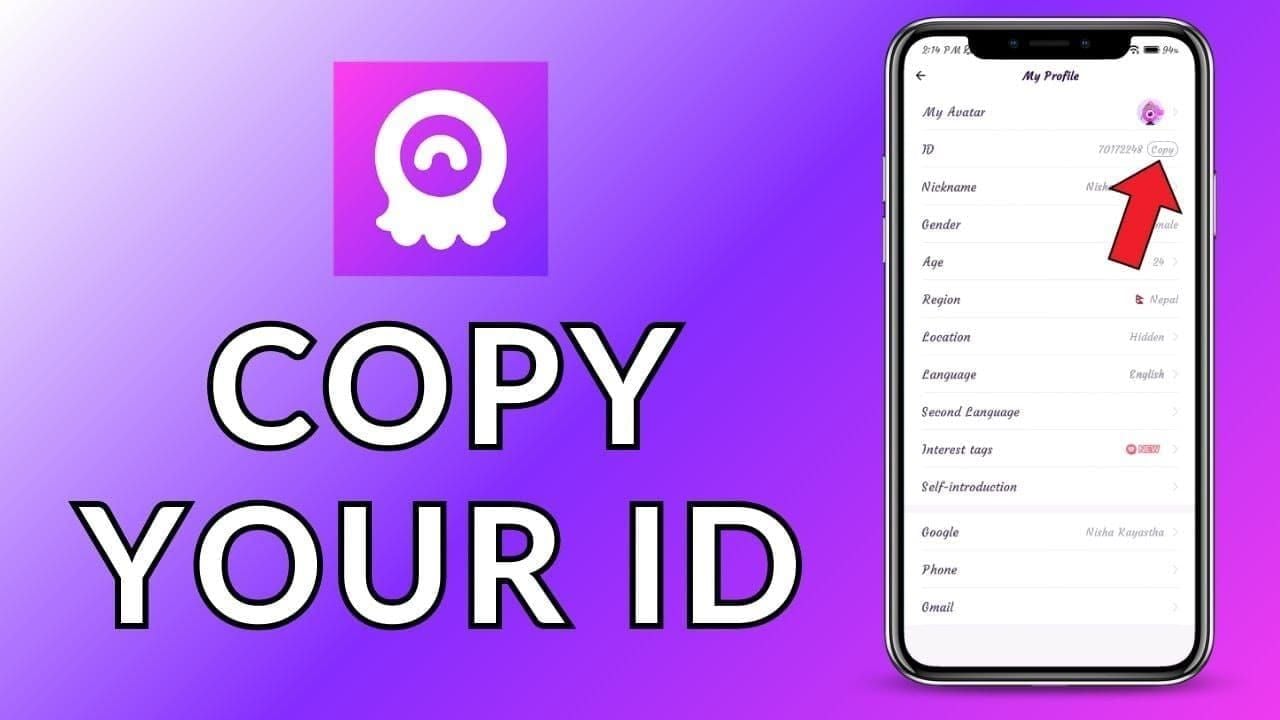
Include registered email and phone number exactly as they appear in account settings. Discrepancies delay verification.
Document account creation date and approximate total previous purchases to establish account history.
Easypaisa Payment Proof Documentation
Easypaisa transactions generate documentation across mobile app, SMS confirmations, and bank statements. Collect evidence from all three sources.
Retrieving Easypaisa Transaction Receipts
- Open Easypaisa app → transaction history section
- Locate Chamet payment by date and amount
- Tap transaction → view full details
- Use Share Receipt or Download Receipt for official PDF/image
If no direct download, screenshot complete transaction detail screen showing transaction ID, amount, recipient name, date, time, status.
Locating Transaction ID
Transaction ID appears at top of detail screen, labeled Transaction ID,Reference Number, or TXN ID. Copy precisely as displayed, maintaining exact capitalization.
Cross-reference transaction ID between app history and SMS confirmation to verify accuracy.
SMS Confirmation Preservation
Screenshot complete SMS including:
- Sender ID (typically Easypaisa)
- Message timestamp
- Transaction details
- Confirmation code
- Device status bar showing date/time
Forward SMS to email as backup. Email timestamps provide additional proof supporting claim timeline.
Bank Statement Entry
If Easypaisa links to bank account, transaction appears on statement within 1-3 business days. Download or screenshot relevant section showing:
- Account balance before transaction
- Chamet payment deduction
- Balance after charge
Bank statements carry significant verification weight as third-party financial institution records.
Google Play Purchase Evidence
Google Play maintains purchase records accessible through Play Store app, web browser, and email confirmations.
Accessing Order History
- Open Google Play Store → tap profile icon
- Select Payments & subscriptions → Budget & history
- Locate Chamet purchase, tap for full details
- Use Report a problem link for Chamet recharge refund Google Play issues
Downloading Official Receipts
Google sends purchase confirmation emails to primary Gmail address immediately upon transaction completion. Search inbox for Google Play and Chamet.
Email receipt contains:
- Complete GPA order number
- Itemized purchase details
- Payment method
- Total amount charged including taxes
Forward email to yourself or save as PDF for permanent record.
Finding GPA Order Numbers
GPA order number appears in three locations:
- Purchase confirmation email
- Play Store order history
- Google Payments dashboard (payments.google.com)
Copy complete GPA number including all digits and hyphens exactly as displayed.
Step-by-Step Fast Refund Process
Timing determines refund success—actions within first 24 hours significantly improve resolution speed. The 48-hour documentation window represents maximum timeframe for refund eligibility.
Force close and restart resolves 60% of synchronization failures without formal refund requests.
Immediate Actions Within First 24 Hours
- Wait full 30 minutes - 99.5% of legitimate transactions complete within this timeframe
- Force close Chamet:
- Android: Recent Apps → swipe away Chamet
- iOS: Swipe up from bottom → remove from app switcher
- Wait 15-20 seconds before reopening
- Clear app cache: Settings > Apps > Chamet > Storage > Clear Cache (Android)
- Log out/in: Wait 15-20 seconds between logout and login to force fresh account data sync
Contacting Chamet Support Effectively
In-app: Profile > Settings > Help Center > Payment Issues > Diamonds Not Credited (most direct routing to specialized payment teams)

Email: chamet.feedback@gmail.com
Subject: Payment Deducted - Diamonds Not Credited - [Your User ID]
Phone: +628111446644
- Weekdays: 9:00-17:00 UTC+8
- Saturday: 10:00-15:00 UTC+8
Email Template for Refund Requests
Subject: Payment Deducted - Diamonds Not Credited - User ID [Your 8-12 digit ID]
Body:
**I purchased [X amount] Chamet diamonds on [date] at [time] using [payment method]. Payment was deducted but diamonds not credited after [time elapsed].
Transaction Details:
- Chamet User ID: [8-12 digits]
- Transaction ID/Order Number: [ID]
- Purchase Amount: [amount]
- Payment Method: [method]
- Transaction Date/Time: [date/time]
- Diamond Package: [package]
Attached Proof:
- Pre-purchase balance screenshot
- Current balance screenshot
- Payment confirmation from [provider]
- Transaction history screenshot
Requested Resolution: Immediate crediting of purchased diamonds or full refund of [amount] to original payment method.
Contact: [email], [phone], preferred contact method: [method]**
Follow-Up Strategy and Timeline
Escalate after 72 hours if no response. Reference original ticket number, request case escalation to senior support.
Refund Processing Times:
- Google Play: 3-14 days
- App Store: 3-14 days
- Digital wallets: 5-45 days
- Credit cards: 7-90 days
Peak processing: Tuesday-Thursday 09:00-12:00 UTC+8 for optimal follow-up communications.
Common Mistakes That Delay Refunds
Incomplete Documentation Errors
- Missing transaction IDs - Prevents support from locating payment in systems
- Screenshots without timestamps - Eliminates temporal verification
- Omitting Chamet User ID - Forces follow-up requests, adding delay cycles
Wrong Support Channel Usage
- Social media comments don't create trackable support tickets
- Third-party review sites can't access account information or process refunds
- App store reviews don't trigger support ticket creation
Misconceptions About Automatic Refunds
Payment failures don't trigger automatic refunds. Manual refund requests with proper documentation remain necessary.
Waiting beyond 48-hour documentation window doesn't improve chances—it eliminates eligibility.
Payment providers won't automatically reverse charges without your intervention. Both Google Play and App Store require explicit refund requests.
Preventing Future Payment Issues
Why BitTopup Offers Superior Transaction Security
- Instant delivery guarantees - Transactions complete within minutes with real-time confirmation
- 24/7 dedicated support - Immediate assistance vs Chamet's limited weekday 9:00-17:00 UTC+8, Saturday 10:00-15:00 UTC+8 hours
- Competitive pricing - Secure payment infrastructure with established reputation
- Zero credit delays - Eliminates 30-minute waiting period anxiety
Network Stability Checks Before Purchasing
- Verify connection maintains consistent speed throughout 2-minute test period
- Switch from mobile data to WiFi when available
- Ensure strong signal strength (4+ bars) if using mobile data
- Close background apps consuming bandwidth (video streaming, downloads, cloud backups)
Account Verification Best Practices
- Reinstall app to resolve 60% of persistent synchronization issues (note login credentials first)
- Verify account email remains active and accessible
- Update Chamet app to latest version before purchases (outdated versions may contain payment processing bugs)
- Copy User ID directly from Profile > My Profile before every purchase
FAQ
What should I do immediately if Chamet diamonds are deducted but not credited?
Wait full 30 minutes (99.5% of transactions complete within this timeframe). Then force close Chamet, clear app cache, log out/in, check balance again. If diamonds still don't appear, screenshot current balance, payment confirmation, transaction history, then submit support ticket within 48 hours including User ID and all documentation.
How long does Chamet take to credit diamonds after payment?
Digital wallets: 2-5 minutes. Credit cards: 5-10 minutes. Bank transfers: 10-30 minutes during business hours. Peak hours (18:00-22:00 UTC+8) add 10-15 minutes. First-time purchases: 24-48 hours for security review. Transactions over $500: 5-30 minutes verification. Weekend bank transfers: 24-48 hours.
What specific payment proof does Chamet support require for refunds?
8-12 digit Chamet User ID, transaction ID or GPA order number, pre-purchase and current balance screenshots with timestamps, payment confirmation showing deduction, transaction history from Chamet's app. Submit all documentation within 48 hours as attachments (maximum 5 files, 10MB total) through Profile > Settings > Help Center > Payment Issues or email chamet.feedback@gmail.com.
Can I get a refund if my Chamet diamond purchase fails?
Yes, refunds available for non-delivery or unprocessed orders within 30 days. Google Play refunds: 3-14 days through Play Store > Account > Order History > Request Refund. App Store: 3-14 days via reportaproblem.apple.com. Digital wallets: 5-45 days. Credit cards: 7-90 days. Escalate after 72 hours if unresolved.
Why are my Chamet diamonds not showing after payment?
Wrong User ID causes 40% of failures, network instability causes 40%. Other reasons: gateway maintenance (02:00-05:00 UTC+8 weekdays), peak hour congestion (18:00-22:00 UTC+8), first-time purchase reviews (24-48 hours), high-value transaction verification (5-30 minutes for $500+). Force restart resolves 60% of synchronization issues.
How can I prevent Chamet payment problems in the future?
Verify 8-12 digit User ID by copying directly from Profile > My Profile before each purchase. Ensure stable internet (minimum 3 Mbps), avoid purchasing during gateway maintenance (02:00-05:00 UTC+8) or peak hours (18:00-22:00 UTC+8), use digital wallets for fastest processing (2-5 minutes). Consider BitTopup for instant delivery guarantees, 24/7 support, zero credit delays with competitive pricing and secure transactions.
Avoid payment headaches entirely! Purchase Chamet diamonds securely through BitTopup with instant delivery guarantee, 24/7 transaction support, and zero credit delays. Get your diamonds now with complete peace of mind!