Common Missing Coin Scenarios
UID Entry Errors: Your MICO UID is an 8-12 digit number identifying your account. Manual entry has 12-15% error rate. Wrong UID = coins go to wrong account, recovery impossible.
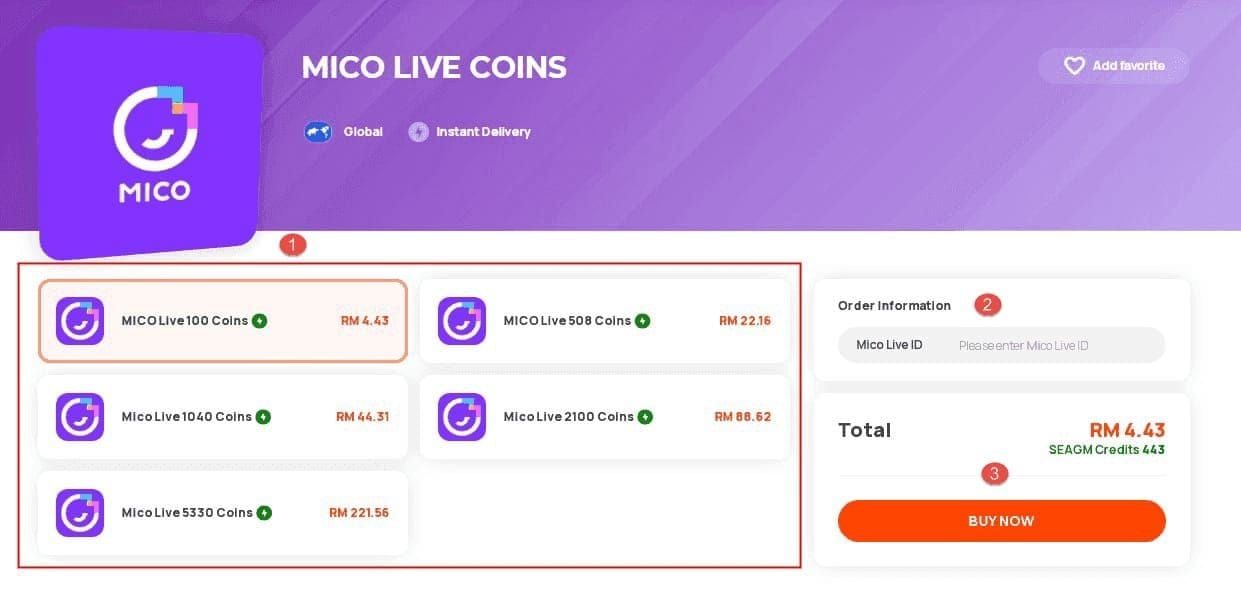
Region Mismatches: Changed locations without updating MICO region causes recharges at unexpected rates or rejection. Region changes require:
- Government ID verification
- 3-month residence proof
- SMS verification
- 24-48 hour processing
- Limited to once per 12 months
Payment Method Timing:
- Cards/wallets: 95% within 5 min, 100% within 30 min
- Cryptocurrency: up to 30 min for blockchain confirmation
- Bank transfers: 1-4 hours
Processing Delays vs Actual Missing Coins
Normal Delays:
- Peak hours (7-11 PM): add 15-30 minutes
- VPN usage: triggers 12-24 hour fraud verification
- Server sync: 30-60 minutes during maintenance
Actual Missing Coins:
- Payment confirmation shows Transaction ID
- Bank shows deduction
- MICO Wallet History (90-day view) shows no credit after double expected delivery time
Device Issues:
- MICO needs 500MB+ free storage to sync wallet data
- Insufficient storage prevents balance updates
- Cached data corruption hides delivered coins
MICO's 2026 Payment System
Payment flow: Gateway validates method → confirms amount → verifies UID exists/active → checks region compatibility → queues delivery.
MICO Refund Policy 2026: Chargebacks filed through banks trigger immediate investigation. Flagged accounts face permanent bans affecting:
- Account itself
- Device ID
- Associated government ID
- Prevents new accounts on same device/documents
Promotional Coins: Expire in 30-90 days. Balance decreases when promotional coins expire—users mistake this for missing purchased coins.
Immediate Action: First 30 Minutes
Right actions in first 30 minutes determine recovery success. Logout/login resolves 60% of cases by forcing server resync.
Step 1: Verify Payment Confirmation
Check email (including spam) for payment confirmation containing Transaction ID. Screenshot immediately—some providers only retain details 7-14 days.
Verify:
- Exact amount charged
- Transaction timestamp
- Last 4 digits of payment method
- Transaction description references MICO
Check payment provider status:
- Pending: authorized but not transferred, no coins until Completed
- Failed/Declined: no money left account, no coins expected
- Completed: should result in delivery
Step 2: Refresh MICO Wallet Balance
Profile → Wallet → pull down to manually refresh. App doesn't auto-refresh—manual sync often reveals delivered coins.
Check Wallet History (90 days) for entry matching recharge amount/timestamp. Compare current balance vs pre-recharge balance.
Wait appropriate time before assuming missing:
- Cards/wallets: 5 minutes
- Cryptocurrency: 30 minutes
- Bank transfers: 4 hours
Step 3: Review Transaction History
Profile > Wallet > History. Filter by date. Look for Purchase or Recharge entries matching payment amount/time.
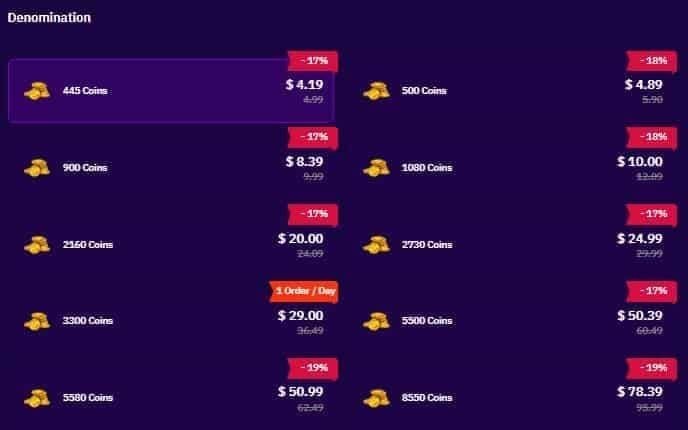
Coin amount should match region rate:
- Global: 110 coins/USD
- MENA: 143 coins/USD
- Other regions: check specific rates
Check for Expired or Promotional Credit Removed entries—expired promotional coins may offset new purchases.
Step 4: Confirm Payment Deduction
Log into bank/card/wallet separately. Verify:
- Exact amount matches intended recharge
- Merchant name (may be payment processor, not MICO)
- Transaction timestamp within 2-3 minutes of recharge initiation
- Status shows Posted/Completed not Pending/Authorized
Pending transactions haven't transferred funds—MICO won't deliver until completed (can take 1-3 business days).
How Long to Wait Before Action
Standard Delivery Timeframes (2026)
Cards/Digital Wallets: 95% within 5 min, 100% within 30 min (credit/debit cards, Apple Pay, Google Pay).
Cryptocurrency: Up to 30 min for blockchain confirmation. Bitcoin during high traffic may take full 30 min. Stablecoins typically 10-15 min.
Bank Transfers: 1-4 hours. Weekends/holidays may delay until next business day.
Peak Hours Impact
7-11 PM in your region: add 15-30 minutes to all methods. Servers handle 3-5x normal volume.
Support response times extend 50-100% during peak hours. Submit tickets 9 AM-5 PM for faster responses.
Special events/promotions spike volume—even cards may take 45-60 minutes.
Red Flag Thresholds
Cards/wallets: 4 hours = genuine problem needing support.
Crypto/bank transfers: 24 hours = action threshold.
Immediate red flags (contact support now):
- Payment shows Failed/Declined but MICO shows pending
- Error message during recharge
- Unusual account activity (unexpected logouts, security alerts)
Safe Recovery Methods (No Chargeback Bans)
Chargeback bans operate automatically—once triggered, even MICO support can't reverse. BitTopup helps avoid risks through verified transactions with buyer protection.
Method 1: In-App Support Ticket
Profile > Settings > Help Center > Contact Support > Payment Issues > Coins Not Received. Routes to specialized payment team.
Required documentation:
- Transaction ID from payment confirmation
- MICO UID (copy from profile, don't type manually)
- Exact purchase timestamp
- Wallet History screenshot showing missing transaction
- Payment proof showing completed deduction
Submit ONE detailed ticket with all documentation. Multiple tickets flag account as potentially fraudulent. Complete cases resolve in 24-72 hours, incomplete take 5-7 days.
Method 2: Customer Service Escalation
If no response within 72 hours, escalate through customer service. Reference original ticket number—don't present as new issue.
Provide same documentation. Remain factual, not emotional. Document all interactions: date, time, representative name, discussion summary.
Method 3: Payment Gateway Verification
If MICO has no transaction record, request payment trace from provider. Takes 5-7 business days (cards) or 10 days (bank transfers).
Request trace for verification purposes, NOT dispute/chargeback. This prevents triggering anti-fraud systems.
Submit trace results to MICO support. Includes routing info, timestamps, merchant confirmation codes.
Required Evidence
Screenshot immediately:
- Payment confirmation (full screen: Transaction ID, amount, timestamp, last 4 digits)
- MICO profile showing UID (long-press UID, tap Copy, then screenshot)
- Wallet History before and after recharge (include date/time)
- Payment provider transaction history (status, amount, date, time, merchant)
Don't crop screenshots—full-screen captures carry more credibility.
The Chargeback Trap: Permanent Bans
Chargebacks are the most dangerous action. Permanent consequences outweigh temporary financial recovery.
What Happens During Chargeback
Payment provider forcibly reverses transaction, debits MICO's account, charges MICO $15-30 fee.
Within 24-48 hours: automated ban of:
- Account username
- Device ID
- IP address
- Government ID documents
Ban is permanent and irreversible. MICO support cannot lift chargeback bans. Automated system treats all chargebacks as fraud, executes without human review.
You lose account, all coins, gifts, content permanently.
Real Cases
Scenario 1: User files chargeback after 30 min, coins arrive at 2 hours during normal processing. Ban already triggered before coins arrive.
Scenario 2: Chargeback for one transaction bans entire account, losing other pending legitimate recharges. Users lose hundreds over $10 disputes.
Scenario 3: Creating new accounts on different devices or using family info gets detected via behavioral patterns, IP addresses, payment linkages. Results in additional bans, potential legal action for identity fraud.
Anti-Fraud Detection System
Machine learning analyzes: transaction patterns, device fingerprints, IP addresses, payment histories, user behavior. Assigns risk scores, monitors for fraud patterns.
Chargeback creates permanent record linking device ID, IP, identity documents to fraud. Persists indefinitely. Future account creation attempts auto-reject.
System operates automatically without human oversight for chargebacks. Support teams cannot access or override.
Safe Alternatives
Official refund: Profile > Settings > Help Center > Contact Support > Payment Issues > Request Refund. Takes 5-7 business days, preserves account.
Escalate, don't chargeback: If no response within 24-72 hours, escalate through customer service.
Payment trace, not chargeback: For bank issues, request trace providing documentation without reversing payment.
Common Recovery Mistakes
Filing Multiple Tickets Quickly
Multiple tickets flag account as fraudulent or attempting duplicate credits. System may auto-hold all tickets for fraud review, adding 3-5 days.
Each ticket creates separate case number. Support must consolidate, verify duplicates, merge documentation—delays investigation.
If multiple tickets submitted, wait for response to any ticket. If 72 hours pass, escalate referencing all ticket numbers—don't create more.
Contacting Bank Before MICO Support
Bank reps may recommend dispute/chargeback as standard procedure, causing permanent bans.
Banks can't resolve MICO delivery issues—only confirm payment reached merchant. Only MICO support resolves delivery.
If contacting bank, explicitly request transaction verification only, not dispute/chargeback. Use confirmation as evidence in MICO ticket.
Deleting Transaction Evidence
Clearing email, deleting confirmations, clearing app cache destroys evidence needed for recovery.
Transaction IDs locate your transaction. Without them, manual search through thousands of transactions extends resolution from 24-72 hours to 7-10 days.
Wallet History screenshots establish baseline balance, prove coins didn't arrive.
Using Unofficial Channels
Social media complaints before official support wastes time, potentially harms case. Social teams can't access accounts or process refunds.
Public complaints with inaccurate info create inconsistencies with later tickets, triggering fraud review.
Fake support accounts on social media/messaging are scams requesting login credentials, payment info, personal details. Sharing info causes account hijacking.
Documenting Your Case for Success
Complete, organized evidence accelerates cases from weeks to 24-72 hours.
Essential Screenshots
Payment confirmation: Transaction ID, exact amount, timestamp, merchant name, last 4 digits. Capture before navigating away.
MICO profile: UID visible. Long-press UID, tap Copy, paste to note app as backup.
Wallet History: Full screen, recent transactions, date/time visible. Multiple screenshots if history is long.
Payment provider: Transaction showing status, amount, date, time.
Transaction ID Importance
Unique identifier linking payment to MICO merchant account.
Location:
- Cards: confirmation email, card issuer transaction details
- Digital wallets: wallet transaction history
- Cryptocurrency: blockchain transaction hash
- Bank transfers: reference/transfer ID
Without Transaction ID, manual search during peak periods (thousands/hour) becomes nearly impossible. Cases take 5-10x longer.
Copy exactly—don't retype. Single incorrect character makes ID unsearchable.
Payment Confirmation Email
Forward to dedicated folder (MICO Transactions). Ensures access even if provider portal only retains 30-60 days.
Save both authorization and completion emails. Authorization proves initiation, completion proves processing.
Check spam folder immediately if no email received. Mark as Not Spam.
Timeline of Events
Document exact sequence:
- Recharge initiation time
- Payment confirmation time
- First wallet check time
- Missing coins discovery time
- Support ticket submission time
Include troubleshooting steps: force-close app, logout/login, Wallet History check, payment verification.
Shows support you've attempted basic troubleshooting, allowing them to skip to advanced investigation.
Prevention: Avoiding Future Missing Coins
Simple verification before recharging reduces missing coin risk by 90%.
Reliable Recharge Platforms (BitTopup)
BitTopup advantages over direct in-app:
- Real-time transaction tracking (updates every 30-60 seconds)
- Dedicated recharge support
- Competitive pricing
- Buyer protection without chargebacks
Automatic escalation if coins don't arrive within promised timeframe—no user action needed.
Tracking shows: Payment Received → Processing → Delivering to Account → Completed with estimated times.
Best Recharge Times
Off-peak (9 AM-5 PM): 60-70% less volume. Cards complete in 3-5 min vs 15-20 min peak.
Avoid promotional events: Unless you want bonus. Events drive 3-5x volume, extending delivery significantly.
Avoid holidays: Bank transfers/cards operate on reduced schedules. Transfers may not process until next business day.
Payment Method Selection
Fastest (cards/wallets): 95% within 5 min. Best for urgent needs.
Privacy (crypto): Requires patience. Bitcoin may take full 30 min, stablecoins 10-15 min.
Lowest fees (bank): 1-4 hours business hours. Only for large recharges where fee savings justify wait.
Pre-Purchase Verification
Region: Profile > Account Settings > Region. Confirm matches location/payment method. Update before recharging if recently moved.
UID: Copy from profile (long-press, tap Copy), paste into recharge form. Eliminates 12-15% manual entry error rate.
Storage: Verify 500MB+ free space. Clear cache/delete apps if low.
VPN: Disable before recharging. Adds 12-24 hour fraud verification delay. Reconnect after delivery.
Escalating Your Case
Escalation Timeline
Cards/wallets: Escalate if no response within 24 hours. Initial acknowledgment should occur within 24 hours.
Crypto/bank: Wait 48 hours before escalating.
Unresolved after response: Escalate at 7 days. Exceeds all documented resolution timeframes.
Higher-Level Support
Escalate through customer service, not new tickets. Reference original ticket number, explain you've waited beyond stated timeframe.
Request supervisor review for 7+ day cases. Explicitly state requesting supervisor/management review due to extended timeline. Routes to senior staff with broader authority.
Document escalations: screenshot requests, note date/time, save responses.
Escalation Content
Include:
- Original ticket number
- Submission date
- Brief issue summary
- All original documentation (escalation recipient may not access original ticket)
- Specific resolution sought (coins credited, refund, etc.)
Remain factual and professional. Emotional language triggers defensive responses, may flag case for legal review.
Why BitTopup is Safest for MICO Recharge 2026
Instant Delivery Guarantee
Real-time tracking from payment to delivery. Updates every 30-60 seconds.
Automatic escalation for delays—no user action needed. Proactive resolution before users notice problems.
Status updates: Payment Received → Processing → Delivering → Completed with time estimates.
Customer Protection
Refunds for undelivered coins without chargebacks that ban MICO accounts. BitTopup issues refunds through own systems.
UID verification before processing payment. Copy-paste UID, system verifies exists/active. Prevents 12-15% manual entry errors.
12-month transaction records vs MICO's 90 days. Provides evidence for delayed cases.
24/7 Specialized Support
Round-the-clock support exclusively for recharge issues. Unlike MICO's general support handling all issues.
Specialized expertise accelerates troubleshooting—minutes vs 24-72 hours.
Multi-channel: live chat (urgent), email/tickets (complex). Choose method matching urgency.
Verified Transaction Security
Verified payment gateways, secure protocols. Redundancy systems reroute if primary gateways fail.
Two-factor authentication, payment confirmation for large transactions, fraud detection blocking suspicious activity.
Confirms coin delivery before marking complete. Queries MICO servers to verify arrival, creates audit trail.
FAQ
How long does MICO recharge take?
Cards/wallets: 5-30 min. Crypto: 30 min. Bank: 1-4 hours. Peak hours add 15-30 min. If coins don't arrive within double expected time, it's a delivery issue.
What if coins don't appear after payment?
Verify payment completed, force close app, wait 30-60 sec, reopen. Check Wallet History. If no coins after appropriate wait (30 min cards, 4 hours bank), submit ticket: Profile > Settings > Help Center > Contact Support > Payment Issues with Transaction ID, UID, payment proof.
Can chargebacks ban me?
Yes. Permanent ban within 24-48 hours affecting account, device ID, identity documents. Automatic, irreversible—support can't lift. Bans new accounts on same device/documents. Use official refund process instead.
How to check transaction history?
Profile > Wallet > History (90 days). Shows purchases, gifts, spending, promotional credits. Each entry: type, amount, timestamp, source. Filter by date.
What info needed to recover coins?
Transaction ID, MICO UID (copied from profile), exact timestamp, Wallet History screenshots (before/after), payment proof showing deduction. Submit all in single ticket for fastest resolution.
Why are coins delayed?
Payment processing times (cards 5-30 min, crypto 30 min, bank 1-4 hours), peak hours (+15-30 min), VPN (12-24 hour verification), server sync (30-60 min), insufficient storage (need 500MB+). Verify appropriate wait time and storage before assuming missing.
Avoid missing coin headaches—recharge MICO coins safely through BitTopup with instant delivery, 24/7 support, zero chargeback risks. Get coins in minutes!