What Defines Peak Hours
Peaks emerge from concentrated user activity during live streaming, battles, and gifting. Evening hours capture largest audiences post-work/school.
Weekend evenings spike 30-40% above weekday peaks. Friday-Sunday nights see transaction volumes surge. Major events and celebrity appearances compound standard delays.
Regional variations:
- Asian markets: 7-11 PM local time
- European users: 8 PM-midnight
- North America: dual peaks at 6-8 PM and 9-11 PM (East/West Coast)
Global Time Zones and Regional Patterns
Asian-Pacific regions dominate Likee's user base, making their peaks particularly congested. When multiple time zones overlap evenings, global server load maxes out.
Fastest windows:
- 2-6 AM: 1-2 seconds to 5-10 minutes (minimal queue)
- 9 AM-12 PM: steady processing without congestion
Major Events Triggering Peak Conditions
Platform-wide events create predictable surges lasting several days. Q2 2026 updates will enable 40% faster delivery during critical periods.
Live battle tournaments create most intense peaks. When popular creators compete, audiences rush to buy diamonds, creating transaction spikes that overwhelm capacity. Plan 24-48 hours ahead.
Holiday seasons (November-January) maintain elevated traffic. Even off-peak hours may see moderate delays.
Peak vs Off-Peak Data Comparison
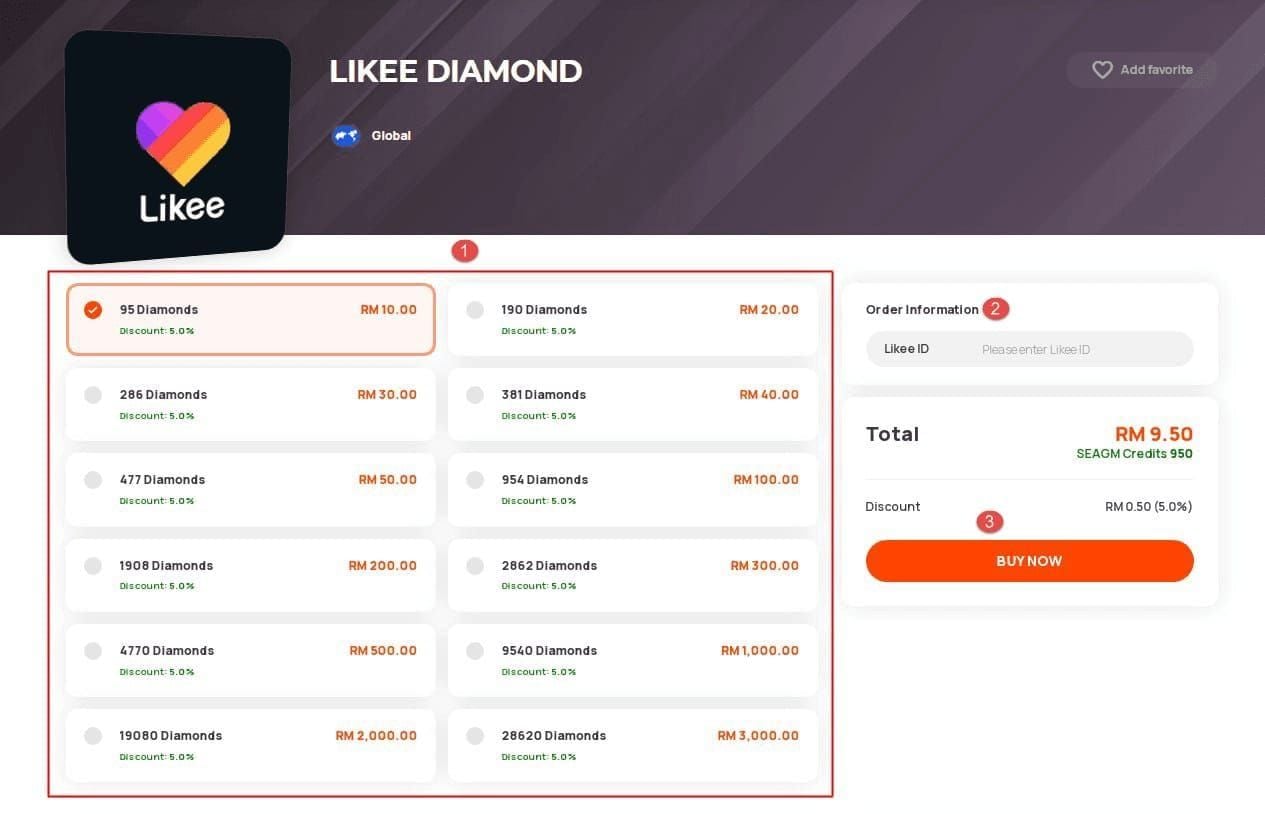
Standard (moderate traffic): 5-30 minutes
Peak hours (6-10 PM):
- 15-minute recharge → 22-30 minutes
- 50-100% extension applies proportionally
Off-peak (2-6 AM):
- Small/medium: 1-2 seconds
- Large transactions: 5-10 minutes
- 70-90% faster than peaks
Diamond Delivery Time Windows (2026 Updated)
Delivery operates through multi-stage verification balancing security with speed. Payment queue functions first-in-first-out normally, but peaks introduce priority algorithms.
Standard Delivery Times
Optimal conditions:
- Under 1,000 diamonds: 5-10 minutes
- 1,000-5,000 diamonds: 10-20 minutes
- Over 5,000 diamonds: up to 30 minutes (extra security)
80% complete within 24 hours. Only 10% extend beyond 24 hours; 90% of pending cases resolve within 48 hours.
Peak Hour Windows
Evening 6-10 PM transforms 5-30 minutes into 7-60 minutes. Worst congestion hits 7-9 PM—expect 45-60 minutes.
Weekend peaks compound delays. Friday/Saturday evenings may reach 60-90 minutes during major events.
Recharge Amount Impact
- Under 500 diamonds: fastest (simplified verification)
- 500-3,000 diamonds: standard priority, typical delays
- Over 5,000 diamonds: +5-10 minutes for security, sometimes priority routing
Payment Method Impact
Digital wallets: 20-30% faster (pre-verified, skip authentication). Peak advantage widens to 5-10 minutes saved.
Credit/debit cards: +3-5 minutes normally, +5-10 during peaks. Refunds take 3-5 business days.
Carrier billing: slowest. +10-15 minutes normally, +20-30 during peaks. Refunds take 7-10 business days.
First-Time Verification: Why First Purchase Takes Longer
First purchases require 24-48 hour verification regardless of timing. This applies universally to all new accounts.
Experiencing delays? Likee first top up verification delay is standard security—BitTopup provides clear status updates throughout.
Verification Process Breakdown
Stage 1: Account verification checks age, profile completion, activity history, linked authentication. Newer accounts face more scrutiny.
Stage 2: Payment method verification confirms legitimacy, fraud indicators, billing accuracy. Involves coordination with payment processors.
Stage 3: Identity confirmation. May require additional documentation for high-value purchases. 6-digit code valid for 10 minutes.
Security Checks Causing Delays
Anti-fraud algorithms: scan for suspicious patterns, unusual amounts, mismatched info. Need 12-24 hours for comprehensive analysis.
Geographic verification: confirms account location, payment region, IP address align. VPN use almost guarantees extended delays.
Account history: examines creation date, posting patterns, engagement. Accounts created immediately before purchase face heightened scrutiny.
First Purchase Waiting Times
24-48 hour window operates independently of peak hours. 80% complete within 24 hours (off-peak submissions, complete profiles, standard payments). Remaining 20% extend to 36-48 hours.
Weekend/holiday submissions may reach 60-72 hours due to reduced manual review staff.
Faster First-Time Approval Prep
Before purchasing:
- Complete profile: photo, bio, link social media
- Verify Likee ID: Profile icon → View/Edit Profile → confirm 10-digit numeric ID (UID mismatches cause 60-70% of failures)
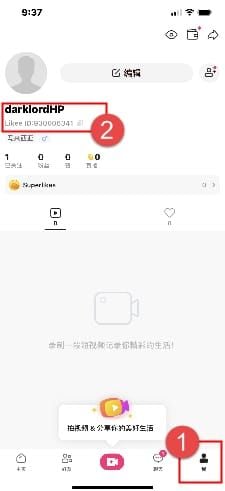
- Device requirements: iOS 12.0+, Android 6.0+, 1GB+ free storage
- Update app to latest version
Why Diamonds Take Longer During Peaks: Technical Explanation
Peak hours increase transaction volume 300-400% vs off-peak. This overwhelms standard capacity, forcing queue management protocols.
Server Load and Queue Systems
Payment servers use tiered queues. Normal operations process instantly; peaks create waiting periods.
Load balancing routes transactions to less-burdened servers. Geographic redistribution adds 2-5 minutes but prevents overload.
Q2 2026 upgrades: 40% faster delivery during peaks via expanded processing nodes, optimized algorithms, enhanced load distribution.
Transaction Volume Impact
Volume spikes: 1,000/min baseline → 4,000+/min during events (300-400% surge).
Payment verification bottleneck: 1-2 seconds normally → 5-10 seconds during peaks.
Balance update propagation: wallet sync cycles run every 15-30 minutes, may take 20-25 minutes during peaks.
Security Protocol Slowdowns
Enhanced monitoring during peaks adds 3-5 minutes for additional fraud checks.
Real-time fraud detection across entire user base requires extra processing power.
Multi-factor authentication increases for high-risk transactions, adding 5-10 minutes if not completed immediately.
Regional Server Differences
Asian-Pacific: highest volumes, most susceptible to congestion
European/North American: greater capacity margins, only 30-50% extension vs 50-100% in Asia
Cross-regional transactions: +10-15 minutes for geographic verification and routing
Peak Hour Patterns: When Delays Are Longest
Daily Peaks
6-10 PM universal peak: 7-9 PM core experiences worst delays
11 PM-2 AM: transition period, moderate traffic
Weekends: Friday 5 PM-11 PM+; Saturday/Sunday 2-11 PM elevated
Monthly Cycles
- First weekend: promotional events
- Mid-month (~15th): payday spending surges
- Month-end: competition finalization, 150-200% above baseline
Creator anniversaries trigger localized 2-4 hour surges.
Holiday Impact
Highest sustained traffic: Dec 30-Jan 2 (New Year)
24-48 hour surges: Valentine's Day (Feb 13-14)
Regional festivals: Lunar New Year (5-7 days), Diwali, Eid
Year-end (mid-Nov to early Jan): 40-60% above normal, even off-peak hours see moderate delays
Live Battles
Scheduled battles: 500-700% transaction increase during event window
Popular creator battles: recharge 24-48 hours ahead to avoid traffic
Spontaneous viral moments: maintain diamond buffer for participation
Planning Event Recharges: Strategic Timing
24-48 Hour Advance Strategy
Recharge 24-48 hours before events for safety margins. First-time buyers need 48-hour minimum. Established accounts work within 24 hours.
Weekend events: extend to 72 hours. Thursday evening recharges ensure Friday-Sunday readiness.
2026 Event Calendar
Quarterly competitions: announced 7-14 days ahead
Seasonal celebrations: Valentine's, summer festivals, Halloween, New Year (predictable)
Creator events: announced 3-7 days ahead
Buffer Time Calculation
Evening events during peaks:
- 30-min standard + 50% extension = 45 min
- Add 15-min safety = 60-min total buffer
First-time purchases: add 24-48 hours to all calculations. New user for Friday event should recharge by Wednesday evening.
High-stakes events: 24-hour buffer even for established users
Emergency Recharge Options
Fastest: 2-6 AM window (1-2 seconds to 10 minutes)
Secondary: 9 AM-12 PM (10-20 minutes)
Peak hour emergency: smaller amounts process faster than large transactions
Avoiding Peak Delays: Best Recharge Times
Optimal Windows by Day
Monday-Thursday 9 AM-12 PM: most consistent fast delivery
Tuesday/Wednesday: lowest weekly traffic (ideal anytime)
Friday-Sunday: target before 10 AM or after 11 PM
Early Morning/Late Night Advantages
2-6 AM: fastest platform-wide (10-15% of peak volumes)
- Small amounts: 1-2 seconds
- Large transactions: 5-10 minutes max
- 70-90% faster than peaks
11 PM-2 AM: compromise for those unable to wake early, still significantly reduced traffic
Pre-Event Timing
Announced events: recharge during optimal window 24-48 hours before
Major weekend events: Thursday morning or Tuesday/Wednesday evening
Viral moments: maintain standing balance via regular small recharges during optimal windows
Checking Server Load
Activity indicators: high concurrent streams, trending content, active battles signal elevated load
Transaction history test: Profile → Wallet → Transaction Log → pull to refresh. If refresh takes >2-3 seconds, load is elevated.
Wallet sync cycles: recharge immediately after successful sync (runs every 15-30 minutes) to process in next cycle
BitTopup Advantage: Reliable Peak Hour Delivery
BitTopup's specialized infrastructure and platform partnerships enable consistent delivery during high traffic. Dedicated processing channels reduce peak hour impact.
How BitTopup Handles High Traffic
Dedicated server capacity: reduces competition with general platform traffic
Priority routing: agreements with payment processors for expedited handling
Advanced queue management: optimizes transaction batching while maintaining fair chronological order
Peak Hour Performance Comparison
Standard peaks: BitTopup maintains 10-30 minutes vs 45-60 minutes direct platform
Off-peak (2-6 AM): 1-5 minutes for standard recharges, matching or exceeding direct platform
First-time verification: standard 24-48 hours with clearer status updates and stage notifications
Priority Processing
High-volume/returning customers: enhanced priority during peaks
Secure transaction history: reliability scores influence processing priority
Customer support: 24-48 hour response to delivery concerns with status updates and resolution assistance
Support During Delays
Real-time tracking: monitor progress through each stage
Proactive notifications: alerts when transactions exceed expected windows with revised estimates
Resolution assistance: direct intervention with payment processors, manual review escalation for stuck transactions
Troubleshooting Delayed Deliveries
How Long to Wait
Off-peak: 30 minutes before investigating
Peak hours: 60-90 minutes (routine delays)
First-time purchases: full 24-48 hours unless explicit error notification
Checking Order Status
Profile → Wallet → Transaction Log:
- Clock icon: pending (normal within 48 hours)
- Green checkmark: completed (pull down to refresh if balance not updated)
- Red X: failed (needs resolution)
Common Causes and Fixes
UID mismatch (60-70% of failures): Profile icon → View/Edit Profile → verify 10-digit numeric ID matches purchase info
App cache issues:
- Android: Settings → Apps → Likee → Storage → Clear Cache
- iOS: Settings → General → iPhone Storage → Likee → Offload App → reinstall
Connection instability: Enable airplane mode 10 seconds → disable. Ensure 1-2 Mbps connectivity. Disable VPN during purchase and 10-15 minutes after.
Contacting Support
When: After 48 hours if pending (90% resolve within 48 hours)
Prepare: Order ID, amount, payment method, timestamp. Google Play format: GPA.####-####-####-#####
Response time: 24-48 hours. Include screenshots of transaction history and error messages.
Expert Diamond Management Tips (2026)
Maintaining Diamond Buffer
Establish threshold: If you gift 500 diamonds weekly, maintain 1,000-diamond buffer
Recharge trigger: When balance hits threshold, not when depleted
Seasonal adjustment: Increase 50-100% during Nov-Jan and major events
Setting Recharge Reminders
Track consumption: Monitor 2-3 months for baseline usage
Schedule recurring recharges: Tuesday mornings or Wednesday evenings during optimal windows
Adjust before events: Move scheduled recharges earlier by 24-48 hours
Bulk Purchase Strategies
Consolidate monthly needs: One or two large purchases during optimal windows vs multiple small recharges
First-time users: Complete initial small purchase and verification before large recharges
Promotional periods: Strategic bulk buying during bonus diamond events
Account Verification Best Practices
After first purchase: Link payment methods, verify email/phone, complete profile
Consistent payment methods: Switching triggers additional verification
Device optimization:
- Android: Settings → Battery → Optimization → Likee → Don't optimize
- iOS: Allow all requested permissions
FAQ
How long for diamonds during peak hours?
6-10 PM extends delivery 50-100%, resulting in 7-60 minutes. Worst period (7-9 PM) typically needs 45-60 minutes. Off-peak 2-6 AM delivers in 1-2 seconds to 10 minutes.
Why is my first purchase taking long?
First purchases need 24-48 hour verification (account checks, payment validation, identity confirmation) regardless of timing. 80% complete within 24 hours. Complete profiles verify faster.
Best times to recharge and avoid delays?
2-6 AM optimal (1-10 minutes). Secondary: Tuesday-Thursday 9 AM-12 PM. Avoid Friday-Sunday evenings and 6-10 PM daily peak.
How far ahead to recharge for events?
24-48 hours before events. First-time buyers need 48-72 hours minimum. Weekend events warrant Thursday recharges.
What if diamonds don't arrive on time?
Wait 60-90 minutes during peaks (routine). Check Profile → Wallet → Transaction Log for status. Verify 10-digit Likee ID matches purchase, clear app cache, refresh wallet. Contact support after 48 hours.
Does BitTopup deliver faster during peaks?
Yes. BitTopup maintains 10-30 minutes during evening peaks vs 45-60 minutes direct platform. Dedicated infrastructure, priority routing, and optimized queue management enable consistent performance with competitive pricing and responsive support.
Don't let peak delays ruin your Likee experience! Recharge through BitTopup now for reliable, fast delivery even during high traffic. Get diamonds ready before your next live event—start your recharge today!























































































































