Why Scammers Use Regedit in Scam Names
The technical terminology serves multiple purposes:
- Creates sophistication illusion appealing to players seeking advanced optimization
- Obscures true purpose behind jargon most mobile gamers don't understand
- Establishes false equivalence with legitimate PC gaming modifications
Scammers target Free Fire's massive mobile player base (predominantly aged 13-25) who may lack experience identifying credential harvesting schemes. The Regedit01 Special Free Fire Panel and variants documented October 29, 2025 follow this naming pattern to maximize perceived legitimacy while delivering account-stealing malware.
Real Game Files vs Fake Configs
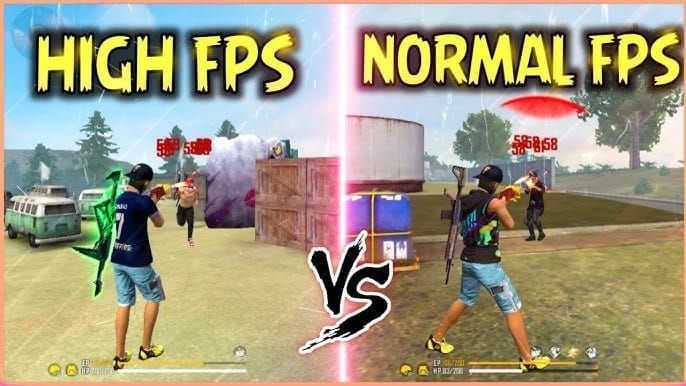
Authentic Free Fire configuration files never exist as standalone downloads. They integrate within the game's encrypted data structure, modified only through official in-game settings. File sizes match Garena's published specifications, with checksums verifying integrity during each launch.
Fake configs exhibit distinct characteristics:
- Arrive as ZIP archives containing folders named com.dts.freefireth
- Claim to require manual placement in Android/Data directories
- Promise impossible features like 100% headshot accuracy or anti-ban protection
- Installation steps mirror legitimate processes to deceive inexperienced users
The Fake Anti-Ban Config Scam: How It Works
The scam begins with enticing promises across social media, YouTube tutorials, and messaging apps. Distributors claim their Economic Panel Free Fire or Ultra Panel Free Fire provides ban immunity while enhancing aim accuracy. These claims contradict Garena's documented anti-cheat capabilities, which operate server-side where no client-side modification can interfere.
What Happens When You Download These Files
The moment you grant file access permissions, malicious code activates. Unlike legitimate game files sandboxed within app-specific directories, these configs request broad storage permissions enabling system-wide data access. Files scan your device for saved login credentials, authentication tokens in Free Fire's legitimate data folders, and linked social media account information.
Modern variants employ sophisticated techniques. Some configs include actual minor graphical tweaks—slightly adjusted crosshair sizes or color modifications—while background processes harvest your data. This dual-purpose design prevents immediate detection.
Step-by-Step: How Your Account Gets Stolen
Phase 1: Installation and Permission Harvesting
You extract the ZIP and copy folders to Android/Data. The modified com.dts.freefireth folder contains executable code disguised as configuration data. When Free Fire launches, it reads these files, triggering the malicious payload.
Phase 2: Credential Extraction
Code accesses Free Fire's authentication cache, extracting your login token—an encrypted string maintaining your logged-in session. Simultaneously scans for saved passwords in your device's credential manager and captures Facebook, Google, or VK account tokens linked to your profile.
Phase 3: Data Transmission
Stolen credentials transmit to remote servers controlled by scammers, disguised as routine game analytics traffic. This occurs during normal gameplay. Your account information enters underground marketplaces within hours.
Phase 4: Account Takeover
Scammers use your login token to access your account from different devices. They immediately change your password, unlink social media accounts, and modify recovery email addresses. By the time you notice unusual activity, recovery becomes extremely difficult.
Real Data: What Information Gets Compromised
Beyond login credentials, these configs harvest comprehensive device data: device ID, IMEI number, installed app list, contact information, and browsing history. Scammers compile this data for targeted phishing attacks against you and your contacts.
Financial information faces particular risk. If you've saved payment methods in Google Play or linked credit cards to your account, this data may be accessible depending on your device's security configuration.
7 Red Flags That Identify Malicious Free Fire Config Files
Red Flag #1: Promises of Ban Protection
No legitimate tool can prevent bans because Garena's anti-cheat operates server-side. When files claim 100% ban risk for headshots wall shots or advertise anti-ban features, they're advertising impossibilities. Garena's permanent suspension policy for unauthorized tools (confirmed April 19, 2025) applies regardless of what any config promises.
Technical reality: Garena's servers validate every shot trajectory, movement pattern, and damage calculation. Client-side files cannot modify server-side validation logic.
Red Flag #2: Requests for Excessive Device Permissions
Legitimate game configurations require zero additional permissions beyond what Free Fire already possesses. When installation instructions demand you enable Unknown Sources, disable Play Protect, or grant storage access to third-party apps, you're enabling malware installation.
Compare to official processes: Garena updates arrive through Google Play Store with pre-verified permissions. You never manually copy files to system directories or modify security settings.
Red Flag #3: No Official Source or Verification
Garena exclusively distributes Free Fire content through official app stores and their verified website. Any config file from Telegram channels, YouTube description links, or third-party download sites lacks official authorization.
Verify sources by checking official Garena social media accounts and the Free Fire website's news section. Legitimate performance updates appear as in-game patches with detailed patch notes, not downloadable ZIP files requiring manual installation.
Red Flag #4: Suspicious File Extensions and Sizes
Free Fire's legitimate configuration data exists in encrypted formats with specific file extensions (.unity3d, .dat, .obb). Configs arriving as .zip, .apk, or .exe files containing folders named exactly com.dts.freefireth are recreations designed to appear authentic while delivering malicious payloads.
File sizes provide additional clues. A genuine game update ranges from 50MB to 500MB depending on content. A 5MB Headshot Config File claiming to revolutionize gameplay lacks the data volume necessary for legitimate changes.
Red Flag #5: Requires Disabling Security Features
Instructions to disable Google Play Protect, turn off antivirus software, or enable Developer Options exclusively benefit malware installation. Legitimate apps function perfectly with all security features active.
Security software blocks these files because signature analysis identifies credential-harvesting code. When distributors claim antivirus false positives, they're exploiting users' limited technical knowledge to bypass protective systems.
Red Flag #6: Community Warnings and Negative Reports
Search the config's name alongside terms like scam,stolen account, or malware before downloading. Established Free Fire communities on Reddit and official forums quickly identify and report malicious tools.
Pay attention to account age and post history when evaluating recommendations. Scammers create fresh accounts to promote their configs, while genuine community members have established posting histories discussing legitimate gameplay.
Red Flag #7: Too-Good-To-Be-True Performance Claims
Claims of auto headshot,wall hacks, or aimbot describe cheating tools that Garena's anti-cheat detects within minutes. The REGEDIT01 Special Free Fire Panel promising these features cannot deliver them without triggering immediate permanent suspension.
Physics and game mechanics impose limitations no config can overcome. Bullet spread, recoil patterns, and hit detection occur server-side. A client-side file cannot modify these calculations without creating detectable discrepancies.
Real Player Experiences: Account Theft Case Studies
A level 65 player with three years of progress downloaded the Economic Panel Free Fire after watching a convincing YouTube tutorial. Within 48 hours, their account accessed from an IP address in a different country. By the time they noticed, the scammer had transferred all valuable items to alternate accounts and changed recovery credentials.
The scammer had gradually modified account details over several days, avoiding sudden changes that might trigger security alerts. They linked new email addresses, added two-factor authentication to their own device, and systematically stripped the account of everything valuable.
How Scammers Sell Stolen Accounts on Underground Markets
Stolen Free Fire accounts enter tiered marketplaces based on level, skin collection, and diamond balance. A level 50+ account with rare skins sells for $50-$200 on underground forums. Scammers specifically target accounts showing in-game purchase history.
The marketplace ecosystem includes account checkers who verify stolen credentials, cleaners who modify account details to prevent recovery, and resellers who market accounts to unsuspecting buyers.
The Emotional and Financial Cost of Account Loss
Beyond monetary value, players lose years of progress, friend connections, clan memberships, and achievement records. The emotional impact often exceeds financial loss, particularly for younger players who've invested significant time building their in-game identity. Garena's zero-tolerance policy means no appeals process exists—once banned for using unauthorized tools, recovery becomes impossible.
Why No Config Can Actually Bypass Garena's Anti-Cheat
Garena's anti-cheat architecture operates on fundamental principles that client-side modifications cannot circumvent. Every game action—shooting, movement, item usage—sends data packets to Garena's servers for validation. The server compares received data against acceptable parameters, rejecting impossible values regardless of what your local game files claim.
When you fire a weapon, your device sends shot angle, target coordinates, and timing data. Garena's server calculates whether that shot could physically hit based on weapon stats, distance, and movement. A config claiming 100% headshot accuracy cannot force the server to accept impossible trajectories.
Server-Side vs Client-Side: The Technical Reality
Client-side files control only what you see on your screen—visual effects, UI elements, and local predictions. Server-side systems control what actually happens—damage calculation, hit registration, and match outcomes. This separation exists specifically to prevent cheating.
When configs modify client-side files to display perfect aim visually, the server still validates each shot independently. Discrepancies between client claims and server physics trigger automatic flags. Garena's system detects these inconsistencies within minutes, resulting in permanent suspension.
Common Misconceptions Debunked
Small modifications won't be detected
Garena's system monitors file integrity through checksums and hash verification. Any modification to com.dts.freefireth files creates detectable signatures, regardless of change size.
Many players use configs without bans
Scammers fabricate these claims or reference players not yet detected. Garena implements ban waves rather than instant suspensions, catching violators in batches.
VPNs hide config usage
Network masking cannot hide client-side file modifications. Detection occurs through gameplay data analysis, not IP tracking.
Paid configs are safer than free ones
Payment creates false legitimacy. The Free Fire Panel Pro requiring Telegram payment still violates Garena's terms identically to free alternatives. Scammers profit twice—from initial payment and subsequent account theft.
Immediate Actions If You've Downloaded Suspicious Files
Step 1: Disconnect from Internet Immediately
Enable airplane mode on mobile devices or disable WiFi/mobile data. This stops credential harvesting processes from sending already-collected data while you implement protective measures.
Step 2: Change Your Password from a Secure Device
Use a different device—one that never had the suspicious files installed—to access your Free Fire account through official channels. Change your password immediately to a strong, unique combination of 12+ characters including uppercase, lowercase, numbers, and symbols.
Step 3: Enable Two-Factor Authentication
Activate 2FA through your linked Facebook, Google, or VK account settings. This adds a verification layer requiring physical access to your phone, preventing scammers from accessing your account even with stolen passwords.
Configure 2FA to send codes to your phone number rather than email. Update recovery phone numbers and backup email addresses.
Step 4: Scan Your Device for Malware
Install reputable mobile security software from official app stores—Malwarebytes, Bitdefender, or Kaspersky. Run comprehensive system scans to identify and remove malicious files beyond the obvious config folders.
Some sophisticated malware persists even after deleting visible files. Security software detects hidden processes, background services, and system modifications that manual deletion misses.
Step 5: Contact Garena Support with Evidence
Document everything: download dates, file names, source URLs, and any unusual account activity. Submit detailed reports through official Garena support channels with this evidence.
Include screenshots of suspicious files, installation instructions you followed, and any communication with file distributors. This information aids Garena's security team in tracking scam operations.
Protecting Your Free Fire Account: Complete Security Checklist
Essential Security Settings Every Player Should Enable
Account Binding: Link your Free Fire account to Facebook, Google, and VK simultaneously. Multiple bindings create redundancy—if scammers compromise one linked account, others provide recovery pathways.
Login Notifications: Enable alerts for new device logins through your linked social media account settings. Immediate notification of unauthorized access allows rapid response.
Privacy Controls: Set your profile to private, limiting who can view your player ID, friend list, and activity status.
Payment Protection: Never save payment methods directly in Free Fire. Instead, use secure platforms like BitTopup for buy ff diamonds online, which processes transactions without exposing your financial data to potential in-game vulnerabilities.
How to Verify Official Free Fire Communications
Garena communicates exclusively through verified channels: in-game announcements, official website news sections, and verified social media accounts with blue checkmarks. Emails claiming to be from Garena should be verified by checking sender addresses—legitimate emails originate from @garena.com domains, never free email services.
Suspicious communication patterns include urgent language demanding immediate action, requests for password information, or links to external websites for account verification. Garena never requests passwords through email or messages.
Creating Strong, Unique Passwords for Gaming Accounts
Effective passwords combine randomness with memorability. Use passphrases—four or more unrelated words combined with numbers and symbols—rather than single words with character substitutions. Sunset$Mountain7Ocean!Tree provides superior security compared to P@ssw0rd123.
Implement unique passwords for each gaming account and associated email addresses. Password managers like Bitwarden or 1Password securely store these credentials.
Regular Security Audits: Monthly Account Check-Up
Schedule monthly reviews of account activity, checking login history for unfamiliar devices or locations. Review linked accounts, recovery email addresses, and phone numbers to ensure scammers haven't added unauthorized recovery methods.
Examine in-game friend lists for unknown accounts that may have been added without your knowledge. Remove suspicious friends and report accounts exhibiting scam behavior patterns.
Legitimate Ways to Optimize Free Fire Performance
Official In-Game Settings for Better Frame Rates
Free Fire's graphics settings menu provides comprehensive performance controls without requiring external files. Reduce graphics quality from Ultra to Smooth for significant frame rate improvements on mid-range devices. Disable shadows, character details, and effects to prioritize responsiveness over visual fidelity.
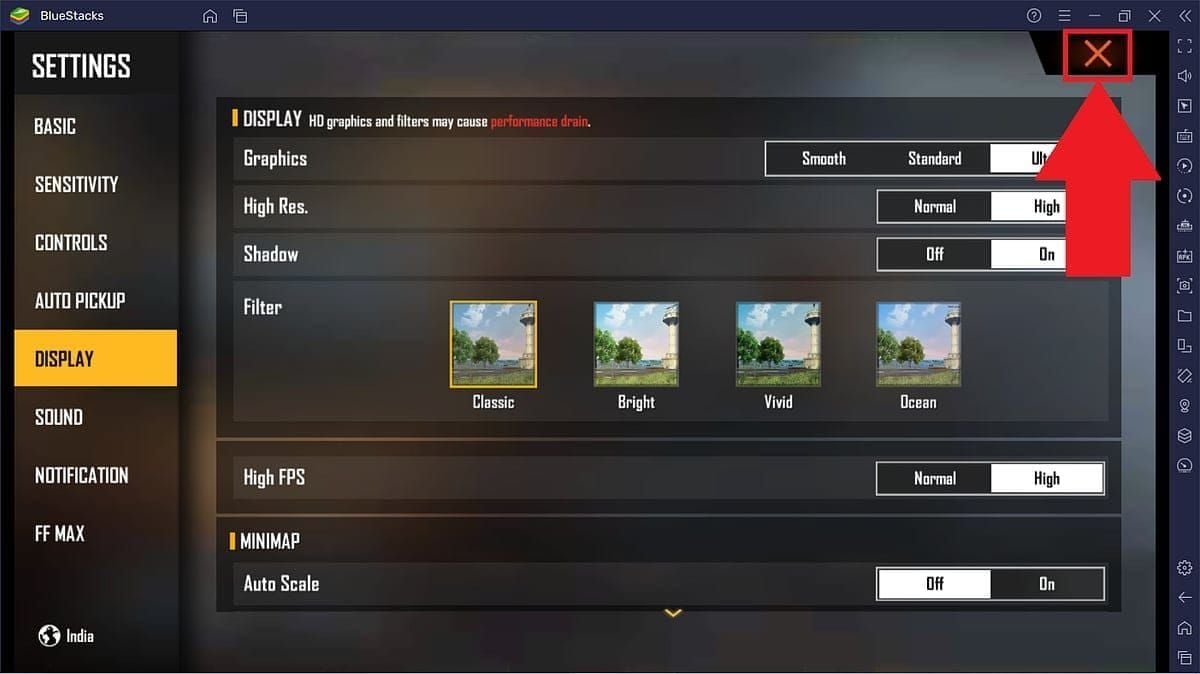
Adjust resolution settings based on your device capabilities. Lower resolutions reduce processing demands, enabling consistent 60fps gameplay on devices that struggle with maximum settings.
Device-Level Optimizations That Are Actually Safe
Close background applications before launching Free Fire to free RAM and processing power. Disable automatic updates, notifications, and background sync during gameplay sessions.
Enable Game Mode or Performance Mode in your device's system settings—most modern Android devices include these features specifically for gaming optimization. These modes prioritize processing power for active applications and reduce background activity.
Network Configuration for Reduced Lag
Connect to 5GHz WiFi networks when available, as they offer lower latency than 2.4GHz alternatives despite shorter range. Position yourself closer to routers during gameplay, or use WiFi extenders to improve signal strength.
For mobile data connections, ensure you're connected to 4G/LTE networks rather than 3G. Contact your service provider about gaming-optimized data plans that prioritize low-latency connections.
When to Upgrade Your Device Instead of Using Configs
If legitimate optimizations fail to achieve acceptable performance, device hardware limitations are the bottleneck. No config file can overcome insufficient RAM, outdated processors, or inadequate graphics capabilities. Devices older than three years often struggle with Free Fire's evolving requirements.
Devices with minimum 3GB RAM, octa-core processors, and dedicated GPUs provide optimal experiences. Investing in appropriate hardware delivers permanent performance improvements that configs falsely promise.
Safe and Secure: How to Support Your Free Fire Journey
Why Official Top-Up Methods Protect Your Account
Official diamond purchases through Google Play Store or App Store create transaction records that verify legitimate account ownership. These records become crucial evidence during account recovery processes.
Direct in-app purchases also avoid exposing your account credentials to third-party systems. Payment processing occurs entirely within Google's or Apple's secure infrastructure.
BitTopup: The Trusted Way to Get Diamonds Safely
BitTopup provides secure diamond top-ups without requiring your Free Fire password or account access. The platform's competitive pricing, fast delivery system, and excellent customer service ratings make it the preferred alternative to risky in-app purchases or suspicious third-party sellers.
BitTopup's transaction security measures include encrypted payment processing, verified seller networks, and comprehensive buyer protection policies.
Avoiding Payment Scams and Fraudulent Diamond Sellers
Legitimate diamond sellers never request your account password or login credentials. Transaction processes require only your Player ID—visible in your Free Fire profile—to deliver diamonds directly to your account.
Verify seller reputation through established review systems and community feedback before purchasing. Extremely low prices often indicate stolen account sources or fraudulent transactions that may result in diamond removal and account penalties.
Frequently Asked Questions
What are regedit files in Free Fire?Regedit files in Free Fire context are fake configs named after Windows Registry Editor to create false legitimacy. Real Free Fire uses no regedit files—all legitimate configurations exist within encrypted game data managed automatically by Garena's servers.
Can anti-ban configs really prevent Free Fire bans?
No. Garena's anti-cheat operates server-side where client files cannot interfere. All configs claiming ban protection are scams designed to steal credentials. Garena's April 19, 2025 policy confirms permanent suspension for any unauthorized tool usage with zero appeals.
How do fake configs steal Free Fire accounts?
Fake configs request device permissions during installation, then scan for saved login credentials, authentication tokens, and linked social media account data. This information transmits to scammer servers who use it to access your account, change passwords, and steal valuable items.
What should I do if my Free Fire account was stolen?
Immediately change your password from a secure device, enable two-factor authentication on all linked accounts, contact Garena support with theft evidence, and scan your device for malware.
Are there legitimate ways to optimize Free Fire performance?
Yes—use official in-game graphics settings to reduce quality for better frame rates, enable device-level Game Mode features, optimize network connections, close background apps, and ensure your device meets Free Fire's system requirements.
How can I tell if a Free Fire config is fake?
Fake configs promise impossible features like ban protection or auto-aim, require manual file installation to Android/Data folders, request excessive device permissions, come from unofficial sources, demand security feature deactivation, and lack verification from established Free Fire communities.