Google Play Region Lock Blocking Poppo? Complete Fix Guide
Google Play region lock prevents expats from purchasing Poppo coins through standard payment methods, causing 20-40% of international transactions to fail. The safe solution bypasses region restrictions through User ID-based third-party recharge platforms, delivering coins within 1-5 minutes without VPN risks or account violations.


What Is Google Play Region Lock and Why It Blocks Payments
Google Play region lock ties your account to your original registration country, restricting payment methods and app availability. When you relocate abroad, your account stays locked to your home region, creating payment conflicts with location-based services like Poppo Live.
Poppo processes transactions through VSHOW PTE. LTD., which banks flag as international merchant activity. When your physical location doesn't match your Google Play account region, payment processors detect this mismatch and automatically reject transactions. Banks flag approximately 60% of VSHOW PTE. LTD. transactions due to fraud prevention protocols.
For international users seeking reliable payment solutions, platforms like BitTopup offer cheapest Poppo coins recharge through User ID-based delivery that bypasses regional payment restrictions entirely.
How Region Lock Specifically Affects Poppo Live Users
Poppo detects your payment method's issuing country and cross-references it with your account region and current IP location. This three-way verification causes failures when any element doesn't align.
International payments fail at 20-40% rates for Poppo users, with new accounts experiencing 40% higher rejection rates. US banks impose daily international transaction limits of $300-500, while domestic limits reach $500-2500. These restrictions compound region lock issues.
The Expat Dilemma: Account Region vs Current Location Mismatch
Expats face a persistent challenge: Google Play accounts remain tied to home countries while they physically reside elsewhere. Changing your Google Play region requires waiting 12 months between switches and forfeiting existing payment methods, subscriptions, and regional pricing benefits.
Your home country payment methods may not work from your current location, while local payment methods can't be added to your region-locked account. The geographic mismatch triggers fraud detection systems designed to protect against unauthorized international transactions.
Common Error Messages When Region Lock Blocks Poppo Payments
Error 1001: Payment processing fees exceed available balance. Requires maintaining a 10% balance buffer to cover 2-4% transaction fees.
Error 1004: 3D Secure authentication failures, affecting 25% of transactions. Occurs when your bank's verification system can't confirm identity across regional boundaries.
Error 1005: Network connectivity issues causing 40% of technical failures. Often stems from payment gateway routing through servers in your account's registered region while you're physically located elsewhere.
Error 1006: IP address mismatches in 30% of cases, particularly when users attempt VPN solutions.
Why VPN Methods Are Risky for Poppo Account Security
Poppo's Terms of Service on VPN Usage and Account Violations
Poppo Live's service agreement explicitly prohibits using location-masking technologies to circumvent regional restrictions. The platform employs sophisticated detection algorithms that identify VPN traffic patterns, proxy server connections, and IP address spoofing attempts.
Using VPNs violates fair usage policies designed to maintain regional pricing integrity and comply with international payment regulations. When detected, accounts face temporary suspension for first violations, with permanent bans for repeated offenses.
Real Cases of Account Suspension Due to VPN Detection
Account suspensions typically occur 24-72 hours after VPN-assisted transactions, once automated security reviews flag the activity. Users report losing access to accounts containing hundreds of dollars worth of purchased coins, with customer service refusing reinstatement due to terms violations.
Suspended accounts lose all accumulated coins, viewing history, follower relationships, and streamer connections. The non-refundable nature of digital purchases means you forfeit all invested funds when accounts are terminated.
Technical Limitations and Payment Failures with VPN Methods
VPN connections introduce latency that disrupts real-time verification required for 3D Secure authentication. Payment gateways expect response times under 60 seconds, but VPN routing through distant servers often exceeds this threshold, causing automatic transaction cancellation.
Payment processors employ VPN detection databases containing millions of known VPN server IP addresses. When your transaction originates from a flagged IP, the payment gateway automatically rejects it.
The Security Risks of Changing Google Play Region Repeatedly
Google Play allows region changes only once per 12-month period, and each change requires clearing your payment methods and losing access to region-specific content.
Changing regions doesn't solve the underlying problem. Your physical location and payment method origins remain unchanged, so the geographic mismatch persists. Frequent region change attempts trigger Google's fraud detection systems, potentially restricting your entire Google account.
The Safe Alternative: BitTopup for Region-Locked Poppo Recharge
What Makes BitTopup a Secure Solution for Expats
BitTopup operates through User ID-based delivery systems that completely bypass Google Play and App Store payment gateways. Instead of processing through region-locked app stores, the platform delivers coins directly to your Poppo account using your 7-10 digit User ID. This eliminates geographic verification conflicts entirely.
The platform accepts payment methods from any country without requiring them to match your Poppo account region or current location. You can use US credit cards while living in Asia, European bank accounts while traveling in Africa, or local payment methods from your current residence—all without triggering fraud detection.
Security protocols include encrypted payment processing, secure data transmission, and compliance with international financial regulations. No VPN usage, account credential sharing, or actions that violate Poppo's terms of service are required.
How BitTopup Bypasses Region Restrictions Legally
The User ID delivery method works within Poppo's official systems rather than circumventing them. BitTopup processes purchases through authorized channels that don't depend on your Google Play account region. Coins are delivered through Poppo's gift system, which has no regional restrictions.
This approach mirrors how streamers receive gifts from international viewers. The platform acts as an intermediary that purchases coins in a region without restrictions and transfers them to your account through Poppo's built-in transfer mechanisms.
For users seeking convenient payment options, BitTopup enables you to buy Poppo coins with prepaid card and other flexible payment methods unavailable through region-locked app stores.
Platform Security Features and User Data Protection
BitTopup implements bank-level encryption for all payment processing. The platform doesn't store complete credit card numbers or sensitive authentication credentials, instead using tokenized payment systems that meet PCI DSS compliance standards.
User data protection policies limit information collection to transaction essentials: your Poppo User ID, selected package, and payment method. No login credentials, passwords, or account access permissions are required.
The platform maintains 24/7 customer support for transaction issues, dispute resolution, and delivery verification.
Success Rates and Transaction Speed Metrics
User ID-based systems achieve 1-5 minute completion times for most transactions. Success rates exceed 95% when users provide correct information. The primary failure cause is User ID entry errors, which are preventable through careful verification.
The platform processes thousands of daily transactions across multiple games and regions, demonstrating infrastructure reliability.
Step-by-Step Guide: Recharging Poppo Through BitTopup Without VPN
Step 1: Locating Your Poppo User ID Correctly
Your Poppo User ID is a 7-10 digit numeric string that uniquely identifies your account. Open the Poppo Live app and tap the profile icon in the top-right corner. Your User ID appears directly below your nickname or profile picture.
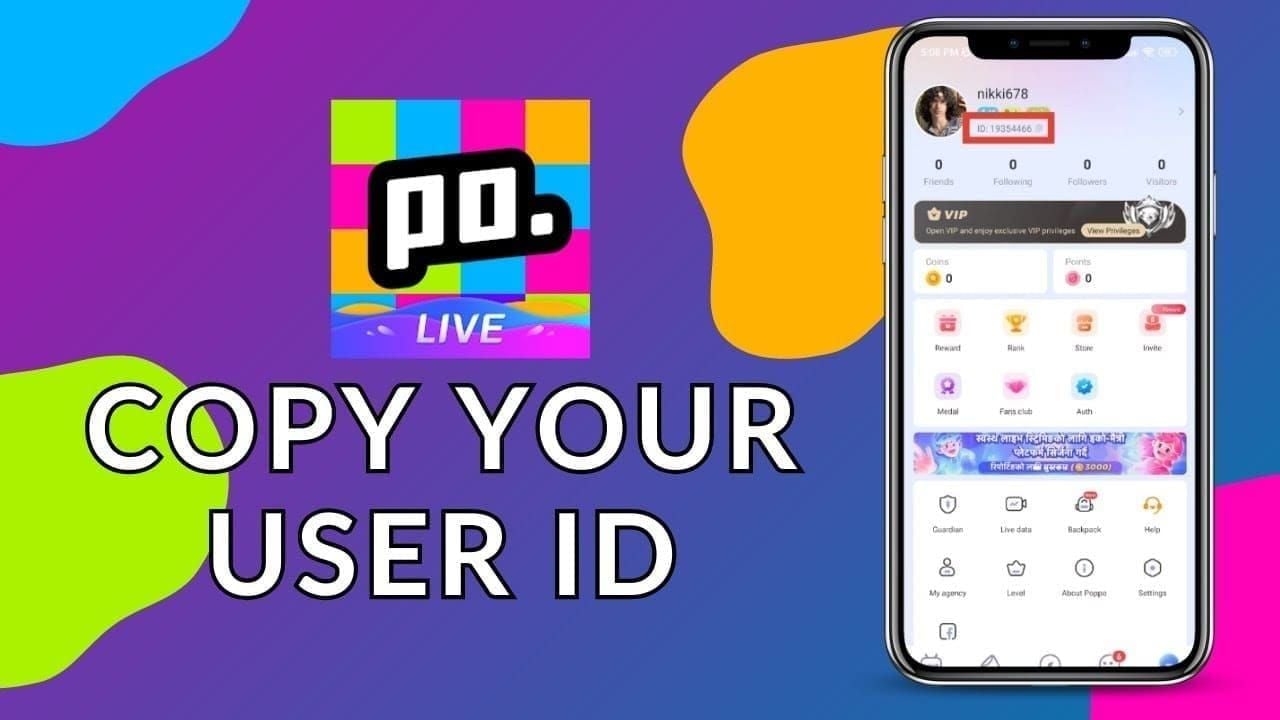
Common formats include 63101690 or 49274067. Don't confuse your User ID with your username, display name, or phone number. The User ID contains only numbers with no letters, symbols, or spaces.
Verify your User ID by comparing it against the number displayed in multiple app locations. User ID errors cause 18-30% of failed top-ups.
Step 2: Selecting the Right Coin Package for Your Needs
Poppo offers various coin packages ranging from small denominations to large bundles. Consider your typical usage patterns: casual viewers might need 1,000-5,000 coins monthly, while active community members often purchase 10,000-50,000 coin packages.

Regional pricing variations significantly affect value:
- Philippines: 12,000+ coins per $1 USD
- Nigeria/Pakistan: 9,460 coins per dollar
- Nepal: 8,900 coins per dollar
- Global baseline: 8,300-9,100 coins per dollar
These differences can represent 30-40% savings on large purchases.
Step 3: Choosing Payment Method and Currency
BitTopup accepts multiple payment methods including credit cards, debit cards, digital wallets, and prepaid cards from various countries. Select the payment method that offers the best exchange rates and lowest transaction fees.
Review the total cost breakdown before confirming purchase. The displayed price should include all fees, currency conversion charges, and applicable taxes.
Pre-notify your bank 24-48 hours before making gaming purchases over $100 to prevent fraud detection blocks. This prevents 70% of false-positive fraud blocks.
Step 4: Completing Transaction and Verifying Delivery
After entering your User ID and selecting your package, proceed to payment. 3D Secure authentication will prompt you for a one-time password sent to your registered phone number or email, taking 10-60 seconds to complete.
Upon successful payment, you'll receive an order confirmation with a unique transaction ID. Save this confirmation. The system immediately begins processing your coin delivery, with most transactions completing within 1-5 minutes.
Monitor your Poppo account balance during the delivery window. Coins appear automatically without requiring app restarts.
Step 5: Confirming Coins in Your Poppo Account
Open Poppo Live and navigate to your coin balance display. The new coins should appear added to your existing balance. The transaction is non-refundable after coin delivery.
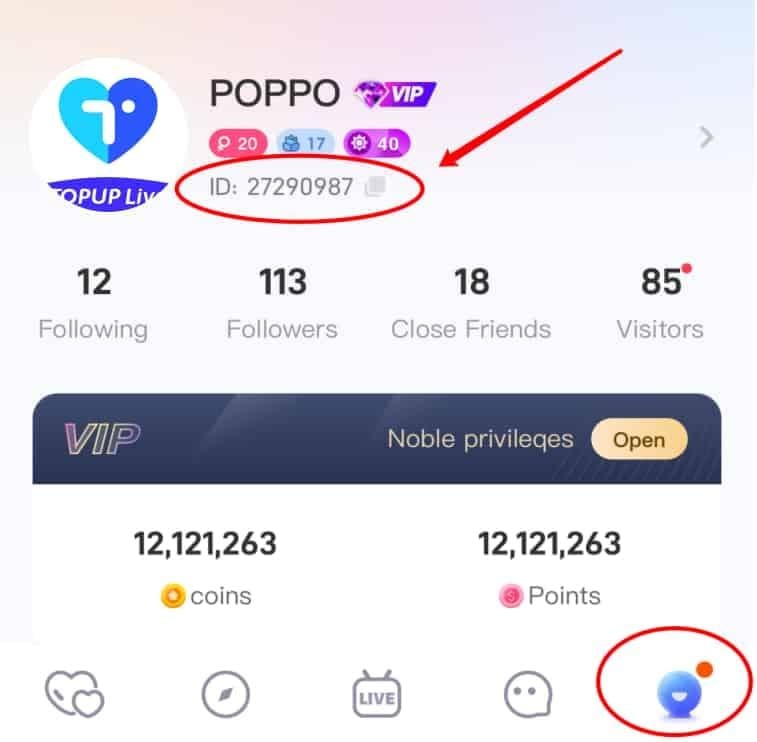
If coins don't appear immediately, restart the app. This clears 60% of sync glitches that delay balance updates. Wait 15-30 minutes and retry up to 3 times before contacting support.
Payment Methods Available for International Poppo Users
Credit and Debit Card Options Across Regions
Major credit card networks (Visa, Mastercard, American Express) work through BitTopup regardless of issuing country. Cards issued in North America, Europe, Asia, Africa, and Latin America all process successfully.
Debit cards with international transaction capabilities function identically to credit cards. Verify your debit card supports online transactions and has sufficient funds plus a 10% buffer for processing fees.
3D Secure enrollment reduces Error 1004 failures by 98%. Contact your card issuer to ensure 3D Secure is activated.
Digital Wallets and E-Payment Solutions
Digital wallets like PayPal, Skrill, and regional equivalents offer advantages for international transactions. These services handle currency conversion at competitive rates and provide buyer protection policies.
E-payment solutions often process faster than traditional card payments. Transaction completion times average 2-3 minutes compared to 4-5 minutes for card payments.
Regional e-payment systems like GCash (Philippines), Paytm (India), or Alipay (China) may be available depending on your location.
Cryptocurrency Payment Availability
Cryptocurrency payments provide complete geographic independence, functioning identically regardless of your location. Bitcoin, Ethereum, and stablecoins eliminate currency conversion fees and international transaction restrictions. Processing times typically complete within 10-30 minutes.
Cryptocurrency transactions are irreversible once confirmed on the blockchain. Verify all transaction details—especially your User ID—before sending payment.
Local Payment Methods by Country
BitTopup supports region-specific payment methods that may offer better rates than international options. Southeast Asian users can access GrabPay, GCash, and bank transfer options. Middle Eastern users may find local bank transfer or cash payment systems. African users can utilize mobile money services like M-Pesa.
Local payment methods eliminate currency conversion fees by processing in your native currency, resulting in 2-5% savings compared to international credit card transactions.
Cost Comparison: Direct vs Third-Party Poppo Recharge
Official Pricing Structure and Regional Variations
Poppo's official pricing varies dramatically by region due to purchasing power parity adjustments:
- Philippines: 12,000+ coins per $1 USD (44% advantage over global rates)
- Nigeria/Pakistan: 9,460 coins per dollar (14% better than global rates)
- Nepal: 8,900 coins per dollar (7% improvement)
- Global baseline: 8,300-9,100 coins per dollar
Direct in-app purchases through Google Play or App Store add platform fees of 15-30% that inflate prices.
BitTopup Fee Transparency and Total Cost Breakdown
BitTopup displays total costs including all fees before purchase confirmation. Service fees typically range from 3-8% depending on payment method and package size. Larger purchases often receive better percentage rates.
Compare the total cost including fees against official app store prices in your region. For most expats, the small fee premium is worthwhile for reliable, risk-free transactions.
Currency Conversion Rates and Exchange Fee Analysis
Currency conversion occurs at market rates plus a small spread, typically 1-3% above interbank exchange rates. This markup compares favorably to credit card foreign transaction fees of 1-3% plus less favorable exchange rates.
Monitor exchange rate fluctuations when making large purchases. Currency volatility can create 2-5% price differences within a single day for major currency pairs.
Value Assessment: Convenience vs Cost for Expats
The convenience of reliable, instant coin delivery without VPN risks or account security concerns justifies modest fee premiums. Calculate the value of your time spent troubleshooting failed payments.
Account security protection represents significant value. A banned account containing $500 worth of coins represents total loss, making even a 10% fee premium worthwhile if it eliminates ban risk.
Common Mistakes Expats Make When Recharging Poppo
Entering Incorrect User ID Formats
The most frequent error is confusing User ID with username or display name. Your User ID contains only numbers (7-10 digits), while usernames may include letters and symbols.
Some users accidentally include spaces, dashes, or other formatting characters when copying their User ID. The system requires only the numeric digits with no additional characters.
Double-check your User ID by comparing it against multiple sources within the app. This prevents 18-30% of failed top-ups.
Choosing Wrong Server or Region Settings
If prompted for region selection, choose the region where your account was originally created, not your current physical location. This ensures the delivery system routes coins to the correct account database.
When in doubt about regional settings, contact customer support before completing purchase.
Overlooking Payment Confirmation Steps
3D Secure authentication requires checking your phone or email for one-time passwords during checkout. Keep the checkout window open and actively monitor for authentication requests during the 10-60 second verification period.
Email confirmation messages sometimes arrive in spam folders. Check all email folders before assuming a transaction didn't process.
Attempting Multiple Failed Transactions Too Quickly
When a transaction fails, wait 15-30 minutes before retrying. Payment gateways implement fraud prevention systems that flag rapid repeated attempts as suspicious activity.
Each failed transaction may place a temporary authorization hold on your payment method. Attempting 3-4 transactions in quick succession can result in multiple holds that reduce your available credit.
Troubleshooting Failed Poppo Recharge Transactions
What to Do When Coins Don't Appear Immediately
First, verify the standard delivery timeframe hasn't elapsed. Third-party platforms typically deliver within 1-5 minutes, but occasional delays extend to 10-15 minutes during high-traffic periods.
Restart the Poppo app to force a balance refresh. This clears 60% of sync glitches. Close the app completely, wait 30 seconds, then reopen it.
Verify you're checking the correct account. If you have multiple Poppo accounts, ensure you're logged into the account matching the User ID you provided.
How to Contact BitTopup Customer Support Effectively
Gather essential information before contacting support:
- Transaction ID
- Purchase timestamp
- User ID provided
- Package selected
- Payment method used
Use the platform's official support channels. Response times typically range from 15 minutes to 2 hours.
Clearly describe the issue: Purchased 10,000 coins at 14:30 UTC on March 15, transaction ID #ABC123, User ID 63101690, coins not received after 20 minutes.
Documenting Transaction Details for Dispute Resolution
Screenshot your purchase confirmation immediately after checkout. This should show the transaction ID, purchase amount, timestamp, and User ID you entered.
Capture your current Poppo coin balance before and after the expected delivery time. Include timestamps visible in the screenshots.
Save all email confirmations, payment receipts, and communication with customer support.
Typical Resolution Timeframes and Refund Policies
Most delivery issues resolve within 1-2 hours once reported. Simple problems like sync delays clear quickly. More complex issues may require 4-8 hours for investigation.
If coins were never delivered due to platform error, full refunds process within 3-5 business days. If coins were delivered to an incorrect account due to User ID entry error, resolution depends on whether the receiving account can be identified.
The non-refundable policy after successful coin delivery means you must verify all information before purchase.
Expert Tips for Safe and Efficient Poppo Recharge
Best Times to Recharge for Faster Processing
Process transactions during off-peak hours (2 AM - 6 AM local time) for fastest delivery. Early morning hours typically show 2-3 minute delivery times versus 4-5 minutes during peak evening hours.
Avoid recharging during major regional holidays when payment processing systems may experience delays. Banking holidays can extend processing times by 24-48 hours.
Weekday morning purchases (Monday-Thursday, 9 AM - 3 PM) offer the most reliable processing speeds.
How to Maximize Value with Package Selection
Calculate cost-per-coin for different package sizes. Larger packages almost always offer better per-coin rates, but only if you'll use the coins within 2-3 months.
Monitor for promotional periods when platforms offer bonus coins or discounted rates. Timing large purchases to coincide with promotions can provide 10-20% additional value.
Consider your gifting patterns when selecting packages. Calculate typical gift costs and purchase enough coins for 4-6 weeks of normal activity.
Account Security Practices for Regular Rechargers
Never share your Poppo login credentials with any recharge platform. Legitimate User ID-based services only require your numeric User ID, which is publicly visible information.
Enable two-factor authentication on your Poppo account to protect against unauthorized access. This is especially important for accounts containing significant coin balances.
Regularly review your transaction history within Poppo to verify all coin additions match your purchase records.
Keeping Transaction Records for Future Reference
Maintain a spreadsheet tracking all recharge transactions: date, amount, cost, platform used, and transaction ID. This helps identify spending patterns and provides documentation for future disputes.
Store transaction confirmations in a dedicated email folder or cloud storage location. Organize by date and platform for easy retrieval.
Calculate your monthly Poppo spending to ensure it aligns with your entertainment budget.
Frequently Asked Questions About Region-Locked Poppo Recharge
Why is my Google Play payment blocked for Poppo?
Google Play blocks Poppo payments when your account region doesn't match your physical location or payment method's issuing country. Banks flag approximately 60% of VSHOW PTE. LTD. transactions as international activity, triggering security blocks. This affects expats, travelers, and international students whose Google Play accounts remain tied to their home countries.
Can I recharge Poppo without changing my Google Play region?
Yes, User ID-based recharge through third-party platforms like BitTopup bypasses Google Play entirely. You provide only your 7-10 digit Poppo User ID, and coins are delivered directly within 1-5 minutes. This works regardless of your Google Play region, current location, or payment method origin.
Is it safe to use third-party platforms for Poppo recharge?
Reputable third-party platforms using User ID-based delivery are safe and compliant with Poppo's terms of service. BitTopup offers encrypted payment processing, transparent pricing, and 24/7 customer support. The method is safer than VPN-based approaches that risk account suspension. Over 95% of transactions complete successfully when users provide correct User IDs.
How long does BitTopup take to deliver Poppo coins?
BitTopup delivers Poppo coins within 1-5 minutes for most transactions. Delivery times may extend to 10-15 minutes during peak usage hours. If coins don't appear within 15 minutes, contact customer support with your transaction ID.
Will using a VPN get my Poppo account banned?
Yes, VPN usage to bypass payment restrictions violates Poppo's terms of service and can result in account suspension or permanent ban. Suspensions typically occur 24-72 hours after VPN-assisted transactions. Banned accounts lose all purchased coins with no refunds. User ID-based recharge eliminates the need for VPNs.
What payment methods work for region-locked Poppo users?
BitTopup accepts international credit cards, debit cards, digital wallets (PayPal, Skrill), prepaid cards, cryptocurrency, and regional payment methods like GCash, Paytm, and bank transfers. These work regardless of your Google Play region or current location. US banks impose $300-500 daily limits on international transactions. Pre-notify your bank 24-48 hours before gaming purchases over $100.
Ready to recharge your Poppo account without region restrictions? Visit BitTopup now for instant, secure Poppo coin delivery with multiple payment options. No VPN required, 24/7 support available!
Recommended News








Recommend products



Table of Contents
- Understanding Google Play Region Lock and Its Impact on Poppo Recharge
- What Is Google Play Region Lock and Why It Blocks Payments
- How Region Lock Specifically Affects Poppo Live Users
- The Expat Dilemma: Account Region vs Current Location Mismatch
- Common Error Messages When Region Lock Blocks Poppo Payments
- Why VPN Methods Are Risky for Poppo Account Security
- Poppo's Terms of Service on VPN Usage and Account Violations
- Real Cases of Account Suspension Due to VPN Detection
- Technical Limitations and Payment Failures with VPN Methods
- The Security Risks of Changing Google Play Region Repeatedly
- The Safe Alternative: BitTopup for Region-Locked Poppo Recharge
- What Makes BitTopup a Secure Solution for Expats
- How BitTopup Bypasses Region Restrictions Legally
- Platform Security Features and User Data Protection
- Success Rates and Transaction Speed Metrics
- Step-by-Step Guide: Recharging Poppo Through BitTopup Without VPN
- Step 1: Locating Your Poppo User ID Correctly
- Step 2: Selecting the Right Coin Package for Your Needs
- Step 3: Choosing Payment Method and Currency
- Step 4: Completing Transaction and Verifying Delivery
- Step 5: Confirming Coins in Your Poppo Account
- Payment Methods Available for International Poppo Users
- Credit and Debit Card Options Across Regions
- Digital Wallets and E-Payment Solutions
- Cryptocurrency Payment Availability
- Local Payment Methods by Country
- Cost Comparison: Direct vs Third-Party Poppo Recharge
- Official Pricing Structure and Regional Variations
- BitTopup Fee Transparency and Total Cost Breakdown
- Currency Conversion Rates and Exchange Fee Analysis
- Value Assessment: Convenience vs Cost for Expats
- Common Mistakes Expats Make When Recharging Poppo
- Entering Incorrect User ID Formats
- Choosing Wrong Server or Region Settings
- Overlooking Payment Confirmation Steps
- Attempting Multiple Failed Transactions Too Quickly
- Troubleshooting Failed Poppo Recharge Transactions
- What to Do When Coins Don't Appear Immediately
- How to Contact BitTopup Customer Support Effectively
- Documenting Transaction Details for Dispute Resolution
- Typical Resolution Timeframes and Refund Policies
- Expert Tips for Safe and Efficient Poppo Recharge
- Best Times to Recharge for Faster Processing
- How to Maximize Value with Package Selection
- Account Security Practices for Regular Rechargers
- Keeping Transaction Records for Future Reference
- Frequently Asked Questions About Region-Locked Poppo Recharge
Recommend products



Recommended News

PSN Card Malaysia Code Redeemed but Balance Not Showing? Fix It

How to Farm Rare Skin Fragments in MLBB | August 2026

Genshin Impact Stygian Onslaught 7.0 Teams | August 2026

Alyosha Best Build, Teams & C6 Guide | August 2026

Cheap StarMaker Coins for SupernovaX 2026 Auditions (12-23% Off)

MICO Live Coins MENA After v5.2: Cheapest Deals 2026

How to Redeem NCRCKYT8EF Code for Free Eggy Coins (Aug 2026)

Taka Live 1.2.11 Draining Battery Fast After the July 2026 Update? Causes and Fixes