How to Delete Likee Videos Without Losing Total Likes
Deleting Likee videos won't reduce your total likes counter. This guide shows the fastest manual deletion methods, explains how likes tracking works, and covers critical privacy settings to configure before cleanup.


How Likee Calculates Your Total Likes Counter
Your total likes number is a permanent account metric, not a live sum of current videos. When you delete content, those likes stay in your historical record. The platform treats total likes as an achievement milestone reflecting overall performance, not active content calculation.
This design supports creators by maintaining social proof even after removing specific videos. Your engagement history remains intact regardless of current library size.
For profile enhancement after cleanup, likee diamond recharge through BitTopup provides secure access to premium visibility features.
The Difference Between Video Likes and Profile Total Likes
Individual video metrics and profile total likes operate on separate tracking systems. Each video maintains its own engagement data while active. These contribute to your total counter at engagement time, but deletion doesn't reverse this.
Once a user likes your video, that interaction logs to lifetime statistics. Removing content deletes the video and its public metrics, but your profile retains the engagement credit.
What Actually Happens When You Delete a Video
Deletion triggers these actions:
- Video disappears from profile grid immediately
- Individual metrics (likes, comments, views) removed from public display
- Total likes counter unchanged
- Follower count stays intact
- Account authority metrics unaffected
Deletion affects content visibility and individual data, not account-level achievements.
Common Myths About Losing Engagement Metrics
Myth 1: Deleting videos reduces total likes proportionally. Reality: These are separate data points in Likee's architecture.
Myth 2: Mass deletion triggers algorithmic penalties. Reality: Algorithm prioritizes quality, engagement velocity, and relevance over quantity. Removing low performers often improves profile performance.
Myth 3: Followers get deletion notifications. Reality: Likee sends no deletion alerts. Cleanup is private.
Privacy Settings You Must Configure Before Bulk Deletion
Navigating to Likee Privacy Controls Dashboard
Access privacy settings: tap three horizontal lines (upper left) > Settings > Privacy. This dashboard contains Account Privacy, Interaction Controls, and Content Restrictions subsections.
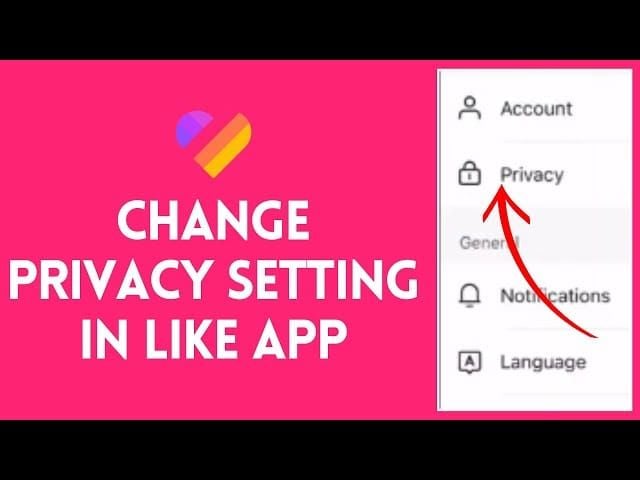
Video Visibility Settings That Protect Your Metrics
Private Account mode: Settings > Privacy > Private Account. Restricts profile to approved followers during cleanup.
Interaction controls:
- Set comments to Friends Only
- Disable content saving/sharing
- Limit duet permissions
These work independently of deletion but create private workspace for reorganization.
Follower Notification Settings During Content Changes
No automatic notifications exist for deletions. To minimize disruption:
- Toggle Don't Recommend Me to Friends in Account Settings
- Hide online status
- Set Who Can Message Me to None temporarily
Archive Privacy vs Deletion Privacy Options
Private videos (archive alternative):
- Remain in content library with full metrics
- Disappear from public view
- Reversible anytime
- Count toward total video count in dashboard
Permanent deletion:
- Complete removal of video and individual metrics
- Total likes counter unaffected
- Irreversible
- Reduces total video count
Choose based on whether you might restore content later.
Step-by-Step Guide: How to Bulk Delete Likee Videos Without Losing Total Likes
Accessing Your Likee Content Management Interface
- Tap avatar (upper left) to access Me page
- View complete video grid (chronological order)
- Screenshot current total likes counter for verification
Each thumbnail has options menu via tap-and-hold or three-dot icon.
Selecting Multiple Videos Using Batch Tools
Likee lacks native batch selection. Fastest method:
- Identify deletion targets based on audit criteria (date, engagement, brand alignment)
- Create organized list by grid position or characteristics
- Work systematically through grid
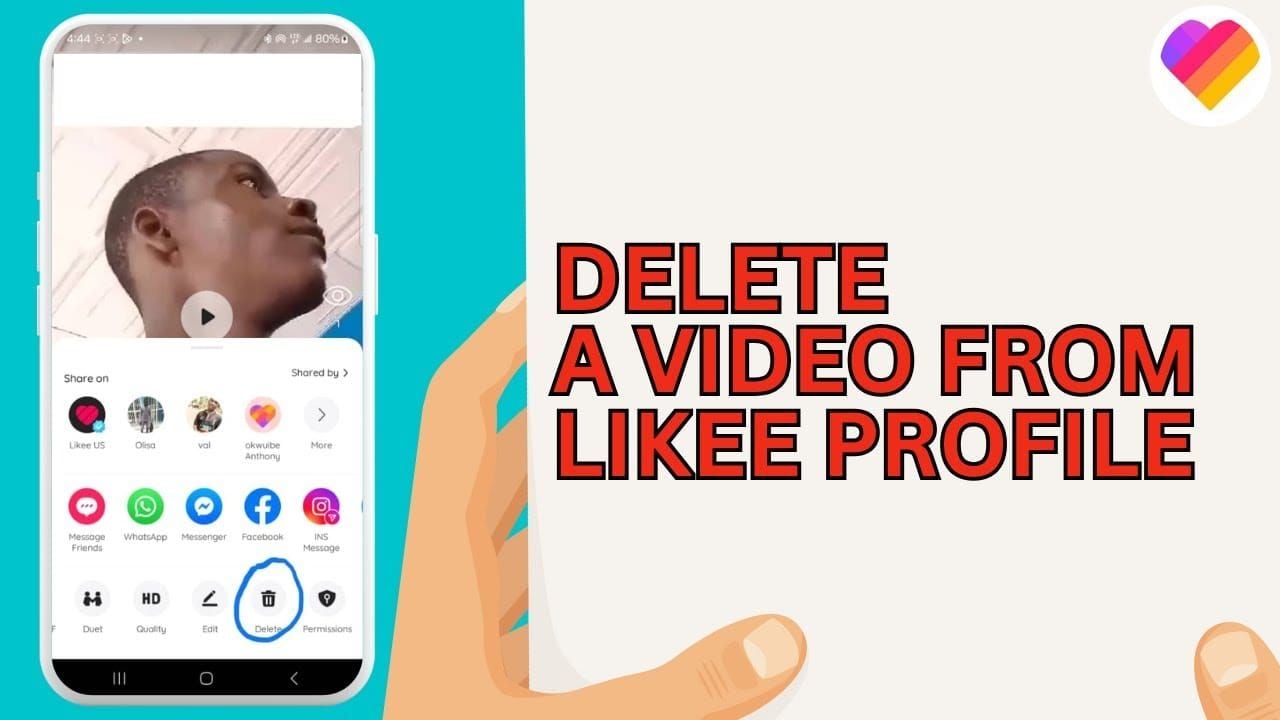
- For each video: tap > options menu (three dots) > Delete > confirm
Focused 15-20 minute sessions can handle dozens of videos.
Confirming Deletion While Preserving Engagement Data
Confirmation prompt warns deletion is permanent but doesn't mention total likes because that metric stays unchanged. Video disappears immediately; total likes counter remains identical.
Verifying Your Total Likes Counter After Deletion
Compare current counter to pre-deletion screenshot. Numbers should match exactly. Small increases during cleanup reflect new engagement on remaining videos, not deletion impact.
Check profile from secondary account or logged-out browser to verify public appearance.
Troubleshooting: What to Do If Metrics Change
If counter decreases:
- Verify you're viewing correct metric (not followers or video count)
- Update to Likee version 3.0.4+ for latest algorithms
- Check for platform-wide spam engagement removal (unrelated to your deletions)
For boosting refreshed profiles, top up likee diamonds cheap through BitTopup offers competitive pricing and secure transactions.
Archive vs Delete: Choosing the Right Strategy
When to Archive Instead of Permanently Deleting
Archive (via privacy settings) for:
- Seasonal content with future relevance
- High-performing videos that don't fit current brand
- Collaboration/sponsored content with contractual requirements
Pros and Cons of Each Approach
Archiving:
- ✅ Instant restoration without losing metrics
- ✅ Maintains complete engagement history
- ✅ Reversible decisions
- ❌ Counts toward backend video total
Permanent deletion:
- ✅ Complete removal and simplified library
- ✅ Reduces total video count
- ❌ Irreversible
- ✅ Total likes still preserved
Reversing Decisions: Recovery Options
Archived content: Navigate to private video > settings > toggle back to public. All metrics restore immediately.
Deleted content: No recovery option. No trash folder or recovery period exists.
Advanced Bulk Deletion Techniques for Large Content Libraries
Filtering Videos by Date Range for Targeted Deletion
Grid displays chronologically (newest first). Scroll to target time period and work backward. Check individual video detail view for precise upload dates.
Using Performance Metrics to Decide What to Remove
- Calculate account averages across views, likes, comments, shares, watch time
- Delete videos significantly below averages (especially <50% average views or <2% engagement rate)
- Preserve high-performers regardless of age
- Prioritize removing low watch time videos (signals poor quality to algorithm)
Managing Videos by Category or Hashtag Groups
Search specific hashtags you no longer want associated with profile. Systematically delete videos containing those tags. Effective for niche pivots or rebranding.
Time-Saving Shortcuts
- Work in 30-60 minute focused blocks
- Batch by criteria (date, performance threshold, hashtags)
- Document process via screen recording
- Maintain deletion spreadsheet for future reference
Protecting Your Engagement Metrics During Content Cleanup
Why Total Likes Stay Intact When Properly Deleted
Likee's database stores metrics at three levels:
- Individual video metrics
- Daily/weekly/monthly aggregates
- Lifetime account achievements (includes total likes)
Deletion removes content and individual display but retains historical engagement data in account-level statistics.
Monitoring Your Follower Count During Cleanup
Small decreases (1-3%) are normal—often inactive accounts. If >5% decrease occurs, pause to evaluate if you're removing valuable content. Some creators see increases as profile becomes more focused.
Maintaining Profile Authority After Mass Deletion
Authority depends on:
- Engagement rate (improves when low performers removed)
- Follower growth velocity
- Content consistency
- Audience retention
Removing underperformers often boosts authority by increasing average engagement rate.
Analytics to Track Before and After Deletion
Document before cleanup:
- Total likes counter
- Follower count
- Total video count
- Average views per video
- Average engagement rate
- Profile visit statistics
Review after 7-14 days: Same metrics. Most creators see stable/increased likes and followers with significantly improved engagement rates.
Common Mistakes That Can Actually Hurt Your Likee Engagement
Deleting Videos Without Checking Privacy Settings First
Set account to private, disable search visibility, or hide online status before large-scale deletion to prevent real-time observation by active followers.
Removing Content Too Quickly Without Follower Warning
For deletions >30% of library, post announcement video explaining refresh and new direction. Prevents confusion and maintains follower trust.
Ignoring Archive Options for Borderline Content
Reserve permanent deletion for:
- Technical quality issues
- Content violating current values
- Reputation-damaging material
Archive everything else for reversibility.
Not Backing Up Important Engagement Data
Screenshot meaningful comments and final stats before deletion. Individual engagement data (who liked, specific comments, shares) disappears permanently.
Content Audit Strategy: Deciding What to Delete
Analyzing Video Performance Metrics for Deletion Candidates
- Review views, likes, comments, shares, watch time
- Calculate account averages from 10-15 representative videos
- Target videos <50% average views or <2% engagement
- Prioritize high views + low watch time (misleading content hurts algorithm)
Identifying Off-Brand Content That Hurts Your Profile
Remove content that:
- Contradicts current messaging
- Targets different demographic
- Represents outdated views
- Creates niche confusion for new visitors
Keeping High-Engagement Videos Even If Old
Preserve videos with sustained engagement over time. Content generating consistent daily views months after publication provides ongoing discovery value regardless of age.
Creating a Content Calendar for Future Prevention
Establish pre-publication criteria:
- Minimum production quality
- Brand pillar alignment
- Target audience relevance
- Strategic purpose
Plan themed batches/series for cohesive profile sections.
Post-Deletion Best Practices for Likee Growth
Refreshing Your Profile After Content Cleanup
- Update bio, avatar, banner to reflect refined direction
- Review pinned videos—replace deleted ones with best current work
- Audit from logged-out view for cohesive impression
Announcing Your New Content Direction to Followers
Create announcement video framing cleanup as positive evolution. Set expectations for posting schedule and content types. Pin temporarily, then replace with regular content.
Leveraging BitTopup for Boosting Your Refreshed Profile
Premium promotion works best after content optimization. BitTopup offers secure, competitively priced Likee diamond recharge for promoted posts and profile boosts, maximizing conversion from new profile visitors.
Monitoring Engagement Recovery Timeline
Track weekly for 30 days:
- Average views per new video
- Engagement rate
- Follower growth rate
- Profile visit conversion
Most creators see improved engagement within 7-14 days. Significant follower increases typically require 4-6 weeks of consistent quality posting.
Frequently Asked Questions About Bulk Deleting Likee Videos
Does deleting Likee videos remove your total likes count?
No. Total likes is a cumulative lifetime metric. Deleted video's individual metrics disappear, but engagement credit remains in your account's historical statistics permanently.
How do I delete multiple Likee videos at the same time?
No native bulk feature exists. Fastest method: Me page > tap video > three dots > Delete > confirm. Repeat systematically. Organized approach allows 20-30 deletions per 15 minutes.
What happens to my likes when I delete a Likee video?
Individual like count disappears with video. Those likes remain credited to profile total counter. Users who liked it lose access, but your account retains engagement credit.
Can I recover deleted Likee videos with their likes?
No recovery option exists. Deletion is permanent. Total likes counter retains engagement credit, but specific video and individual data cannot be restored. Use privacy settings for reversible hiding.
Will my followers see when I delete old Likee videos?
No notifications sent. Changes remain private unless followers actively view profile during deletion. Configure privacy settings beforehand for maximum control.
How long does it take to bulk delete Likee videos?
20-30 videos per 15-minute focused session. For 50+ videos, plan multiple sessions across several days. Organized batching by criteria significantly improves speed.
Ready to boost your refreshed profile? Visit BitTopup for exclusive Likee diamond deals and promotional tools. Secure transactions, competitive pricing, fast delivery!
Recommended News







Recommend products



Table of Contents
- Understanding Likee's Video Deletion System and Total Likes Mechanics
- How Likee Calculates Your Total Likes Counter
- The Difference Between Video Likes and Profile Total Likes
- What Actually Happens When You Delete a Video
- Common Myths About Losing Engagement Metrics
- Privacy Settings You Must Configure Before Bulk Deletion
- Navigating to Likee Privacy Controls Dashboard
- Video Visibility Settings That Protect Your Metrics
- Follower Notification Settings During Content Changes
- Archive Privacy vs Deletion Privacy Options
- Step-by-Step Guide: How to Bulk Delete Likee Videos Without Losing Total Likes
- Accessing Your Likee Content Management Interface
- Selecting Multiple Videos Using Batch Tools
- Confirming Deletion While Preserving Engagement Data
- Verifying Your Total Likes Counter After Deletion
- Troubleshooting: What to Do If Metrics Change
- Archive vs Delete: Choosing the Right Strategy
- When to Archive Instead of Permanently Deleting
- Pros and Cons of Each Approach
- Reversing Decisions: Recovery Options
- Advanced Bulk Deletion Techniques for Large Content Libraries
- Filtering Videos by Date Range for Targeted Deletion
- Using Performance Metrics to Decide What to Remove
- Managing Videos by Category or Hashtag Groups
- Time-Saving Shortcuts
- Protecting Your Engagement Metrics During Content Cleanup
- Why Total Likes Stay Intact When Properly Deleted
- Monitoring Your Follower Count During Cleanup
- Maintaining Profile Authority After Mass Deletion
- Analytics to Track Before and After Deletion
- Common Mistakes That Can Actually Hurt Your Likee Engagement
- Deleting Videos Without Checking Privacy Settings First
- Removing Content Too Quickly Without Follower Warning
- Ignoring Archive Options for Borderline Content
- Not Backing Up Important Engagement Data
- Content Audit Strategy: Deciding What to Delete
- Analyzing Video Performance Metrics for Deletion Candidates
- Identifying Off-Brand Content That Hurts Your Profile
- Keeping High-Engagement Videos Even If Old
- Creating a Content Calendar for Future Prevention
- Post-Deletion Best Practices for Likee Growth
- Refreshing Your Profile After Content Cleanup
- Announcing Your New Content Direction to Followers
- Leveraging BitTopup for Boosting Your Refreshed Profile
- Monitoring Engagement Recovery Timeline
- Frequently Asked Questions About Bulk Deleting Likee Videos
- Does deleting Likee videos remove your total likes count?
- How do I delete multiple Likee videos at the same time?
- What happens to my likes when I delete a Likee video?
- Can I recover deleted Likee videos with their likes?
- Will my followers see when I delete old Likee videos?
- How long does it take to bulk delete Likee videos?



Recommended News

Is the Next Free Fire Banner Worth It? 2026 Leaks and Math

MICO Live Coins MENA After v5.2: Cheapest Deals 2026

Chamet Diamond Not Received After Google Recharge? 2026 Fix

Chamet Diamond Chargeback Ban Appeal 2026: Is the Success Rate Really 0%?

Chamet Diamonds Payment Declined? Safe Buy Fixes (June 2026)

Likee Short Video Shutdown in Indonesia (April 2026): Coins, Backup & Next Steps

Chamet Diamond $3.44 Pack 2026: Is It Actually Worth Buying?
Likee Indonesia Shutdown April 2026: Your Complete Next-Steps Guide