


IMO Diamond Recharge Not Working? 12 Proven Fixes (2026)
Experiencing IMO diamond recharge failures? 40% of failures stem from incorrect User IDs, another 40% from network instability. This guide covers 12 proven solutions, error codes, regional restrictions, refund procedures, and reliable alternatives when official channels fail.


Root Causes of Payment Failures
Two categories account for 80% of all recharge problems:
- Wrong User IDs: 40% of failures—surprisingly high for straightforward information
- Network instability: 40% of failures, especially in regions with inconsistent internet
- Other issues: 20% from payment gateway errors, bank authorization, regional restrictions, account problems
For reliable alternatives, platforms like BitTopup offer IMO diamond recharge solutions with competitive pricing and fast delivery across 100+ countries.
What Causes IMO Payment Failed Errors
Payment gateways impose strict 60-90 second timeout limits—any delay triggers automatic failure. This tight window creates problems for slower connections or additional verification steps.
Banks increasingly flag international digital currency purchases as fraudulent, especially from unfamiliar IP addresses or outside normal spending patterns. Your bank may decline without notifying you, leaving only payment failed in the IMO app.
Currency conversion during the 60-90 second window can cause mismatches between authorized amounts and final charges, triggering rejection.
Types of IMO Diamond Recharge Issues
- Transaction declined: Payment gateway rejects before processing—insufficient funds, expired cards, incorrect details
- Authorization failed: Bank rejects during verification, common with international purchases
- Diamonds not credited: Payment succeeded, account charged, but diamonds missing. 95% of deliveries complete in under 5 minutes; direct top-ups finish in under 30 seconds. Remaining 5% experience 15-30 minute delays during server maintenance
- Region restriction: Transaction can't initiate. Since Google Play removed IMO in August 2023, certain jurisdictions face additional barriers
Identify Your Specific Problem
Check three verification points:
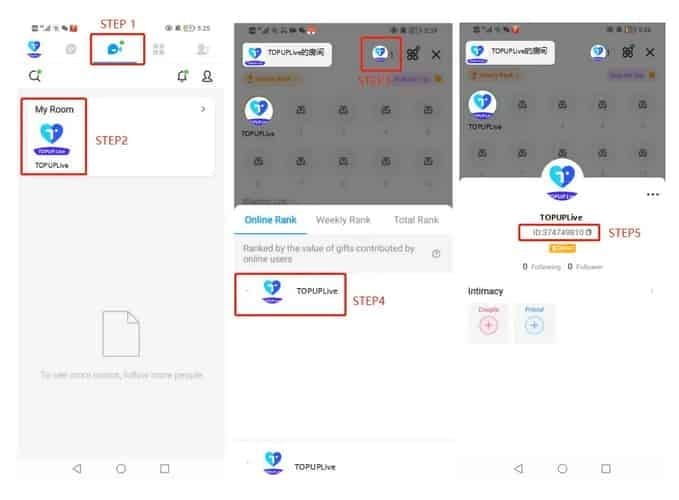
1. Confirm IMO ID (7-10 digits) Open IMO app → tap top center button → My Room → tap avatar (upper right) → Online Rank page → locate IMO ID under nickname
2. Verify payment processed Check online banking for credit card charges or PayPal activity. Credit card pending charges clear in 1-3 business days if failed; PayPal completes in minutes to 3 days if successful
3. Check diamond balance Open IMO → Me tab → IMO Wallet → My Diamonds
12 Proven Fixes for IMO Payment Failed
Fix 1: Verify IMO ID Accuracy
Wrong User IDs cause 40% of failures. Double-check your 7-10 digit IMO ID. Copy directly from Online Rank page rather than typing manually—eliminates transcription errors. One transposed digit sends diamonds to another user's account, difficult to reverse.
Fix 2: Check Internet Connection Stability
Network instability causes 40% of failures. IMO requires minimum 3 Mbps stable connection throughout the entire transaction. Fluctuating speeds during the 60-90 second timeout trigger automatic failures.
- Test connection speed before recharging
- Switch from mobile data to Wi-Fi or vice versa
- Avoid peak hours (7-11 PM, 6-10 AM local time)
- Disable VPN/proxy services—they add routing complexity exceeding timeout limits
Fix 3: Wait Full 30-Minute Delivery Window
While 95% deliver in under 5 minutes, the system allows up to 30 minutes. Purchases exceeding $500 extend to 5-30 minutes for security verification.
Server delays of 15-30 minutes occur during maintenance. Before assuming failure, wait 30 minutes while monitoring balance. Log out, wait 15-20 seconds, log back in—this force refresh resolves 60% of synchronization issues.
Fix 4: Clear IMO App Cache
Corrupted cache interferes with transactions and balance updates.
Android: Settings → Apps → IMO → Storage → Clear Cache
iOS: Delete IMO app completely, reinstall from App Store. Wait 2-3 minutes after reinstallation before logging in. iOS doesn't offer selective cache clearing.
Fix 5: Verify Payment Method Details
Check:
- Card expiration dates, CVV codes, billing addresses match bank records exactly
- Available credit exceeds purchase amount plus currency conversion fees (typically 2-3%)
- PayPal linked funding source has sufficient balance
Fix 6: Contact Bank for Authorization
Banks block international digital currency purchases for fraud prevention. Call customer service and inform them of legitimate IMO purchases. Request they whitelist the merchant code or lift international transaction restrictions.
If your bank consistently blocks, use PayPal—adds verification layer banks trust more than direct merchant charges.
Fix 7: Switch Payment Methods
Different payment methods show varying success rates across regions. If credit cards fail, try PayPal, debit cards, or digital wallets.
PayPal's two-step process (PayPal authorization → funding source charge) provides additional time beyond 60-90 second timeout, reducing timing failures.
For persistent failures, third-party platforms like BitTopup support multiple payment methods and offer payment failed refund assistance with 24/7 support.
Fix 8: Update IMO App
Outdated versions contain deprecated payment code newer gateways reject. Since Google Play removed IMO in August 2023, Android users must download updates from alternative sources or official IMO website.
iOS users update through App Store. Android users verify downloads from legitimate sources to avoid compromised versions.
Fix 9: Disable Security Software Temporarily
Antivirus, firewalls, mobile security apps sometimes block IMO's payment connections. Temporarily disable during recharge, re-enable immediately after. If this resolves the issue, add IMO to your security program's whitelist.
Fix 10: Try Different Devices/Platforms
Device-specific issues affect success rates. If mobile fails, try desktop browser or different mobile device. Desktop browsers provide more stable connections and avoid mobile-specific restrictions.
Fix 11: Verify Account Authentication
IMO requires verification for purchases above certain thresholds. Unverified accounts face transaction limits or blocks. Sign in using fingerprint, face scan, screen lock, or passkey.
If you've recently changed devices or reset password, additional verification may be required. Check for pending verification emails or in-app notifications.
Fix 12: Use Alternative Recharge Platforms
When official channels fail repeatedly, third-party platforms provide reliable alternatives. BitTopup specializes in IMO diamonds with competitive pricing, fast delivery, secure transactions, and regional payment method support.
Third-party platforms process through different gateways, bypassing specific technical issues. They offer customer service for crediting issues, refunds, payment complications—often unavailable through direct IMO recharge.
Regional Payment Restrictions
Why Restrictions Exist
Three primary sources:
- Local financial regulations: Strict capital controls limit digital currency purchases
- International sanctions: Block transactions from specific countries
- Platform decisions: IMO's Google Play removal in August 2023 created additional barriers
Identify if You're Restricted
Region restriction errors appear immediately when accessing recharge options, before entering payment details.
Test: Tap Me tab → IMO Wallet → Recharge. If you can choose packages and proceed to payment, your region isn't blocked. If recharge option is grayed out or missing, you're restricted.
Your IP address determines detection, not account registration country.
Legal Workarounds
Third-party platforms operate under different frameworks, providing access where official channels are blocked. They purchase diamonds through unrestricted regions, then transfer to your account.
BitTopup serves 100+ countries, including regions where official IMO recharge faces restrictions. Diverse payment method support accommodates regional banking systems official channels don't accept.
Payment Gateway and Bank Errors
Common Error Codes
- Transaction timeout: Processing exceeds 60-90 seconds from slow authorization or network delays
- Insufficient funds: Payment method lacks required balance, including conversion fees and international charges
- Invalid payment method: Card type, issuing bank, or platform isn't supported
Why Banks Decline
Banks decline for fraud prevention, spending limits, or transaction type restrictions. International purchases to unfamiliar merchants trigger automatic fraud alerts.
Call your bank before large purchases. Inform them of upcoming transaction amount, merchant name, timing. This pre-authorization dramatically increases approval rates.
Daily spending limits affect digital currency purchases even with available credit. Banks impose separate limits on international transactions, online purchases, digital goods.
3D Secure Verification Failures
3D Secure requires identity verification through SMS codes, app confirmations, or security questions. Failures occur when codes don't arrive, expire, or you can't access authentication method.
Ensure your bank has current contact info. Outdated phone numbers/emails prevent code delivery. Some VPN services interfere—disable during payment.
Currency Conversion Issues
Exchange rate fluctuations during processing can cause mismatches, triggering rejection. Dynamic currency conversion (DCC) offers charges in home currency but includes 3-5% markups. Declining DCC and accepting merchant's currency often results in lower costs.
International transaction fees add 2-3% to purchases, sometimes pushing total above available credit or daily limit.
IMO Diamonds Not Credited: Recovery
Check Transaction History
IMO doesn't provide comprehensive in-app history. Check credit card statement or PayPal log for charge confirmation, noting exact timestamp and amount.
Compare payment timestamp against diamond balance updates: IMO → Me tab → IMO Wallet → My Diamonds.
Screenshot payment confirmation and current balance for support claims.
Payment Succeeded But Diamonds Missing
- Complete 30-minute waiting period
- Force refresh: log out, wait 15-20 seconds, log back in (resolves 60% of display issues)
- If still missing, document: payment screenshot, transaction ID, timestamp, package purchased, correct IMO ID
- Contact support with complete documentation
Delivery Timeframes
- Standard: Under 5 minutes for 95% of transactions
- Direct top-ups: Under 30 seconds normally
- Third-party (BitTopup): 5-15 minutes typically
- Large purchases ($500+): 5-30 minutes for security verification
- Server maintenance: 15-30 minute delays
Documentation for Support
Essential elements:
- Payment confirmation screenshot (transaction ID, amount, timestamp)
- Bank statement/PayPal log confirming charge
- Current IMO diamond balance screenshot showing no increase
- Correct IMO ID from Online Rank page
- Diamond package details (quantity, price)
- Purchase timestamp in local timezone
IMO Diamond Refund Process
Refund Eligibility
Official IMO: Terms updated December 2025 state diamonds are non-refundable after purchase, regardless of use.
Third-party platforms: Many offer refunds for non-delivery after 72 hours. Applies to payment succeeded but diamonds never credited—not buyer's remorse or accidental purchases.
Requests must be submitted within 48 hours of failed transaction.
Refund Request Procedure
Third-party platforms: Locate customer support, submit request with transaction ID, payment confirmation, IMO ID, non-delivery explanation.
Credit card disputes: Contact card issuer's dispute department. Explain digital goods never delivered, provide documentation. Processes in 60-120 days.
PayPal disputes: Access account → locate transaction → Report a Problem → I didn't receive my item. Resolves in minutes to 3 days for straightforward cases.
App Store (iOS): Purchase history → select IMO diamond purchase → Report a Problem. Processes in 4-8 days when approved (low approval rates for digital currency).
Required Documentation
- Original payment receipt/confirmation email
- Bank statement showing charge
- IMO diamond balance screenshots (before/after purchase)
- IMO ID verification from Online Rank page
- Purchase attempt timestamp
- Error messages/failure notifications
Processing Times
- Third-party platforms: 5-7 business days from approval
- App Store: 4-8 days after approval
- Credit cards: 60-120 days (chargeback investigation)
- PayPal: Minutes to 3 days (straightforward cases); 10-14 days (complex)
If Denied
- Credit cards: Request detailed denial reasons, appeal with additional documentation
- Third-party platforms: Escalate to senior support, reference stated refund policy
- Last resort: Public review platforms (only after exhausting standard channels)
BitTopup: Reliable Alternative
Why BitTopup Solves Payment Issues
- Operates through different payment gateways than official IMO
- Supports payment methods unavailable through official channels
- Serves 100+ countries, including regions with restrictions
- 24/7 customer support for transaction issues, crediting delays, payment complications
How BitTopup Works
- Visit BitTopup platform
- Select IMO diamonds from game list
- Choose diamond package
- Enter 7-10 digit IMO ID
- Select payment method (credit cards, PayPal, digital wallets, regional systems)
- Complete transaction
- Receive confirmation within seconds
- Diamond delivery typically 5-15 minutes with real-time tracking
Payment Methods & Availability
- Credit/debit cards from major networks
- PayPal integration (increases approval rates)
- Digital wallets including regional platforms
- 100+ country availability
- Major international currencies and regional options
Security & Safety
- Industry-standard security measures
- Encrypted connections for all payment processing
- Established reputation, high user ratings
- Refund policies for non-delivery situations
- Buyer protection unavailable through official channels
Preventing Future Problems
Account Verification Best Practices
- Maintain current contact info (phone, email)
- Complete all verification steps before large purchases
- Use consistent authentication methods (fingerprint, face scan, screen lock, passkey)
Choose Right Payment Method
- Test multiple methods to identify most reliable for your region
- Prioritize 3D Secure support
- Maintain backup payment methods
Security Settings
- Review device security for payment-blocking configurations
- Whitelist IMO and payment processor domains in security software
- Disable VPN during recharge attempts
Regular Maintenance
- Verify IMO ID hasn't changed (rare but possible)
- Clear app cache monthly
- Update IMO app promptly when new versions release
Advanced Troubleshooting
Device-Specific Problems
Older devices with outdated operating systems may lack security protocols required by modern gateways. Test recharge from different device. Factory reset as last resort (backup data first).
Network & Firewall Issues
- Corporate/school networks often block payment ports
- Mobile carrier restrictions may block digital currency purchases
- Switch to Wi-Fi or try different networks
- Check router firewall settings
Account Restrictions
IMO may restrict recharge on accounts flagged for suspicious activity, terms violations, security concerns. Check in-app notifications/emails. Contact support to verify account status.
Recent password changes or security incidents trigger temporary 24-48 hour restrictions.
When to Contact Support
Contact when:
- Diamonds don't credit after 30 minutes following confirmed payment
- Specific error codes require technical investigation
- Account restrictions prevent recharge access
Prepare comprehensive documentation: transaction IDs, payment confirmations, error messages, troubleshooting steps attempted, correct IMO ID.
FAQ
Why is my IMO diamond recharge not working? Incorrect IMO ID (40%) and network instability (40%) are most common. Verify 7-10 digit IMO ID from Online Rank page, ensure stable 3 Mbps connection. Wait full 30-minute delivery window—90% of issues resolve automatically.
How long for diamonds to appear? 95% complete in under 5 minutes; direct top-ups in under 30 seconds. Purchases exceeding $500 may take 5-30 minutes. Server delays during maintenance extend 15-30 minutes. Always wait full 30 minutes before reporting.
Can I get a refund? Official IMO (December 2025 terms): non-refundable. Third-party platforms: refunds for non-delivery after 72 hours (request within 48 hours). Credit cards: 60-120 days. PayPal: minutes to 3 days. App Store: 4-8 days when approved.
Diamonds don't appear after payment? Wait 30 minutes. Log out, wait 15-20 seconds, log back in (resolves 60% of sync issues). Check balance: IMO → Me → IMO Wallet → My Diamonds. If still missing after 30 minutes and force refresh, contact support with payment confirmation.
Why does my bank decline purchases? Banks block international digital currency as fraud prevention. Call bank before purchasing, inform of legitimate transaction. Request whitelist or lift restrictions. Alternatively, use PayPal—banks trust it more.
Is BitTopup safe? Yes. Industry-standard security, encrypted connections, serves 100+ countries, high user ratings, established reputation. Offers 24/7 support and refund policies for non-delivery.
Tired of IMO diamond recharge failures? Get instant, reliable top-ups through BitTopup—multiple payment methods, 100+ countries, 24/7 support. Recharge securely today with competitive prices and guaranteed fast delivery!
Recommended Articles
Recommended Products



Table of Contents
- Understanding IMO Diamond Recharge Failures
- Root Causes of Payment Failures
- What Causes IMO Payment Failed Errors
- Types of IMO Diamond Recharge Issues
- Identify Your Specific Problem
- 12 Proven Fixes for IMO Payment Failed
- Fix 1: Verify IMO ID Accuracy
- Fix 2: Check Internet Connection Stability
- Fix 3: Wait Full 30-Minute Delivery Window
- Fix 4: Clear IMO App Cache
- Fix 5: Verify Payment Method Details
- Fix 6: Contact Bank for Authorization
- Fix 7: Switch Payment Methods
- Fix 8: Update IMO App
- Fix 9: Disable Security Software Temporarily
- Fix 10: Try Different Devices/Platforms
- Fix 11: Verify Account Authentication
- Fix 12: Use Alternative Recharge Platforms
- Regional Payment Restrictions
- Why Restrictions Exist
- Identify if You're Restricted
- Legal Workarounds
- Payment Gateway and Bank Errors
- Common Error Codes
- Why Banks Decline
- 3D Secure Verification Failures
- Currency Conversion Issues
- IMO Diamonds Not Credited: Recovery
- Check Transaction History
- Payment Succeeded But Diamonds Missing
- Delivery Timeframes
- Documentation for Support
- IMO Diamond Refund Process
- Refund Eligibility
- Refund Request Procedure
- Required Documentation
- Processing Times
- If Denied
- BitTopup: Reliable Alternative
- Why BitTopup Solves Payment Issues
- How BitTopup Works
- Payment Methods & Availability
- Security & Safety
- Preventing Future Problems
- Account Verification Best Practices
- Choose Right Payment Method
- Security Settings
- Regular Maintenance
- Advanced Troubleshooting
- Device-Specific Problems
- Network & Firewall Issues
- Account Restrictions
- When to Contact Support
- FAQ
Recommended Products



Recommended Articles

IMO Location Data in 2026.7.1: What's Tracked & How to Stop It
How to Recharge Xena Live Coins at BitTopup (2026 Guide): Fast, Safe & Cheaper Per Coin
How to Find Your Xena Live ID: The Complete 2026 Guide to Locating, Copying & Using It
Is BitTopup Xena Recharge Safe? An Editor's Honest 2026 Test
How to Recharge Bigo Live Diamonds at BitTopup: The Complete 2026 Guide
How to Find Your Bigo ID: Fast Step-by-Step Guide (2026)
Is BitTopup Bigo Recharge Safe? Honest 2026 Review
3600 Mango Live Diamonds at RM 3.62 — Is This June 2026 Deal Real?




























































































