



MICO Live Talent Badge Revoked? 35-Hour Fix Guide 2025
Losing your MICO Live Talent Badge due to insufficient monthly hours devastates streaming income and visibility. This guide reveals the exact 35-hour monthly requirement, explains January revocation spikes, and provides recovery strategies. Learn to track streaming time, avoid calculation mistakes, and restore badge status within 5-7 business days.


What Is the MICO Live Talent Badge
The MICO Live Talent Badge verifies professional broadcaster status, unlocking premium monetization, algorithm priority, and exclusive events. Verified talents see 3-5x higher visibility in discovery feeds versus non-badged broadcasters.
The badge directly impacts earnings through preferential gift conversion rates and agency support (Agency ID 8387). It builds viewer trust, increasing virtual gift willingness during streams.
For serious broadcasters, maintaining Talent Badge status is essential for sustainable income. Services like mico live coins top up through BitTopup help maintain viewer engagement with competitive pricing and instant delivery.
The January Revocation Wave
January sees the highest Talent Badge revocations because the platform conducts comprehensive reviews during the first week, evaluating December performance when holidays disrupt streaming patterns.
One week off during December reduces total streaming time by 25-30%, pushing broadcasters below the mandatory threshold. The automated system flags accounts without considering seasonal circumstances.
The 5-7 business day review process intensifies in January as thousands of accounts are processed simultaneously. Initial automated screening occurs within 48-72 hours, followed by manual verification for borderline cases.
How Low Monthly Hours Trigger Removal
When monthly streaming hours fall below 35, the algorithm automatically flags accounts for badge removal. The system tracks total streaming hours, active streaming days, and violation counts simultaneously.
The platform requires 15+ streaming days monthly—sporadic marathon sessions can't compensate for inconsistent daily activity. Violation history compounds low hours impact. While the platform tolerates fewer than 3 violations monthly, any combination of insufficient hours and policy breaches accelerates revocation.
Monthly Hours Requirements: Exact Numbers
Minimum Streaming Hours
Baseline requirement: 35+ monthly streaming hours
- 25 hours regular streaming
- 5 hours Game Live sessions
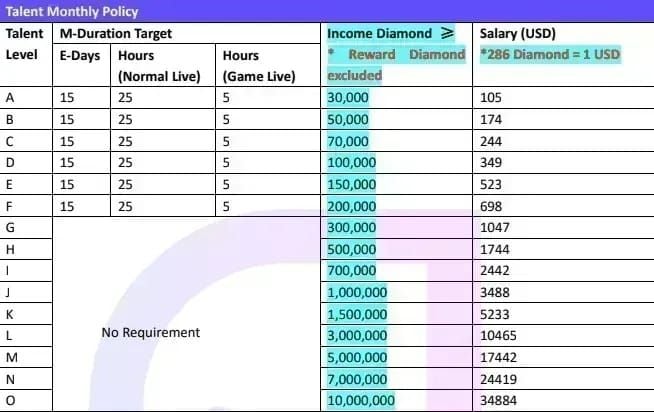
Both components must be satisfied independently. Game Live hours require actual gameplay streaming with specific category tags.
Talents joining after the 15th receive modified requirements. M-Duration Target becomes optional for late-month joiners, though meeting full requirements builds consistent habits. Level A-F talents face mandatory M-Duration Targets regardless of join date.
How MICO Live Calculates Monthly Hours
MICO Live operates on Pacific Standard Time (PST) for all calculations. A session crossing midnight PST counts toward two separate calendar days. One hour of streaming per calendar day PST equals one effective day toward the 15-day monthly requirement.
The system rounds to the nearest minute, not hour. A 59-minute session counts as 59 minutes. Monthly calculations reset at midnight PST on the first day of each month—no carryover from previous months.
What Counts as Valid Streaming Time
Valid streaming requires public broadcast sessions. Private sessions contribute minimally. The platform mandates 45+ minute public sessions minimum for talent demonstration; private sessions need only 15+ minutes.
Technical interruptions from platform server issues typically count toward your total. Disconnections from broadcaster internet problems or device failures don't receive credit. The system logs connection stability data to differentiate.
Offline hours never contribute, regardless of profile appearance. Setting status to away while logged in doesn't accumulate passive hours. The platform exclusively tracks active broadcasting time.
Why Your Badge Was Revoked: Common Causes
Insufficient Consecutive Days
The 15+ streaming days monthly requirement operates independently from total hours. You could stream 35 hours across 10 days yet still face revocation for insufficient active days.
Calendar day calculations follow PST strictly. Streaming 11:30 PM to 12:30 AM PST counts as two days, though the session lasted one hour. Gaps longer than 48 hours between sessions raise algorithmic flags, reducing discovery feed visibility.
Violation Thresholds
MICO Live enforces fewer than 3 violations monthly. Scenario 1 violations result in complete payment forfeiture regardless of streaming hours. More than 3 violations of Scenarios 2-6 monthly also trigger zero payment.
The platform tracks violations across 2-6 month periods for serious infractions. A single major violation in November can impact January badge review. Common violations include inappropriate content, viewer harassment, copyright infringement, and platform manipulation.
Technical Issues
Platform analytics occasionally experience synchronization delays. Real-time hour displays may lag behind actual streaming time. These delays typically resolve within 24 hours—wait 24-48 hours before assessing monthly totals.
Mobile versus desktop streaming can create tracking discrepancies. Mobile sessions occasionally fail to register properly, particularly when switching between WiFi and cellular data mid-stream. Using consistent streaming methods reduces complications.
Impact of Losing Talent Badge Status
Revenue Drops
Badge revocation immediately removes enhanced gift conversion rates. Standard users see 15-25% conversion rates; verified talents enjoy 20-35% depending on performance tier. This 5-10 percentage point difference creates significant income loss.
Scenario 1 violations result in no talent payment. More than 3 violations of Scenarios 2-6 monthly also zero out compensation. Audiences perceive non-badged broadcasters as less professional, reducing gift willingness. Many talents report 40-60% revenue drops within the first week.
Loss of Visibility
MICO Live's discovery algorithm heavily weights Talent Badge status. Verified talents receive preferential placement in Recommended and Hot sections. Badge revocation removes this algorithmic advantage, causing dramatic drops in new viewer acquisition.
Engagement metrics like chat interaction rates (20-35% threshold) and star ratings (4.5+ required) become harder to maintain without algorithmic support. Reduced visibility creates a negative feedback loop.
Restricted Access
Verified talents access Agency ID 8387 support structures for direct communication with platform representatives. Badge revocation severs these connections, leaving broadcasters with standard user support channels and longer response times.
Exclusive talent events, collaborations, and promotional campaigns require active badge status. Advanced analytics tools available exclusively to verified talents offer granular insights—losing badge status restricts access to basic analytics only.
How to Recover Your Revoked Talent Badge
Immediate Actions
Upon receiving revocation notification, document your streaming history from the previous month. Screenshot analytics showing total hours, active days, and technical issues. This documentation proves essential for appeals or identifying calculation errors.
Review violation history thoroughly through account settings compliance sections. Understanding which violations occurred prevents repeat issues during reapplication.
Contact platform support within 48 hours if you believe the decision resulted from technical errors. The 5-7 business day review window means delayed responses could push restoration into the following month.
Reapplication Requirements
Reapplication requires:
- 50+ total streaming hours in account history
- 100+ followers
- 18+ age verification with government-issued photo ID
- 4.5+ star rating
- 15-25% gift conversion rate
Submit the MICO TALENT Registration Form via the Hot page green banner. Incomplete submissions face automatic rejection, restarting the 5-7 business day review timeline.

Timeline for Restoration
Standard review: 5-7 business days from submission to decision
- 48-72 hours: Initial automated screening (follower count, total hours, age verification)
- Manual review: Violation history, streaming consistency, engagement metrics
Successful reapplication restores badge immediately upon approval, but rebuilding algorithmic priority takes 2-3 weeks. The recommendation system gradually reintegrates your profile. Consistent streaming during this period accelerates recovery.
Documentation Needed
Prepare detailed streaming schedules showing commitment to meeting monthly requirements for the next 30-60 days. Include specific streaming times, content categories, and backup plans.
If technical issues contributed to revocation, compile evidence: internet service provider outage reports, device malfunction documentation, or platform server status confirmations.
For violation histories, provide context and remediation plans. Explain what caused violations and detail specific prevention steps.
Prevent Future Revocation: Proven Strategies
Create a Consistent Schedule
Establish a weekly schedule allocating 9-10 hours across 4-5 days, creating a buffer above the 35-hour minimum. This accounts for unexpected absences without jeopardizing badge status.
Designate specific days for Game Live content to ensure you meet the 5-hour gaming minimum monthly. Many successful talents dedicate weekends to gaming when viewer availability peaks.
Streaming 5-6 days weekly guarantees you'll exceed the 15+ day minimum even if you miss several days. This buffer transforms requirements from stressful targets into achievable baselines.
Use Analytics to Track Progress
Access your monthly hours dashboard through the talent portal at least twice weekly. The dashboard displays total hours, active days, Game Live hours, and violation counts.
Set personal milestones at 10, 20, and 30 hours monthly. Reaching 10 hours by day 10 ensures you're on pace for the 35-hour target. Falling behind triggers immediate schedule adjustments.
Compare current month performance against previous months to identify trends. Declining hours or active days signal potential problems before they cause revocation.
Set Up Alerts
Create calendar reminders at the 15th and 25th of each month to assess progress. These checkpoints provide sufficient time to add extra sessions if tracking behind target.
Use smartphone alarms or scheduling apps to remind you of planned sessions. Automated reminders transform streaming from casual activity into professional commitment with structured accountability.
Join talent communities or partner with fellow broadcasters for mutual accountability. Peer check-ins create external motivation to maintain consistent schedules.
Build Buffer Hours
Target 40-45 monthly streaming hours rather than the 35-hour minimum, creating a 5-10 hour safety margin. This accommodates illness, emergencies, technical failures, or unforeseen disruptions.
Front-load monthly hours during the first two weeks when possible. Accumulating 20-25 hours before mid-month provides substantial cushion. This approach proves valuable during months with holidays or scheduling conflicts.
Track buffer hours separately in a personal spreadsheet. Visualizing your safety margin reinforces positive streaming habits.
Maximize Streaming Efficiency
Optimal Session Duration
Sessions lasting 2-3 hours represent the sweet spot for efficient hour accumulation while maintaining content quality. Sessions exceeding 4 hours often see declining viewer engagement and broadcaster energy.
The 45+ minute public session minimum means sessions shorter than one hour provide minimal benefit. Planning 90-minute minimum sessions ensures you comfortably exceed this threshold. Two 90-minute sessions daily yields 42 hours monthly, exceeding requirements with just 14 streaming days.
Schedule one longer 4-5 hour session weekly for special events. These extended sessions boost monthly totals while creating memorable viewer experiences.
Peak Times Strategy
Stream during platform peak hours (typically 7-11 PM in your target audience's timezone) to maximize both hour accumulation and viewer acquisition. High-traffic periods increase algorithmic promotion chances.
Analyze your personal analytics to identify when your specific audience shows highest engagement. Your peak times may differ from platform-wide patterns based on content niche and follower demographics.
Consider splitting daily streaming into two sessions during peak morning and evening hours. Morning sessions might target 60-90 minutes, with longer 2-3 hour evening sessions for primary content.
Quality vs Quantity Balance
Prioritize maintaining your 4.5+ star rating threshold while focusing on hour accumulation. Low-quality marathon streams damage your rating, creating new problems while solving hour deficiencies.
Interactive content formats like Q&A sessions, viewer challenges, and collaborative games extend session duration organically. These engagement-focused approaches simultaneously build the 15-25% gift conversion rate required for talent status.
Monitor chat engagement rate during streams and adjust content when participation drops. Strategic content pivots maintain quality throughout extended sessions.
Tools and Resources
Access Your Monthly Hours Dashboard
Navigate to profile settings and select Talent Portal from the menu. The dashboard displays on the portal homepage, showing current month statistics: total hours, active days, Game Live hours, and violation counts. Updates occur every 24 hours.
Mobile app users can access condensed dashboard information through the profile menu. For comprehensive tracking, use the desktop platform at least weekly.
Historical data spanning previous 6 months appears in the dashboard's archive section, allowing you to identify seasonal patterns and compare current performance against historical averages.
BitTopup Support Services
BitTopup offers comprehensive support for MICO Live talents beyond standard coin top-up services. The platform provides competitive pricing on MICO Live coins, ensuring talents can maintain viewer engagement through gifts and effects without excessive personal investment.
Secure transaction processing protects your financial information. Fast delivery times mean you can respond immediately to streaming opportunities. Excellent customer service addresses technical questions and transaction issues promptly.
Wide game coverage through BitTopup extends beyond MICO Live to support talents who stream gaming content for their 5-hour Game Live monthly requirement.
FAQ
What are the monthly hours required to keep MICO Live Talent Badge? 35+ total monthly streaming hours: 25 regular streaming hours and 5 Game Live hours. Additionally, stream on 15+ separate calendar days (PST timezone) and maintain fewer than 3 violations monthly. All three requirements must be met simultaneously.
Why was my MICO Live Talent Badge revoked in January? January sees peak revocations because the platform conducts comprehensive annual reviews evaluating December performance. Holiday schedules disrupt regular streaming patterns, causing talents to fall below the 35-hour threshold. The 5-7 business day review process flags accounts with insufficient hours.
How do I recover my Talent Badge after revocation? Submit the MICO TALENT Registration Form via the Hot page green banner with government-issued photo ID. Ensure your account shows 50+ total streaming hours, 100+ followers, 4.5+ star rating, and clean violation history. Review takes 5-7 business days; badge restores immediately upon approval.
What happens when you lose your Talent Badge? You lose enhanced gift conversion rates (dropping from 20-35% to 15-25%), algorithmic priority in recommendations, exclusive talent events, and Agency ID 8387 support. Revenue typically drops 40-60% within the first week due to reduced visibility.
Can I appeal a Talent Badge revocation? Yes, contact platform support within 48 hours of revocation notice if you believe technical errors caused the decision. Provide documentation like analytics screenshots, internet service provider outage reports, or platform server status confirmations. Appeals extend beyond the standard 5-7 day review window.
How long does it take to restore a revoked Talent Badge? Reapplication review requires 5-7 business days. Automated screening occurs within 48-72 hours, followed by manual review. Upon approval, badge status restores immediately, but rebuilding algorithmic priority takes 2-3 weeks of consistent streaming.
Don't let badge revocation hurt your MICO Live earnings! BitTopup offers exclusive support for talents, including fast top-ups, gift packages, and account management tools. Visit BitTopup now to secure your streaming career and maintain your Talent Badge status effortlessly!
Recommended News







Recommend products



Table of Contents
- Understanding MICO Live Talent Badge Revocation
- What Is the MICO Live Talent Badge
- The January Revocation Wave
- How Low Monthly Hours Trigger Removal
- Monthly Hours Requirements: Exact Numbers
- Minimum Streaming Hours
- How MICO Live Calculates Monthly Hours
- What Counts as Valid Streaming Time
- Why Your Badge Was Revoked: Common Causes
- Insufficient Consecutive Days
- Violation Thresholds
- Technical Issues
- Impact of Losing Talent Badge Status
- Revenue Drops
- Loss of Visibility
- Restricted Access
- How to Recover Your Revoked Talent Badge
- Immediate Actions
- Reapplication Requirements
- Timeline for Restoration
- Documentation Needed
- Prevent Future Revocation: Proven Strategies
- Create a Consistent Schedule
- Use Analytics to Track Progress
- Set Up Alerts
- Build Buffer Hours
- Maximize Streaming Efficiency
- Optimal Session Duration
- Peak Times Strategy
- Quality vs Quantity Balance
- Tools and Resources
- Access Your Monthly Hours Dashboard
- BitTopup Support Services
- FAQ



Recommended News

Is the Next Free Fire Banner Worth It? 2026 Leaks and Math

MICO Live Coins MENA After v5.2: Cheapest Deals 2026

Chamet Diamond Not Received After Google Recharge? 2026 Fix

Chamet Diamond Chargeback Ban Appeal 2026: Is the Success Rate Really 0%?

Chamet Diamonds Payment Declined? Safe Buy Fixes (June 2026)

Likee Short Video Shutdown in Indonesia (April 2026): Coins, Backup & Next Steps

Chamet Diamond $3.44 Pack 2026: Is It Actually Worth Buying?
Likee Indonesia Shutdown April 2026: Your Complete Next-Steps Guide


































































































