Exact Price Differences: iOS vs Android
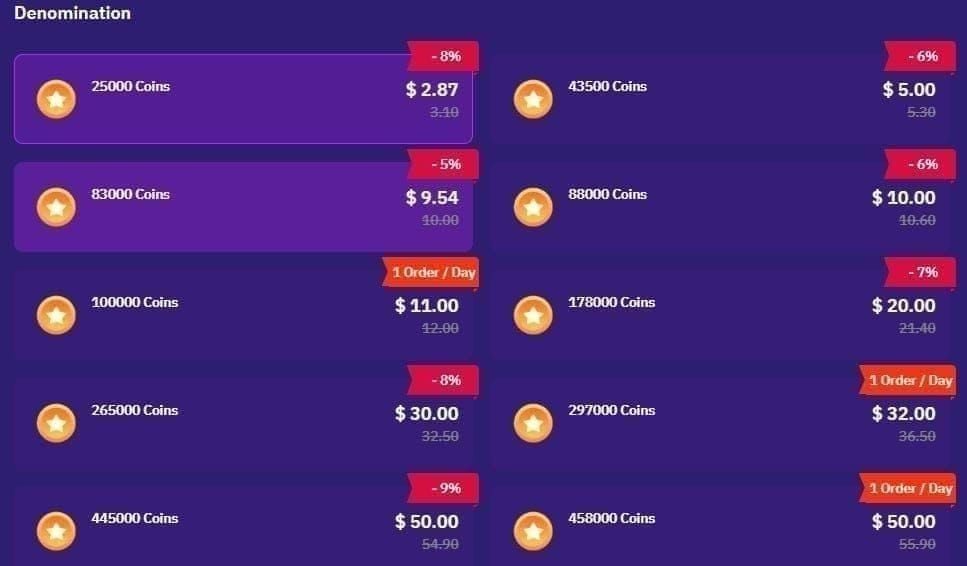
Small Packages:
- 2,100 coins: iOS USD 0.29 vs Android USD 0.23 (21% premium)
- 7,000 coins: iOS USD 0.99 vs Android USD 0.77 (29% premium)
Medium Packages:
- 21,000 coins: iOS USD 2.99 vs Android USD 2.31 (29% premium)
- 70,000 coins: iOS USD 9.99 vs Android USD 7.69 (30% premium)
Large Packages:
- 210,000 coins: iOS USD 29.99 vs Android USD 27.44 (9% premium, includes 20% bonus)
- 430,000 coins: Not available iOS vs Android USD 46.82
- 870,000 coins: Not available iOS vs Android USD 94.73
2025 benchmark: 9,460 coins per USD on third-party platforms vs ~7,000 coins per USD on iOS. Android bulk orders process 10-20% faster.
Annual Cost for iPhone Users
Monthly 70,000 coins: USD 119.88 yearly on iOS vs USD 92.28 on Android—extra USD 27.60
Monthly 210,000 coins: USD 359.88 on iOS vs USD 329.28 on alternatives—wasting USD 30.60
Heavy users buying more amplify this difference. Your account balance remains identical regardless of purchase method—only acquisition cost changes.
Maintaining Android Prices on iPhone
Three methods bypass iOS premium while maintaining full account functionality. Poppo coins sync across all devices logged into your account.
Method 1: Third-Party Web Platforms – Purchase through BitTopup at Android-equivalent pricing with 1-15 minute delivery (99% under 3 minutes).
Method 2: Retain Android Device – Keep your old Android phone for purchases. Buy coins at Android rates, balance appears instantly on iPhone.
Method 3: Regional VPN Pricing – Connect to Philippines, Nepal, Nigeria, or Pakistan servers for additional savings beyond standard Android pricing.
Why BitTopup Works for iOS Users
BitTopup specializes in Poppo coins alternative payment with key advantages:
- Competitive pricing matching Android rates
- Fast delivery averaging under 3 minutes
- Secure transactions with 2FA protection
- Dedicated customer service for iOS issues
- Transparent rates, no hidden fees
- First-time bonuses: 8-12% extra coins
- Packages over 210,000 coins: 20% bonus
Multiple payment methods beyond Apple Pay. For Poppo Live recharge USA, BitTopup serves all regions with localized payment support.
Real Savings Examples
Casual Player (50,000 coins monthly):
- iOS: USD 66.00 annually
- BitTopup: USD 66.00 annually
- Savings: USD 0 (similar at this tier)
Regular Player (210,000 coins monthly):
- iOS: USD 359.88 annually
- BitTopup: USD 329.28 annually
- Savings: USD 30.60 (8.5% reduction)
Heavy Player (870,000 coins monthly):
- iOS: ~USD 120+ monthly (multiple packages)
- BitTopup: USD 1,136.76 annually
- Savings: USD 300+ (21% reduction)
Excludes first-time bonuses and promotions—actual savings often exceed these estimates.
How to Buy at Android Prices on iPhone
Method 1: BitTopup Web Platform
Works entirely on your iPhone:
- Update Poppo App – Version 2.9.6 (October 9, 2025) or later
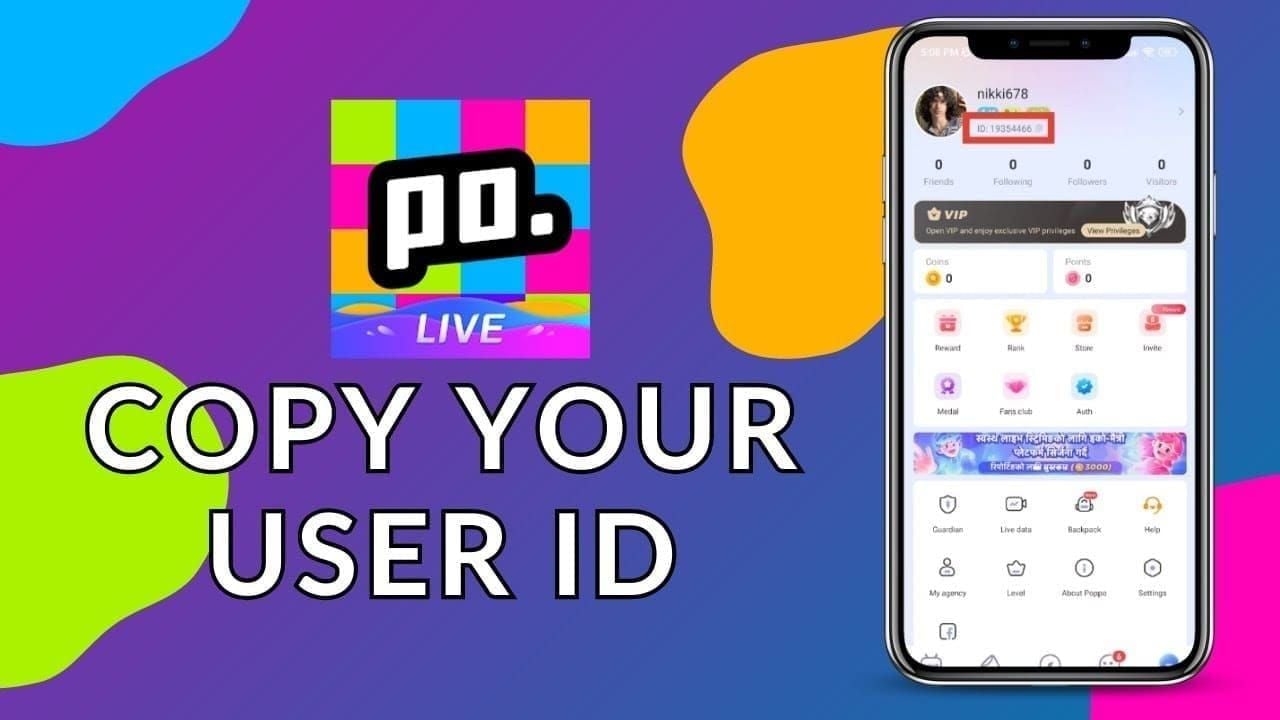
- Locate User ID – Tap My tab, copy numeric ID under profile picture
- Enable 2FA – Activate on Apple ID for security
- Access BitTopup – Open Safari, navigate to Poppo coins section
- Select Package – Choose from 1,000 to 4,450,000 coins
- Enter User ID – Paste your copied ID
- Complete Payment – Select payment method, finalize
- Verify Delivery – Check wallet within 1-15 minutes (typically under 3)
Saves 30% on every transaction with no technical knowledge required.
Method 2: Old Android Device
If you kept your Android phone:
- Maintain Installation – Keep Poppo Live version 2.9.6+ on Android
- Same Account – Use identical credentials on both devices
- Purchase on Android – Open Poppo, tap Wallet, select package, pay

- Verify on iPhone – Coins appear within minutes
Guarantees official Android pricing. Coins transfer instantly via server-side balance tracking.
Method 3: Regional VPN
For maximum savings:
- Install VPN – Choose service with Philippines, Nepal, Nigeria, or Pakistan servers
- Connect to Region – Philippines offers best rate at 12,000+ coins per USD
- Clear Cache – Force-close Poppo, clear cached data
- Open Poppo – Launch while connected to VPN
- Purchase – Select packages in local currency
- Complete – Use region-accepted payment methods
Regional pricing:
- Philippines: 7,000 coins for PHP 33 (~USD 0.60)
- Nepal: 10,000 coins for NPR 150 (~USD 1.12)
- Nigeria: 10,000 coins for NGN 1,690 (~USD 1.06)
- Pakistan: 10,000 coins for PKR 2,960 (~USD 1.06)
Requires more setup but delivers absolute lowest per-coin cost.
Account Security & Cross-Platform
How Balances Sync
Poppo stores coin balance on central servers, not locally. Purchases through any method update your server-side account. Logging into iPhone immediately displays complete balance, including Android or web purchases.
Synchronization occurs in real-time, typically within seconds. You never transfer coins—you access the same balance from different devices.
Note: Coins expire after 12 months of inactivity (3 months for some legacy accounts). Regular login from any device resets this timer.
Security Best Practices
Enable 2FA – Activate on both Apple ID and Poppo account before purchases.
Verify Platforms – Confirm you're on official websites. BitTopup uses SSL encryption and secure payment processing.
Unique Passwords – Never reuse Poppo password. Use password managers.
Monitor History – Review Poppo purchase history in Wallet tab regularly.
Secure User ID – Only share on HTTPS connections. Never share password—legitimate services only need numeric User ID.
Device Transition Protection
Verify Authorization – Check Poppo settings for all authorized devices. Remove unrecognized ones.
Update Contact Info – Ensure email and phone are current for security notifications.
Gradual Transition – Keep Android logged in first week to verify sync.
Document User ID – Store in password manager for third-party purchases.
Test Small Purchase – Start with small package on new method before large transactions.
Troubleshooting
Coin Delivery Delays
99% complete within 3 minutes. Standard window: 15 minutes during peak hours. If delayed:
- Force-Close – Swipe up from app switcher, relaunch
- Check Connection – Switch between WiFi and cellular
- Verify User ID – Confirm correct numeric ID provided
- Review Status – Check confirmation email or BitTopup account
- Contact Support – After 15 minutes, contact with transaction ID
BitTopup resolves iOS issues within 30 minutes during business hours.
Payment Rejection
Regional Restrictions – Some processors limit by Apple ID country. Disable VPN during payment.
Card Verification – Check email/texts for confirmation codes on first purchase.
Daily Limits – Banks impose online transaction limits. Wait 24 hours or contact bank.
Currency Conversion – Ensure payment method supports international transactions.
Alternative Methods – Try PayPal, digital wallets, or cryptocurrency if card fails.
Login Issues After Switch
Password Reset – Use Forgot Password via email or phone.
Age Verification – Re-verify on iOS using same credentials (16+ requirement).
App Version – Ensure iOS 12.0+ and latest app (2.9.6 as of October 2025).
Clear Cache – Delete and reinstall Poppo if login consistently fails.
Third-Party Login – Use identical method (Facebook/Google) as on Android. Switching creates separate accounts.
Maximizing Savings
Best Purchase Times
First-Time Bonuses – New BitTopup users get 8-12% bonus on initial transaction.
Holiday Promotions – Christmas, New Year, Valentine's Day feature 15-25% bonus coins.
Monthly Resets – Some platforms refresh offers on 1st of month.
Off-Peak Hours – 2-6 AM improves processing speed.
Bulk Packages – 210,000+ coins include 20% extra regardless of timing.
Combining Promotions
Pre-Event Stocking – Purchase 1-2 days before major Poppo events.
Event Packages – BitTopup offers event-themed packages during Poppo promotions.
Streamer Birthdays – Have coins ready from cheaper sources for multiplied gift values.
Ranking Competitions – Quarterly events reward top gifters. Buy all coins through third-party platforms.
Long-Term Strategies
Monthly Budget – Purchase full monthly amount in single transaction for bulk bonuses.
Price Alerts – Track BitTopup promotional calendar for recurring patterns.
Multi-Device – Maintain installations on iPhone and Android for backup options.
Expiration Management – Buy only what you'll use within 12 months.
Referrals – Use referral programs for additional coins or discounts.
Common Myths
Myth: External Purchases Violate Terms
Reality: Poppo's terms govern account behavior, not purchase location. Platform accepts coins from any authorized source. You're exercising consumer choice. BitTopup operates as authorized reseller—entirely legal.
Myth: Coins Don't Transfer
Reality: Poppo maintains unified server-side balances. Coins sync across all devices immediately regardless of purchase method. Only exception: rare region-locked promotional coins.
Myth: Third-Party Platforms Are Unsafe
Reality: Safety depends on choosing verified services. BitTopup offers SSL encryption, secure payment processing, transparent pricing, responsive support. Meets all security criteria while maintaining competitive pricing.
User ID vs Password: Platforms only need numeric User ID. Never provide password—if requested, it's a scam.
2FA Protection: Prevents unauthorized access. Delivery only adds coins, cannot withdraw or access personal info.
Payment Security: Details go to established processors (PayPal, credit networks), not Poppo. Enhances security vs storing in app.
Why Choose BitTopup
Verified Security
Bank-level SSL encryption for all transactions. Never stores credit card details—processing through PayPal and major networks. Transaction guarantees, dispute resolution, refund options match or exceed App Store.
Device-agnostic purchasing through Safari, Chrome, or any iOS browser. No additional apps needed.
iOS-Specific Support
Dedicated channels for:
- Apple ID payment conflicts
- iOS app version compatibility (2.9.6+)
- iCloud synchronization issues
- Safari browser problems
Response times under 2 hours during business hours. 24/7 availability for urgent issues. Multilingual support.
Exclusive Promotions
First-Time iOS Bonuses – 8-12% extra vs standard 5-8%
Device Transition Packages – Special deals for verified switchers
Holiday iPhone Promotions – Additional discounts during peak seasons
Loyalty Rewards – Points redeemable for bonuses, accelerated rates for iOS users
Promotions stack with standard bonuses—new users during promotions can receive 30-40% more coins.
Transparent Pricing
No hidden fees. Displayed price = exact payment amount. Clear currency conversion rates shown before confirmation. Delivery timeframes disclosed (1-15 minutes, 99% under 3). Real-time transaction tracking.
FAQ
Why are Poppo coins more expensive on iPhone?
Apple charges 30% commission on App Store purchases. Third-party platforms bypass these fees, offering 70% lower rates. 2025 benchmark: 9,460 coins per USD third-party vs ~7,000 on iOS.
How much can I save?
8-30% depending on package size. Small packages save 21-29%, large packages save ~9% plus 20% bonus. Heavy users save USD 300+ annually. First-time purchases add 8-12% bonuses.
Will coins transfer from Android to iPhone?
Yes, immediately. Poppo stores balances on central servers. Coins sync across all devices within seconds. Only requirement: same login credentials.
Is buying from third-party platforms safe?
Yes, with verified platforms like BitTopup. Only requires numeric User ID (never password), uses SSL encryption, processes through established gateways, delivers within 1-15 minutes. Enable 2FA for additional security.
How long for delivery?
99% within 3 minutes, maximum 15 minutes during peak periods. Matches or exceeds App Store speeds. Android orders process 10-20% faster. Contact support if delayed beyond 15 minutes.
Can I use old Android device for iPhone purchases?
Yes, simplest method. Keep Poppo Live 2.9.6+ on Android, log in with same credentials, purchase at Android rates—appears instantly on iPhone. Guarantees official Android pricing.
Ready to save up to 30% on every Poppo coin purchase? Visit BitTopup now and start buying at Android prices on your new iPhone!