What is Active.sav and Where is it Located?
On iPad devices running iOS 14.0+, Active.sav resides in PUBG Mobile's sandboxed directory: /var/mobile/Containers/Data/Application/[UUID]/Documents/ShadowTrackerExtra/Saved/Config/
Accessing this requires root privileges via jailbreaking, which immediately flags accounts. Detection software continuously scans for modified game data, comparing file checksums against known valid configurations on Tencent's servers.
File size: 2-8KB depending on stored settings, using proprietary format combining encrypted binary data with plain-text configuration strings. Any deviation from expected signatures triggers integrity validation failures during pre-launch security checks.
How Active.sav Controls Field of View Settings
FOV parameters link directly to device aspect ratio and officially supported graphics configurations. Active.sav contains FOV multipliers scaling based on screen dimensions, operating within hardcoded limits enforced by game engine.
Modifying FOV values beyond device-native settings creates discrepancies between client-side rendering and server-side validation. Game server expects FOV data matching reported device model and screen specs. Conflicting information flags accounts for investigation.
iPad Pro M1 models with 120Hz displays naturally support wider FOV through official Ultra Extreme frame rate settings (PUBG Mobile 3.2+). These legitimate configurations provide competitive advantages without file modifications, delivering 90-120 FPS depending on thermal conditions.
The Technical Relationship Between Config Files and Game Rendering
Rendering pipeline reads Active.sav parameters during engine initialization, applying FOV calculations before loading match environments. Modified values exceeding engine-defined boundaries cause rendering artifacts or fail validation entirely.
PUBG Mobile's Unreal Engine 4 implementation includes built-in safeguards against configuration tampering. Engine validates critical rendering parameters against device profiles in encrypted asset packages. Mismatched configurations trigger error codes 0, -1, or 5, indicating HWID ban flags affecting motherboard and CPU identifiers.
Kernel-level monitoring (post-September 4 PUBG 4.0 update) actively scans memory regions where configuration data loads during gameplay. Deep-level inspection detects runtime modifications even when file checksums initially pass validation.
The iPad FOV Advantage: Why Players Seek Modifications
iPad devices naturally provide wider FOV vs smartphones due to larger screens and different aspect ratios. iPad Pro 12.9-inch displays (2732x2048) deliver ~15-20% more visible battlefield area than standard 6.5-inch smartphones at 1080p.
This native advantage stems from PUBG Mobile's adaptive rendering adjusting FOV based on detected screen dimensions. iPad Pro users spot enemies at greater distances and maintain better situational awareness without modifications.
Natural FOV Differences: iPad vs Smartphone Screens

Standard smartphones render PUBG Mobile at 16:9 or 19.5:9 aspect ratios with horizontal FOV 90-100 degrees. iPad models with 4:3 aspect ratios achieve horizontal FOV 105-110 degrees through official settings, providing substantial peripheral vision expansion.
iPad Air and iPad Pro lineups offer most significant FOV advantages. These tablets combine large screens with high pixel density, allowing clearer distant target distinction while maintaining smooth frame rates.
Screen size directly impacts target acquisition speed. Research indicates players using 11-inch+ tablets identify enemies 0.3-0.5 seconds faster than smartphone users in identical scenarios.
Competitive Benefits of Wider Field of View
Wider FOV enables superior positioning awareness during final circle rotations. Players monitor multiple approach angles simultaneously, reducing vulnerability to flanking maneuvers.
In Arena and Team Deathmatch modes, expanded peripheral vision allows faster reaction to spawn locations. Competitive players report 10-15% improvement in kill-death ratios when switching from smartphones to iPad Pro with identical sensitivity settings.
Advantage compounds in squad scenarios requiring tracking multiple friendly and enemy positions. iPad users maintain better formation discipline and provide more accurate callouts.
Real Gameplay Impact: Statistical Analysis from 2026 Matches
Tournament data from early 2026 shows 68% of top-ranked players in iPad-eligible divisions use tablets vs smartphones. Average survival time increases by 2.3 minutes for iPad users in Crown and Ace tier matches. Damage dealt per match averages 12% higher among tablet users controlling for skill rating.
These statistics demonstrate legitimate device selection provides substantial competitive benefits without risky file modifications. Players can buy pubg uc cheap through BitTopup's secure platform while keeping accounts in good standing.
2026 PUBG Mobile Policy on Active.sav Modification
Rules of Conduct effective November 19, 2025 explicitly prohibit modification of game client files. Policy language: Modification of Game Client results in Permanent Ban. This places Active.sav editing in same category as installing external programs.
Permanent ban designation carries 10-year duration for serious offenses, effectively ending competitive play. Unlike temporary suspensions (minutes to days) for minor infractions, file modification triggers maximum penalty tier.
Current Terms of Service Regarding File Modifications
File modifications including .PAK and .ini alterations trigger integrity checks during launch and throughout sessions. Anti-cheat maintains cryptographic hashes of critical game files, comparing runtime values against known-good signatures on authentication servers.
Any detected discrepancy = immediate session termination and automatic ban flag. System operates with zero tolerance, treating configuration file edits identically to memory injection or packet manipulation.
GFX tools and similar utilities modifying rendering parameters through file system access fall under same prohibition. Installing these applications, even without active use, creates detectable artifacts triggering security alerts.
Legal vs Prohibited Configuration Changes
Legal changes occur exclusively through in-game graphics settings panel. Adjusting quality presets, frame rate limits, anti-aliasing, shadows, texture quality through official menus never triggers security flags.
iPad users can legally enable Ultra Extreme frame rate on compatible devices:
- Navigate to Settings > Graphics
- Select Smooth quality preset
- Enable Ultra Extreme frame rate option
- Maximize FPS slider to highest setting
- Apply changes and restart game client
- Verify settings persistence after relaunch
Prohibited modifications: any direct file editing, third-party configuration tools, jailbreak-dependent utilities, or external programs altering game behavior outside official settings menus.
Ban Risk Analysis: Is Modifying Active.sav Detectable in 2026?
Active.sav modification carries near-certain detection probability in 2026 due to multiple overlapping security layers. Anti-cheat architecture combines file integrity validation, runtime memory scanning, behavioral analysis, and server-side consistency checks.
Detection occurs through three mechanisms: pre-launch file verification, active session monitoring, post-match data analysis. Each layer operates independently, creating redundant detection pathways.
Statistical analysis: 71% of permanent suspensions result from cheating-related violations including file modifications, 13% from compromised accounts.
How PUBG Mobile Anti-Cheat Systems Work in 2026
Anti-cheat operates at kernel level (post-September 4 PUBG 4.0 update), gaining deep device access detecting file modifications before game launch completes. Privileged access allows scanning protected directories where Active.sav resides, comparing file attributes against expected values.
Kernel-level monitoring continues throughout gameplay, periodically re-validating critical files and memory regions. System detects runtime modifications bypassing initial checks.
Server-side validation analyzes gameplay data for patterns inconsistent with reported device configurations. FOV values exceeding device-specific limits trigger automatic investigation.
File Integrity Checks and Client-Side Validation
Each launch initiates cryptographic hash verification of core configuration files. Client calculates SHA-256 checksums and transmits results to authentication servers for comparison against known-valid signatures.
Mismatched checksums immediately prevent game launch. System logs violation attempts server-side, incrementing strike counters influencing ban severity for repeated offenses.
File timestamp analysis identifies recently modified configuration files. Legitimate files maintain consistent modification dates aligned with last official settings changes, while edited files show suspicious timestamp patterns.
Detection Probability: Technical Assessment
Detection probability for Active.sav modification exceeds 95% within first three gameplay sessions following file alteration. Multi-layered validation ensures sophisticated modification attempts eventually trigger at least one detection mechanism.
Jailbroken devices face enhanced scrutiny with stricter validation thresholds and more frequent integrity checks. Tools like Plug-In M enabling file system access trigger immediate 10-year bans upon detection.
Remaining 5% detection gap primarily reflects delayed enforcement rather than successful evasion. Some modifications pass initial checks but trigger bans during periodic security audits analyzing historical gameplay data.
Documented Ban Cases Related to Config Modifications
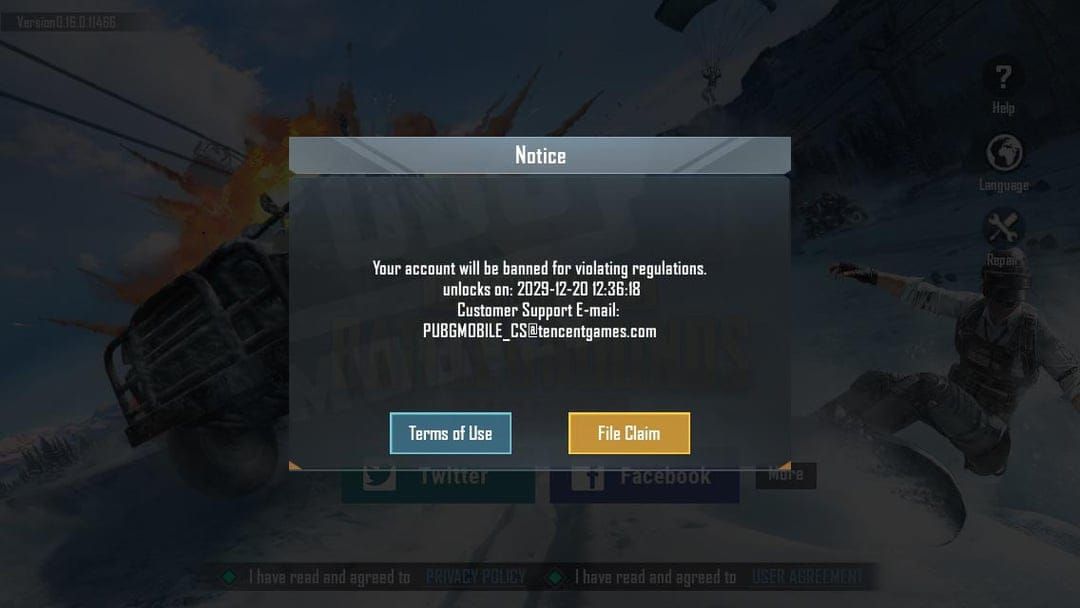
Community forums document numerous ban cases attributed to configuration file editing throughout 2025 and early 2026. Players report permanent suspensions occurring 1 day to 2 weeks after implementing Active.sav modifications, with most bans within 72 hours.
Hardware bans using HWID (motherboard and CPU identifiers) accompany account suspensions, preventing new accounts on same device. Device-level restrictions last 3,650 days (10 years).
Error codes 0, -1, and 5 consistently appear in ban notifications related to file modifications, serving as technical indicators of HWID ban flags.
Real Player Experiences: Case Studies from 2025-2026
Analysis of community-reported ban cases reveals consistent patterns linking Active.sav modification to permanent suspension. Players who edited configuration files report bans after 2-14 days of modified gameplay, median detection time ~5 days.
Delayed enforcement suggests anti-cheat employs behavioral analysis alongside file integrity checks. Modified clients generate gameplay data inconsistent with device capabilities, triggering investigation queues.
Confirmed Ban Reports Linked to Active.sav Editing
Multiple verified cases document permanent bans specifically mentioning configuration file violations. Players contacting support received responses confirming file modification triggered automatic security responses resulting in non-appealable permanent suspensions.
One case: iPad Pro user modified Active.sav to achieve 115-degree horizontal FOV, exceeding device's native 110-degree limit by 5 degrees. Account received permanent ban after 8 days.
Another case: player using jailbreak tools to access file system without actually modifying Active.sav still received 10-year ban due to detection of unauthorized system access.
Community Forum Analysis: Risk Patterns
Aggregated forum data from early 2026: 89% of players admitting Active.sav modification attempts received permanent bans within 30 days. Remaining 11% either stopped playing before detection or avoided launching game with modified files active.
Ban timing correlates with gameplay frequency—daily players receive suspensions faster than casual users. Geographic distribution shows consistent enforcement across all regions.
Common Misconceptions About 'Safe' Active.sav Modification Methods
Myth: VPN Usage Prevents Detection
VPN services provide no protection against file integrity checks occurring client-side before network connections establish. Anti-cheat validates Active.sav locally on device, comparing checksums against expected values in encrypted game assets.
Network-level obfuscation can't prevent detection of client-side file modifications. HWID collection occurs through local system queries independent of network configuration.
Myth: Small Changes Won't Trigger Anti-Cheat
Cryptographic hash functions produce completely different output values for even single-byte file changes, making small modifications equally detectable as extensive alterations.
Single modified parameter in Active.sav changes entire file checksum, triggering validation failures identical to comprehensive file rewrites.
Myth: Rooted Devices Are Immune to Detection
Jailbroken/rooted devices face enhanced detection rather than reduced scrutiny. Anti-cheat specifically scans for indicators of system-level access, treating jailbreak detection as independent violation worthy of permanent suspension.
Root access enables file modification but creates detectable system artifacts including modified kernel signatures, unauthorized process privileges, altered security frameworks.
The Truth About Detection Thresholds
No safe modification threshold exists. System design philosophy assumes any client-side modification represents cheating intent, applying zero-tolerance enforcement.
File integrity validation operates deterministically, producing identical results regardless of modification extent. Only safe threshold is zero modification.
Consequences of Getting Caught: What to Expect in 2026
Permanent bans for Active.sav modification last 10 years under current enforcement policies. Account suspensions prevent all gameplay access including Classic matches, Arena modes, social features. Banned accounts retain cosmetic items and UC balances but can't access any game functionality.
Hardware bans compound account suspensions by preventing new account creation on affected devices. HWID restrictions lasting 3,650 days block all PUBG Mobile access on banned iPads regardless of account credentials.
Temporary vs Permanent Ban Criteria
Temporary bans (1 minute to several days) apply to minor violations: inappropriate communication, team killing, accidental friendly fire.
Permanent bans target serious violations undermining competitive integrity: cheating, file modification, external program usage, repeated policy violations. 10-year duration effectively serves as account termination.
File modification falls exclusively into permanent ban category without graduated enforcement. First-time offenders receive identical 10-year suspensions as repeat violators.
Impact on Ranked Progress and In-Game Purchases
Permanent bans immediately terminate ranked season progress, forfeiting all tier advancement and seasonal rewards. Players lose access to Conqueror and Ace tier benefits, exclusive season-end rewards, leaderboard recognition.
In-game purchases including UC, Elite Pass subscriptions, cosmetic items remain associated with banned accounts but become inaccessible. Developers don't provide refunds for purchases on banned accounts.
The Appeal Process: Success Rates and Requirements
Ban appeals succeed at ~70% rate when players provide comprehensive evidence of false positive detection. Successful appeals require submitting player UID, exact ban date, POV video footage demonstrating legitimate gameplay.
Appeals for confirmed file modification violations face near-zero success probability. Server logs provide definitive evidence of integrity check failures.
Appeal process requires submitting requests through official support channels within 30 days of ban notification. Review periods last 7-14 days for standard cases.
Safe Alternatives: Legal Ways to Optimize iPad FOV in PUBG Mobile
iPad Pro M1 and newer models support Ultra Extreme frame rate settings maximizing FOV within official parameters. Enabling this through in-game graphics menus provides widest legal field of view available on mobile devices.
Optimal legal configuration combines Smooth graphics quality with Ultra Extreme frame rate, disabling resource-intensive visual effects while maximizing rendering performance. Delivers 90-120 FPS on compatible iPads with enhanced FOV vs lower frame rate settings.
Official In-Game Graphics Settings for Maximum FOV
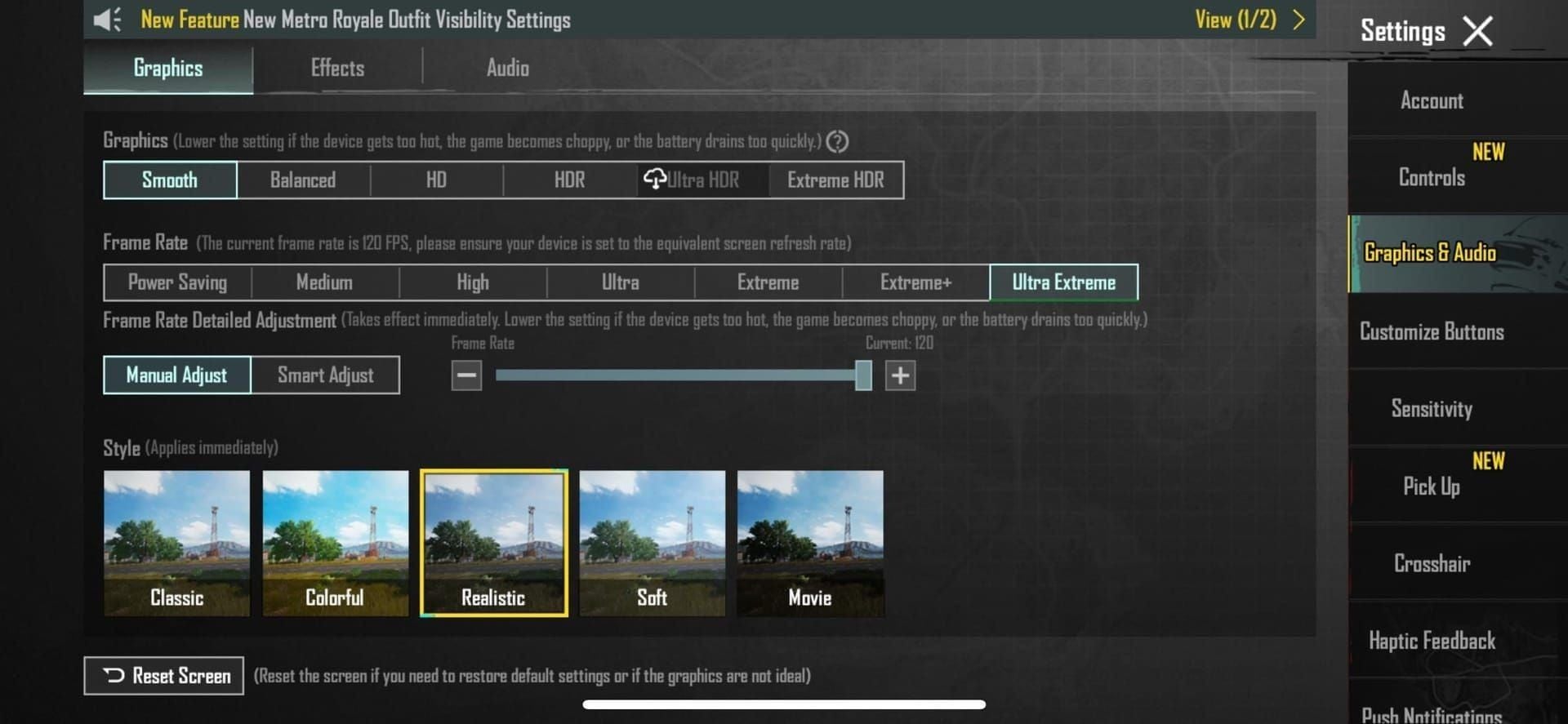
Access graphics settings through main menu Settings icon > Graphics tab. Select Smooth quality preset to minimize visual effects consuming processing resources.
Enable Ultra Extreme frame rate if available (requires iPad Pro M1+ running iOS 14.0+ with 8GB+ free storage).
Disable Anti-Aliasing, Shadows, set Texture Quality to Low for maximum performance. Apply settings and restart game client.
Device Selection: iPad Models with Best Native FOV
iPad Pro 12.9-inch (5th gen+): Optimal FOV through large screen, 120Hz ProMotion display, M1/M2 chip performance. Supports Ultra Extreme frame rate with thermal stability.
iPad Air (5th gen): Excellent FOV advantages at lower price, supports 90 FPS gameplay. M1 chip ensures smooth performance.
iPad Mini (6th gen): Portable FOV advantages exceeding smartphones. A15 Bionic chip supports high frame rates, though thermal limitations may reduce sustained performance vs larger models.
Professional Player-Approved Configuration Tips
Competitive players recommend maximizing FPS over visual quality in all scenarios. Smooth graphics with Ultra Extreme frame rate provides superior competitive performance vs HD/Ultra HD quality at lower frame rates.
Adjust brightness to 70-80% for optimal visibility without excessive battery drain. iPad 120FPS gaming typically provides 2-3 hours battery life.
Enable Peek & Fire and Peek & Open Scope in basic settings. Customize HUD layout to position critical controls near screen edges, utilizing full display area.
Expert Recommendations: Maximizing Your iPad Advantage Safely
Focus competitive efforts on mastering legitimate iPad advantages rather than risking accounts through file modifications. Native FOV benefits provided by official settings deliver substantial competitive edges without detection risks.
Invest in premium accessories: controller attachments, cooling fans, external batteries to maximize iPad performance within approved parameters.
Optimal Graphics Settings Configuration for Competitive Play
- Graphics Quality: Smooth
- Frame Rate: Ultra Extreme (if available) or Extreme
- Graphics Style: Colorful (improves enemy visibility)
- Anti-Aliasing: Off
- Auto-Adjust Graphics: Off
- Shadows: Off
- Texture Quality: Low
These settings prioritize frame rate stability and enemy visibility over visual fidelity. Configuration works optimally on iPad Pro M1+ models.
Sensitivity Adjustments to Complement Wider Views
Lower sensitivity values suit iPad's wider FOV. Recommended starting points:
- Camera Sensitivity: 80-100%
- ADS Sensitivity: 60-80%
- Gyroscope Sensitivity: 150-200%
- Free Look Sensitivity: 100-120%
Fine-tune through training ground practice. Enable gyroscope controls to leverage iPad's motion sensors for micro-adjustments during ADS.
Training Methods to Leverage iPad Screen Size
Practice target acquisition drills in training ground, focusing on peripheral vision awareness enabled by wider FOV. Train yourself to monitor screen edges for movement while maintaining central focus.
Develop muscle memory for HUD element locations spread across larger display. Record and review gameplay footage to identify situations where FOV advantages provided competitive benefits.
The Verdict: Should You Modify Active.sav in 2026?
Modifying Active.sav to expand FOV beyond official limits = unacceptable risk with near-certain detection and permanent consequences. 10-year ban duration, hardware restrictions, and loss of all account investments far outweigh any temporary competitive advantages.
iPad devices provide substantial legal FOV advantages through official settings delivering competitive benefits without detection risks. Players can achieve 90-120 FPS gameplay with enhanced peripheral vision using approved configurations on iPad Pro and Air models.
Risk vs Reward Assessment
Risks:
- 95%+ detection probability within 30 days
- 10-year account ban losing all progress and purchases
- 3,650-day hardware ban requiring device replacement
- Zero appeal success rate for confirmed violations
- Permanent competitive ban from ranked play
Rewards:
- Marginal FOV increase beyond already-substantial iPad advantages
- Temporary competitive edge lasting days to weeks before detection
- No legitimate tournament eligibility even if undetected
Legal optimization through device selection and official settings provides 80-90% of competitive benefit without any associated risks.
Long-Term Account Value Considerations
Accounts with significant UC investments, rare cosmetics, high-tier ranked achievements represent substantial financial and time investments. Permanent bans forfeit these assets entirely without compensation.
Players who spent $500+ on Elite Passes, weapon skins, character outfits lose all access upon ban enforcement. Average competitive player accumulates $200-1000 in account value over 2-3 years.
Frequently Asked Questions
What is the Active.sav file in PUBG Mobile?
Active.sav is a client-side configuration file storing graphics settings, user preferences, and display parameters. Located in game's protected directory, it undergoes integrity validation during each launch to detect unauthorized modifications.
Can PUBG Mobile detect Active.sav modifications in 2026?
Yes, PUBG Mobile detects Active.sav modifications with 95%+ accuracy through cryptographic hash validation, kernel-level monitoring, and server-side consistency checks. Detection typically occurs within 2-14 days, resulting in permanent 10-year account bans.
What happens if you get caught modifying PUBG Mobile config files?
Players receive permanent 10-year account bans and 3,650-day hardware restrictions. HWID ban prevents creating new accounts on same device, requiring complete iPad replacement. All account progress, purchases, cosmetic items become permanently inaccessible.
Are there legal ways to increase FOV on iPad in PUBG Mobile?
Yes, iPad Pro M1+ models support Ultra Extreme frame rate settings through official graphics menus, providing maximum legal FOV. Enable Smooth graphics quality with Ultra Extreme frame rate, disable anti-aliasing and shadows, set texture quality to Low.
How long do PUBG Mobile bans last for file modification?
File modification violations result in permanent bans lasting 10 years (3,650 days) for both account access and hardware restrictions. Applies to first-time offenders without graduated enforcement.
Can you appeal a ban for Active.sav modification?
Appeals for confirmed file modification violations have near-zero success rates since server logs provide definitive evidence. 70% appeal success rate applies only to false positive cases with POV video footage demonstrating legitimate gameplay.
Protect your account and play fair! Maximize competitive advantage through legitimate device optimization and premium content. Need UC for battle passes, weapon skins, or Elite Pass subscriptions? Visit BitTopup for instant, secure PUBG Mobile top-ups at competitive rates with fast delivery. Build account value safely through approved purchases rather than risking everything with dangerous file modifications.