Beta Timeline (January 29 – February 4, 2026)
Testing begins January 29 with four-wave server activation, ending February 4 when all beta servers shut down permanently. This creates 144 hours of testing time before the official late March/early April 2026 release.
How to Access 4.3 Beta
Step 1: Generate Binding Code
- Open regular PUBG Mobile
- Navigate to Events > Test Server
- Tap Generate Binding Code and copy (format: 7307-1085-6780-4282-435)
Step 2: Download APK
- Low-end devices (<4GB RAM): 32-bit APK
- High-end devices (6GB+ RAM): 64-bit APK
- Enable Unknown Sources in Android settings
- Install APK (1GB basic, 1.18GB enhanced)
Step 3: Complete Resource Download
- Select Guest Login
- Paste binding code
- Choose low-spec or HD resource pack (~2GB)
- Wait for verification
Requires minimum 3GB free storage, 5GB recommended.
Key Beta vs. Stable Differences
Beta operates on isolated servers with no cross-play. Friends lists, clans, and social connections exist separately. Match data, stats, and achievements don't transfer to your main account.
Beta features higher server instability, experimental graphics options, and unrestricted premium feature access. All temporary access disappears when testing concludes.
What Carries Over vs. Resets
Nothing transfers:
- Match stats and K/D ratios
- Tier rankings and competitive points
- UC purchases
- Inventory items and cosmetics
- Friend list additions
- Clan memberships
- Training ground records
What you retain:
- Knowledge of new mechanics
- Familiarity with map changes
- Muscle memory for updated controls
- Understanding of weapon balance
- Tactical insights for new modes
System Requirements and Optimization
Minimum Requirements
Android 5.0+, 3GB RAM minimum. Requires 3GB free storage for installation, expanding to 5-6GB after resource extraction.
Device-Specific Paths
Low-End (<4GB RAM):
- 32-bit APK
- Low-spec resource pack
- Smooth + Balanced settings
- Expected: 30-40 FPS
High-End (6GB+ RAM):
- 64-bit APK
- HD resource pack
- Smooth + Extreme or HDR + Ultra
- Expected: 60-90 FPS
Snapdragon 7/8 Gen processors receive optimization priority.
Hidden Changes in 4.3 Beta
Undocumented Weapon Balancing
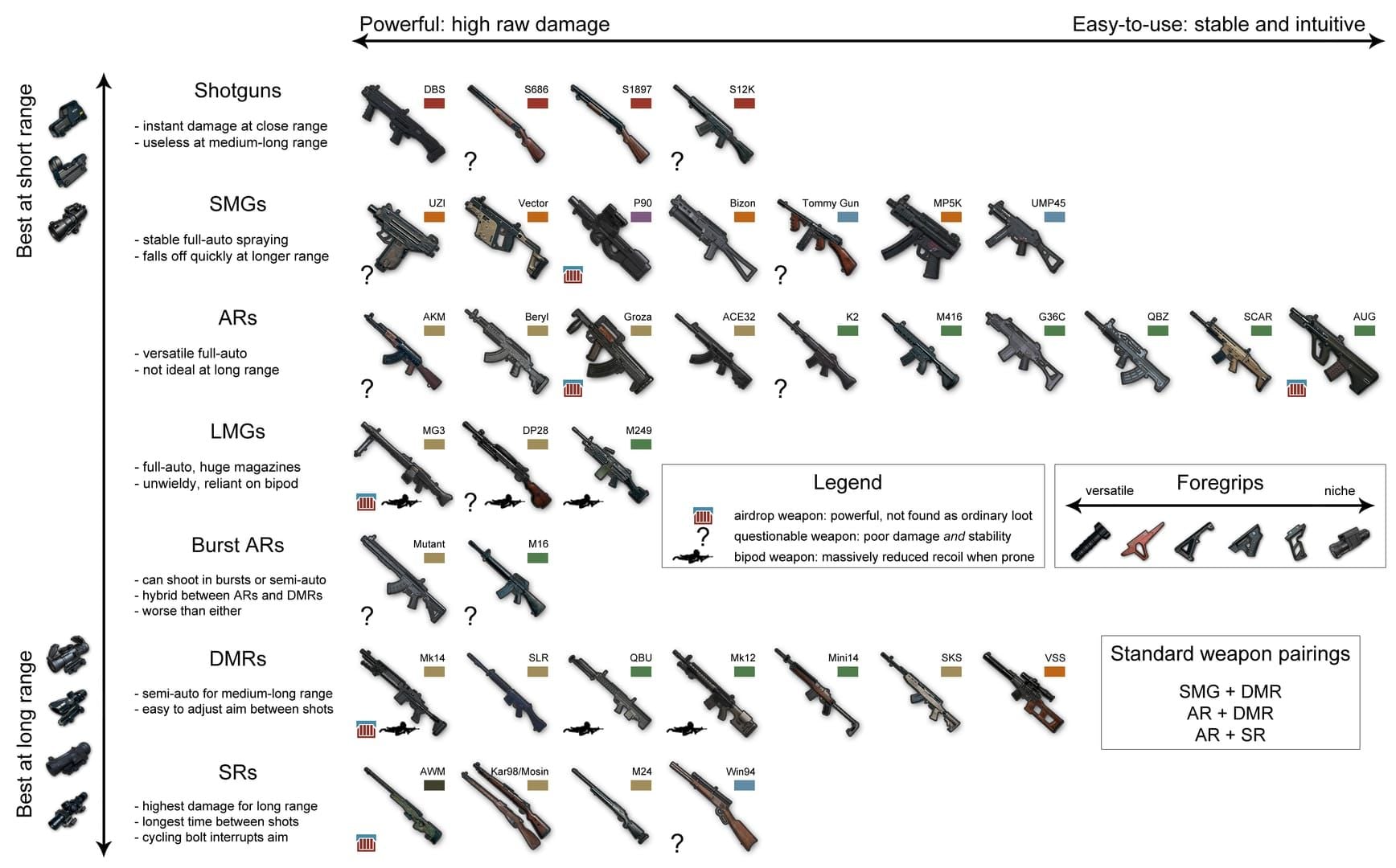
Assault rifles show tighter horizontal spread at medium range. DMRs have increased first-shot accuracy but slower follow-up recovery. Damage falloff curves recalibrated—weapons dominant at 100-150m now reduce damage starting at 120m.
Attachment compatibility expanded for certain weapon classes, creating new meta loadout possibilities.
UI/UX Improvements
Minimap rendering optimized, reducing CPU overhead 8-12% during combat. Inventory management features predictive sorting that learns your preferred arrangements.
Damage indicators show precise directional info with color gradations: close-range (0-50m) bright red, long-range (150m+) orange-tinted.
Backend Performance
Server tick rate improvements reduce input lag 15-20ms in optimal conditions. Memory management prioritizes texture streaming based on movement patterns.
Network packet compression refined, reducing bandwidth 18% without compromising hit registration.
Audio Enhancements
Footsteps include material-specific variations (concrete, grass, metal). Vertical audio recalibrated for better elevation representation in multi-story structures.
Weapon firing at extreme distances (300m+) includes atmospheric attenuation effects for more realistic sound propagation.
New Weapons & Equipment
Firearms and Attachments
Expanded attachment compatibility allows previously incompatible scope/grip combinations. Muzzle attachments rebalanced—compensators provide enhanced vertical control but increased horizontal deviation.
Throwables and Tactical Equipment
Grenade throwing incorporates wind resistance beyond 60m. Smoke grenades have refined dispersion patterns with more consistent visual obstruction and longer persistence.
Armor and Helmet Changes
Damage reduction percentages for level 2/3 equipment microscopically adjusted. Helmet durability follows predictable linear degradation instead of randomized reduction.
Map Changes
Erangel 4.3 Updates
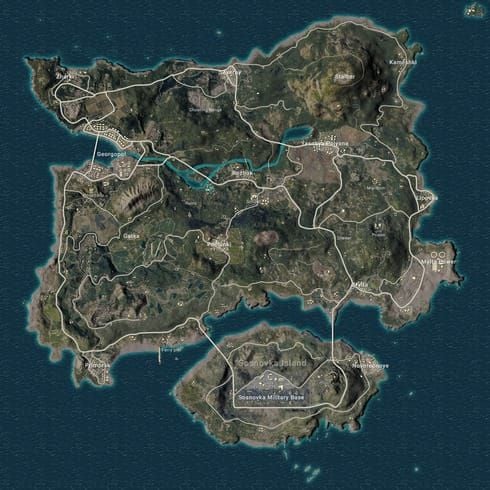
Compound layouts in mid-tier zones received structural additions, transforming open areas into complex multi-building positions. Loot density redistributed from hot drops toward underutilized sections.
Vehicle spawns relocated near map edges, facilitating safer zone entries for peripheral landings.
Hot Drop Tier List
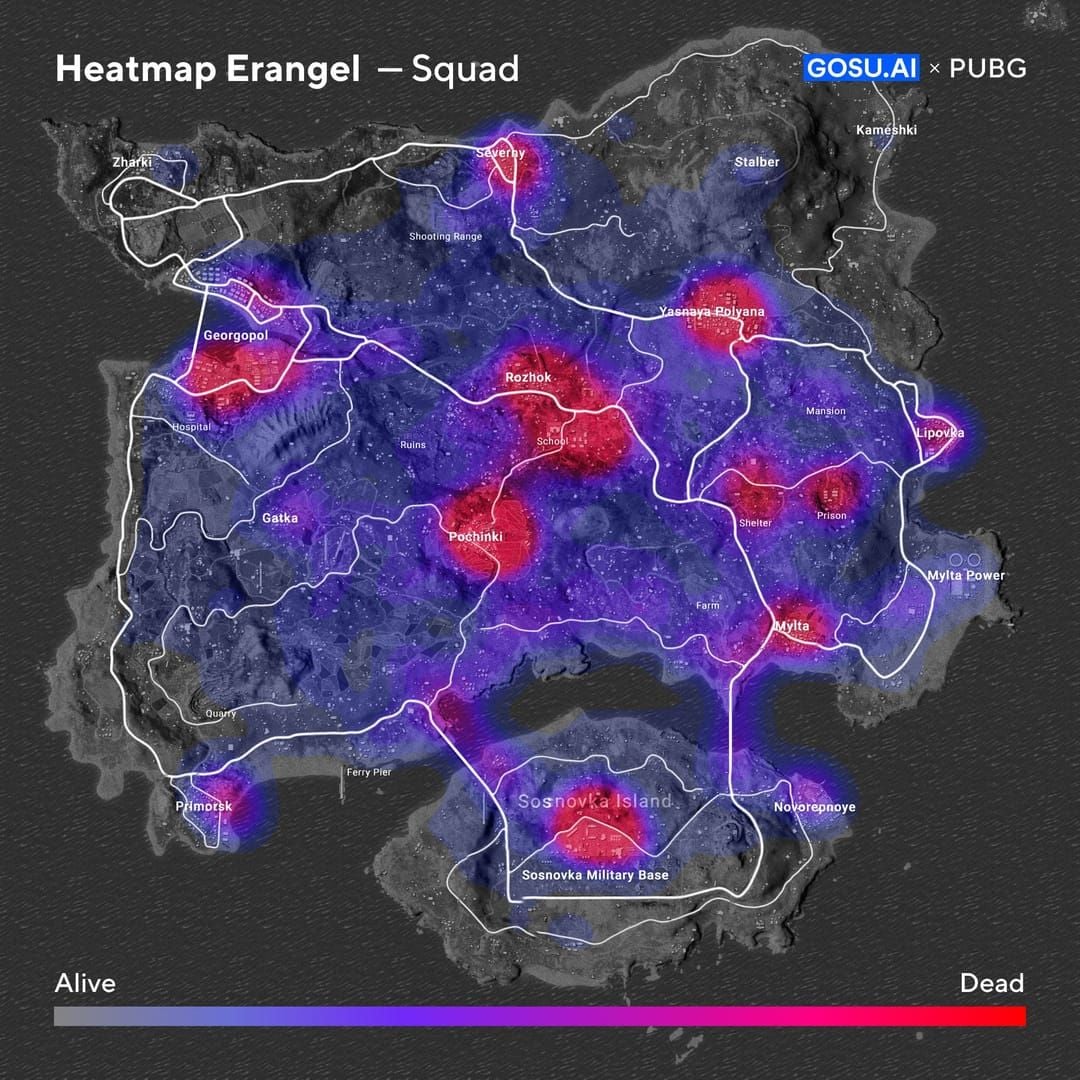
S-Tier (Highest Risk/Reward):
- Modified compounds with enhanced loot
- Restructured multi-story complexes near center
- Newly accessible rooftop positions
A-Tier (Balanced):
- Expanded peripheral zones
- Renovated warehouse districts
- Updated bridge checkpoints
B-Tier (Safe Development):
- Edge-map compounds with guaranteed vehicles
- Isolated building clusters
- Secondary zones with reduced traffic
Best Graphics Settings
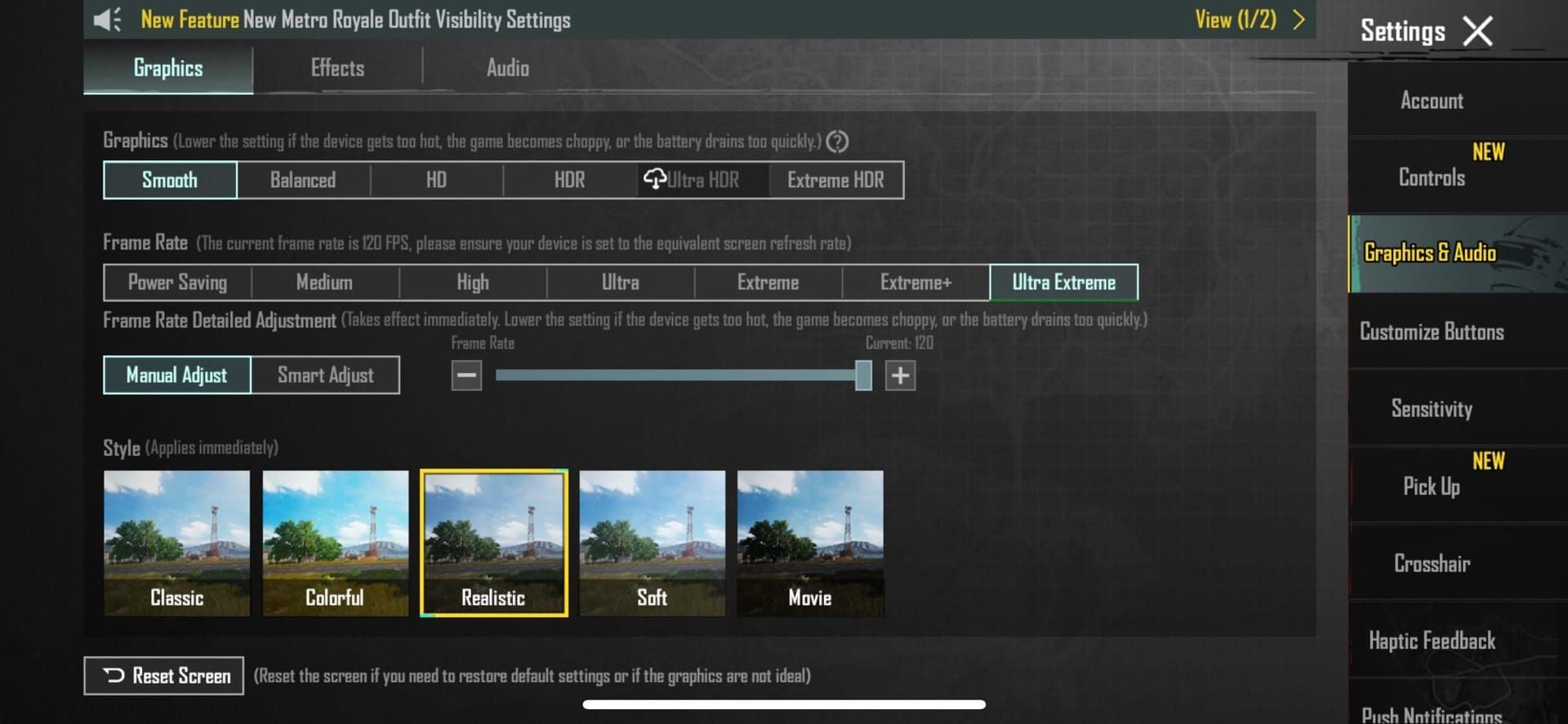
Flagship Devices (Smooth + Extreme)
Graphics Config:
- Graphics: Smooth
- Frame Rate: Extreme (60 FPS) or Ultra Extreme (90 FPS)
- Style: Colorful
- Anti-Aliasing: Enabled
- Auto-Adjust: Disabled
Advanced:
- Shadows: Disabled
- HDR: Disabled
- Ultra HD Resolution: Disabled
Maintains 60+ FPS during intense final circles.
Mid-Range Devices
Graphics Config:
- Graphics: Smooth or Balanced
- Frame Rate: High (40 FPS) or Ultra (60 FPS if stable)
- Style: Realistic
- Anti-Aliasing: Disabled
- Auto-Adjust: Enabled
Advanced:
- Shadows: Disabled
- HDR: Disabled
- Texture Quality: Medium
Monitor temperature—thermal throttling begins after 20-25 minutes.
Budget Devices
Graphics Config:
- Graphics: Smooth
- Frame Rate: Medium (30 FPS) or High (40 FPS)
- Style: Classic
- Anti-Aliasing: Disabled
- Auto-Adjust: Enabled
Additional Optimization:
- Close background apps
- Enable battery saver exceptions for PUBG
- Clear cache before sessions
- Reduce brightness to 60-70%
Avoid hot drops where 8+ players land simultaneously.
Competitive Priority
Consistent 60 FPS beats visual quality. Colorful style and disabled shadows enhance enemy visibility. Resolution above native provides negligible benefit while reducing frame rate.
Control Layout & Sensitivity
Custom Layout for New Modes
Allocate screen space for mode-specific buttons by relocating less-critical controls. Thumb players maintain fire buttons in lower-right quadrant. Claw players distribute new controls across upper screen regions.
Test layouts in Training Ground before competitive matches.
Sensitivity Fine-Tuning
Red Dot/Holo:
- Increase 5-8% for reduced recoil weapons
- Enables faster target tracking
2x-3x:
- Maintain current or reduce 3-5%
- Controlled tracking over rapid flicks
4x-6x:
- Reduce 8-12% for improved first-shot accuracy
- Prevents overcompensation during recoil control
8x:
- Minimal adjustment (±2-3%)
- Prioritizes stability over rapid acquisition
Gyroscope Optimization
Enable scope-only activation. Recommended sensitivity:
- Red Dot/Holo: 150-200%
- 2x-3x: 100-150%
- 4x-6x: 75-100%
- 8x: 50-75%
Practice gyroscope recoil control in Training Ground.
Performance Optimization
FPS Stability
Stable 40 FPS beats fluctuating 45-60 FPS.
Critical Settings:
- Disable Auto-Adjust Graphics
- Set Graphics to Smooth
- Disable Shadows
- Limit Frame Rate to sustainable level
Monitor FPS during hot drops, rotations, and final circles. Set target based on worst-case performance.
Battery Reduction
Optimization Strategies:
- Reduce brightness to 50-60% (15-20% battery savings)
- Enable battery saver with PUBG whitelisted
- Disable haptic feedback (3-5% savings per hour)
- Close background sync
- Use airplane mode with WiFi
Maintain device temperature below 40°C.
Network Optimization
Ping Reduction:
- Connect to 5GHz WiFi
- Position within line-of-sight of router
- Close bandwidth-intensive apps
- Enable network acceleration
- Use USB-C to Ethernet adapter
Test connection in Training Ground. Ping fluctuations exceeding ±20ms indicate instability.
Cache Management
Protocol:
- Clear cache every 2-3 days
- Maintain minimum 2GB free storage
- Uninstall unused apps
- Move media to external storage
- Restart device before sessions
Maintain 15-20% free space for optimal performance.
Preparing for 8th Anniversary
How Beta Hints at Anniversary
Beta previews anniversary mechanics without revealing cosmetic rewards. New systems tested integrate into anniversary events as core mechanics.
Infrastructure improvements prepare for traffic spikes when player concurrency peaks.
Resource Stockpiling
Anniversary events feature time-limited lucky draws, exclusive Royal Pass content, and premium bundles requiring substantial UC.
For reliable UC with instant delivery, buy PUBG UC through BitTopup. Competitive pricing, 24/7 support, guaranteed security.
Stockpile silver fragments, coupons, and achievement medals during beta—these often convert to anniversary currency.
Expected Events
Anniversary celebrations span 2-3 weeks with rotating modes, login bonuses, and community challenges. Previous anniversaries introduced permanent cosmetics, exclusive weapon skins, and limited-edition vehicle finishes.
Anticipate anniversary tournaments with unique rule sets tested during beta.
Advanced Pro Tips
Early Meta Predictions
Assault rifles with improved mid-range accuracy may displace DMRs. Shotgun buffs could revitalize close-quarters combat.
Map changes adding vertical complexity favor coordinated teams over individual skill. Expect increased utility usage (grenades, smokes).
Weapon Combinations
Versatile loadouts perform best: mid-range primary (AR or DMR) with specialized secondary (shotgun for buildings, SMG for vehicles).
Avoid over-specialization until meta stabilizes.
Positioning Strategies
New buildings create defensive strongpoints controlling surrounding areas. Identify these during beta and develop rotation paths.
Vehicle rotations riskier in areas with added structures. Plan alternative on-foot routes.
Training Routine
Dedicate first 2-3 days to Training Ground experimentation. Allocate 30-minute focused sessions on specific skills: recoil control, grenade trajectories, optimal routes.
Record gameplay to review positioning and mechanical execution.
Common Bugs & Workarounds
Known Issues
Matchmaking occasionally places players in incorrect regions (150+ ms ping). Occurs during off-peak hours.
Cosmetic items display as default models or flicker. Audio desync after 90+ minutes continuous play (200-300ms delay).
Temporary Fixes
Matchmaking:
- Manually select server regions
- Queue during peak hours
- Restart if matched to distant servers
Cosmetics:
- Equip default skins
- Clear cache and restart
- Report through feedback system
Audio Desync:
- Restart every 60-90 minutes
- Reduce audio quality
- Disable voice chat if not communicating
Reporting Bugs
Include device model, Android version, actions before bug, match ID, timestamp, graphics settings, network conditions, and screenshots.
Submit through in-game feedback system for automatic diagnostic data attachment.
When to Rollback
If critical bugs prevent match completion or cause account issues, switch to stable version. Discontinue beta if experiencing overheating exceeding 45°C, battery drain exceeding 25% per hour, or crashes more than once per 3 matches.
FAQ
When does 4.3 Beta end?
February 4, 2026. Official 4.3 releases late March or early April 2026.
System requirements?
Android 5.0+, 3GB RAM, 3GB free storage. Low-end devices use 32-bit APK, high-end use 64-bit. Snapdragon 7/8 Gen recommended.
Does beta progress transfer?
No. All stats, rankings, inventory, UC, and social connections remain separate. Nothing transfers.
Can I play with stable version friends?
No. Beta servers operate independently with no cross-play.
What new weapons?
Specific additions under testing. Confirmed: expanded attachment compatibility, rebalanced damage falloff, modified recoil patterns.
Storage required?
APK: 1-1.18GB. Resource pack: 2GB. Total: minimum 3GB, 5GB recommended.




























































































































