Primewood Genesis and Peaky Blinders Connection
Primewood Genesis is the primary mode for earning Peaky Blinders tokens through Shelby Trials—four scenarios based on the show's narrative. However, the Peaky Blinders event runs independently, letting you earn rewards through alternative methods.
Event structure includes:
- Lucky Spin crates (10x bundles save 20%)
- Token exchanges at 500 Lucky Coins per mythic outfit
- 25 free Lucky Coins via Perk Shop
Exclusive rewards: Thomas Shelby Suit Set, Arthur Shelby outfit, John Shelby outfit—all accessible without Primewood Genesis.
Server-Side Activation vs Client Update
Downloading 4.2 doesn't mean immediate feature access. The update contains all assets, but modes need separate server-side activation controlled by PUBG Mobile's backend. This two-stage process prevents server overload and allows stability monitoring.
Beta testing preceded release: Beta 1 launched December 4, 2025; Beta 2 on December 11, 2025. This identified issues before widespread activation, explaining delayed features after client updates.
Regional Rollout Strategy
PUBG Mobile operates distinct server clusters for Australia, Southeast Asia, Russia, North America, South America, and Europe. Each region gets mode activations based on player density, server capacity, and historical data. Feature availability varies 24-72 hours across regions.
Weekly maintenance happens Tuesday nights, when server-side activations frequently occur. Check @PUBG_Support on X for real-time regional status updates.
Regional Availability Checklist
Understanding your region's schedule eliminates unnecessary troubleshooting.
Phase 1: Early Access Territories
Initial deployment targeted Southeast Asia and Europe, starting January 6, 2026 at 00:00 UTC. North American servers followed within 12 hours (12:00 UTC January 6). Australian servers activated January 7, 2026.
BGMI operated separately due to regional regulations, completing rollout January 15, 2026. Staggered Android/iOS deployment addressed platform-specific optimization.
Phase 2 and 3 Schedule
Secondary regions (South America, Russia) activated January 7-8, 2026, coinciding with Metro Royale Chapter 30 launch (January 8). Season 28 and A17 Royale Pass both launched January 11, 2026, completing the full 4.2 feature set.
Check Your Server Region
Your default server appears in lobby's upper-right corner. Tap to reveal available servers and status. Green = operational; yellow/red = maintenance or limited availability.

PUBG online ping test tool provides network diagnostics, distinguishing between regional unavailability and local connection issues.
7-Step Fix Guide
Follow sequentially for optimal results.
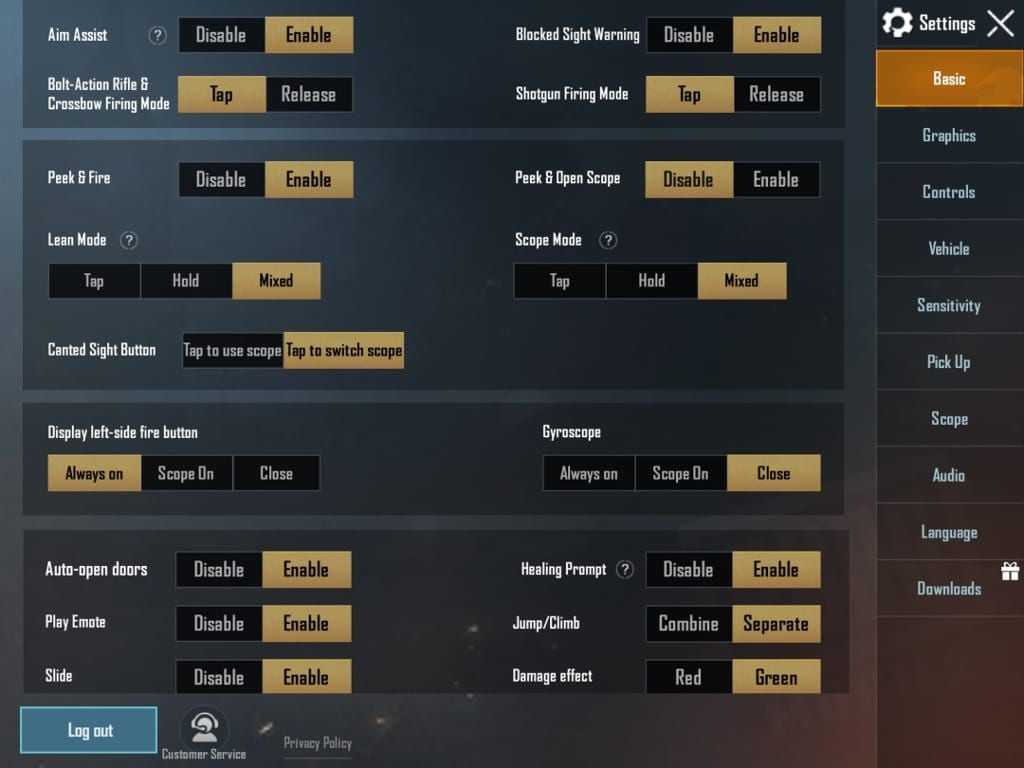
Step 1: Verify Version Number (Must Be 2.6.0+)
Check Settings > Basic > Version. 4.2 update = version 2.6.0 or higher.
Android:
- Open Google Play Store
- Tap Profile Icon > Manage apps & device
- Navigate to Updates available
- Locate PUBG Mobile/BGMI > Update
iOS:
- Open App Store
- Tap Profile Icon > Pull down to refresh
- Check Available Updates
- Select PUBG Mobile/BGMI > Update
Step 2: Clear App Cache
Cache corruption causes display issues with new modes.
Android:
- Settings > Apps > PUBG Mobile > Storage
- Tap Clear Cache (NOT Clear Data)
- Restart device > Relaunch game
iOS:
- Offload app through Settings > General > iPhone Storage
- Reinstall without deleting documents/data
Step 3: Check Resource Pack Downloads
Primewood Genesis requires supplementary packs beyond base update (200-400MB depending on graphics settings).
Access Downloads through lobby settings. Look for Map Resources or Mode Resources. Primewood Genesis appears as separate downloadable component.
Step 4: Confirm Server Selection
Incorrect server prevents access to region-specific content. Verify active server matches physical location. Disable VPNs—PUBG Mobile restricts features based on IP geolocation. VPN usage doesn't unlock region-locked content early and may trigger security flags.
Step 5: Network Connection Quality
Unstable connections interrupt resource downloads. Test using in-game network diagnostic tool. Switch between Wi-Fi and mobile data to identify network-specific issues. Test during off-peak hours (early morning) if ISP throttles gaming traffic.
Step 6: Device Compatibility
Minimum requirements:
- RAM: 3GB
- OS: Android 5.1.1 or iOS 9.0
- Processor: Snapdragon 625 equivalent
- Storage: 2.5GB free (maintain 4GB for smooth operation)
Devices below specs may hide mode to prevent performance issues.
Step 7: Reinstall vs Wait
Reinstall only after exhausting other steps. If version is correct, cache cleared, and resources downloaded, issue likely stems from pending server-side activation.
Monitor official channels 48-72 hours before reinstalling. Most regional activations complete within this timeframe.
Start Peaky Blinders Event Without Primewood Genesis
The collaboration operates independently from Primewood Genesis. For efficient reward maximization, PUBG UC recharge online through BitTopup provides fast delivery for Lucky Spin purchases.
Alternative Token Earning
Peaky Blinders tokens accumulate through standard gameplay across all modes. Classic matches award tokens based on survival time, kills, placement. Arcade modes (Team Deathmatch, Arena Training) contribute to daily caps.
Daily missions refresh at 00:00 UTC, offering bonus tokens for specific objectives: placement ranks, damage thresholds, weapon types.
Daily Mission Strategy
Prioritize highest token-to-time ratios. Survival-based objectives in Classic mode provide better returns than kill-focused challenges. Landing in low-traffic areas and surviving to top 10 earns more tokens than aggressive hot-drops.
Combine multiple objectives in single matches. Plan loadouts and drop locations around active missions for maximum efficiency.
Event Lobby Access
Peaky Blinders interface appears in Events tab immediately after updating to 4.2, regardless of Primewood Genesis availability.
Navigate to Events > Peaky Blinders for reward shop. Interface separates free rewards, token exchanges, and Lucky Spin options.
Rewards Optimization While Waiting
Strategic prioritization ensures you obtain valuable items before event ends February 5, 2026.
Priority Rewards
Thomas Shelby Suit Set = flagship reward (500 Lucky Coins through token exchange). This mythic-tier outfit won't return post-event. Arthur Shelby and John Shelby outfits follow similar rarity.
Weapon skins like Bullet Line P90 (available January 19-22, 2026 through SPIN) provide permanent cosmetic upgrades. Prioritize permanent items over temporary consumables.
Token Farming Efficiency
Classic mode on Erangel provides optimal token-per-hour rates. Matches lasting 20+ minutes with top 10 finishes yield 150-200% more tokens than quick Arcade matches.
Squad mode offers additional bonuses through team-based objectives. Solo players should focus on survival-oriented strategies.
Free-to-Play vs UC Investment
Completing full collection without UC requires consistent daily play throughout 27-day duration. Maximum daily cap (≈100 tokens) yields 2,700 total—sufficient for 5-6 mythic items.
UC investment through Lucky Spin accelerates completion. 10x bundle discount (20% savings) provides best value. Claim 25 free Lucky Coins from Perk Shop immediately.
Common Misconceptions
Myth: Update Downloaded = All Features Available
Client update contains dormant assets activated remotely. This allows developers to control feature rollout independently from app store cycles. Players with identical versions may experience different availability based on server region.
Myth: VPN Unlocks Region-Locked Modes
PUBG Mobile validates region eligibility through multiple factors beyond IP: account registration region, payment history, device location. VPN doesn't bypass these checks and may trigger security protocols risking account suspension.
Truth: Phased Rollouts Ensure Stability
Simultaneous global activation would overwhelm infrastructure. Phased rollouts distribute server load, maintaining stability while monitoring for bugs. Previous updates showed this strategy's effectiveness—4.1 experienced minimal downtime vs earlier simultaneous launches.
Device Requirements
Minimum and Recommended Specs
Minimum:
- RAM: 3GB
- OS: Android 5.1.1 or iOS 9.0
- Processor: Snapdragon 625 equivalent
- Graphics: Adreno 506 equivalent
Recommended:
- RAM: 6GB+
- OS: Android 8.0 or iOS 12.0
- Processor: Snapdragon 845 equivalent
- Graphics: Adreno 630 equivalent
Devices below minimum may not display Primewood Genesis to prevent poor performance.
Storage Requirements
Base 4.2 update: 2.2GB. Primewood Genesis packs: 300-450MB (graphics dependent). HD resource packs: additional 1.5GB.
Maintain 4GB free storage beyond installed size. PUBG Mobile generates temporary cache during matches. Regular monthly cache clearing prevents storage bloat.
Graphics Settings Impact
Ultra HD requires corresponding resource packs. Lower graphics presets may not prompt for high-resolution Primewood Genesis assets.
Navigate to Settings > Graphics and verify preset matches device capabilities. Enable Download HD Resources to trigger mode-specific assets.
If Mode Still Doesn't Appear
Official Support
In-game support (Settings > Customer Service) responds within 24-48 hours. Include:
- Device model and OS version
- Network type (Wi-Fi/mobile data)
- Issue date and time
- Server region and selected server
- ISP name
- Mobile carrier (if cellular)
Community Reports
Player communities on Reddit/Discord aggregate regional availability reports. Search for your region and device model to distinguish between widespread delays and isolated problems.
Patience Timeline
Historical data shows regional rollout completion within 72 hours of initial launch. Outlier regions occasionally experience 5-7 day delays.
Peaky Blinders event duration (January 9 - February 5, 2026) provides ample participation time even with week-long delays. Token earning rates remain consistent regardless of access timing.
FAQ
Why is Primewood Genesis not showing in my PUBG Mobile 4.2?
Phased regional rollouts, not technical errors. Mode launched globally January 6-7, 2026; BGMI January 15, 2026. Server-side activation varies by region. Verify version 2.6.0+, clear cache, check resource packs. Monitor @PUBG_Support for regional updates.
Can I get Peaky Blinders rewards without Primewood Genesis?
Yes. Access rewards through Events tab after updating. Earn tokens via Classic/Arcade modes, daily missions. Exchange tokens for mythic outfits at 500 Lucky Coins. Lucky Spin and 25 free Perk Shop coins provide additional pathways.
How do I know if 4.2 installed correctly?
Check Settings > Basic > Version—should show 2.6.0+. Verify Events tab shows Peaky Blinders event, Metro Royale Chapter 30, Season 28/A17 Royale Pass. If these appear but not Primewood Genesis, update installed correctly—you're waiting for regional activation.
What regions got Primewood Genesis first?
Southeast Asia and Europe: January 6, 2026. North America: within 12 hours. Australia: January 7. South America/Russia: January 7-8. BGMI: January 15, 2026.
Will reinstalling fix the missing mode?
Only if version is incorrect or resource downloads failed. If you have 2.6.0+ with all packs, reinstalling won't fix server-side delays. Wait 48-72 hours after regional rollout date before reinstalling.
How long does regional rollout take?
Most regions complete within 72 hours of initial launch. Outlier regions: 5-7 days due to regulations/maintenance. Event runs through February 5, 2026—sufficient time regardless of delays.
Don't let missing modes stop progress! Secure Peaky Blinders exclusive rewards with instant UC top-up from BitTopup. Fast, safe, trusted by millions with competitive pricing and excellent service. Top up now and claim Thomas Shelby outfit before event ends February 5, 2026!




























































































































