Reward Types
Silver Fragments: PGMB20 provides 3,000 fragments for Silver Fragment Shop purchases.
Challenge Points: CLPOZEZVEG grants 20 points toward seasonal challenges.
Cosmetics: GAMECODECITYPUBGMOBILE unlocks random weapon skins or character outfits.
Premium: PUBGMOBGIFTFREE delivers Elite Royale Pass worth 600 UC.
UC Codes: PUBGMBGAMECODECITY provides 1,000 UC (≈$10 value). UC codes appear less frequently due to direct monetary value.
Codes vs Direct Purchases
Codes impose strict limitations absent from direct purchases:
- One use per account only
- Expire within 3 months
- Regional restrictions block entire servers
- Require account binding (Facebook, Twitter, etc.)
- Case-sensitive formatting required
Guest accounts can't redeem codes until properly linked. Direct purchases work immediately regardless of account status.
Official Distribution Channels
Verified sources:
- Official PUBG Mobile social media (Facebook, Instagram, Twitter)
- Partnership events (Spotify, McLaren)
- In-game event interfaces (rare)
Official redemption portal: https://www.pubgmobile.com/redeem
This URL never changes. Requires only Character ID, code, and CAPTCHA. Any site requesting passwords or social logins is a scam—over 260 fake websites currently steal credentials.
Working Codes February 2026 (Verified)
Active codes as of February 2026. Each works once per account. Case-sensitive entry mandatory.
High-Value Rewards:
- PUBGMBGCCTODAY — Random Top Weapon skin
- PUBGMBGAMECODECITY — 1,000 UC (limited)
- GAMECODECITYPUBGMOBILE — Random character skin
- PUBGMOBGIFTFREE — Free Elite Royale Pass
Silver Fragments:
- PGMB20 — 3,000 Silver Fragments
- CMCKZBZBAW — Sea Breeze Myth Voucher
Challenge Points:
- CLPOZEZVEG — 20 Points
- CLPOZDZ6PP — 20 Points
- CLPOZCZTVW — 20 Points
- CLPOZBZ6JE — 20 Points
- CLHFZFZ7VE — 20 Points
- CLPOZFZ56S — 20 Points
Special Collections:
- PUBGMBennyMoza1 — Benny Moza Pack 1
- PUBGMBennyMoza2 — Benny Moza Pack 2
- PUBGMBRAUC — Brazil Championship Outfit (region-specific)
Expiration & Limits
Free codes expire 3 months after release. Expiration follows UTC timezone—codes may appear expired in some regions while active in others. Once expired, system returns immediate error with no grace period.
One redemption per account enforced. System tracks by Character ID, not device. Attempting reuse triggers code already redeemed error. No cooldown exists—once used, permanently unavailable for that account.
Regional Availability
Global codes work across most servers but exclude: China, Japan, South Korea, Taiwan, Vietnam. These regions operate under separate publishers with different code systems.
PUBGMBRAUC works exclusively on South American servers. European partnership codes restrict to EU servers. Portal checks Character ID's server assignment before processing, rejecting region-mismatched attempts with generic invalid code errors.
How to Redeem Codes Safely
Step 1: Launch PUBG Mobile
Open game, wait for lobby to load. Ensure stable internet. Guest accounts must bind first: tap user icon, select binding method (Facebook, Twitter, Google Play, Game Center).
Step 2: Copy Character ID
Character ID appears below username (top-left). Tap profile picture, long-press Character ID to copy. This 10-12 digit number differs from username.

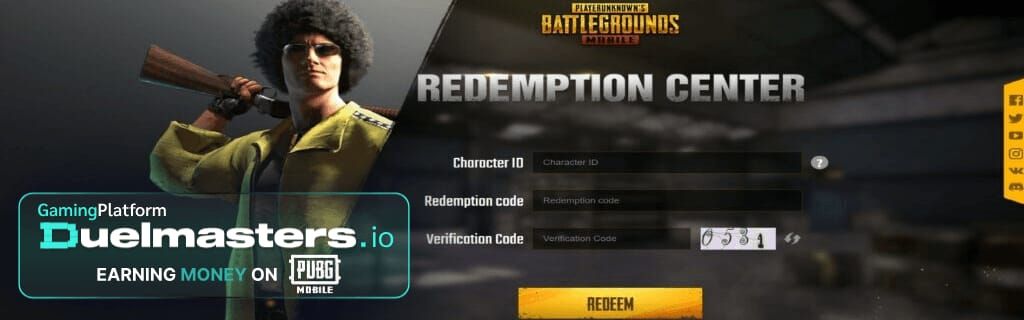
Step 3: Visit https://www.pubgmobile.com/redeem
Open browser, navigate directly to official redemption center. Bookmark this URL. Verify exact address—fake sites use similar URLs like **pubgmobile-redeem.com.
**
Step 4: Enter Details
Paste Character ID in first field. Enter redeem code in second field—maintain exact capitalization. Complete CAPTCHA. Never enter passwords, emails, or social logins.
Step 5: Click Redeem
Press blue Redeem button once. Avoid multiple clicks. Page displays success message or specific error reason.
Step 6: Check In-Game Mail
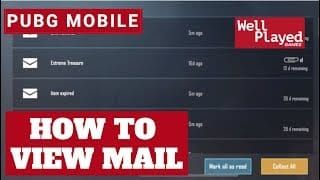
Return to PUBG Mobile, tap mail icon. Rewards arrive in System tab within 5-10 minutes. Tap message, select Claim. Unclaimed mail expires after 30 days.
For instant delivery without complexities, pubg mobile uc purchase top up with card or paypal through BitTopup provides immediate UC with secure payment and 24/7 support.
Platform-Specific Instructions
iOS: Ensure Game Center binding. Settings > Profile > Game Center—verify PUBG Mobile appears. iOS clipboard sometimes fails when switching apps—manually type Character ID if needed.
Android: Bind through Google Play Games. PUBG Mobile > Settings > Account > Google. Clear browser cache (Settings > Apps > Browser > Storage > Clear Cache) if errors persist.
Fix Invalid Code Error — 7 Solutions
1. Code Already Used
Each code works once per Character ID. Check in-game mail for past rewards matching code's items. Use different codes instead.
2. Typing Errors
O (letter) ≠ 0 (zero). I (uppercase i) ≠ l (lowercase L). Copy codes directly from verified sources. When copying fails, type slowly while comparing each character.
3. Region Restrictions
Global codes fail on China, Japan, South Korea, Taiwan, Vietnam servers. Error doesn't specify regional restrictions. Check flag icon next to Character ID in-game. Seek region-specific codes through local social media if on restricted servers.
4. Server Limitations
Some codes work exclusively on Asia, Europe, North America, or South America servers. Check code announcements for server specifications. Cross-server redemption never works.
5. Account Not Bound
Guest accounts can't redeem codes. Bind through Settings > Account > Social Media. Select platform, complete authorization, restart PUBG Mobile. Binding takes 2-3 minutes.
6. Case Sensitivity
pgmb20 ≠ PGMB20. Match exact capitalization from official announcements. When uncertain, try all-uppercase first.
7. Cache Problems
Clear browser cache/cookies, restart browser. Use incognito/private mode to bypass cache. Try different browser if errors persist.
Fix Code Expired Error
Expiration Mechanics
Codes carry 3-month validity from release. System checks expiration in real-time—no grace period. Event-specific codes expire when events conclude. Portal doesn't display expiration dates—track from original announcements.
Timezone Differences
UTC+12 regions experience expiration 12 hours before UTC-12 players. Code expiring February 15 23:59 UTC becomes unusable at different local times globally. Convert announced times to your timezone using UTC offset. Redeem 24 hours before announced expiration to avoid miscalculations.
Checking Validity
No official API for pre-checking. Most reliable method: check announcement date—codes older than 3 months likely expired. Monitor official social media for expiration announcements and extensions.
When All Codes Expired
Code droughts occur between major events. Options: wait for announcements, participate in community events, or pursue direct UC. Direct UC top-up through BitTopup eliminates dependency on unpredictable releases with instant delivery and competitive pricing.
Redeem Code Scams — Red Flags
Over 260 fraudulent websites target PUBG Mobile players. Scams range from credential theft to malware distribution.
Fake Code Generators
Promise unlimited codes through automated systems. Feature progress bars, dropdown menus, require survey completion or app downloads. Red flag: legitimate codes come from official announcements only, never automated generation.
These sites generate random strings matching code formats. Strings appear valid but fail redemption—they lack server-side registration. No legitimate code generation exists.
Phishing Sites
Clone official portal's design while changing URL. Request Facebook passwords, email credentials, or PUBG Mobile logins for account verification. Official portal never requests passwords—only Character ID, code, CAPTCHA.
Check URL before entering info. Legitimate: https://www.pubgmobile.com/redeem with SSL (padlock icon). Phishing variations: pubgmobile-redeem.com,pubgmobile.com.redeem-center.net.
Social Media Scams
Fake accounts impersonate official pages, announce giveaways requiring post shares, friend tags, account details through external links. Genuine giveaways never request passwords or direct access.
Red flags: slight name variations, recent creation dates despite high followers (purchased), external links to non-official domains. Verify blue checkmark, cross-reference across official channels.
Survey Scams
Promise codes after verification surveys or human checks. Generate revenue through affiliate marketing, never deliver codes. Often require phone numbers, emails, sometimes credit cards for age verification.
Legitimate distribution never requires surveys, app installations, or personal info beyond Character ID.
Real Consequences
Account compromise, unauthorized UC purchases, complete account loss. Players entering passwords on phishing sites report unauthorized logins within hours. Some scams install keyloggers capturing credentials for other services.
Recovery requires immediate password changes, two-factor authentication, contacting support. Prevention easier than recovery—never enter credentials except official PUBG Mobile app and verified partners.
Can Codes Get You Banned?
Official codes from legitimate channels carry zero ban risk when used properly. Redemption system operates as intended feature, not exploit.
Official vs Illegitimate Sources
Legitimate: codes from official social media, in-game events, verified partnerships. Using these through official portal complies with terms of service.
Illegitimate: codes from account trading, third-party sellers, exploits. Purchase transactions violate terms. Exploit-obtained codes trigger immediate bans.
Terms of Service
Prohibits: using codes from unauthorized means, redeeming on accounts you don't own, selling/trading codes, exploiting redemption vulnerabilities. Allows public code sharing.
Code Generators Violate Rules
Attempt to reverse-engineer creation algorithm or exploit vulnerabilities. Using these violates no unauthorized access clause. System logs generation attempts, flags accounts using generator-produced codes.
Generators frequently contain malware. Anti-cheat detects patterns like attempting dozens of invalid codes rapidly.
Security Best Practices
- Enable two-factor authentication
- Use unique passwords
- Never share Character ID with personal info
- Review account activity regularly
- Avoid public WiFi for redemption
- Use official apps/websites only
Safe Redemption Pattern
Obtain codes from official announcements → access portal through verified URL → enter only Character ID and code → complete CAPTCHA → claim rewards through in-game mail. Zero third-party tools, no credential sharing, no payment for codes.
Redeem only on accounts you own. Don't log into friends' accounts—triggers security alerts. Share codes instead.
Region Locks & Account Binding
Regional restrictions operate at server level, creating hard boundaries preventing cross-region usage regardless of VPN.
Why Codes Don't Work in Your Region
Server segregation divides players into distinct databases: Asia, Europe, North America, South America, plus region-specific for China, Japan, South Korea, Taiwan, Vietnam. Codes register to specific server databases. System checks Character ID's server assignment against code's registered servers.
Mismatches trigger invalid code errors without specifying regional restrictions. Partnership codes restrict based on sponsor agreements.
Server-Specific Distribution
Global codes register to all servers except five excluded regions. Work across Asia, Europe, North America, South America, Middle East. Region-specific codes like PUBGMBRAUC register only to designated servers.
System extracts server prefix from Character ID, compares against code's allowed server list.
How to Bind Account
Settings > Account within PUBG Mobile. Select binding method: Facebook, Twitter, Google Play (Android), Game Center (iOS). Authorize PUBG Mobile to access basic profile.
Takes 2-3 minutes, requires internet. Green checkmark appears when complete. Bind multiple platforms for redundancy. Enables code redemption, cross-device syncing, account recovery.
Guest Account Limitations
Guest accounts lack persistent server-side identity. System can't track code usage history, creating abuse potential. Guest accounts face complete redemption lockout.
Solution: Bind before attempting redemptions. Preserves all progress, purchases, achievements. Restart PUBG Mobile after binding. Portal recognizes bound accounts within 5 minutes. Zero progress loss.
Maximizing Rewards
Prioritize High-Value Codes
UC codes deliver highest value. 1,000 UC ≈ $10. Elite Royale Pass = 600 UC equivalent plus exclusive rewards.
Priority order: PUBGMBGAMECODECITY (1,000 UC) → PUBGMOBGIFTFREE (Elite Pass) → PUBGMBGCCTODAY (random top weapon). Redeem immediately due to high demand potentially exhausting limits.
Stack Multiple Codes
One-code-per-account applies individually to each unique code. Redeem all 15 active codes sequentially on single account.
Optimal strategy: redeem all in single session, prioritize high-value first. Space 30-60 seconds apart to avoid rate-limiting (≈10 redemptions/hour). Claim mail immediately—unclaimed expires after 30 days.
Track Release Schedules
Major updates coincide with releases—version updates, new seasons, collaborations. PUBG Mobile follows ≈60-day season cycle, mid-season events around day 30. Code releases cluster around milestones.
Follow official social media with notifications. High-value codes sometimes exhaust within 24-48 hours. Community Discord/Reddit aggregate codes quickly. Set calendar reminders for known events.
When Codes Aren't Enough
Code dependency creates uncertainty—can't plan purchases around unknown releases. Time-limited offers may expire before codes appear. Specific UC amounts rarely match code values.
BitTopup eliminates uncertainty through instant delivery at competitive rates. Multiple payment methods, 5-minute completion, 24/7 support. Reliability free codes can't match.
BitTopup — Safe, Instant Alternative
Why BitTopup Is Most Reliable
Verified third-party platform specializing in mobile game currency for 100+ titles. Direct relationships with payment processors and publishers ensure legitimacy. 24/7 UC availability in any denomination.
Security: SSL encryption, no password requirements (only Character ID), fraud detection. Never requests login credentials—processes through official channels using Character ID as delivery address.
Instant Delivery
95% of orders within 5 minutes. Automated systems detect payment, validate ID, initiate delivery. Peak periods may extend to 15 minutes. Compare to codes: waiting days/weeks, expiration uncertainty, regional restrictions.
Real-time delivery status tracking. Email confirmation when UC arrives. If delivery exceeds 30 minutes, support investigates proactively.
Competitive Pricing
Typically 5-15% below official rates depending on denomination and promotions. Bulk purchases receive additional discounts. Accepts credit cards, PayPal, regional methods (GCash, Paytm), cryptocurrency.
PCI DSS compliance for card processing. PayPal buyer protection. Never stores payment credentials. Refund policies cover non-delivery, 24-hour resolution.
How to Top Up
- Visit BitTopup, select PUBG Mobile
- Choose UC package (60-8,100 UC)
- Enter Character ID (copy-paste recommended)
- Select server region
- Choose payment method, complete transaction
- UC arrives in mail within 5-15 minutes
- Claim mail to transfer to balance
First-time users: start with smaller denominations to verify process. Customer support via live chat, email, ticket system. Account creation enables order history and faster checkout.
FAQ
How do I redeem codes in February 2026?
Visit https://www.pubgmobile.com/redeem, enter Character ID, input code (case-sensitive), complete CAPTCHA, click Redeem. Rewards arrive in mail within 5-10 minutes. Account must be bound to Facebook, Twitter, Google Play, or Game Center.
Why does my code say invalid?
Code already used, typing errors, wrong capitalization, regional restrictions, expired, unbound guest account, or browser cache issues. Verify fresh code from verified list, check capitalization, confirm account bound, clear browser cache.
Can I get banned for using codes?
Official codes from legitimate sources carry zero ban risk. Bans occur when using exploit-obtained codes, purchased from unauthorized sellers, or illegal generators. Never use generators or enter credentials on third-party sites.
Where do I find legitimate codes?
Official PUBG Mobile social media (Facebook, Instagram, Twitter), in-game events, verified partnerships. Official portal: https://www.pubgmobile.com/redeem. Avoid generators, survey sites, platforms requesting passwords.
Why are codes region-locked?
Server segregation and licensing agreements. China, Japan, South Korea, Taiwan, Vietnam operate under separate publishers. Partnership codes restrict based on sponsor agreements. System checks Character ID's server assignment.
How often are new codes released?
Cluster around major updates, new seasons, collaborations—typically every 30-60 days. Droughts between events may last weeks. No guaranteed schedule. Follow official social media with notifications.
Tired of waiting for limited codes? Get instant UC through BitTopup—safest, fastest way to unlock premium content. Secure transactions, competitive rates, immediate delivery. Stop depending on unpredictable releases and restrictions. Top up now for reliable UC access with 24/7 support and multiple payment options including cards and PayPal!






























































































































