Poppo Coins iPhone: Save 30-70% Bypassing Apple Tax
iPhone users pay Apple's automatic 30% commission on every Poppo coin purchase through the App Store. By using browser-based platforms like BitTopup, iOS users bypass this fee entirely, accessing coins at up to 70% lower prices. This guide reveals exact steps, price comparisons, and security measures for safe purchases outside Apple's ecosystem—no jailbreak required.


What Is the Apple Tax
Apple's App Store enforces a mandatory 30% commission on all in-app purchases, including Poppo coins. This fee applies universally to iOS apps—every coin package includes this surcharge. The commission goes to Apple, not Poppo or creators, making it a pure platform fee inflating costs without adding value.
For regular users, this compounds fast. Spending $100 monthly means $30 in Apple fees alone—$360 annually that could've purchased additional coins. Understanding this is the first step toward Poppo coins iOS top up savings, as BitTopup offers direct pricing eliminating this tax.
The commission applies regardless of package size. Apple's system automatically deducts this fee before funds reach Poppo, making it invisible to users who assume displayed prices represent actual coin values.
Real Price Comparison
The difference between App Store and third-party platforms reveals the true cost:
Small Packages:
- 7,000 coins: $0.99 in-app vs $0.85 third-party (14% savings)
- 10,000 coins: $1.87 in-app vs $1.10 third-party (41% savings, $0.77 saved)
Large Packages:
- 430,000 coins: $79.59 in-app vs $46.82 third-party (70% savings, $32.77 saved)
- 4,450,000 coins: $823.68 in-app vs $484.52 third-party (70% savings, $339.16 saved)
Per-coin economics:
- In-app rate: $0.000106 per coin
- Third-party rate: $0.00011 per coin
- Bulk third-party: Best efficiency on large packages
Why Apple Charges This Fee
Apple justifies the 30% commission as payment for App Store infrastructure, payment processing, security verification, and distribution services. The company maintains this covers hosting costs, fraud prevention, and curated ecosystem ensuring app quality.
However, this commission applies equally to all digital goods regardless of Apple's actual involvement. Virtual currency like Poppo coins requires no additional storage or bandwidth beyond initial app download, yet carries the same 30% fee as complex software. This pricing structure has faced regulatory scrutiny in multiple jurisdictions.
The Legal Alternative: Bypassing App Store Fees
Safe, Non-Jailbreak Methods
iPhone users can legally purchase Poppo coins through web browsers without modifying devices or violating Apple's terms. This works because browser-based transactions occur outside Apple's payment ecosystem, connecting directly to third-party processors that don't trigger the 30% commission.
The process requires no technical expertise or jailbreaking. Access legitimate top-up platforms through Safari or any iOS browser, complete purchases using standard payment methods, and receive coins directly to your Poppo account within 10-60 seconds. The 99% delivery success rate demonstrates reliability.
Coins purchased externally function identically to App Store coins, contributing to VIP progression, enabling gift purchases, and participating in all platform events. Your account remains in good standing.
Why Browser Purchases Avoid Apple's Commission
Apple's 30% commission applies exclusively to transactions through its In-App Purchase (IAP) system. When you complete purchases through web browsers, payments route through independent gateways connecting directly to the service provider, completely bypassing Apple's infrastructure.
This distinction is crucial: Apple controls app-based transactions but has no jurisdiction over web-based commerce accessed through browsers. Same legal principle allows purchasing Kindle books through Amazon's website rather than the Kindle app.
Third-party platforms process payments through established financial networks supporting Visa, MasterCard, PayPal, Google Pay, and Apple Pay. These work identically on iOS browsers as on desktop computers, with same security protocols. The transaction completes entirely outside Apple's ecosystem.
Legality and Terms of Service
Purchasing Poppo coins through third-party platforms violates no laws and complies with Poppo's terms of service. The platform officially supports multiple top-up methods and recognizes coins delivered through authorized resellers. Your account faces no suspension risk.
Apple's terms restrict developers from directing users to external payment methods within apps, but users face no restrictions on how they choose to make purchases. This legal distinction allows platforms to offer web-based top-up services without violating App Store policies.
The key to maintaining security lies in using authorized platforms with established track records. Legitimate services deliver coins through official Poppo APIs using your User ID—the same system Poppo uses for promotional distributions and event rewards.
BitTopup: Complete Solution for iOS Poppo Players
Why BitTopup Is Trusted
BitTopup has established itself as a premier destination for cheap Poppo coins for iPhone users seeking reliable, cost-effective top-up services. The platform specializes in digital currency transactions across multiple gaming and social platforms.
Competitive advantage centers on direct supplier relationships eliminating intermediary markups. By sourcing coins through authorized distribution channels, BitTopup maintains pricing reflecting actual coin values rather than inflated App Store rates. This translates to consistent 30-70% savings across all package sizes.
Infrastructure supports high-volume transactions with automated delivery processing 98% of orders within 10-60 seconds. The platform maintains 99% delivery success rate, with dedicated customer service addressing the remaining 1% requiring manual intervention.
New users benefit from 5-10% additional discounts on first orders, further reducing initial costs and allowing risk-free platform testing.
Security Features
BitTopup implements multiple security layers protecting user accounts and financial information:
- Encrypted Connections: Industry-standard SSL/TLS protocols ensure payment details remain confidential
- No Password Required: Platform never requests your Poppo password, requiring only your public User ID
- PCI DSS Compliance: Payment processing through established financial institutions meeting same security standards as major e-commerce platforms
- Refund Policy: Request refunds within 24 hours by providing order number
- Two-Factor Authentication: Optional extra protection for frequent large purchases
Transaction histories remain accessible for record-keeping and dispute resolution, providing transparency through documented service delivery.
Supported Payment Methods
BitTopup accepts diverse payment methods optimized for iOS users:
- Apple Pay: One-tap purchases with biometric authentication
- Credit/Debit Cards: Visa and MasterCard with instant confirmation
- PayPal: Secure payments with buyer protection
- Google Pay: Digital wallet integration
- Direct Bank Transfers: Available for large purchases
Apple Pay compatibility represents significant convenience for iPhone users. The payment method works identically on BitTopup as throughout iOS, requiring only Face ID or Touch ID confirmation. This eliminates manual card entry while maintaining tokenized transaction security.
Strategic payment method selection compounds savings from avoiding Apple's 30% commission. Some credit cards offer cashback on digital purchases, PayPal occasionally runs promotional bonuses, and certain processors provide additional buyer protection.
Step-by-Step: Buying Poppo Coins on iPhone Without App Store
Finding Your Poppo User ID
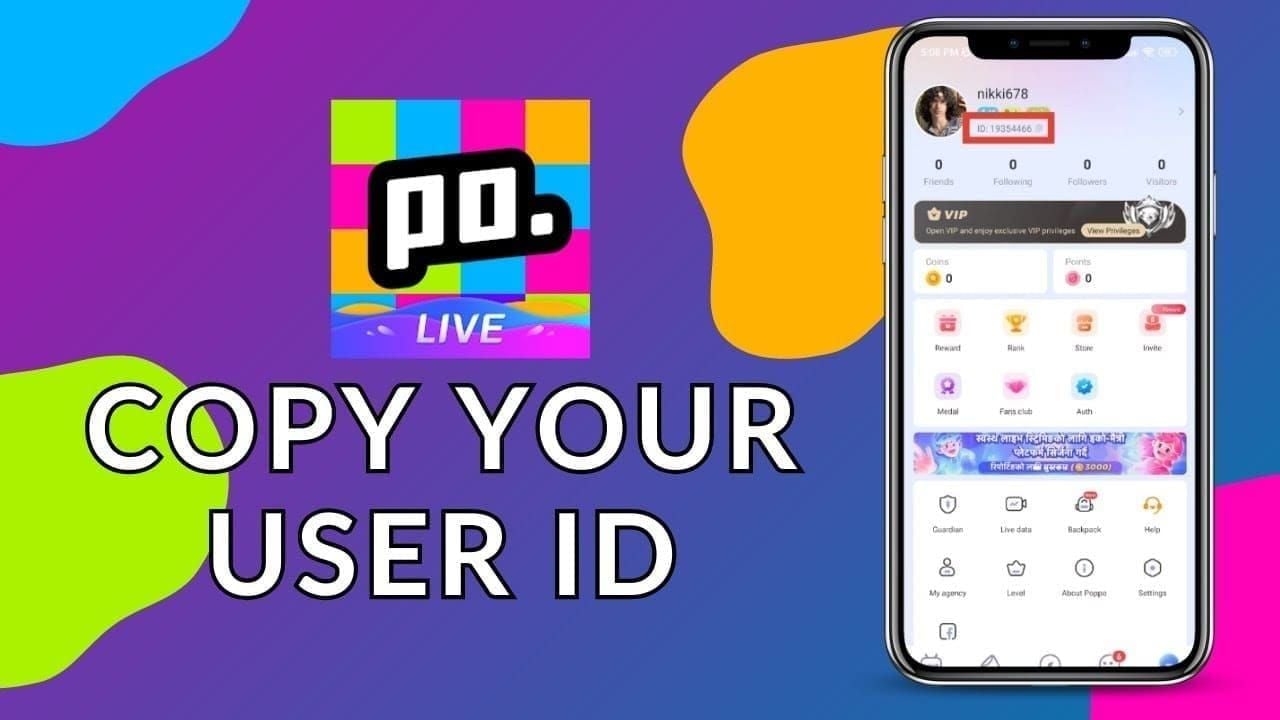
Before making any external purchase, you need your unique Poppo User ID—an 8-10 digit numeric code identifying your account for coin delivery.
To locate your User ID:
- Open Poppo Live app on your iPhone
- Tap profile icon in top-right corner
- Your User ID appears directly below your nickname
- Format looks like 63101690 (8-10 digits)
For quick copying, long-press the User ID number to activate copy function, then paste into notes app for easy reference. Alternatively, tap Me tab at bottom navigation where your User ID displays under profile picture.
Verify you're copying the correct number by confirming it matches the User ID label rather than other numeric codes like follower counts or coin balances.
Completing Your First BitTopup Purchase
Navigate to BitTopup using Safari or your preferred iOS browser. The mobile-optimized site loads quickly without requiring app installation.
Purchase process:
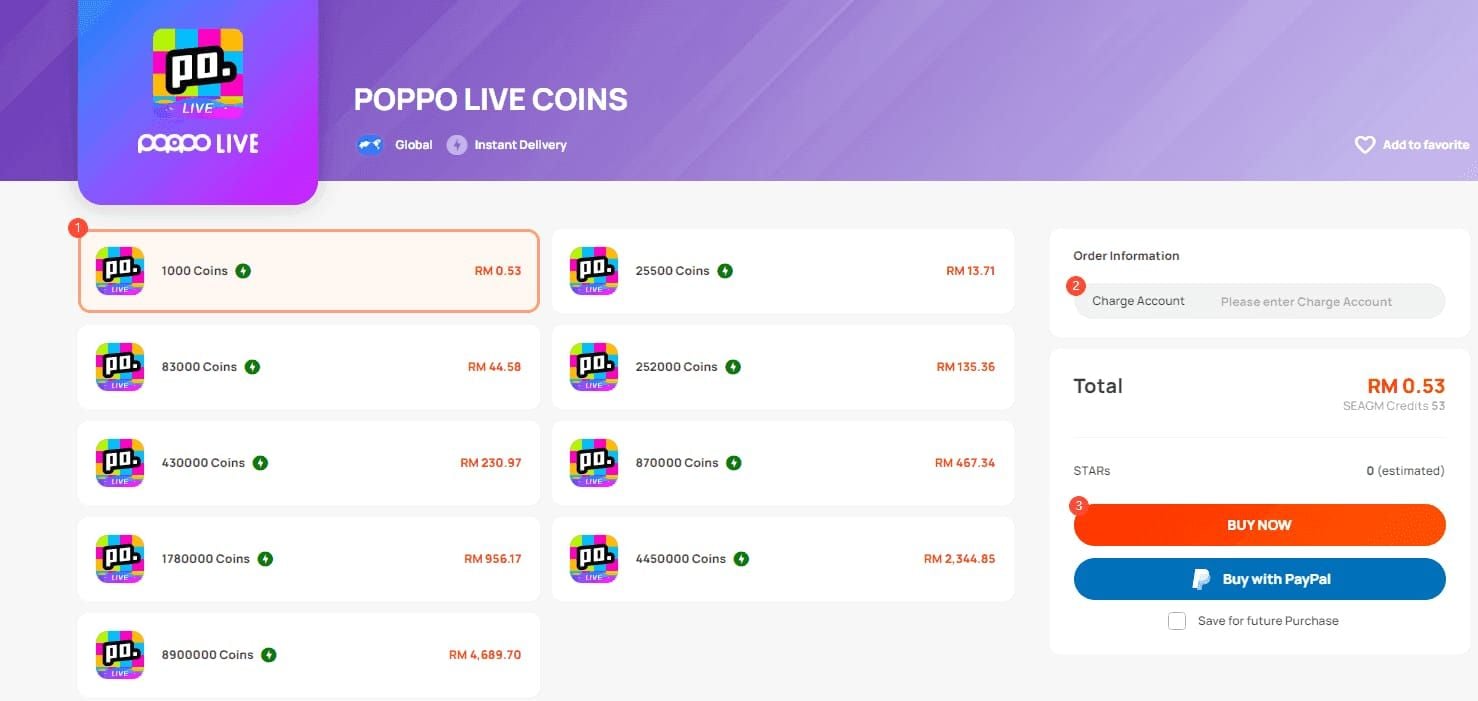
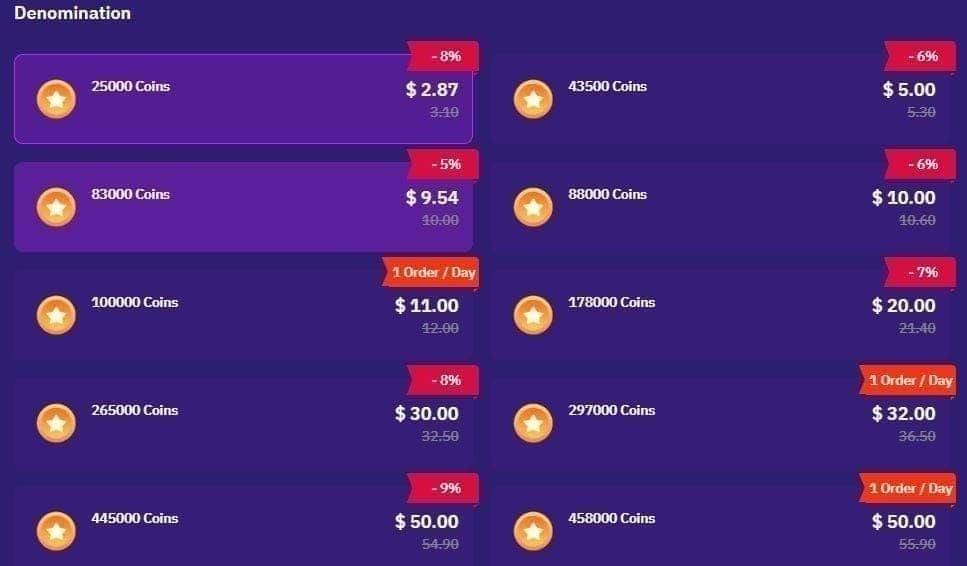
Select Package: Browse coin packages from 1,000 coins ($0.11) to 4,450,000 coins ($484.52). Each listing displays coin quantity, price, and percentage savings vs in-app rates.
Enter User ID: Paste or type your 8-10 digit Poppo User ID. Double-check for accuracy—incorrect IDs result in delivery failures.
Choose Payment: Select from Apple Pay, credit cards, PayPal, or other supported methods. First-time users note any new customer discounts applied automatically.
Complete Payment: Follow your payment method's authentication. Apple Pay requires Face ID or Touch ID; cards may require CVV and billing address.
Receive Confirmation: After successful payment, you'll receive order number and estimated delivery time. Most orders complete within 10-60 seconds.
Verifying Successful Delivery
After payment, return to Poppo Live app to confirm coin delivery. Coins should appear within one minute for 98% of transactions.
To check balance:
- Open Poppo Live and tap profile icon
- View coin balance on profile page
- Verify amount increased by purchased quantity
If coins don't appear within 60 seconds, wait up to 5 minutes—occasional processing delays occur during high-traffic periods.
For deliveries exceeding 5 minutes, check BitTopup order status using order number. Contact BitTopup support if coins don't arrive within 10 minutes, providing order number and User ID. The 24-hour refund policy protects your purchase.
Price Breakdown: Exact Savings Across All Packages
Small Packages
1,000 Coins
- In-app: $0.19
- Third-party: $0.11
- Savings: $0.08 (42% discount)
7,000 Coins
- In-app: $0.99
- Third-party: $0.85
- Savings: $0.14 (14% discount)
10,000 Coins
- In-app: $1.87
- Third-party: $1.10
- Savings: $0.77 (41% discount)
Medium Packages
70,000 Coins
- In-app: $9.99
- Third-party: ~$7.62
- Savings: $2.37 (24% discount)
210,000 Coins
- In-app: $29.99
- Third-party: ~$22.86
- Savings: $7.13 (24% discount)
Large Packages
430,000 Coins
- In-app: $79.59
- Third-party: $46.82
- Savings: $32.77 (70% discount)
870,000 Coins
- In-app: $161.03
- Third-party: $94.73
- Savings: $66.30 (70% discount)
1,780,000 Coins
- In-app: $329.47
- Third-party: $193.81
- Savings: $135.66 (70% discount)
4,450,000 Coins
- In-app: $823.68
- Third-party: $484.52
- Savings: $339.16 (70% discount)
Note: 100,000-coin package has 1-order-per-day limit on some platforms. Larger packages face no restrictions.
Annual Savings Calculator
Casual User ($20 monthly in-app):
- Annual in-app: $240
- Third-party: $165
- Annual savings: $75
Active User ($50 monthly in-app):
- Annual in-app: $600
- Third-party: $412
- Annual savings: $188
VIP User ($200 monthly in-app):
- Annual in-app: $2,400
- Third-party: $1,648
- Annual savings: $752
Security Best Practices
Verifying Legitimate Platforms
Before entering payment information, confirm you're accessing authentic services. Legitimate platforms display:
- Secure Connection: https:// in URL and padlock icon in browser address bar
- Professional Design: Polished, error-free interfaces with consistent branding and clear contact info
- Transparent Pricing: Exact coin quantities, prices, and delivery timeframes without hidden fees
- Established Presence: Documented history, customer reviews, and active customer service
Avoid platforms requesting your Poppo password—legitimate top-up services only require your public User ID. Password requests indicate phishing attempts.
Red Flags for Fraudulent Sellers
Warning signs distinguishing scams from legitimate services:
- Unrealistic Pricing: Offers significantly below established rates (e.g., 90% off instead of 70%)
- Prepayment Requirements: Requests for untraceable methods like cryptocurrency or gift cards
- Poor Communication: Broken English, grammatical errors, or vague responses
- Pressure Tactics: Artificial urgency like offer expires in 10 minutes
- No Refund Policy: Absence of clear refund procedures indicates potential fraud
Trust your instincts—if a deal seems too good to be true, it probably is.
Account Security Checklist
Before making third-party purchases:
- Unique Password: Ensure Poppo account uses strong, unique password
- Two-Factor Authentication: Enable available security features in Poppo settings
- Payment Method Security: Use methods with buyer protection (credit cards, PayPal)
- Order Documentation: Save confirmation emails, order numbers, and receipts
- Regular Balance Checks: Monitor Poppo coin balance after purchases
Never share your Poppo password with anyone, including customer service. Legitimate support can verify accounts using only User ID and order information.
Maximizing Savings: Advanced Strategies
Timing Purchases with Promotions
BitTopup occasionally offers promotional bonuses beyond standard pricing, including new user discounts of 5-10% off first orders. Monitor for seasonal promotions around major holidays, gaming events, or platform anniversaries.
Some platforms offer loyalty programs rewarding repeat customers with graduated discounts or bonus coins on subsequent purchases.
Stacking Savings Opportunities
Combine multiple savings mechanisms:
- Base Third-Party Discount: 30-70% savings from avoiding Apple's commission
- New User Bonus: 5-10% additional savings on first order
- Payment Method Cashback: Credit cards offering 1-5% cashback on digital purchases
- Bulk Package Efficiency: Larger packages for better per-coin rates
Strategic first purchase using all mechanisms can achieve total savings exceeding 75% compared to small in-app packages. Example: new user buying 430,000-coin package with 10% new user discount and 2% credit card cashback pays ~$42.33 instead of $79.59—$37.26 savings (47% total discount).
VIP Level Optimization
Poppo's VIP system rewards total spending with progressive benefits. Third-party purchases contribute to VIP progress identically to in-app purchases—the platform tracks total coins received, not payment source.
Strategic bulk purchasing accelerates VIP progression more cost-effectively. A user targeting VIP level 5 can reach this milestone for 30-70% less money by purchasing through third-party platforms.
Calculate your VIP goals and purchase the most efficient package size to reach that threshold. The 1,780,000-coin package at $193.81 delivers same VIP progress as $329.47 in App Store purchases, saving $135.66 while achieving identical status benefits.
Payment Method Selection Strategy
Different payment methods offer varying advantages:
- Apple Pay: Maximum convenience with biometric authentication for repeat purchases
- Credit Cards: Buyer protection, dispute resolution, and potential cashback rewards
- PayPal: Additional buyer protection layer and balance payment option
- Bank Transfers: Lowest processing fees for very large purchases ($500+)
For purchases under $100, Apple Pay or credit cards provide optimal balance of convenience and security. Larger purchases may benefit from PayPal's enhanced buyer protection.
Some credit cards categorize digital currency purchases as entertainment or online shopping for bonus cashback categories. Check your card's rewards structure to identify whether Poppo coin purchases qualify for enhanced earning rates.
Common Questions
Will My Account Get Banned for External Purchases?
No. Purchasing Poppo coins through legitimate third-party platforms carries no ban risk. Poppo officially supports multiple top-up methods and can't distinguish between coins delivered through different authorized channels. The platform receives payment through official APIs using your User ID—same system used for promotional distributions.
Your account status depends on following Poppo's community guidelines regarding content and behavior, not payment method selection. Thousands of users purchase through third-party platforms daily without issues.
The key distinction lies in using authorized platforms rather than fraudulent sellers. Legitimate services like BitTopup deliver coins through official Poppo systems.
Do External Coins Function Differently?
No. Coins purchased through third-party platforms function identically to App Store coins in every respect. They contribute equally to VIP progression, enable same gift purchases, participate in all platform events, and carry identical value for all in-app transactions.
Poppo's system tracks total coin balance without differentiating payment sources. Once coins arrive, they become indistinguishable from coins acquired through any method.
How Quickly Do Coins Arrive?
98% of orders complete delivery within 10-60 seconds of payment confirmation. BitTopup's automated systems process transactions immediately, connecting to Poppo's delivery APIs to credit your account in real-time.
The remaining 2% may experience delays up to 5 minutes during high-traffic periods or due to payment verification. First-time users occasionally face slightly longer processing as payment methods undergo initial verification.
If coins don't appear within 10 minutes, contact customer service with your order number.
Can I Get Refunds?
Yes. BitTopup offers refunds within 24 hours of purchase when requested with valid order number. This policy covers delivery failures, incorrect package selections, accidental duplicate orders, or any transaction issues.
The refund process requires contacting customer service and providing order number for verification. Refunds typically process within 24-48 hours, returning funds to original payment method.
This refund protection exceeds Apple's standard App Store policies, which generally prohibit refunds for consumable in-app purchases like virtual currency.
Are There Purchase Limits?
Most packages have no purchase limits, allowing unlimited transactions per day. Exception: 100,000-coin package carries 1-order-per-day limit on some platforms.
Larger packages face no restrictions, making them preferable for users requiring immediate high-volume purchases. You can buy multiple large packages in a single session if needed.
Payment method limits may apply based on your financial institution's policies. Credit cards may flag unusually large digital purchases for fraud verification.
How Do I Verify I'm Using a Safe Platform?
Verify platform legitimacy through these checks:
- Secure Connection: Confirm https:// and padlock icon in browser
- Professional Presentation: Evaluate site design, grammar, and transparency
- Clear Contact Information: Multiple customer service channels
- Established Reviews: Search for independent user experiences
- Reasonable Pricing: Compare rates across platforms; extreme outliers indicate fraud
BitTopup meets all criteria with encrypted connections, professional interface, responsive customer service, documented user base, and pricing consistent with established third-party market rates. The 99% delivery success rate and refund policy demonstrate commitment to service quality.
Start with small test purchases if uncertain, verifying delivery speed and service quality before committing to larger transactions.
Recommended News








Recommend products



Table of Contents
- Understanding Apple's 30% Commission on Poppo Coins
- What Is the Apple Tax
- Real Price Comparison
- Why Apple Charges This Fee
- The Legal Alternative: Bypassing App Store Fees
- Safe, Non-Jailbreak Methods
- Why Browser Purchases Avoid Apple's Commission
- Legality and Terms of Service
- BitTopup: Complete Solution for iOS Poppo Players
- Why BitTopup Is Trusted
- Security Features
- Supported Payment Methods
- Step-by-Step: Buying Poppo Coins on iPhone Without App Store
- Finding Your Poppo User ID
- Completing Your First BitTopup Purchase
- Verifying Successful Delivery
- Price Breakdown: Exact Savings Across All Packages
- Small Packages
- Medium Packages
- Large Packages
- Annual Savings Calculator
- Security Best Practices
- Verifying Legitimate Platforms
- Red Flags for Fraudulent Sellers
- Account Security Checklist
- Maximizing Savings: Advanced Strategies
- Timing Purchases with Promotions
- Stacking Savings Opportunities
- VIP Level Optimization
- Payment Method Selection Strategy
- Common Questions
- Will My Account Get Banned for External Purchases?
- Do External Coins Function Differently?
- How Quickly Do Coins Arrive?
- Can I Get Refunds?
- Are There Purchase Limits?
- How Do I Verify I'm Using a Safe Platform?
Recommend products



Recommended News

PSN Card Malaysia Code Redeemed but Balance Not Showing? Fix It

How to Farm Rare Skin Fragments in MLBB | August 2026

Genshin Impact Stygian Onslaught 7.0 Teams | August 2026

Alyosha Best Build, Teams & C6 Guide | August 2026

Cheap StarMaker Coins for SupernovaX 2026 Auditions (12-23% Off)

MICO Live Coins MENA After v5.2: Cheapest Deals 2026

How to Redeem NCRCKYT8EF Code for Free Eggy Coins (Aug 2026)

Taka Live 1.2.11 Draining Battery Fast After the July 2026 Update? Causes and Fixes