Common Error Codes Explained
Error 1001: Insufficient funds—requires 10% buffer beyond displayed price for 2-4% processing fees. $100 purchase needs $104 available.
Error 1004: 3D Secure authentication failure (25% of transactions). Card issuer requires Visa Verified/Mastercard SecureCode verification that times out. System expects completion within 5-10 minutes; OTP takes 10-60 seconds.
Error 1005: Network issues (40% of technical failures). Public WiFi fails 50% more than private connections.
Error 1006: Geographic blocking. VPN usage triggers 30% of IP mismatches between location and billing address.
Error 1007: Bank blocks gaming purchases through merchant category restrictions.
UID Errors: 18-30% of failed top-ups. Poppo User ID is 7-10 digits (example: 63101690) shown below profile picture in Me tab. Manual entry adds spaces/prefixes that invalidate transactions.
Regional Payment Spikes
US: Banks impose $300-500 daily limits on international transactions vs $500-2500 domestic. Resets midnight Eastern Time.
Saudi Arabia: Banking-level blocks on gaming transactions. STC Pay and Mada cards work as domestic alternatives.
Currency conversion: Real-time rates + 1-3% fees cause final charges to exceed displayed prices. Rate fluctuations during 30-60 second processing push transactions above pre-authorized amounts.
Decoding UID Errors
UID (User Identification) is your unique 7-10 digit numeric account identifier, separate from username/email. Remains constant even when changing display name or profile picture.
How UID Verification Works
Payment gateway queries Poppo's database before processing payment, checking:
- UID format (correct digit count)
- Account status (active vs suspended)
- Regional eligibility (registered country accepts payment method)
Verification failures cancel transactions immediately. Third-party platforms like BitTopup pre-validate UIDs against Poppo's API before accepting payment.
Top 4 UID Invalid Reasons
Manual typing errors: Transposed digits (63101690 as 63101960), omitted numbers, added spaces. Mobile autocorrect inserts periods/commas.
Copy-paste errors: Selecting too broadly captures username above or follower count below UID. Some versions include ID: prefix.
Account status changes: Temporary suspensions for guideline violations render UIDs inactive during restriction period.
Regional mismatches: UID registered in one country rejects payment methods from incompatible regions.
Finding Your Correct UID

- Open Poppo Live → tap Me tab
- Locate numeric string below profile picture (gray font)
- Long-press number → Copy
- Paste into text editor to verify 7-10 consecutive digits, no spaces/letters/symbols
- If extra characters appear, manually select only numbers and copy again
Can't access app? Email support@poppo.live with registered email + username for 24-48 hour UID verification.
Regional Restrictions: US & Saudi Arabia
US Payment Limitations
US banks apply enhanced scrutiny to international entertainment platforms. VSHOW PTE. LTD.'s Singapore registration + live streaming categorization triggers fraud protocols.
Daily international limits: $300-500 vs domestic $500-2500. Applies cumulatively across all international transactions in 24 hours, not per merchant.
Credit cards restrict recurring charges from international entertainment platforms. Multiple small transactions within short timeframes trigger velocity checks. Limit retries to 3 attempts per 24 hours, spaced 15-30 minutes apart.
Saudi Arabia Regulations
Banking-level restrictions on gaming/social entertainment platforms via Merchant Category Codes (MCCs). Financial institutions block payments to live streaming, virtual gifting, digital entertainment merchants.
STC Pay and Mada cards operate within Saudi domestic payment infrastructure, avoiding international flags. Availability depends on individual bank participation.
Geographic IP Blocking
Payment gateway checks IP geolocation matches account registration country + billing address. Three-way verification prevents fraud—misalignment triggers Error 1006.
VPN triggers 30% of IP mismatches because apparent origin (VPN server) differs from registration country and billing address. Payment gateways detect VPN traffic through IP reputation databases.
Mobile data (1Mbps+ download, 0.5Mbps+ upload) provides reliable processing. Cellular IPs clearly identify geographic regions + carrier info, satisfying verification.
Legal Compliance
KYC Level 5 requires:
- Government ID valid 6+ months
- Address proof <90 days old
- 1080p selfie for facial verification
- Processing: 30 minutes to 48 hours
Currency support limitations force conversion through USD/EUR, adding 1-3% fees. Price discrepancies cause declines when final amount exceeds pre-authorized limits.
Step-by-Step UID Error Fixes
Method 1: Verify UID

Navigate to Me tab → copy numeric User ID below profile picture → paste into text editor → confirm exactly 7-10 consecutive digits.
For third-party platforms, ensure UID goes in correct field (not username field). Check autocomplete hasn't populated old UIDs from different accounts.
Test with minimal purchase: 2100 coins ($0.29) or 7000 coins ($0.99) to validate UID before larger transactions.
Method 2: Clear Cache
iOS: Swipe up → swipe app away. Wait 30 seconds → reopen. Or Settings → General → iPhone Storage → Poppo Live → Delete App, then reinstall.
Android: Recent Apps → swipe Poppo closed. Or Settings → Apps → Poppo Live → Storage → Clear Cache.
After clearing, log in fresh → navigate directly to coin purchase for clean payment session.
Method 3: Update App
Current version: 2.9.6 (released Oct 9, 2025) fixed 15% of authentication bugs. Requires iOS 12.0+ or Android 8.0+ with 500MB storage.
After updating, restart device completely for new version to initialize with updated permissions.
Method 4: Re-link Payment
iOS: Settings → [Your Name] → Payment & Shipping → remove card → re-add with exact billing address.
Android: Google Play → Payment methods → remove and re-add.
Enter card precisely: 16 digits no spaces, MM/YY expiration, CVV exact. Billing address must match bank records character-for-character.
Alternative: Purchase Poppo coins online through BitTopup, which handles verification independently and delivers to verified UID.
Bypassing Region Locks Safely
Why VPNs Fail for Payments
VPNs mask IP but don't change billing address or account registration country. Payment gateways verify: IP location, billing address, account registration—VPN only affects first factor.
Processors maintain VPN IP databases, flagging these transactions as high-risk. Detection occurs even using VPN servers in your actual country.
Mobile data connections provide reliable processing—cellular IPs contain clear geographic + carrier identification.
Third-Party Platform Solutions
Authorized platforms like BitTopup maintain payment infrastructure in multiple jurisdictions, accepting payments through regional banking systems that block direct Poppo transactions.
You pay BitTopup (standard e-commerce your bank recognizes) → BitTopup delivers coins through official Poppo APIs. Two-step process separates payment acceptance from coin delivery, bypassing merchant category restrictions.
US users: BitTopup processes as domestic transactions using US payment methods, avoiding international categorization.
Saudi users: BitTopup integrates STC Pay, Mada cards, local bank transfers through Saudi domestic infrastructure.
Direct vs Alternative Methods Comparison
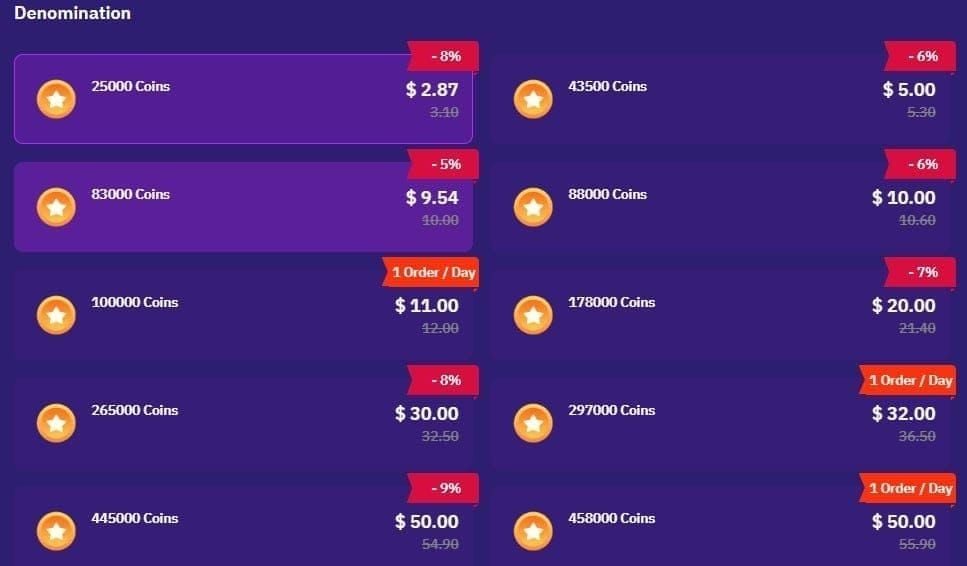
Direct in-app: 98% success in unrestricted markets, drops to 50-60% in restricted regions. Instant delivery.
PayPal: 98% success, 30-60 second processing. Limited country availability.
App Store gift cards: 99% success, bypasses real-time processing.
BitTopup: 95-98% success all regions, multiple payment options, 2-5 minute delivery, competitive pricing with discounts.
Platform-Specific Troubleshooting
iOS App Store Fixes
Verify Apple ID payment: Settings → [Your Name] → Payment & Shipping.
Expired cards cause immediate declines. Update expiration dates to match bank records exactly.
2FA codes must arrive within purchase screen timeout. OTP takes 10-60 seconds; network delays extend to several minutes.
Family Sharing: Check Settings → [Your Name] → Family Sharing to confirm independent purchase authority. Ask to Buy sometimes restricts adult accounts.
Android Google Play Fixes
Access Google Play Store → Menu → Payment methods to verify current info.
Google Play balance takes precedence. Insufficient balance triggers split transaction to backup method—fails if backup doesn't support partial charges.
Check Settings → Apps → Poppo Live → Permissions for payment processing permissions.
Google Play Protect false positives flag Poppo updates. Verify Play Store → Menu → Play Protect and whitelist Poppo Live.
Web Browser Fixes
Disable browser extensions (ad blockers, privacy tools) during checkout—they interfere with payment gateway scripts.
Enable cookies for poppo.live and payment gateway domains. Third-party cookie blocks interrupt multi-step checkout.
Manually verify autofill data—cached info may be outdated (expiration dates, CVV codes).
Cross-Platform Compatibility
PayPal works on web/Android but not iOS (Apple requires Apple Pay or stored cards).
Regional methods like Mada cards work on web but may not appear in mobile apps. Check web version for additional options.
Currency handling: iOS charges in App Store account currency; Android/web process multiple currencies based on region.
BitTopup for Hassle-Free Recharges
Why BitTopup Works
Operates as authorized digital goods retailer with merchant accounts across payment networks and regions. Banks process as standard e-commerce, not international gaming.
Maintains infrastructure in restricted regions, accepting local methods that don't work for direct Poppo purchases: STC Pay, Mada cards, regional wallets, local bank transfers.
95-98% success rate from multiple payment options—if one fails, try alternatives immediately without waiting for pending holds to clear.
Regional Restriction Handling
Multi-jurisdictional processing accepts local payments through familiar banking, delivers coins through official Poppo APIs. Two-step process separates payment acceptance (local) from delivery (Poppo API).
US: Processes as domestic transactions using US payment methods, avoiding international categorization and $300-500 limits.
Saudi Arabia: Integrates STC Pay, Mada, local transfers through domestic infrastructure, avoiding international gateway blocks.
Recharge Steps
- Visit BitTopup → search Poppo Live
- Select coin package (2100 coins at $0.29 to larger packages, often with discounts)
- Enter verified UID (copy-paste from app)—system validates in real-time before payment
- Choose payment method (varies by region: cards, PayPal, wallets, local systems)
- Complete secure payment
- Coins deliver in 2-5 minutes with email confirmation
Security & Verification
SSL encryption, PCI DSS compliance, 2FA options. Never stores complete card info—uses tokenized processing.
UID verification queries Poppo API before payment, confirming active account eligible for coins. Prevents payment for invalid accounts.
Transaction records in dashboard provide purchase proof. Customer service tracks delivery through Poppo merchant API for concrete resolution timelines.
Preventing Future Failures
Account Setup Tips
Complete KYC Level 5 before large purchases:
- Government ID valid 6+ months
- Address proof <90 days old
- 1080p selfie
- Processing: 30 minutes to 48 hours
Enable 2FA: Settings → Account → Security. Reduces fraud-related payment blocks.
Register account with accurate geographic info matching payment method billing address. Update if relocated.
Payment Method Checklist
Enroll in 3D Secure (Visa Verified/Mastercard SecureCode) through bank portal—reduces declines 98%.
Pre-notify bank 24-48 hours before gaming purchases over $100. Mention VSHOW PTE. LTD. and request merchant whitelisting.
Verify card entry: 16 digits no spaces, MM/YY expiration, exact CVV. Billing address must match bank records character-for-character including abbreviations.
Keep Info Updated
Set reminders for card expiration dates. Update new cards in all platforms (App Store, Google Play, PayPal, BitTopup) immediately upon receiving replacements.
Monitor bank communications for card reissuance. Banks reissue due to security breaches, changing numbers without notice.
Update billing addresses after relocating. Address Verification Systems check against bank records—outdated addresses cause failures even when entering current address correctly.
Support vs Self-Troubleshoot
Self-troubleshoot common errors (UID, card info, network) first—resolves 80-95% within 24 hours.
Contact support for persistent failures after trying all solutions, account-level issues, or missing coins after successful payment.
Email support@poppo.live with Account ID, Transaction ID, error screenshots for 24-48 hour response.
In-app chat achieves 98% resolution within 24 hours vs email's 24-48 hour window.
Advanced Troubleshooting
Persistent Declined Errors
Same payment fails across platforms → bank issue, not Poppo. Contact bank fraud department about VSHOW PTE. LTD. or Singapore merchant blocks.
Banks maintain unpublished restriction lists for merchant categories (live streaming, social gaming, virtual goods). Ask explicitly about category-based restrictions and request removal.
If bank refuses whitelisting, open account at online bank/fintech with permissive international policies.
Account Suspension vs Payment Block
Suspensions prevent all activity with login notifications. Payment blocks only restrict transactions during checkout.
Temporary payment blocks (24-72 hours) result from failed fraud checks, chargebacks, suspicious patterns. Resolve automatically; contacting support expedites review.
Permanent suspensions require formal appeals with documentation. Causes: TOS violations, chargebacks, association with suspended accounts. Resolution: 48 hours to weeks.
Currency Issues
Real-time exchange rates + 1-3% conversion fees push charges above pre-authorized amounts. Request bank increase limits 5-10% for conversion fluctuations.
Some methods don't support dynamic conversion, requiring specific currencies. Use USD/EUR-denominated methods.
Multi-currency accounts eliminate fees by using pre-loaded balances in transaction currency.
Escalation Process
After exhausting self-troubleshooting and initial support, request escalation to payment specialists with access to detailed logs.
Document attempts with screenshots, timestamps, error messages, transaction IDs. Comprehensive info accelerates reviews.
Consider BitTopup as permanent solution when direct payment proves unresolvable due to banking/regional conflicts.
FAQ
Why does Poppo Live say payment failed?
Bank fraud flags on VSHOW PTE. LTD. (60%), UID errors (18-30%), or regional restrictions. Enroll in 3D Secure (98% decline reduction) and use verified UIDs.
What is UID error?
User Identification number (7-10 digits) doesn't match platform records. Occurs from typing mistakes, copy-paste issues, or suspended accounts. Copy directly from Me tab below profile picture.
How do I find my UID?
Open Poppo → Me tab → long-press 7-10 digit number below profile picture → Copy → paste in text editor to verify digits only, no spaces/letters.
Can I use Poppo in US?
Yes. US banks limit international transactions to $300-500 daily and flag VSHOW PTE. LTD. Pre-notify bank 24-48 hours before $100+ purchases, enroll in 3D Secure, use PayPal (98% success) or BitTopup for domestic processing.
Why is Poppo blocked in Saudi Arabia?
Banking-level merchant category blocks on gaming/live streaming. Use STC Pay/Mada cards (domestic networks) or BitTopup accepting local payment methods.
Best payment methods?
PayPal: 98% success, 30-60 seconds. App Store gift cards: 99% success. BitTopup: 95-98% all regions with local methods (STC Pay, Mada, wallets). Enable 3D Secure on cards for 98% decline reduction.
Tired of payment errors? BitTopup offers instant, secure Poppo coin recharges without UID errors or region blocks. Guaranteed delivery in 2 minutes with competitive pricing. Visit BitTopup now!