Common Causes of SUGO Coin Delivery Failures
Accounts under 7 days old face automatic 24-72 hour security holds when purchases exceed $20 USD—fraud prevention implemented in version 2.41.0.0 on November 24, 2025. New accounts limited to 6250 coin packages maximum during first 30 days.
Multiple recharges within 15 minutes trigger automatic suspension flags. The system interprets rapid successive purchases as potentially fraudulent, temporarily blocking coin delivery until manual review completes.
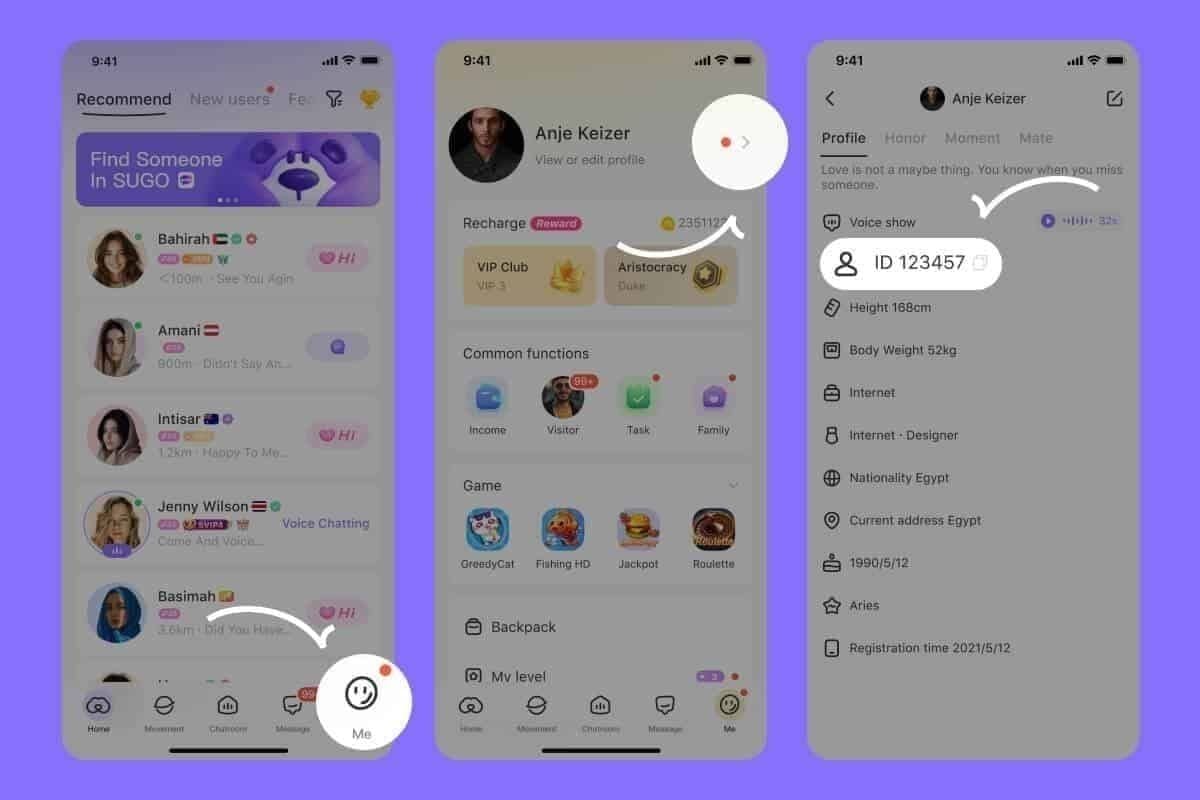
User ID mismatches account for 30% of support cases. When the User ID entered during purchase doesn't match your actual account—even by a single digit—coins deliver to the wrong account or enter processing limbo. Your User ID is an 8-12 digit numeric string found by tapping ME icon > View/Edit Profile.

Payment Processed vs Coins Delivered
Payment confirmation emails indicate your money left your account, not that coins arrived in SUGO. Transaction IDs (formatted as TXN- followed by 12-20 alphanumeric characters) track payment processing through the gateway, while coin delivery requires separate server-side confirmation.
Established accounts receive coins within 30 seconds of payment confirmation. New accounts experience 1-5 minute delivery windows as additional verification layers process. Identity verification charges of $0.01-$1.00 may appear for first-time purchases, automatically refunded within 24 hours.
Server maintenance can delay delivery up to 2 hours regardless of account status. During these windows, payments process normally but coin distribution queues until maintenance concludes.
Immediate Verification Steps: Confirm Your SUGO Coins Are Actually Missing
Before initiating disputes, systematic verification prevents wasted effort on coins that actually delivered.
Check Your SUGO Account Balance Correctly
Your coin balance displays in top-right corner of home screen. Force-close SUGO completely, wait 10 seconds, then reopen to refresh balance display. Cached data frequently shows outdated balances.
Clear app cache through Settings > Apps > SUGO > Storage > Clear Cache. This resolves 95% of connection issues preventing balance updates. After clearing cache, log out completely, then log back in to force fresh server sync.
Check payment history through Settings > Payment History. Use date filter for purchases older than 30 days. Each entry should display purchase date, coin package amount (1200, 2400, 6250, 12500, 37500, 65000, or 130000 coins), and transaction status.
Verify Server and Account Details Match Your Purchase
Server region mismatches prevent coin delivery even when payment succeeds. If you purchased coins for a specific server but logged into a different regional server, coins won't appear. SUGO maintains separate coin balances per server.
Confirm your User ID matches the ID used during purchase by comparing your current ID (ME > View/Edit Profile) against purchase confirmation email.
Two-factor authentication status affects delivery timing. Navigate to ME > Account Security to verify authentication settings. Newly enabled two-factor authentication triggers additional verification delays of 15-30 minutes for first purchase after activation.
Locating Your Codapay/Codashop Reference Number
Reference numbers serve as unique transaction identifiers essential for dispute resolution. Without this number, payment platforms can't locate your specific transaction.
Finding Reference Numbers in Confirmation Emails
Payment confirmation emails arrive within 5 minutes of successful transactions, sent to the email address associated with your payment method. Search inbox for emails from payment platform, checking spam folders.
The reference number appears in email body, typically labeled Transaction Reference,Order ID, or Reference Number. Copy this entire alphanumeric string exactly—reference numbers are case-sensitive.
For users experiencing codashop sugo top up not received, BitTopup provides instant transaction tracking with guaranteed delivery confirmation.
Screenshot and Documentation Best Practices
Capture screenshots showing:
- Complete reference number
- Purchase date and time
- Coin package amount
- Payment total
Support teams require maximum 5MB file sizes per screenshot, accepting up to 10 files total per inquiry.
Include your User ID in every screenshot by opening ME > View/Edit Profile. This prevents the 30% of cases where User ID mismatches delay resolution.
Payment histories on third-party platforms retain records for 90 days. Access transaction history immediately after noticing missing coins.
SUGO Coin Delivery Time Expectations: 2026 Benchmarks
Standard Delivery Windows by Payment Method
Digital wallet payments (PayPal, Apple Pay, Google Pay) deliver fastest, with 85% completing within 1-5 minutes. Credit card transactions average 3-7 minutes for established accounts. Bank transfers require 15-30 minutes minimum.
Network quality directly impacts delivery speed. Toggle airplane mode for 10 seconds then disable—this resolves 80% of network-related delays by forcing fresh server connections. Ensure minimum 3 Mbps download and 1 Mbps upload speeds.
Update SUGO to version 2.41.0.0 or later. Older versions contain communication bugs that delay or block coin delivery.
Peak Hours and Server Maintenance Impact
Evening hours (7 PM - 11 PM local time) experience highest transaction volumes, occasionally extending delivery times to 10-15 minutes. Weekend purchases during promotional events face similar delays.
Server maintenance windows occur without advance notice. During these periods, payments process normally but coin distribution pauses until maintenance completes—typically within 2 hours maximum.
The 72-Hour Rule: When to Start Worrying
For new accounts with purchases exceeding $20 USD, wait 72 hours before initiating disputes. The automatic security hold requires this full window to complete verification. Premature disputes trigger automatic rejections, restarting the entire timeline.
Why Most Delays Resolve Within 24 Hours
System errors causing 25% of delays typically self-resolve within 24 hours as automated retry systems reprocess failed deliveries. Payment gateway communication failures trigger automatic retry attempts every 4 hours for 24 hours.
Set battery optimization to unrestricted for SUGO through Settings > Apps > SUGO > Battery > Unrestricted, preventing the system from closing background processes that complete coin delivery.
Red Flags That Indicate a Real Problem
If your payment confirmation email shows a different User ID than your actual account, coins delivered to wrong account and require immediate support intervention.
Error codes E001 (VPN Detected) and E003 (Network Timeout) appearing during purchase indicate technical blocks preventing delivery. Disable all VPN services, reset DNS settings to 8.8.8.8 (primary) and 8.8.4.4 (secondary).
Multiple purchases within 15 minutes showing pending status beyond 2 hours indicate triggered suspension flags requiring support contact.
Step-by-Step Dispute Process
Required Documentation Checklist
- Complete reference number from payment confirmation email
- Screenshot of payment confirmation showing transaction date, time, amount
- Screenshot of current SUGO coin balance from app home screen
- Screenshot of User ID from ME > View/Edit Profile
- Screenshot of payment history from Settings > Payment History
Contact Support Effectively
Navigate through ME > Help & Support > Contact Us > Payment Issues > Coins Not Received After Payment. This specific path routes inquiries to payment specialists, reducing response times.

Support provides initial acknowledgment within 24 hours for 90% of tickets. Investigation periods span 48-72 hours for standard cases, extending to 5-7 business days for complex scenarios.
Submit all five mandatory screenshots in a single inquiry. Each file must remain under 5MB.
If Initial Dispute Is Rejected
Request specific rejection reasons in writing. Common rejection causes include incomplete documentation, disputes filed during 72-hour security hold window, or User ID mismatches.
Escalate through payment platform's dispute resolution system if SUGO support can't resolve. Digital wallet refunds process within 1-3 days, PayPal within 3-5 days, credit cards within 5-10 business days once approved.
Advanced Troubleshooting: Technical Issues
Account Linking Problems
Identity verification incomplete status blocks coin delivery. Navigate to ME > Account Security and complete any pending verification steps, including email confirmation and phone number linking.
Two-factor authentication recently enabled requires 15-30 minute processing windows for first purchases.
Payment Gateway Communication Failures
Clear app cache resolves 95% of connection issues. After clearing cache through Settings > Apps > SUGO > Storage > Clear Cache, force-close app, wait 10 seconds, then reopen.
Network timeout errors (E003) require DNS reset to 8.8.8.8 and 8.8.4.4. Access network settings, locate DNS configuration, manually enter these Google DNS servers.
VPN detection errors (E001) trigger automatic delivery blocks. Disable all VPN services, proxy servers, and DNS-over-HTTPS configurations before attempting purchase verification.
Preventing Future Payment Issues
Pre-Purchase Verification Checklist
Before completing any SUGO coin purchase:
- Verify User ID by copying directly from ME > View/Edit Profile
- Confirm stable network connection with minimum 3 Mbps download speed
- Update SUGO to version 2.41.0.0 or later
- Disable all VPN and proxy services
- Space purchases at least 15 minutes apart
- Ensure battery optimization set to unrestricted for SUGO
Why BitTopup Offers More Reliable SUGO Coin Delivery
BitTopup eliminates third-party communication delays through direct server integration, providing instant delivery for established accounts and guaranteed delivery within 5 minutes for new accounts. 24/7 customer support responds to inquiries within 2 hours, compared to 24-48 hour response times from traditional payment gateways.
Competitive pricing, secure transaction processing, and high user ratings make BitTopup the preferred alternative for users experiencing repeated delivery issues. The service covers all SUGO coin packages (1200, 2400, 6250, 12500, 37500, 65000, 130000 coins) with transparent pricing and no hidden fees.
Record-Keeping Best Practices
Create a dedicated folder for SUGO purchase documentation, saving confirmation emails and screenshots immediately after each transaction.
Note purchase dates and times in a simple spreadsheet, including User ID used, coin package amount, and payment method. This log identifies patterns if repeated issues occur.
Frequently Asked Questions
How long does it take for SUGO coins to appear after payment?
Established accounts receive coins within 30 seconds, new accounts within 1-5 minutes. Accounts under 7 days old with purchases exceeding $20 USD face 24-72 hour security holds. Network issues and server maintenance can extend delivery up to 2 hours.
What is a reference number and where do I find it?
Reference numbers are unique transaction identifiers formatted as TXN- followed by 12-20 alphanumeric characters. Find them in payment confirmation emails within 5 minutes of purchase, labeled Transaction Reference,Order ID, or Reference Number.
When should I dispute a missing SUGO coin payment?
Wait 72 hours if your account is under 7 days old and purchase exceeded $20 USD. For established accounts, wait 24 hours. Contact support immediately if error codes E001 or E003 appear, or if payment confirmation shows different User ID than your account.
Can I get a refund if SUGO coins never arrive?
Yes, refunds process through original payment method. Digital wallets refund within 1-3 days, PayPal within 3-5 days, credit cards within 5-10 business days. Identity verification charges of $0.01-$1.00 refund automatically within 24 hours.
Why are my SUGO coins not showing up after successful payment?
Payment gateway delays cause 60% of delivery issues, requiring 1-5 minutes for processing. Clear app cache (resolves 95% of connection issues), toggle airplane mode for 10 seconds (resolves 80% of network delays), force-close then reopen app. Verify you're logged into correct server and account matching purchase details.
How do I contact support for missing SUGO payment?
Navigate to ME > Help & Support > Contact Us > Payment Issues > Coins Not Received After Payment. Submit five mandatory screenshots: payment confirmation with reference number, current coin balance, User ID from profile, payment history, transaction details. Support acknowledges 90% of tickets within 24 hours, investigations complete in 48-72 hours.
Tired of payment delays and missing coins? Get your SUGO coins instantly with BitTopup—guaranteed delivery, 24/7 support, zero hassle. Top up now and get back to gaming!