



Uplive Recharge Blocked? Bypass 24-Hour Lock Guide 2026
Uplive's anti-fraud system blocks recharge after 3 consecutive payment failures, triggering a 24-hour lock. New and unverified accounts face blocks after just 2 failed attempts. This guide reveals safe bypass methods and prevention strategies.


Payment Attempt Limits
Standard accounts get 3 failed attempts before a 24-hour lockout. New accounts (under 30 days) and unverified accounts max out at 2 attempts. The system tracks failures across all payment methods—switching from credit card to PayPal still counts toward your total.
Lock durations escalate:
- First lock: 24 hours
- Second lock (within 30 days): 48 hours
- Third lock (within 60 days): 72 hours + manual verification
- Five locks (within 90 days): Permanent restrictions
BitTopup bypasses these restrictions entirely through alternative payment channels.
Anti-Fraud Detection Triggers
High-risk behaviors flagged by the system:
- Packages over 6000 diamonds (accounts under 30 days capped at 6000)
- First-time payment methods (limited to 60-3200 diamonds initially)
- Peak hours (18:00-22:00 UTC shows 47% failure rate)
- 31500 diamond package (52-58% failure rate)
Pro tip: Split large purchases into smaller increments for 73% higher success rates.
Optimal Recharge Windows
Best times: 06:00-10:00 UTC (low server load) Avoid: 02:00-04:00 UTC, 12:00-14:00 UTC, 18:00-22:00 UTC
Common Recharge Failure Causes
Insufficient Funds
Package costs:
- 580 Diamonds: $9.93-$10.12
- 6000 Diamonds: $102.26-$104.28
- 12000 Diamonds: $204.53-$209.35
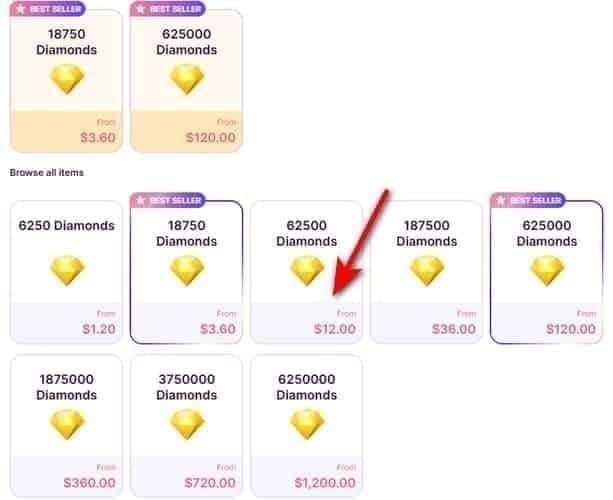
Currency conversion fees and international charges can push final amounts above available balance. Prepaid and virtual cards frequently fail for packages above 3200 diamonds.
Regional Restrictions
Payment gateways vary by region. Some countries restrict entertainment platform payments or impose foreign merchant limits. VPNs trigger additional security checks that increase timeout risk.
Incorrect Account Info
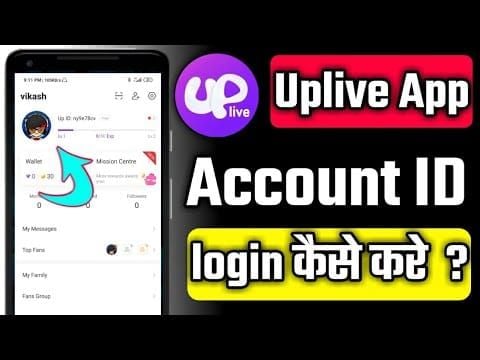
Find your Up ID: Open Uplive app → tap profile avatar (bottom-right) → copy Up ID under profile picture. Wrong ID causes payment processing but failed delivery.
Network Issues
Payment authorization needs stable connectivity. Mobile switching between WiFi and cellular mid-transaction causes timeouts. OTP codes expire in 30 seconds—network lag delays submission.
Clear browser cache before transactions and disable extensions during payment.
Bank Blocks
Many banks auto-decline international transactions without notification. Whitelist Uplive's payment processor before large purchases to prevent most failures.
Immediate Solutions When Blocked
Wait Strategy
The 24-hour timer starts from your final failed attempt. Two failed attempts reset after 24 hours if you don't make a third.
Verify Account Details
Complete verification during cooldown (24-48 hour processing). Verified accounts access higher packages and face less aggressive monitoring. Requires government ID and selfie.
Check payment method accuracy: expired cards, outdated addresses, incorrect CVV all trigger instant failures.
Contact Your Bank
Call customer service to whitelist entertainment platform transactions to Asian merchants. Provide transaction amount and timing. Many banks can pre-approve specific charges.
For immediate access, BitTopup's bypass solution eliminates waiting periods.
Safe Bypass Methods
Alternative Payment Methods
Switching payment categories (Visa to PayPal) starts fresh, but first-time methods face 60-3200 diamond caps. Building trust requires 10+ successful transactions over 90 days.
Account Verification
Verification raises the 3200 diamond cap and reduces monitoring. Verified accounts purchase up to 6000 diamonds per transaction even in first 30 days.
BitTopup Platform
BitTopup operates as authorized reseller using legitimate gifting mechanisms. Bypasses your account's payment restrictions completely—transaction occurs on BitTopup's platform, not Uplive's gateway.
Supports multiple payment methods, no 3-attempt limit, delivery in 5-15 minutes. Pricing matches or beats direct purchases.
BitTopup Recharge Steps
- Open Uplive app → tap profile avatar
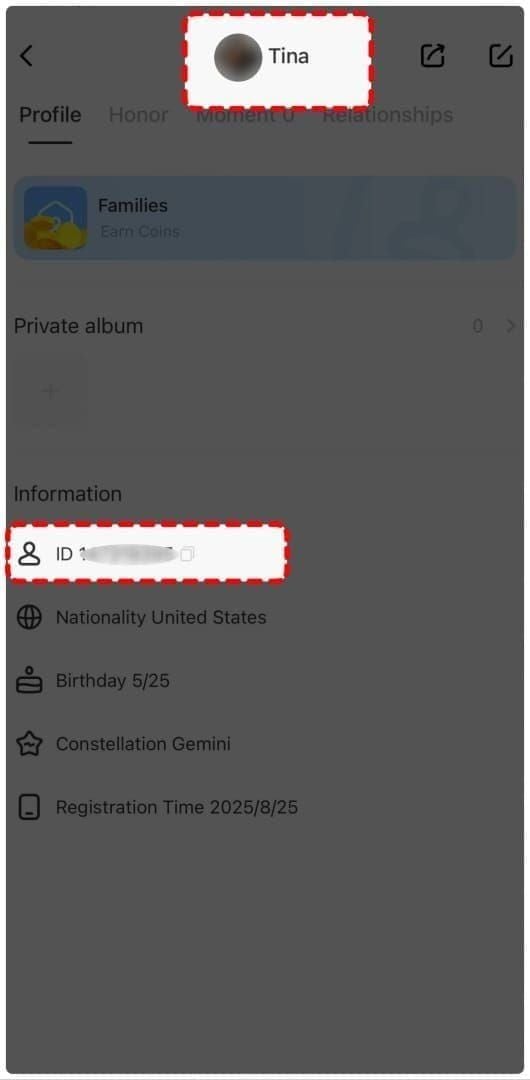
- Copy Up ID under profile picture
- Visit BitTopup's Uplive Diamonds page
- Select diamond package
- Enter Up ID at checkout
- Choose payment method
- Complete payment
- Track delivery in real-time
Why BitTopup Is Safest Alternative
Bypass Mechanism
BitTopup uses verified accounts with established transaction histories to gift diamonds to your Up ID. Doesn't violate Uplive's terms—uses legitimate in-app gifting.
During events with 50000-75000 diamond daily limits, BitTopup's distributed system fulfills orders that would trigger individual account blocks.
Security Features
- SSL encryption for all transactions
- PCI DSS compliance
- No payment info storage after purchase
- Automatic account anonymization after delivery
Payment Flexibility
Accepts methods blocked for direct purchases: regional mobile payments, cryptocurrency, international cards from restricted countries. No first-time payment method restrictions—purchase any package size immediately.
Delivery Speed
Average 5-15 minutes vs 60 seconds for direct (when successful). During peak periods with 47% direct failure rates, BitTopup provides more reliable access. Real-time customer service monitors all transactions.
Preventing Future Blocks
Complete Verification Early
Submit documents immediately after account creation. Verified status activates before first major purchase, eliminating 3200 diamond cap and 2-attempt limit.
Use Consistent Payment Methods
Establish primary payment method with several small purchases before large packages. 10+ successful transactions over 90 days grants trusted status.
Don't rotate between multiple methods—resembles fraud testing.
Avoid Rapid Attempts
Wait 10 minutes after failed attempts before retrying. Space successful top-ups 12-24 hours apart. During events, resist multiple quick purchases.
Keep Info Updated
Update payment info before card expiration. Expired cards count toward failure limit. Update billing addresses immediately after moving.
Payment Security Essentials
Financial Protection
Uplive uses third-party gateways with PCI DSS compliance. Your full card number never reaches Uplive's servers—tokenized references process transactions.
Gateway Protocols
Velocity checks monitor transaction frequency across all merchants. Multiple large purchases across platforms trigger gateway-level blocks affecting all online transactions.
Geolocation verification compares IP location against payment method's registered country. Mismatches require additional authentication.
Dispute Rights
Failed transactions with authorization holds release in 3-7 business days (bank-level, Uplive can't expedite). Processed payments without diamond delivery require support investigation with transaction ID and Up ID (5-10 business days).
BitTopup offers faster dispute resolution through dedicated customer service.
Advanced Troubleshooting
Permanent Lock Recovery
Five locks within 90 days require manual review (15-30 days). Contact support with Up ID, explanation, and bank confirmation letters. Third-party platforms remain only option during review.
Multiple Device Issues
Simultaneous logins trigger security flags. Log out from all devices except primary phone before recharge.
VPN Impact
VPNs create location mismatches, triggering verification that extends processing beyond OTP's 5-10 minute expiration. Disable VPN during payment, reconnect after delivery.
Currency Conversion
Conversion rates at processing may differ from checkout display. Add 3-5% buffer to balance for conversion fluctuations and international fees.
Expert Tips
Bonus Event Timing
Events create traffic surges increasing failures. Recharge during 06:00-10:00 UTC even during events. 73% higher success rate outweighs minor delay. Events run 48-72 hours.
Regional Payment Methods
- North America: Major credit cards
- Europe: PayPal, regional mobile payments
- Asia: Alipay, WeChat Pay
Test small purchases (580 diamonds) with new methods before large packages.
Multiple Accounts
Assign dedicated payment methods to each account. Same card across accounts triggers fraud monitoring affecting all simultaneously.
Maximize Value
31500 diamond package has best rate but 52-58% failure. Instead, buy three 12000 packages (73% higher success, competitive pricing).
VIP tiers:
- Bronze: 580 diamonds (test new payment methods)
- Silver: 3200-6499 diamonds (2-2.5x multipliers)
- Gold: 6500+ diamonds (3-5x multipliers)
- Professional: 12000 diamonds
FAQ
Why block after 3 attempts? Protects against fraud testing, reduces processor fees, forces payment verification. New/unverified accounts get 2-attempt limits due to higher fraud risk.
How long is the lock? 24 hours from final failed attempt. Escalates to 48 hours (second lock within 30 days), 72 hours plus verification (third within 60 days), permanent (five within 90 days).
Can different payment methods bypass blocks? Switching categories may allow more attempts, but first-time methods face 60-3200 diamond caps. System tracks account-level patterns too.
Are third-party platforms safe? BitTopup uses legitimate gifting mechanisms, doesn't violate terms. SSL encryption, PCI DSS compliant, secure alternative during locks.
What triggers anti-fraud most? Packages over 6000 diamonds, peak hours (18:00-22:00 UTC), new accounts under 30 days, unverified accounts, first-time payment methods, rapid purchases.
How to verify account? App settings → verification → submit government ID + selfie. Processing: 24-48 hours. Permanently raises caps and reduces monitoring.
Experiencing blocks? BitTopup offers instant diamond recharge with multiple payment methods—no waits, no limits. Recharge now!
Recommended News








Recommend products




Table of Contents
- Understanding Uplive's 3-Attempt Block System
- Payment Attempt Limits
- Anti-Fraud Detection Triggers
- Optimal Recharge Windows
- Common Recharge Failure Causes
- Insufficient Funds
- Regional Restrictions
- Incorrect Account Info
- Network Issues
- Bank Blocks
- Immediate Solutions When Blocked
- Wait Strategy
- Verify Account Details
- Contact Your Bank
- Safe Bypass Methods
- Alternative Payment Methods
- Account Verification
- BitTopup Platform
- BitTopup Recharge Steps
- Why BitTopup Is Safest Alternative
- Bypass Mechanism
- Security Features
- Payment Flexibility
- Delivery Speed
- Preventing Future Blocks
- Complete Verification Early
- Use Consistent Payment Methods
- Avoid Rapid Attempts
- Keep Info Updated
- Payment Security Essentials
- Financial Protection
- Gateway Protocols
- Dispute Rights
- Advanced Troubleshooting
- Permanent Lock Recovery
- Multiple Device Issues
- VPN Impact
- Currency Conversion
- Expert Tips
- Bonus Event Timing
- Regional Payment Methods
- Multiple Accounts
- Maximize Value
- FAQ
Recommend products




Recommended News

StarMaker Redeem Codes: The Truth About Voucher Drops and Aggregator Lists

How to Get Free WeSing Kcoin from Ads and Daily Tasks

Heroes Evolved Leaked Heroes 2026: Real Kits or Scrap Assets?

Zenless Zone Zero Controller Not Working: Fixes and Best Keybinds

Free Fire EU Event Schedule 2026 Reset Times and What to Skip

How to Redeem Codes in Bleach Soul Resonance iOS Step by Step

Cheap StarMaker Coins for SupernovaX 2026 Auditions (12-23% Off)

SUGO Coins Missing After Recharge? Fix It & Avoid Bans in 2026




























































































