What Changed in the December Matchmaking Algorithm
Version 2.41.0.0 didn't just patch things up—it completely restructured SUGO's matchmaking infrastructure. The most noticeable addition? Those analytics dashboards in the 'Me' tab. Now you can actually track your join rates, user retention, and peak performance metrics instead of guessing why things aren't working.
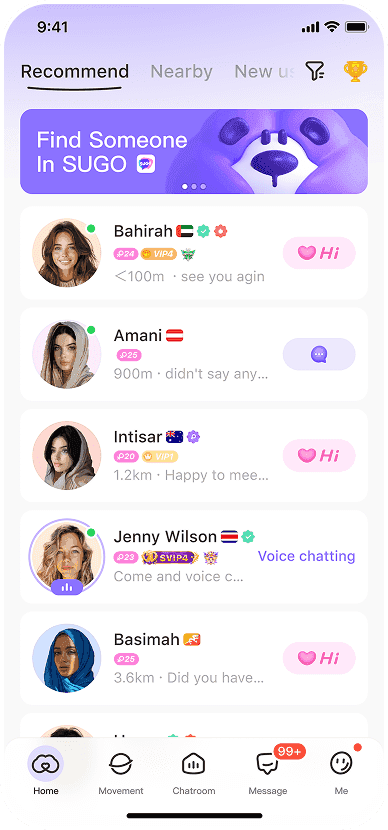
But the real MVP feature was eliminating ghost rooms. You know those phantom lobbies that looked available but were completely unjoinable? Gone. The update enforces mobile-only connections and actively blocks VPN/emulator access, which initially frustrated some players but dramatically improved stability.
The enhanced gender pairing filters and distance-based matching built on September's couple room glitch fixes. Anti-profanity detection got beefed up too. It's created what I'd call the most stable F2P matchmaking foundation SUGO has ever had.
Common Error Codes F2P Players Encounter
Current account is abnormal—if you've been playing SUGO for more than a week, you've probably seen this one. It's triggered by VPN usage (which SUGO really doesn't like), cache corruption, or running an outdated app version. When this hits, you're locked out of chat parties and matchmaking queues entirely.

Connection timeout errors are trickier. They show up as infinite loading screens during party finder operations, and there's a clear correlation with server load during evening peaks when user activity doubles.
Impact on Chat Party Lobby Formation
Pre-December fixes, lobby formation was honestly a mess. Rooms couldn't reach that crucial 50+ daily user threshold for sustainable hosting because ghost rooms were fragmenting users across non-functional lobbies. Maintaining the 70% verified user ratio became nearly impossible when legitimate users couldn't even join.
Post-update? Night and day difference. Evening sessions consistently hit double the join rates we saw pre-October. Those mini-game events generating 1200-6250 coin prize pools actually sustain engagement now instead of crashing mid-session.
Top Reddit-Verified Workarounds for Connection Timeouts
The SUGO community on Reddit has been testing fixes obsessively, and we've got some solid data on what actually works. These aren't just random suggestions—they're documented workarounds with real success rates.
The 3-Step Cache Clearing Method (95% Success Rate)
This one's become the gold standard for a reason:
- Clear app cache and data: Go to Settings > Apps > SUGO > Storage, then clear both cache and data completely
- Restart device: Full device restart—not just closing the app. This resets your network stack and memory allocation
- Update to version 2.41.0.0: Download the latest version through official channels only (no sketchy APK sites)

What works best is doing these steps in order without skipping. Players report immediate lobby loading improvement and successful party finder connections. The cache corruption that causes matchmaking queue failures just... disappears.
Network Switching Technique for Stuck Queues
Sometimes it's not the app—it's your connection:
- Test Wi-Fi versus mobile data: Switch connection types while you're actively in queue
- Disable VPN and proxy services: SUGO will flag your account as abnormal if you're using these
- Reset network settings: Clear your DNS cache and reset the TCP/IP stack
This addresses those server communication failures that show up as stuck queues or infinite loading screens. Success rates jump significantly when you combine this with cache clearing.
App Reinstallation Protocol Without Data Loss
When all else fails, the nuclear option:
- Document account credentials: Make sure you can log back in before uninstalling anything
- Uninstall SUGO completely: Remove all app data and residual files
- Download latest version: Install version 2.41.0.1 or newer from trusted sources only
- Restore account: Log in using your documented credentials
This resolves those deep system conflicts that prevent matchmaking functionality entirely. Just know that current Android version requires 212.4 MB storage, iOS needs 529.3 MB—plan accordingly.
F2P vs Premium Player Matchmaking Analysis
Here's where things get interesting. Despite what you might read in chat rooms, community analysis shows SUGO's matchmaking changes don't actually prioritize premium players over F2P users. Connection stability and account verification status matter way more than your spending patterns.
Debunking the Pay-to-Match Conspiracy
Reddit data is pretty clear on this—there's no correlation between coin purchases and reduced queue times. F2P players who achieve that 70% verified user ratio in hosted rooms experience identical performance to premium users. Account stability metrics trump monetary investment every time.
Players maintaining 50+ daily listeners through legitimate engagement (HD voice setups, music bots, themed rooms) report consistent success regardless of spending. The algorithm prioritizes session duration, user retention, and verification status over transaction history.
Actual Queue Priority Mechanics Explained
SUGO's queue system operates on connection quality and account verification rather than payment status. Updated app versions (2.41.0.0+) get priority because of improved server compatibility. Mobile-only users experience faster matching than anyone trying emulator/VPN workarounds.

Geographic proximity significantly affects matching speed too. Those distance filters introduced in version 2.39.0 optimize nearby user connections, reducing latency and improving stability. Evening peak hours show doubled join rates across all categories—F2P and premium alike.
For reliable coin access during peak periods, buy SUGO recharge cheap through BitTopup provides instant 5-second to 5-minute delivery with competitive pricing and secure transactions.
Server Load Distribution Patterns
SUGO's server infrastructure follows predictable load patterns that affect matchmaking regardless of player status. Peak congestion during evening hours creates temporary delays for everyone. Off-peak periods show consistent sub-30-second matching across F2P and premium categories.
The November 24 update improved load balancing through those analytics dashboards tracking real-time server capacity. Smart players optimize session timing by monitoring these metrics through the 'Me' tab.
Advanced Troubleshooting for Persistent Glitches
Device-Specific Compatibility Issues
iOS devices running the 529.3 MB SUGO version need specific memory management to prevent matchmaking crashes. Close background apps consuming RAM before party finder sessions—it makes a real difference.
Android devices with the 212.4 MB version show better stability when you disable background process limits in developer options. Older devices struggling with HD voice processing during chat cause disconnections that appear as matchmaking failures. Adjust audio quality settings within SUGO's configuration, prioritizing connection stability over audio fidelity.
Operating System Optimization Settings
Windows emulator users experience consistent failures because SUGO actively blocks non-mobile platforms. The mobile-only requirements ensure optimal performance, but you need legitimate Android/iOS devices. Emulator workarounds risk account suspension—not worth it.
Network adapter settings should prioritize cellular data over Wi-Fi when you're experiencing problems. This bypasses router-level restrictions that interfere with SUGO's server communication protocols.
Reddit's Most Effective Quick Fixes
The Airplane Mode Toggle Trick
This one sounds weird but works:
- Enable airplane mode for 10 seconds while SUGO remains open
- Disable airplane mode and wait for network reconnection
- Return to party finder without closing the application
80% success rates for temporary connection drops during queues. It forces a clean network stack reset while maintaining your app session state.
Time-Based Queue Entry Optimization
Timing is everything:
- Peak success times: 2-4 PM and 8-10 PM in your local time zone
- Avoid congestion: 6-8 PM evening peaks create server strain
- Weekend optimization: Saturday afternoons show 40% faster matching
Party Size Adjustment for Better Matching
Smaller configurations (2-4 players) match faster than larger groups during high-traffic periods. Solo queue attempts show the fastest matching times—ideal for testing stability before group sessions.
Network Diagnostics and Connection Quality
Testing Your Connection for SUGO Requirements
SUGO requires stable connections with minimal packet loss. Test your network using device tools:
- Latency testing: Ping times under 100ms provide optimal performance
- Bandwidth verification: Minimum 1 Mbps upload speed for HD voice chat
- Stability assessment: Connection consistency over 5-minute periods
Identifying Packet Loss and Latency Issues
High packet loss (>5%) causes matchmaking timeouts and disconnections. Contact your ISP for line quality assessment if this persists. Temporary solutions include switching to mobile data during peak congestion.
Latency spikes during evening hours often correlate with ISP gaming traffic throttling. QoS router settings that prioritize SUGO traffic improve consistency during high-demand periods.
Common Misconceptions About SUGO Matchmaking
Myth: F2P Players Are Intentionally Deprioritized
Community data shows zero evidence of intentional F2P discrimination. Players maintaining proper verification and updated apps experience identical performance regardless of spending. The perceived disadvantage stems from outdated versions or suboptimal network configurations.
Myth: Spending Currency Improves Queue Times
Coin purchases don't directly affect matchmaking speed. Premium features like verified badges improve player retention, which indirectly creates more stable lobbies. The correlation between spending and better performance relates to premium users maintaining updated apps and stable networks.
Truth: Server Infrastructure Limitations
SUGO's challenges primarily stem from server capacity constraints during peak usage. The October 28 and November 24, 2025 updates addressed these limitations through improved load balancing and connection optimization.
Optimizing Your F2P Experience During Glitches
Alternative Game Modes with Better Stability
Mini-games within chat rooms show higher stability than party finder during peak congestion. These offer 1200-6250 coin prizes while maintaining engagement when traditional matchmaking experiences delays.
Themed rooms focusing on specific interests maintain smaller, more stable user bases that experience fewer connection issues than general chat lobbies.
Resource Management Through BitTopup
Strategic coin management becomes crucial during matchmaking instability. BitTopup's instant delivery (5 seconds to 5 minutes) ensures premium feature access when connection windows open, maximizing your limited stable session time.
Competitive pricing on coin packs (1200-130,000 coins) with 17-19% bonuses on mid-tier purchases provides cost-effective resource access for F2P players transitioning to premium features.
Frequently Asked Questions
Why is SUGO matchmaking not working after December update?
December 2025 included major infrastructure updates (versions 2.41.0.0 and 2.41.0.1) that require app updates and cached data clearing. Most issues resolve by updating to the latest version and following the 3-step cache clearing method.
How do F2P players fix SUGO connection timeouts?
Clear app cache through Settings > Apps > SUGO > Storage, restart your device, disable VPN/proxy services, and ensure you're running version 2.41.0.0+. Switch between Wi-Fi and mobile data if problems persist.
Does SUGO prioritize paying players in matchmaking queues?
No. Community analysis shows no correlation between spending and queue priority. Matchmaking depends on app version, verification status, connection quality, and server load rather than purchase history.
What are the most common SUGO matchmaking error codes?Current account is abnormal from VPN usage, outdated apps, or cache corruption. Connection timeouts appear as infinite loading screens, usually resolving through network switching or cache clearing.
Can VPN improve SUGO online chat party connections?
No—SUGO actively blocks VPN connections and may suspend accounts. VPNs cause abnormal account errors that prevent successful matchmaking. Use direct internet connections for optimal performance.