What Binding Means for Your Progress
Binding creates permanent association between your character data and the social platform's unique identifier. Your skins, weapon finishes, emotes, and achievements exist independently—stored on PUBG servers, accessed through the social login gateway.
Account must be linked 21-30 days before unlinking becomes available. This prevents rapid account flipping and unauthorized access. System tracks device login history, requiring your current device logged in 15 of last 30 days to qualify.
Common Scenarios Leading to Inaccessible Accounts
Deleted Facebook accounts represent the most frequent trigger. Users who deactivate for privacy often forget their PUBG connection until attempting login weeks later.
Hacked social media creates urgent problems. When attackers change your Facebook password and recovery email, you lose both platform access and your linked PUBG account simultaneously.
Account ownership disputes arise when players sell devices without unlinking, or shared family devices create conflicting credentials.
The Problem: Lost Access to Linked Social Accounts
Your only login method becomes unavailable but your PUBG account remains active on servers. The game denies entry when authentication fails. Your character data, UC balance, and inventory stay intact but inaccessible.
This differs from forgotten PUBG passwords or lost Player IDs—those involve direct account recovery. Lost social access requires breaking the authentication link itself.
Deleted or Deactivated Facebook/Twitter
Facebook deactivation creates temporary authentication block. Deactivated profiles enter recovery-eligible state for 30 days before permanent deletion. Reactivating within this window resumes game access immediately.
Permanent deletion after 30 days creates irrecoverable authentication. The API returns errors when PUBG queries the deleted profile, but the database still lists Facebook as active login method.
Forgotten Login Credentials
Players who linked Twitter years ago often forget credentials. The account exists but without password access, you can't authenticate to initiate unlinking. Password recovery works only if you control the associated email—often outdated from the same era.
Account Ownership Disputes
Second-hand devices sometimes include pre-linked PUBG accounts. New owners can play but can't change linked accounts or access security settings without original Facebook credentials.
What Is the 7-Day Claim Trick?
The 7-day claim mechanism functions as security-balanced unlinking for players who've lost social access but retain device-based authentication proof. When you initiate unlinking through settings, the system enters 7-day grace period before finalizing disconnection.
Anyone with original social account access can cancel unlinking by logging in during this window, preventing unauthorized takeovers.
How It Works
Select Settings using ▲ button on lobby right side, tap unlink button on top of Settings left of social platform icon. System verifies you're logged in through alternative method—you can't unlink your only credential. Tap continue to unlink account, starting countdown.
During grace period, social account remains linked but flagged for removal. Logging in with social media cancels the request immediately.
After seven days without social login, binding dissolves on next game launch. System removes platform from linked accounts, freeing slot for new credentials. Player ID, inventory, and progress remain unchanged.
Why the Waiting Period
7-day delay balances accessibility against security. Immediate unlinking would enable device thieves to quickly disconnect owner accounts. Waiting period provides notification window—most active players log in within a week, discovering and canceling unauthorized attempts.
Prerequisites Before Starting
Successful unlinking requires specific device usage and account configuration criteria. Quick unlinking (no 7-day wait) requires: currently logged in using registration platform, current device frequently used, all linked methods used on current device today.
Standard unlinking requires device logged in 15 of last 30 days. This proves consistent device-based access.
Verify Current Login Method
Tap Settings > Account > Linked Accounts. This displays all bound platforms—Facebook, Twitter, etc.
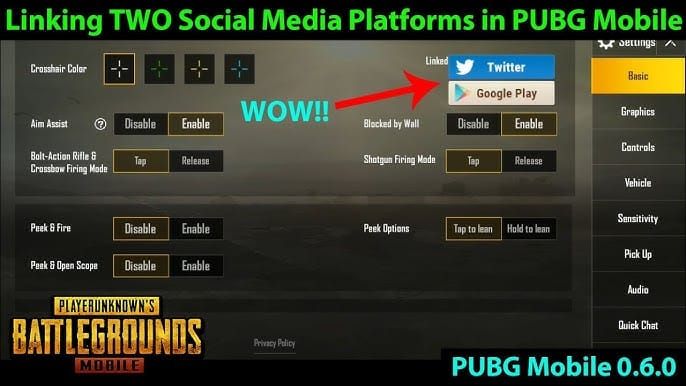
If only one linked account exists (the inaccessible platform), establish alternative login first. Guest conversion or email/phone binding provides backup. Email or phone must be linked 7 days before becoming valid alternative.
Ensure Alternative Login Methods
Game prevents unlinking sole login credential. If Facebook is your only method and you've lost access, you face circular problem: can't unlink without alternative credentials, can't add alternatives without logging in.
This requires Account Recovery tool: Help > Hacked Account & Other Account Issues > Account Recovery on login page. Recovery requires email logged 90-120+ days and previous 6 months information. 3-month cooldown between claims.
What Data Remains After Unlinking
Unlinking affects only authentication—character data, inventory, UC balance, season progress, Royal Pass status, and Crew rankings remain intact. Game stores this via Player ID, not external credentials.
Friends added through Facebook integration may disappear, but manually added friends remain. UC coins from pubg mobile top up center stay in account—purchases link to Player ID.
Step-by-Step: How to Unlink Lost Social Accounts
Step 1: Access Settings from Lobby
Launch PUBG Mobile logged in through alternative method. From main lobby, locate Settings button (▲ symbol) on screen right side. Tap to open settings menu.
Step 2: Navigate to Account Security
Tap Account tab to access authentication configuration. Screen displays Player ID, server region, and Linked Accounts section with connected platforms.
Step 3: Initiate Unlinking Request
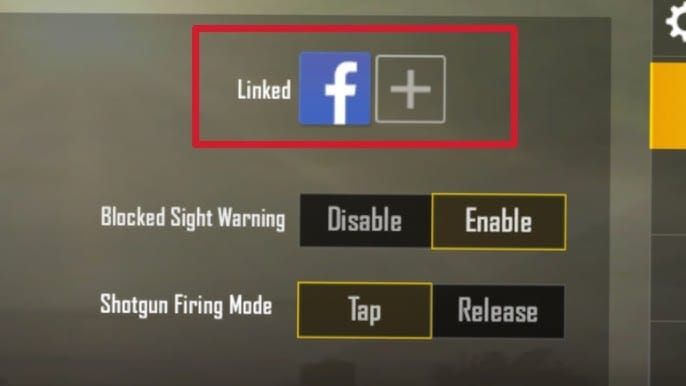
Locate unlink button on top of Settings, left of social platform icon. Button appears only for accounts meeting minimum linkage duration (21-30 days). Tap unlink button to trigger confirmation prompt.
Step 4: Confirm 7-Day Period
Review warning prompt, tap continue to unlink account. System registers request and begins countdown. You'll receive notification confirming activation with exact completion date/time.
Unlinking takes effect 7 days later on first login after grace period expires.
Step 5: During 7-Day Window
Avoid logging in with social account you're unlinking. Any social login cancels pending request immediately.
Continue playing normally using alternative method. No restrictions on gameplay, purchases, or progression.
Step 6: Claim Account After 7 Days
Once seven days pass, launch PUBG Mobile using alternative login. System automatically finalizes unlinking during first post-grace-period login. You'll receive confirmation notification.
Verify completion: Settings > Account > Linked Accounts. Previously linked platform should no longer appear.

Step 7: Link New Social Accounts (Optional)
After unlinking, link different social account to vacant slot. From Linked Accounts, tap platform icon to connect. Game redirects to platform authentication.
New linking creates fresh association. Game data unchanged—just new authentication pathway. Newly linked accounts must stay connected 21-30 days before future unlinking eligibility.
Critical Rules During 7-Day Period
Actions That Reset Timer
Logging in with social account you're unlinking cancels pending request immediately. System interprets this as legitimate owner rejecting unlinking. Once cancelled, restart entire process.
Login Restrictions
Exclusively use alternative login method during grace period. Configure game to default to this method, preventing accidental social authentication. Some players reinstall app to clear cached credentials.
Avoid account recovery features or customer service during waiting period unless necessary. Support actions sometimes reset unlinking as security precaution.
Monitor Progress
PUBG doesn't provide visible countdown timer. Note exact date/time when you initiated unlinking, calculate completion by adding seven days. Set reminder for day eight.
Social account remains listed as linked until grace period expires and you complete first post-period login.
Troubleshooting Common Issues
Error: 'Cannot Unlink This Account'
You're attempting to unlink your only login method. Verify Linked Accounts shows multiple platforms before unlinking.
If only inaccessible social account listed, first link email/phone, wait required 7-day linkage period, then retry unlinking.
Unlinking Option Grayed Out/Missing
Grayed-out button: account hasn't met minimum linkage duration (21-30 days from original linking date).
Missing option: device usage requirements not satisfied. Current device must have logged in 15 of last 30 days. Rebuild usage pattern by logging in consistently for two weeks.
Account Claimed During Waiting Period
If someone with original social access logs in during 7 days, they cancel your request. Requires regaining full social control or using Account Recovery tool with email logged 90-120+ days and 6 months purchase history.
Lost Access to All Methods
Most challenging scenario. Contact customer service through Help button on login screen to access Account Recovery without logging in. Requires substantial ownership proof.
Facebook vs Twitter Unlinking
Platform-Specific Procedures
Facebook unlinking: tap Facebook logo in Linked Accounts, confirm prompt, wait 7 days. System treats Facebook as primary authentication, often default login when multiple accounts linked.
Twitter unlinking: identical steps but affects fewer features. Twitter primarily serves as authentication without importing social connections.
Which to Unlink First
If lost access to both, prioritize based on recovery likelihood. If any chance of regaining Facebook access, unlink Twitter first—Facebook's deeper integration makes it more valuable.
If Facebook permanently inaccessible but Twitter recoverable, unlink Facebook first.
Multiple Accounts Simultaneously
Can't unlink multiple social accounts simultaneously. Must complete one cycle (full 7-day grace period) before initiating another.
After first successful unlinking, wait 24 hours before second request. Cooling-off period allows system to update status.
Alternative Solutions If 7-Day Trick Fails
Account Recovery Through Player ID
Access Help > Hacked Account & Other Account Issues > Account Recovery on login page (available without logging in). Requires email logged 90-120+ days, purchase history from previous 6 months, device info matching historical logins.
Submit with maximum documentation: UC purchase receipts, Player ID confirmation, character details, email communications. Whitelist noreply@pubgmobile.com and service@pubgmobile.com for response emails. 3-month cooldown between claims.
Starting Fresh
Creating new account viable when recovery costs exceed account value. If minimal progression (low rank, few skins, limited UC), starting fresh might be more efficient.
For accounts with significant Royal Pass progression, rare skins, or substantial UC balances from trusted platforms, exhaust all recovery options first.
Protecting Account After Unlinking
Best Practices for Linking
Link multiple authentication methods immediately: email, phone, one reliable social account. Creates three independent access pathways.
Choose social accounts you actively maintain and access daily for non-gaming purposes.
Multiple Secure Login Methods
Enable 2FA (two-factor authentication) if available. Use authenticator app rather than SMS—phone-based authentication vulnerable to SIM swapping.
Link email you control completely with own 2FA and strong unique password. Avoid shared emails or employer/school addresses.
Regular Security Audits
Review Linked Accounts monthly. Test each login pathway by logging out/in through different methods.
Monitor UC balance and inventory for unauthorized changes. Maintain transaction records from secure platforms like BitTopup to identify unauthorized purchases.
FAQ
How long does unlinking take?
Standard unlinking requires 7-day grace period, finalizing on first login after expiration. Quick unlinking eliminates wait but requires strict criteria: logged in via registration platform, device frequently used, all methods used today.
Will I lose progress unlinking Facebook?
No. Unlinking affects only authentication—character data, inventory, skins, season progress, Royal Pass, and UC balance remain intact. Friend list may change if friends added through Facebook integration.
Can I unlink social account I can't access?
Yes, through 7-day claim trick. Doesn't require logging in with social account you're unlinking—only alternative method login and device usage requirements (15 of last 30 days).
What if someone claims my account during 7 days?
Anyone logging in with social account during grace period cancels unlinking immediately. Must restart process or pursue Account Recovery through ownership verification.
Can I link different Facebook after unlinking?
Yes. After successful unlinking, immediately link different Facebook profile. New linking creates fresh association without affecting game data. Newly linked accounts need 21-30 days before future unlinking eligibility.
Is unlinking safe?
Safe when performed correctly with alternative methods established. Primary risk: unlinking only authentication method—but game prevents this. Follow steps carefully, verify working alternatives, enable 2FA after unlinking.
Need UC coins for your secured account? Visit BitTopup for instant, safe, affordable UC top-ups with 24/7 support and competitive pricing. Fast delivery, secure transactions, high user ratings—your gaming currency arrives safely while you maintain full account control.





























































































































