


Uplive GIFTO Withdrawal Blocked? Complete 2026 Fix Guide
Uplive GIFTO withdrawal blocks stem from network congestion during peak hours (14:00-22:00 UTC), wallet binding errors with incorrect BNB Chain addresses, or KYC verification mismatches. Diamond-to-GFT conversion takes 3-7 days with minimum balances of 10,000-50,000 diamonds to avoid prohibitive gas fees. This guide provides proven solutions for network busy errors, wallet configuration issues, and verification problems based on 2023 and 2026 blockchain migrations.


What is GIFTO and How Withdrawal Works
GIFTO (GFT) operates as the blockchain token underlying Uplive's diamond economy. Conversion rates: 1,000 diamonds = $10 USD, 10,000 diamonds = $100 USD, 100,000 diamonds = $1,000 USD.
Withdrawals require smart contract conversions using 100,000-300,000 gas units, far more complex than standard ERC-20 transfers (21,000-65,000 gas units). This explains why GIFTO withdrawals face more failure points.
For hassle-free experience, Uplive diamonds recharge through BitTopup offers competitive pricing and fast delivery without blockchain complexity.
Common Reasons Withdrawals Get Blocked
Network congestion: Peak hours (14:00-22:00 UTC) spike gas prices from 10-50 gwei to 100-500 gwei. On BNB Chain, fees jump from $0.50-$5 to $10-50.
Wallet binding errors: Invalid BNB Chain addresses. Valid format: 0x + exactly 40 hexadecimal characters. Single character mistake invalidates withdrawal.
KYC verification mismatches: Account info doesn't match identity documents. Platform enforces strict one-account-per-user policies and prohibits VPN, TOR, proxy connections, disposable emails, and VOIP numbers.
Blockchain Verification Process
BNB Chain confirmations complete in 3-15 seconds under normal conditions. Full diamond-to-GFT conversion extends to 3-7 days due to platform verification layers.
Track transaction progress on BSCScan using the transaction hash provided after submission.
2026 Security Measures
Following GFT to GOTG migration (April 12-30, 2025), withdrawal protocols updated significantly. Migration followed earlier GTO to GFT transition (January 15, 2023).
Platform issued 1.2 billion new GFT tokens on November 28 (120% supply increase), necessitating enhanced anti-fraud measures.
Fixing 'Network Busy' Withdrawal Errors
What 'Network Busy' Means
Indicates blockchain congestion, not Uplive server issues. When gas exceeds 100 gwei, platform pauses withdrawals to protect users from excessive fees.
Optimal Timing Strategy
Gas fees drop 30-60% during off-peak hours (02:00-08:00 UTC). Weekends show consistently lower prices than weekdays.
Gas fee impact by withdrawal size:

- 1,000 diamonds: $8 gas = 44% loss
- 10,000 diamonds: $8 gas = 8% cost
- 50,000 diamonds: $10 gas = 2% cost
- 100,000+ diamonds: gas fees under 1%
Resolution Process
- Wait 2-4 hours after network busy error
- Check current BNB Chain gas prices
- Schedule attempts during 02:00-08:00 UTC
- Consolidate to 10,000-50,000+ diamonds minimum
- Monitor transaction via BSCScan hash
Check Network Status Before Withdrawing
Verify BNB Chain conditions before initiating withdrawal. Normal range: 10-50 gwei. Prices exceeding 100 gwei = delay transaction.
BNB Chain's 3-15 second confirmation means successful transactions complete rapidly. Pending status beyond 30 seconds indicates congestion—cancel and reschedule.
Resolving Wallet Binding Errors
Common Address Format Mistakes
BNB Chain addresses require: 0x prefix + exactly 40 hexadecimal characters (0-9, a-f).
Common errors:
- Omitting 0x prefix
- Including spaces/special characters
- Copying incomplete addresses (fewer than 42 total characters)
- Confusing Ethereum with BNB Chain addresses
- Inconsistent uppercase letters
How to Properly Bind Your Wallet
- Establish BNB Chain-compatible wallet (MetaMask, Trust Wallet)
- Store 12-24 word recovery phrase offline
- Add BNB Chain network with correct RPC endpoints
- Verify GFT contract address matches official documentation
- Copy wallet address directly from wallet app
- Paste into Uplive withdrawal interface without manual editing
- Double-check all 42 characters before confirming
Fixing 'Invalid Wallet Address' Error
Verify you've selected BNB Chain network, not Ethereum mainnet. Same wallet generates different addresses for different networks.
Copy address using wallet's built-in copy function, not manual selection. Manual copying introduces invisible characters or truncates address.
Wallet Compatibility Requirements
Wallet must support:
- BNB Chain (BSC) network
- Custom token additions
- BEP-20 tokens
- Smart contract interactions
- Transaction hash tracking
Changing Bound Wallet Address
Requires customer service intervention via KChat:
- Contact KChat requesting email/mobile change
- Receive verification code to registered mobile (email changes) or email (mobile changes)
- Provide verification code to customer service
- Complete password reset after confirmation
KYC Mismatch Solutions
KYC Requirements 2026
Government-issued ID matching account registration exactly. Platform enforces one-account-per-user.
Acceptable: passports, national ID cards, driver's licenses with clear photos and readable text. Must show current validity.
Why KYC Gets Rejected
- Blurry/low-resolution photos
- Partial document visibility
- Mismatched names between account and ID
- Expired documents
- Reflections/glare obscuring details
- Different name formats (legal name vs. nickname)
Document Quality Standards
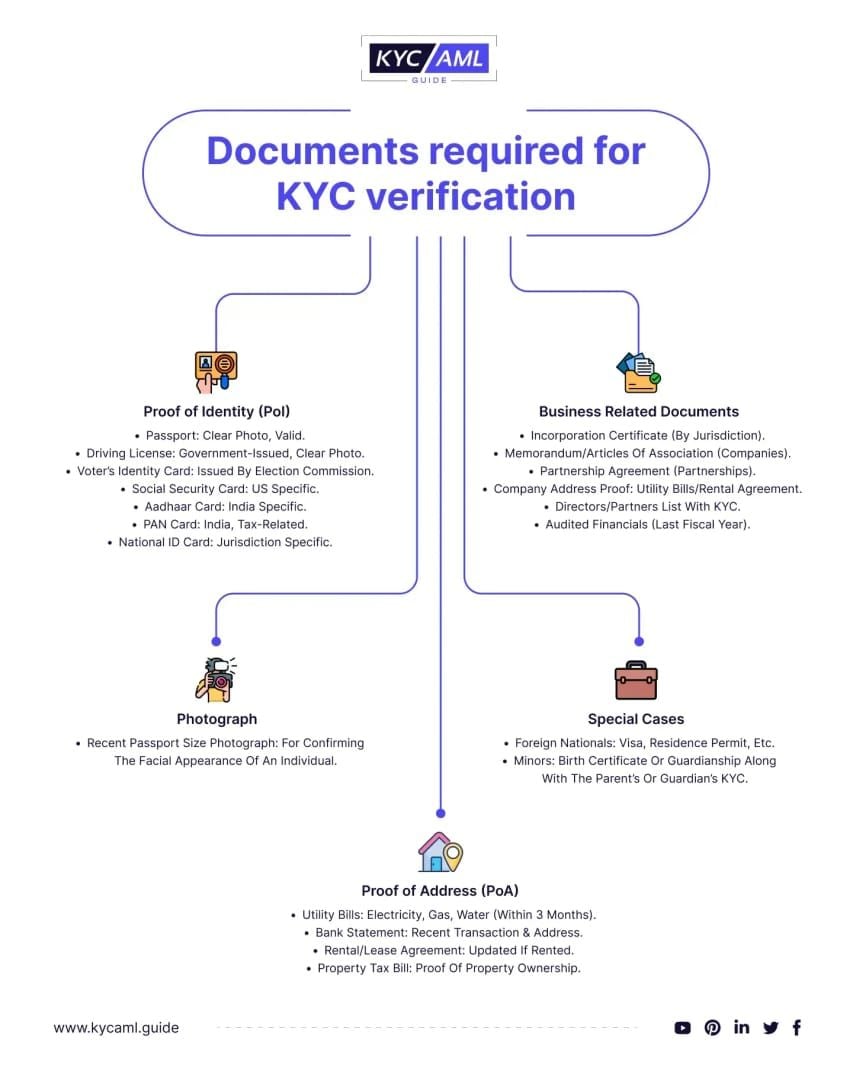
- Minimum 1200x900 pixels
- All four corners visible
- Text clearly readable without magnification
- Color photos (no black and white)
- Original documents (no photocopies/screenshots)
- Adequate lighting without shadows/glare
KYC Re-submission Process
- Review rejection notification for specific issues
- Prepare new photos addressing problems
- Ensure account name exactly matches ID
- Submit through verification portal during business hours
- Monitor email for status updates
- Respond promptly to additional requests
KYC Verification Timeline
Initial submissions: 24-72 hours. Re-submissions: 5-7 business days. Peak periods (holidays/promotions): 7-10 business days. Mid-week, mid-month submissions process faster.
Payment Method Verification Issues
Linking Payment Methods
Payment methods must be registered under same name as KYC-verified identity. Bank transfers take up to 3 business days.
Resolving Verification Failures
Error 104 in Pay Portal resolution:
- Email uplivecsteam@asiainnovations.com with account details
- Include Transaction ID from failed attempt
- Provide error message screenshots
- Wait 24-48 hours for response
- Follow specific instructions provided
Security Checks Delaying Withdrawals
Multi-layer verification adds 1-3 days when:
- First-time withdrawal from new account
- Amount exceeds typical activity patterns
- Recent account changes (password, email, phone)
- Login from new devices/locations
- Extended inactivity followed by sudden withdrawal
Withdrawal Requirements Checklist
Minimum GIFTO Balance
Platforms enforce 10,000-50,000 diamond minimums to make gas fees viable. Below minimums, gas costs consume disproportionate percentages.
For those preferring to top up Uplive diamonds online, BitTopup provides secure transactions with excellent service.
Account Age and Activity
New accounts face 7-14 day withdrawal restrictions. Accounts must show:
- Regular login history spanning multiple weeks
- Consistent platform engagement
- Gradual diamond accumulation
- Verified email/phone for minimum 30 days
Security Level Prerequisites
Maximum security requires:
- Completed KYC verification
- Verified email and phone
- Two-factor authentication enabled
- Recent password update (within 90 days)
- No active security flags
Regional Restrictions
Certain jurisdictions face withdrawal restrictions due to local cryptocurrency regulations. VPN usage triggers automatic blocks—platform detects and prohibits VPN, TOR, and proxy connections.
Advanced Troubleshooting
Persistent 'Withdrawal Under Review' Status
Extended review beyond 7 days indicates deeper issues:
- Suspicious activity patterns
- Incomplete/inconsistent verification
- Previous violations/warnings
- Unusual withdrawal patterns
- Technical issues with specific addresses
Account Security Flags
Automatic withdrawal blocks until resolved:
- Password reset within 72 hours
- Login from new device/location within 48 hours
- Failed login attempts exceeding threshold
- Reported compromise/suspicious activity
- Pending verification of recent changes
Escalating to Uplive Support
- Contact KChat with detailed issue description
- Provide username, registered email, transaction IDs
- Include error message screenshots
- Reference previous ticket numbers if applicable
- Request escalation after 48 hours without resolution
- Email uplivecsteam@asiainnovations.com for critical issues
Response Times
Standard inquiries: 24-48 hours. Complex technical issues: 3-5 business days. Escalated cases: 7-10 business days.
Prevention Strategies
Account Maintenance Best Practices
- Update contact info promptly
- Renew KYC documents 30 days before expiration
- Maintain regular login patterns
- Avoid sudden large withdrawals after inactivity
- Keep security settings current
Optimal Withdrawal Scheduling
Schedule during:
- 02:00-08:00 UTC (30-60% lower gas fees)
- Weekend periods (reduced congestion)
- Mid-week, mid-month (faster support)
- Outside major crypto trading events
- Your region's business hours
Security Settings Protection
Enable:
- Two-factor authentication via authenticator app
- Email notifications for account changes
- SMS alerts for withdrawals
- Withdrawal address whitelisting
- Regular password updates (60-90 days)
Alternative Solutions
Using GIFTO Within Uplive
While resolving blocks:
- Send gifts to broadcasters
- Purchase premium features
- Participate in events/competitions
- Exchange for virtual items
- Support content creators
How BitTopup Simplifies Experience
BitTopup eliminates withdrawal complexity by providing direct diamond recharge:
- Instant delivery without blockchain waiting
- Competitive pricing without gas fee calculations
- Secure transactions with established payment methods
- Fast customer service
- Wide platform coverage
Real User Success Stories
Case 1: 7-Day Network Busy Error Broadcaster with 50,000 diamonds attempted withdrawal at 18:00 UTC. After seven days of errors, rescheduled to 04:00 UTC Sunday. Transaction completed in 15 minutes with $3 gas fees instead of $15-20, saving 80%.
Case 2: KYC Mismatch After Document Update Account registered under legal name rejected when submitting married name ID. Provided marriage certificate to KChat. Customer service updated records within 48 hours, new KYC approved within 24 hours.
Case 3: Wallet Binding Error New user copied Ethereum mainnet address instead of BNB Chain. After configuring proper BNB Chain network in MetaMask and copying correct format, binding succeeded immediately.
Expert Tips
Timing Withdrawals for Maximum Success
- Accumulate minimum 50,000 diamonds before withdrawal
- Schedule during first week of month
- Avoid major cryptocurrency market events
- Monitor BNB Chain gas prices 24 hours beforehand
- Complete mid-week (Tuesday-Thursday)
Documentation Preparation
Prepare before first withdrawal:
- High-resolution government ID photos (front/back)
- Proof of address dated within 90 days
- Verified BNB Chain wallet address
- Account login credentials/recovery info
- Transaction history showing legitimate accumulation
- Customer service contact info
Common Mistakes
- Attempting multiple withdrawals after initial failure
- Changing wallet addresses between attempts
- Using different devices/networks during process
- Ignoring email verification requests
- Withdrawing just above minimum without gas fee buffer
- Failing to verify BNB Chain network selection
FAQ
Why is my Uplive GIFTO withdrawal blocked?
Blocks occur from network congestion (14:00-22:00 UTC), incorrect BNB Chain addresses, incomplete KYC, or security flags. Conversion takes 3-7 days with 10,000-50,000 diamond minimums to avoid gas fees exceeding 44% on small amounts.
How long does withdrawal take in 2026?
3-7 days from initiation to token receipt. BNB Chain confirmations complete in 3-15 seconds, but platform verification and security checks extend total time. First-time withdrawals may add 1-3 days.
What does 'Network Busy' mean?
BNB Chain gas prices exceed 100 gwei, making costs prohibitively expensive. Platform pauses withdrawals to protect users. Retry during off-peak hours (02:00-08:00 UTC) when fees drop 30-60%.
How do I fix wallet binding error?
Verify address starts with 0x + exactly 40 hexadecimal characters (42 total). Ensure BNB Chain network selected (not Ethereum). Use wallet's built-in copy function to avoid errors.
What's the minimum withdrawal amount?
10,000-50,000 diamonds depending on gas conditions. Below 10,000 diamonds, $8 gas = 8% cost. At 1,000 diamonds, 44% loss. Optimal: 100,000+ diamonds where gas stays under 1%.
How do I contact support for withdrawal issues?
Contact KChat within Uplive app. For Error 104 or critical issues, email uplivecsteam@asiainnovations.com with username, registered email, transaction ID, and error description. Standard response: 24-48 hours. Complex issues: 3-5 days.
Tired of withdrawal hassles? BitTopup makes managing your Uplive experience effortless. Get instant, reliable solutions – skip the waiting, avoid errors, enjoy seamless transactions. Visit BitTopup now!
Recommended News








Recommend products




Table of Contents
- Understanding Uplive GIFTO Withdrawal System (2026 Update)
- What is GIFTO and How Withdrawal Works
- Common Reasons Withdrawals Get Blocked
- Blockchain Verification Process
- 2026 Security Measures
- Fixing 'Network Busy' Withdrawal Errors
- What 'Network Busy' Means
- Optimal Timing Strategy
- Resolution Process
- Check Network Status Before Withdrawing
- Resolving Wallet Binding Errors
- Common Address Format Mistakes
- How to Properly Bind Your Wallet
- Fixing 'Invalid Wallet Address' Error
- Wallet Compatibility Requirements
- Changing Bound Wallet Address
- KYC Mismatch Solutions
- KYC Requirements 2026
- Why KYC Gets Rejected
- Document Quality Standards
- KYC Re-submission Process
- KYC Verification Timeline
- Payment Method Verification Issues
- Linking Payment Methods
- Resolving Verification Failures
- Security Checks Delaying Withdrawals
- Withdrawal Requirements Checklist
- Minimum GIFTO Balance
- Account Age and Activity
- Security Level Prerequisites
- Regional Restrictions
- Advanced Troubleshooting
- Persistent 'Withdrawal Under Review' Status
- Account Security Flags
- Escalating to Uplive Support
- Response Times
- Prevention Strategies
- Account Maintenance Best Practices
- Optimal Withdrawal Scheduling
- Security Settings Protection
- Alternative Solutions
- Using GIFTO Within Uplive
- How BitTopup Simplifies Experience
- Real User Success Stories
- Expert Tips
- Timing Withdrawals for Maximum Success
- Documentation Preparation
- Common Mistakes
- FAQ
Recommend products




Recommended News

StarMaker Redeem Codes: The Truth About Voucher Drops and Aggregator Lists

How to Get Free WeSing Kcoin from Ads and Daily Tasks

Heroes Evolved Leaked Heroes 2026: Real Kits or Scrap Assets?

Zenless Zone Zero Controller Not Working: Fixes and Best Keybinds

Free Fire EU Event Schedule 2026 Reset Times and What to Skip

How to Redeem Codes in Bleach Soul Resonance iOS Step by Step

Cheap StarMaker Coins for SupernovaX 2026 Auditions (12-23% Off)

SUGO Coins Missing After Recharge? Fix It & Avoid Bans in 2026




























































































