What Defines Functional Recording Quality Perks
Functional perks directly manipulate audio signals through digital signal processing:
- 192 Kbps dual-channel stereo recording: Doubles data rate, preserving frequency information in 8-16 kHz range where vocal clarity resides
- AI noise cancellation (Version 5.90.0, July 24, 2025): Removes background interference through machine learning algorithms
- Powerful Tuning Menu: 0-100% correction intensity for precise pitch adjustment
- Advanced audio effects: Echo and reverb algorithms that simulate acoustic environments
- Target audio latency: 70ms for real-time effect application
Cosmetic Perks Explained
Cosmetic perks enhance platform experience without touching audio processing:
- Profile badges and exclusive avatar frames
- Special chat emojis
- Priority song queue placement (peak hours 19:00-23:00 SEA time zones)
- Social recognition features
These hold value for community engagement but don't alter recording bitrate or frequency response. Singers focused purely on audio quality should prioritize functional perks.
Why This Distinction Matters for Kcoin Investment
Full VIP at 1866 KCoin (USD 27.65) versus partial VIP at 1031 KCoin (USD 14.80) represents an 81% price increase. This USD 12.85 difference must justify itself through tangible recording quality improvements.
Kcoin packs maintain consistent pricing at 1.48¢ per KCoin across all denominations (373 KCoin at USD 5.53 to 5597 KCoin at USD 82.97). No bulk discounts exist, making precise tier selection crucial.
Recording frequency directly impacts ROI. Users recording 10+ times monthly gain more value from permanent audio enhancements than occasional singers.
Complete VIP Tier Breakdown: Audio Features by Level
Partial VIP Audio Capabilities (1031 KCoin)
Partial VIP grants:
- Limited tuning mode with restricted correction intensity ranges
- Basic AI noise cancellation with less aggressive processing
- Recording bitrate below 192 Kbps maximum
- Echo and reverb effects with fewer customization parameters
- No custom tuning preset saving
This tier suits singers needing occasional pitch assistance and basic noise reduction. The USD 14.80 investment makes sense for intermediate users testing VIP benefits.
Full VIP Professional Audio Tools (1866 KCoin)
Full VIP unlocks:
- Complete 192 Kbps dual-channel stereo recording
- Unrestricted tuning correction intensity 0-100%
- AI intelligent sound effects (Version 5.90.0)
- Up to 5 custom tuning presets
- Full echo and reverb customization
Recommended tuning intensity by voice type:
- Soprano: 35-50%
- Alto/Tenor: 40-60%
- Bass: 50-70%
Genre-Specific Tuning Recommendations
Pop music (90-110 BPM): 40-55% intensity balances natural expression with pitch accuracy
Ballads (60-80 BPM): 50-70% intensity addresses pitch exposure in slower passages
Scoring system rewards:
- 86-95% pitch accuracy: 2x score multiplier
- 96-100% pitch accuracy: 3x score multiplier
- Pitch accuracy carries 35-40% weight in overall scoring
Correction intensity guidelines:
- Below 30%: Subtle assistance for trained vocalists
- 30-70%: Suits most amateur singers
- 70%+: Helps beginners or challenging passages (risks robotic quality)
Functional VIP Perks That Actually Improve Recording Quality
Advanced Tuning Mode: Precision Pitch Correction
Access via Profile → Settings → Audio Settings → Tuning Mode toggle. The system analyzes vocal input in real-time, comparing pitch against the song's musical key and correcting deviations based on selected intensity percentage.
Correction intensity trade-offs:
- Below 30%: Maintains organic vocal character with gentle pitch guidance
- 30-70%: Noticeable stabilization without obvious processing artifacts
- 70%+: Forces vocals tightly to target pitches (creates auto-tune effect)
The ability to save 5 custom presets allows quick switching between intensity levels for different song types.
AI Intelligent Sound Effects and Noise Cancellation
Version 5.90.0 (July 24, 2025) introduced AI intelligent sound effects leveraging machine learning for context-aware audio enhancement. The system analyzes recording environment, vocal characteristics, and song genre to apply appropriate processing automatically.
AI noise cancellation learns your voice's frequency signature during initial recordings, then identifies and suppresses sounds that don't match this profile. This removes air conditioning hum, keyboard clicks, and ambient room noise while preserving vocal detail.
Requirements for optimal performance:
- 5+ Mbps upload speed
- Less than 100ms ping
- SEA servers (ID, MY, PH, TH, SG) for Southeast Asian users
Professional Echo and Reverb Controls
VIP members access granular controls over effect depth, timing, and frequency response:
Reverb types by genre:
- Pop/rock: Short reverb times (0.5-1.0 seconds)
- Ballads/classical: Longer decay (2.0-3.0 seconds)
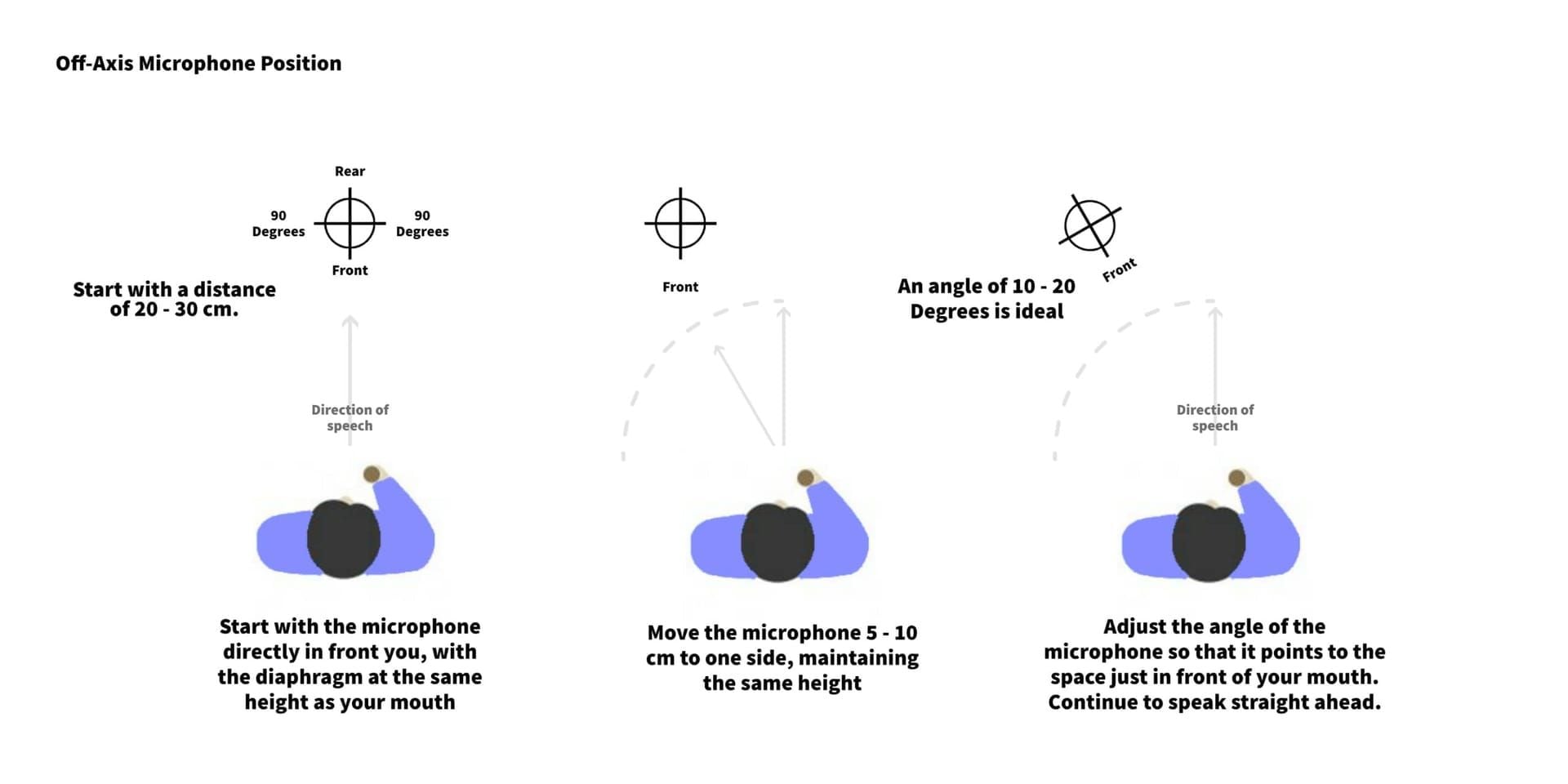
Optimal microphone positioning: 6-8 inches distance at 45-degree angle minimizes plosive sounds and breath noise while optimizing signal capture.
Enhanced Audio Bitrate: 192 Kbps Stereo Recording
The 192 Kbps dual-channel stereo specification preserves significantly more audio information than standard compression, particularly in frequency ranges above 12 kHz where vocal brilliance resides. Stereo recording captures spatial information, creating wider, more immersive vocal presence.
Requirements:
- 5+ Mbps upload speed ensures recordings transmit without quality degradation
- Quality playback systems (studio monitors or high-end headphones) reveal full fidelity improvement
Measurable Recording Quality Improvements: Technical Analysis
Bitrate Impact on Frequency Response
192 Kbps stereo format captures frequencies up to approximately 20 kHz, matching human hearing range limits. Lower bitrates employ psychoacoustic compression that discards frequency information above 15 kHz, creating duller sound lacking sparkle and air.
Dual-channel stereo preserves spatial information that mono formats collapse, creating perceived width and depth. This spatial quality particularly benefits harmony recordings and vocal arrangements.
Noise Floor Reduction Measurements
AI-based noise cancellation measurably lowers the noise floor:
- Standard recordings: -40 to -50 dB noise floor
- VIP noise cancellation: -60 dB or lower
This 10-20 dB improvement makes background distractions imperceptible rather than merely quieter, creating the impression of professional studio recording conditions.
The algorithm's effectiveness depends on consistent background noise patterns. Steady-state noise like fan hum is easier to eliminate than random, intermittent sounds.
Dynamic Range Preservation
VIP recording features preserve greater dynamic range by using higher bitrates and less aggressive compression. The 192 Kbps format maintains approximately 96 dB theoretical dynamic range, though practical recording conditions typically yield 60-70 dB usable range.
Tuning mode intensity affects dynamic range preservation. Lower correction percentages maintain natural volume variations, while aggressive tuning can inadvertently compress dynamics.
Kcoin ROI Calculator: Is VIP Worth Your Investment?
For strategic Kcoin purchases, buy WeSing KCoin online through BitTopup offers secure transactions with multiple payment methods and instant delivery.
Monthly Recording Frequency Break-Even Analysis
Cost per recording calculation:
Full VIP (USD 27.65):
- 10 recordings/month: USD 2.77 per session
- 30 recordings/month: USD 0.92 per session
Partial VIP (USD 14.80):
- 8-12 recordings/month: USD 1.23-1.85 per session
Occasional singers (fewer than 5 recordings/month) face USD 5.53+ per-session costs, making VIP harder to justify purely on recording quality grounds.
Voice Type and Genre Considerations
High-value scenarios:
- Bass voices struggling with pitch accuracy in lower registers (50-70% tuning intensity transformative)
- Ballad specialists (60-80 BPM exposes pitch inconsistencies more prominently)
- Beginners/self-taught vocalists (60-80% tuning intensity provides significant improvement)
Lower-value scenarios:
- Soprano singers with naturally accurate pitch (35-50% correction provides minimal improvement)
- Uptempo pop performers (90-110 BPM conceals minor pitch variations)
- Trained singers with solid pitch control (gain less from aggressive tuning)
Long-Term Value Assessment
Annual cost: USD 331.80 for full VIP (USD 27.65 × 12 months)
This significant investment must deliver sustained value versus allocating funds to vocal lessons, better microphones, or acoustic treatment.
Version 5.90.0's AI intelligent sound effects (July 24, 2025) demonstrate ongoing feature development that adds value to existing VIP subscriptions.
Maximizing VIP Audio Features: Practical Setup Guide
Optimal Tuning Mode Configuration by Genre
Pop (90-110 BPM): 40-55% intensity maintains vocal energy while ensuring pitch accuracy. The 2x score multiplier at 86-95% accuracy becomes achievable for most singers.
Ballads (60-80 BPM): 50-70% intensity addresses pitch exposure slower tempos create. Avoid exceeding 70% to prevent unnatural vocal quality.
Genre-specific preset tips:
- Higher keys: Add 5-10% correction intensity
- Lower keys: Reduce intensity while maintaining accuracy
- Save separate presets for high-key pop, low-key ballads, and mid-range standards
Recording Environment Optimization
Microphone positioning: 6-8 inches from mouth at 45-degree angle balances adequate volume against proximity effect and plosive sounds.
Room treatment: Record in rooms with curtains, upholstered furniture, and carpeting to reduce reverb. Hard surfaces create excessive natural reverb that muddies recordings.
Network stability:
- Ensure 5+ Mbps upload speed and sub-100ms ping
- Close bandwidth-intensive applications
- Connect via WiFi rather than cellular data
- SEA server users: Avoid peak hours (19:00-23:00) if experiencing latency
Combining Multiple VIP Audio Tools Effectively
Processing order for cleanest results:
- Noise reduction
- Tuning
- Reverb
- Echo
Recommended settings:
- Tuning: Appropriate intensity for voice type (40-60% moderate range)
- Reverb: Subtle levels (0.8-1.2 second decay)
- Echo: Short delay times (80-120ms) at low mix levels (10-20%)
Monitor cumulative processing impact on audio latency. Target 70ms latency accommodates real-time monitoring, but combining multiple effects may increase delay.
Strategic Kcoin Investment: When to Upgrade and When to Wait
Signs You Need VIP Recording Features
Immediate VIP benefits if you experience:
- Consistent background noise despite environmental optimization
- Pitch accuracy below 80% despite practice
- Desire for professional-quality recordings to share outside WeSing
- Score multipliers (2x at 86-95%, 3x at 96-100%) currently out of reach
Free Alternative Methods for Quality Improvement
Before investing in VIP, try:
- Vocal technique development through apps, exercises, and lessons
- Environmental optimization: Record in closets with hanging clothes, use blankets for sound absorption, choose quiet times
- Proper microphone technique: Consistent distance, appropriate angle, controlled dynamics
- External audio editing software: Free programs offer noise reduction, equalization, and compression
Trial Period Strategy and Seasonal Timing
Smart VIP testing approach:
- Purchase one month of full VIP (1866 KCoin, USD 27.65) to thoroughly test features
- Document specific quality improvements
- Assess whether improvements justify ongoing monthly expense
Start with partial VIP (1031 KCoin, USD 14.80) if uncertain about feature value. Upgrade to full VIP only after confirming you'll utilize advanced features.
Monitor for seasonal promotions or special events offering discounted Kcoin rates or bonus VIP periods.
How to Purchase Kcoin Safely for VIP Upgrade
BitTopup: Secure Kcoin Recharge Platform
BitTopup provides reliable WeSing Kcoin top-up services with:
- Competitive pricing
- Fast delivery (5-30 minutes)
- Secure transactions with encrypted payment processing
- Multiple payment methods (credit cards, digital wallets, regional payment systems)
- Customer service availability
Recharge process:
- Locate your WeSing ID in profile settings (8-10 digit number)
- Enter ID accurately on BitTopup platform
- Select Kcoin package: 1031 KCoin for partial VIP or 1866 KCoin for full access
- Complete payment through secure checkout
- Verify Kcoin delivery within 5-30 minutes
Payment Methods and Transaction Security
BitTopup accepts various payment methods for international users. Credit/debit cards provide instant processing, while digital wallets offer additional security layers.
Security reminders:
- Never share WeSing passwords or security questions during Kcoin purchase
- Legitimate platforms only require WeSing ID for credit delivery
- Contact BitTopup customer service if credits don't appear within stated timeframe
Account Safety and VIP Activation
After receiving Kcoin credits, activate VIP membership through WeSing's in-app purchase interface. VIP features activate immediately upon successful purchase.
Account protection:
- Monitor Kcoin balance and VIP expiration dates
- Set calendar reminders several days before expiration
- Use strong passwords and two-factor authentication if available
- Regular password updates prevent account compromise
Expert Tips: Getting Professional Sound with VIP Tools
Layering Audio Enhancements Without Over-Processing
Professional approach:
- Apply tuning mode at moderate intensity (40-60%) rather than maximum correction
- Add reverb conservatively—barely perceptible levels create professional space
- Keep echo mix levels low (10-15%) so effect supports rather than competes with dry vocals
Monitoring tip: Periodically disable all effects to hear raw vocal quality. If processed vocals sound dramatically different from your natural voice, you've over-applied effects.
Genre-Specific VIP Feature Combinations
Pop recordings:
- Moderate tuning (45-55%)
- Short reverb (0.8-1.0 seconds)
- Minimal echo
- Emphasize clarity and presence
Ballads:
- Longer reverb (1.5-2.5 seconds)
- Slightly higher tuning intensity (55-65%)
- Minimal echo for vocal purity
Rock/uptempo:
- Higher tuning intensity (60-70%)
- Shorter reverb (0.5-0.8 seconds)
- More prominent echo for energy
Common VIP Audio Mistakes to Avoid
Excessive tuning intensity: Creates robotic vocal quality. Reduce correction percentage if every note locks perfectly to pitch without natural variation.
Reverb overuse: Makes vocals sound distant and washed out. If you struggle to understand lyrics, reduce reverb decay time and mix level.
Ignoring recording environment: AI noise reduction works best when minimizing source noise first. Record in quiet environments with good microphone technique, then apply VIP features.
Advanced Techniques from Experienced Performers
Custom preset strategy: Create tuning presets for your most-performed songs rather than using generic settings. Analyze each song's key, tempo, and challenging passages.
Selective tuning application: Disable correction for sections where you consistently sing accurately, enabling it only for challenging passages.
Dynamic microphone technique: Move slightly closer during quiet passages for intimacy, back away during powerful sections to prevent distortion.
FAQ
Does WeSing VIP actually improve recording quality?
Yes. VIP provides measurable improvements through 192 Kbps stereo bitrate, AI-based noise cancellation, and 0-100% pitch correction intensity. Full VIP at 1866 KCoin unlocks professional-grade audio processing that directly enhances frequency response, reduces noise floor, and improves pitch accuracy.
Which WeSing VIP tier offers the best value for recording quality?
Full VIP at 1866 KCoin (USD 27.65) provides complete access to all recording features. Partial VIP at 1031 KCoin (USD 14.80) offers basic tuning and noise reduction. Best value depends on recording frequency—users recording 10+ times monthly justify full VIP, while occasional singers may find partial VIP sufficient.
What's the difference between functional and cosmetic VIP perks?
Functional perks modify audio quality through signal processing: 192 Kbps bitrate, tuning modes, noise cancellation, reverb, and echo controls. Cosmetic perks enhance user experience without changing sound: profile badges, avatar frames, priority queuing, and special emojis.
How much does tuning mode intensity affect recording naturalness?
Below 30%: Subtle assistance maintaining natural character. 30-70%: Noticeable stabilization without obvious processing (soprano 35-50%, alto/tenor 40-60%, bass 50-70%). 70%+: Creates obvious auto-tune effects, risks robotic quality.
Is WeSing VIP worth it compared to external audio editing software?
VIP provides real-time processing convenience and platform integration. The USD 27.65 monthly cost compares favorably to professional audio software subscriptions. External editing provides more advanced control for users comfortable with post-production workflows. VIP suits users prioritizing convenience and real-time results.
What recording equipment do I need to maximize VIP audio quality?
VIP works with standard smartphone microphones. Position devices 6-8 inches from mouth at 45-degree angles. Ensure 5+ Mbps upload speed and sub-100ms ping. iOS 13.0+ devices with 2GB+ RAM meet minimum requirements. Recording environment optimization maximizes VIP effectiveness regardless of equipment quality.