Master how to top up PSN Indonesia in 2026. Learn exact steps to redeem 12-digit IDR voucher codes on PS5, PS4, and mobile without region-mismatch errors.
Setting up and funding an Indonesian PlayStation Network (PSN) account gives you direct access to regional pricing, localized catalog promotions, and PlayStation Plus plans billed in Indonesian Rupiah (IDR/Rp). Top-up cards for the Indonesian market operate under strict regional rules. If your account country does not match the voucher currency, Sony's servers reject the code.
The Realities of PSN Indonesia Region Locking
Every PlayStation Network profile is permanently bound to the country selected during creation. Sony does not allow users to modify an existing account's home region under any circumstances. If your profile was created under US, Singapore, or UK storefronts, an Indonesian IDR voucher code will fail instantly upon entry.
Indonesian PSN codes deliver prepaid funds denominated strictly in Indonesian Rupiah (Rp). These funds apply exclusively to digital purchases on the Indonesian PlayStation Store. They cannot be transferred between accounts, merged across different regional profiles, or used to purchase physical goods from international hardware stores.
Game content enforces identical boundaries. Downloadable content (DLC) and season passes must match the regional origin of the base game. If you run a game installed from an Asian physical disc (Region 3) or an Indonesian digital store purchase, purchasing DLC with an Indonesian wallet works as intended. If your base game originates from a North American disc or digital library, Indonesian DLC will not load or sync.
To manage multiple regional accounts on one console, use PlayStation's account sharing features. Setting your Indonesian profile as an active user and enabling Console Sharing and Offline Play on PS5 (or activating it as Primary PS4) lets every other profile on that hardware play titles and add-ons bought with your IDR balance.
Checking Your Account Region Before You Buy
Confirm your profile's registered region before purchasing digital balance cards. Region mismatches cause almost all redemption failures.
You can confirm your account region directly through two methods:
- Check the Store Currency: Sign in to the PlayStation Store on your console, mobile app, or browser. Browse any game listing. If prices display in Rupiah (Rp), your profile is set to the Indonesian storefront. If prices appear in USD, SGD, or EUR, your account belongs to another country.
- Use Profile Lookup Services: Search your public PSN Online ID on tracker portals like psnprofiles.com. The platform reads your public PlayStation trophy feed and displays the country flag assigned to your profile.
Once you verify your account country, you can safely buy PlayStation Network Card IDR vouchers to fund your digital wallet.
Step-by-Step: Indonesia PS Store Voucher Code Redeem Methods
Official PlayStation Network top-up codes use a standardized 12-digit alphanumeric format (e.g., XXXX-XXXX-XXXX). Hyphens are omitted during digital entry or formatted automatically. You can redeem your 12-digit voucher across four primary interfaces.
Redeeming on PlayStation 5
Follow these steps on your console dashboard:
- Log in to your Indonesian user profile on PS5.
- Select PlayStation Store on the home screen.
- Press Triangle on your DualSense controller to highlight the top menu bar, then select More (...) next to the cart icon.
- Select Redeem Code from the drop-down list.
- Enter the 12-digit code using the on-screen keyboard.
- Select Redeem and confirm the deposit to credit the IDR balance immediately.
Redeeming on PlayStation 4
The PS4 places the redemption function in the store sidebar:
- Log into your Indonesian PSN account on PS4.
- Open the PlayStation Store from the main dashboard.
- Scroll to the bottom of the left-hand navigation sidebar.
- Select Redeem Codes.
- Type your 12-digit voucher code into the input box.
- Select Continue and confirm the top-up.
Redeeming via the PlayStation App (iOS & Android)
The mobile app lets you paste voucher codes directly from digital order confirmations without typing on a controller:
- Open the PlayStation App on your smartphone and log into your Indonesian account.
- Tap the PlayStation Store icon at the bottom center.
- Tap the menu icon (three horizontal lines) at the top right.
- Select Redeem Code.
- Paste or type the 12-digit code into the box.
- Tap Next and confirm the top-up.
Redeeming via Web Browser
If you manage your account from a desktop browser:
- Open your browser and go to the official PlayStation Store website.
- Sign in with your Indonesian PSN account credentials.
- Click your profile avatar in the upper-right corner.
- Select Redeem Code from the drop-down menu.
- Enter the 12-character alphanumeric code and click Next to finalize the balance update.
PSN ID Wallet Top Up PS5 PS4 Balance Limits and Rules
Managing your Indonesian wallet requires tracking balance caps and payment rules set by Sony. The table below outlines the core technical parameters for Indonesian PlayStation Network accounts.
The following rules define the technical parameters and restrictions for wallet management:
| Parameter / Feature | Rule for Indonesian PSN Accounts | Operational Detail |
|---|
| Maximum Wallet Balance | Rp4,500,000 | Accounts cannot hold funds exceeding this ceiling. |
| Voucher Code Format | 12 alphanumeric characters | Case-insensitive; excludes hyphens or spaces during entry. |
| Wallet Checkout Priority | First priority over secondary cards | Available wallet funds are drained first before charging backup methods. |
| Physical Goods Eligibility | Digital items only | Cannot be used on physical hardware or direct store merchandise. |
| Child / Sub-Account Wallets | No independent balance | Sub-accounts draw directly from the family manager's master wallet. |
| Code Expiration Window | Up to 36 months from activation | Retail and digital distributor terms vary; see details below. |
Takeaway: Always verify your existing balance before adding large funds so that you do not hit the hard Rp4,500,000 ceiling.
When purchasing digital games or add-ons, the PlayStation Store automatically applies your available wallet funds first. If a game costs Rp800,000 and your wallet contains Rp500,000, the system consumes the full Rp500,000 balance and prompts you to cover the remaining Rp300,000 using a secondary payment method.
Child sub-accounts cannot redeem top-up cards to hold individual balances. All vouchers must be applied to the adult family manager's master account. The manager then sets monthly spending limits for each child account under Family Management settings.
To keep your balance ready for upcoming releases, complete your PSN ID wallet top up PS5 PS4 directly to avoid checkout delays.
PlayStation Plus Membership Voucher Conversions in Asia
If you redeem legacy PlayStation Plus subscription vouchers, Sony applies a structured conversion formula for Asian region accounts. Traditional 1-month, 3-month, or 12-month time vouchers convert into specific day counts based on your active membership level.
The table below details how standard PS Plus time vouchers map onto the Essential, Extra, and Deluxe tiers for Indonesian PSN profiles:
| Original Voucher Type | PS Plus Essential | PS Plus Extra | PS Plus Deluxe |
|---|
| 1-Month Voucher | 31 Days | 21 Days | 18 Days |
| 3-Month Voucher | 92 Days | 56 Days | 49 Days |
| 12-Month Voucher | 365 Days | 219 Days | 190 Days |
Takeaway: Redeeming legacy time vouchers onto an active higher tier reduces total days added in proportion to that tier's value.
Topping up standard IDR wallet credit removes conversion formulas entirely. Adding cash-value credit lets you purchase or upgrade your PS Plus tier directly inside the Indonesian PlayStation Store at exact retail prices.
How to Check PSN Indonesia Wallet Balance and Transaction History
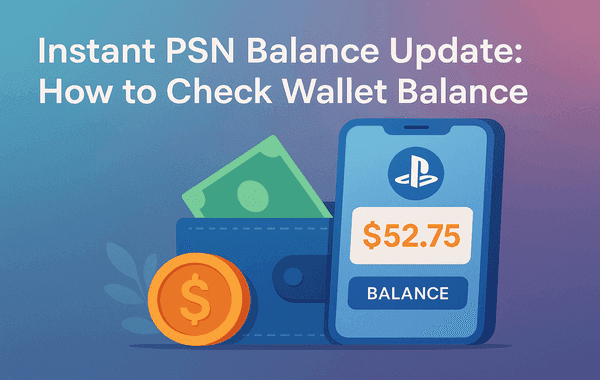
Your current balance displays in the upper-right corner of the PlayStation Store on PS5, PS4, the PS App, and desktop browsers.
To view past top-ups, purchases, and subscription renewals, open the Account Management portal:
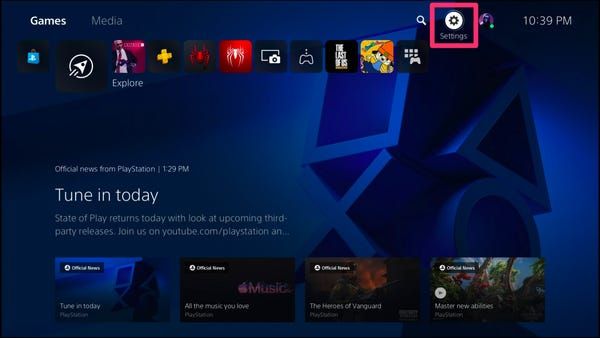
- On PS5: Go to Settings > Users and Accounts > Account > Payment and Subscriptions > Transaction History.
- On PS4: Go to Settings > Account Management > Account Information > Wallet > Transaction History.
- On Web/App: Select your avatar, navigate to Payment Management, and review recent transaction records.
The system tracks funding and spending activities across fixed timelines, summarized in the table below:
| Monitoring Parameter | Active Timeline | Action Required |
|---|
| Transaction History View | 90-day rolling window | Review all wallet top-ups and game purchases within the last 3 months. |
| Dispute Filing Limit | Within 60 days of charge | Contact PlayStation Support if an unauthorized charge is identified. |
| Investigation Window | 7 to 14 business days | Standard timeline for Sony to evaluate transaction anomalies. |
| Standard Balance Sync | Instant (up to 24 hours) | In rare server lag events, wait up to 24 hours before escalating. |
Takeaway: Monitor your transaction history every 90 days to verify recurring subscription renewals and wallet activity.
Redeemed funds appear in your wallet immediately under normal network conditions. If backend synchronization delays occur, balance updates can take up to 24 hours. Keep your voucher code receipt safe until the balance updates on screen.
Budget and Spending Strategies by Player Profile
Allocating your IDR balance effectively depends on whether you play free-to-play titles, subscribe to service tiers, or buy new releases on launch day.
1. Minimalist / Free-to-Play Spenders
If your primary games are free-to-play titles, treat your PSN wallet strictly as a microtransaction depot.
* Recommendation: Buy exact voucher amounts to cover seasonal battle passes or specific in-game bundles, avoiding idle leftover balances.
* Best Practice: Turn off auto-funding in your account settings so unexpected renewals do not pull from your spare balance.
2. Mid-Tier Gamers / Sale Enthusiasts
Players who buy a few major games each year and keep an active subscription benefit from tactical timing.
* Recommendation: redeem PlayStation gift card Indonesia vouchers ahead of major PlayStation Store sales (such as Golden Week, Mid-Year, or Holiday promotions).
* Best Practice: Apply wallet credit toward 12-month PS Plus Extra plans to access the Game Catalog without paying full price for separate games.
3. Heavy Spenders / Day-One Collectors
If you regularly purchase digital deluxe editions and major expansions, balance management requires active tracking.
* Recommendation: Keep your total stored balance below the Rp4,500,000 threshold. When purchasing multiple Rp1,000,000+ titles in a single month, redeem codes in batches right before checkout rather than stockpiling maximum funds.
* Best Practice: Enable two-factor authentication to secure your stored balance.
Account Security and Avoiding Top-Up Traps
A genuine digital voucher purchase requires zero access to your PlayStation account credentials. You pay the merchant, receive an unredeemed 12-digit alphanumeric code, and enter that code yourself on your console or through the official mobile app.
Avoid any service asking for your PSN login email, password, or two-factor authentication (2FA) verification code under the guise of direct account top-ups. Sharing login details violates Sony's Terms of Service and risks permanent account suspension or stolen game libraries.
| Legitimate Digital Voucher Purchase | Unauthorized Top-Up Scam |
|---|
| Delivers a clean 12-digit code for you to enter. | Demands your PSN email, password, or 2FA code. |
| Operates entirely outside your Sony profile. | Claims an "agent" must log in to inject funds. |
| Never asks for remote console access. | Asks you to disable console sharing or security settings. |
| Charges standard currency values for IDR codes. | Promises impossible "unlimited balance glitches." |
Stick to safe habits: buy 12-digit codes from verified sellers, keep your credentials private, and enter codes only through Sony's native interfaces.
Troubleshooting Common Indonesian PSN Voucher Errors
If your code fails to redeem, check these common failure points before contacting support:
1. Region Mismatch Error (Code Not Recognized)
If the PlayStation Store states the code is invalid or unavailable in your region, confirm your account country. Even if your console was purchased in Indonesia, an account registered to another storefront rejects IDR vouchers. Confirm that your store currency displays in Rupiah (Rp).
2. Voucher Activation Glitches
Physical and digital retail cards must be activated at the merchant point of sale. If a card was not scanned through the merchant's activation register, Sony's servers reject it as inactive. Contact the seller with your transaction receipt to resolve activation failures.
3. Maximum Balance Cap Exceeded
If adding a voucher pushes your total wallet balance over Rp4,500,000, the redemption fails. Spend down your existing funds on a game or add-on before redeeming the code.
4. Code Expiration Discrepancies
Regional distributor documentation states that Indonesian PSN top-up codes carry a 36-month validity window from merchant activation. General PlayStation support pages state that standard wallet cards do not expire once activated.
To prevent expiration disputes or merchant record lapses, redeem your 12-digit code immediately upon receipt.
FAQ
Can I redeem a US or Singapore PSN card on an Indonesian account?
No, PSN codes are strictly region-locked and must match the account's registered country. An Indonesian PSN account only accepts vouchers denominated in Indonesian Rupiah (IDR).
What is the maximum wallet balance limit for PSN Indonesia in 2026?
The maximum wallet limit is Rp4,500,000 for Indonesian PlayStation Store accounts. You cannot redeem additional funds if the top-up exceeds this threshold.
Where do I enter a 12-digit wallet code on a PS5 console?
Open the PlayStation Store on your PS5, press the triangle button to select More (...), and choose Redeem Code. Enter the 12-digit code to immediately credit your balance.
Can I change my existing PSN account region to Indonesia?
No, Sony does not permit changing the country or region of an existing PSN profile. You must create a new Indonesian PSN account if your current account is tied to another region.
Can child sub-accounts redeem wallet top-up codes independently?
No, child and sub-accounts do not have their own separate wallets. Top-up codes must be redeemed onto the master family account, which can then set monthly spending allowances for child accounts.
What can I buy with my Indonesian PSN wallet balance?
Wallet funds can be used for digital PS5 and PS4 games, DLC expansions, in-game currencies, and PlayStation Plus plans. They cannot be used to purchase physical hardware from PlayStation Direct or withdrawn as cash.
Summary Verdict
Topping up an Indonesian PSN account requires matching your account region to IDR vouchers. Confirm that your store prices display in Rupiah (Rp), keep your total balance below the Rp4,500,000 cap, and redeem codes promptly through native PlayStation menus to keep your game library funded.