Need UC for Elite Royale Pass or a crate after you lock the sliders? Top up PUBG Mobile UC on BitTopup with Player ID only.
iPhone 15 Pro sensitivity codes (August 2026)
Updated on 2026-08-25: live client is Version 4.5 (9 July 2026). Season 31 runs 16 July to 11 September 2026 (UTC+0). iPhone 15 Pro and 15 Pro Max show Ultra Extreme (120 FPS) on Smooth. A share code writes Camera, ADS, and Gyroscope. You still pull the burst.
Start here | Code | Who it fits |
|---|
iPhone 15 Pro / 120 Hz first import | 1-7478-5115-3389-3888-855
| 6.1-inch ProMotion, close TPP |
iOS alternate | 7120-0143-8549-4140-855
| If Preview rejects the 7478 string |
Universal / first lock | 1-7435-8846-3421-0303-0728
| Gyro on, most phones |
4-finger claw | 7275-1794-4178-8556-303
| Always On gyro |
2-thumb | 7412-8257-5673-1968-774
| Gyro low or off |
Fallback if expired | 7307-1085-6780-4282-435
| Type the table by hand if this also fails |
Some builds print a leading1-. Paste the full string Preview accepts. Drop the prefix only if the field rejects it.
Older copies of this page called1-7478-5115-3389-3888-854 a Jonathan code and1-7462-2496-3022-3831-210 a ScoutOP code. Those labels were wrong.…854 is the iPad / tablet string.…210 is the Android 90 Hz+ string. Public creator IDs change every season. Start from the iPhone 15 Pro row, then move 5% at a time.
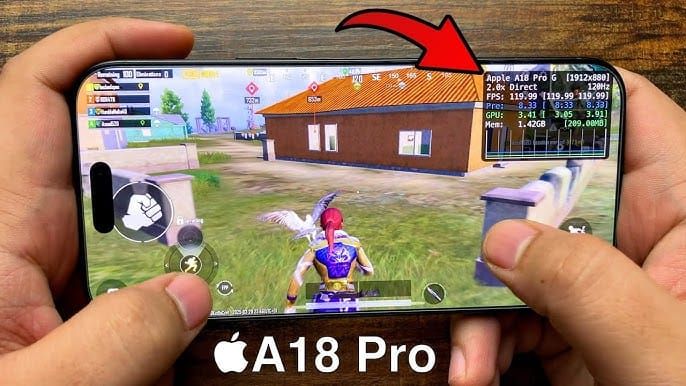
After import, check three rows: TPP Camera 120–150%, Red Dot ADS 50–70%, gyroscope no-scope 300–400% if you left gyro on. More device rows sit on the PUBG Mobile sensitivity codes page.
Scope | Camera | ADS | Gyro (if on) |
|---|
No Scope | 95–120% | 95–110% | 300–400% |
Red Dot / Holo | 50–60% | 50–70% | 280–365% |
2x | 35% | 35–50% | 270–330% |
3x | 25% | 25–35% | 180–275% |
4x | 20–25% | 20–30% | 160–250% |
6x | 15% | 15–25% | 120–180% |
8x | 12% | 10–15% | 55–90% |
Keep the cascade. Red Dot 50% → 3x 25% → 8x 12% is the shape1-7435-8846-3421-0303-0728 uses. Jump a scope by more than 10% and a 6x-to-Red-Dot swap feels broken. Full slider tables for every gun sit on the PUBG Mobile best sensitivity settings page.
120 FPS, ProMotion, and aim jumps
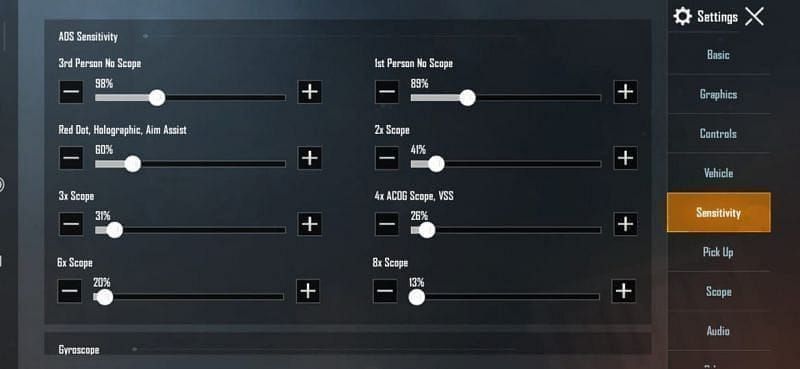
Apple’s iPhone 15 Pro spec is a 6.1-inch Super Retina XDR panel (2556×1179) with ProMotion up to 120 Hz, an A17 Pro chip, and 8 GB RAM. iPhone 15 Pro Max is the same chip on a 6.7-inch 2796×1290 panel. Base iPhone 15 stays at 60 Hz, so it never shows Ultra Extreme.
On Version 4.5, 15 Pro and 15 Pro Max sit on the PUBG Mobile 120 FPS device list. Enable it in Settings → Graphics & Audio → Smooth → Frame Rate → Ultra Extreme. Auto-adjust Graphics stays off. Setup steps live on the PUBG Mobile 120 FPS guide.
Frame Rate row | Interval | When you pick it |
|---|
Ultra Extreme (120) | 8.3 ms | Smooth, back stays cool, ranked |
Extreme (90) | 11.1 ms | Heat, long sessions, battery |
High / 60 | 16.7 ms | Low Power Mode on, or a hitching 120 |
The old Custom + Ultra textures at 90 FPS line is leftover from before this phone joined the 120 whitelist. Smooth is required for Ultra Extreme. If 120 hitches or the back gets hot, drop to Extreme. A17 Pro can hold 120 on Smooth at the start of a session. Plan a drop to Extreme if heat builds.
Aim jumps on this phone come from palm or finger contact on the thin bezels. The panel reads that as a second touch and the sight teleports. A case that lifts your grip off the glass stops most of it. Play without a case and you will catch the same jump at 90 or 120. Recalibrate gyro on a desk if the sight drifts with no finger on the screen: Settings → Sensitivity → Gyroscope → Calibrate.
ProMotion can run from 1 Hz to 120 Hz on the lock screen. In PUBG Mobile you want the Frame Rate you locked, not the Always-On idle rate. Leave Low Power Mode off for 120. iOS can cap refresh when that toggle is on. Turn it on only when you accept 60 FPS to finish a session.
Camera, ADS, and gyroscope on iPhone 15 Pro
Camera moves the view when you are not firing. ADS moves the sight while you hold fire. Gyroscope adds tilt on top of both if you turn it on.
Row | 15 Pro (6.1") start | 15 Pro Max (6.7") |
|---|
TPP Camera (no scope) | 120–150% | +5–10% |
FPP Camera | 100–130% | Same band |
Parachute / Free Look | ~130% | Same band |
Red Dot ADS | 50–70% | +0–5% if the swipe feels heavy |
8x ADS | 10–15% | Keep 12% until the first shot walks |
Do not add 20–30% to every slider just because the panel is 120 Hz. Import the 7478 code, run the 180° test, then add Camera 5% only if the swipe stops short.
Gyroscope:
Style | Mode | Start |
|---|
Week one | Scope On (Activate the scope) | 200–300% ADS gyro |
Claw / ranked | Always On | 300–400% no-scope, ~90% 8x |
Thumbs only | Off | Red Dot ADS 60–70%, more thumb travel |
Hybrid play uses thumbs for the 180° and tilt for the last inches of a spray. Turn gyro on before you judge a gyro code. Preview can look fine on a gyro-off account and feel empty in a fight.
Weapon skins change the model. Recoil stays on the gun and the attachments. After you lock sliders, M416 sensitivity code is the 5.56 spray to prove on the 50 m plate.
How to import the iPhone 15 Pro sensitivity code
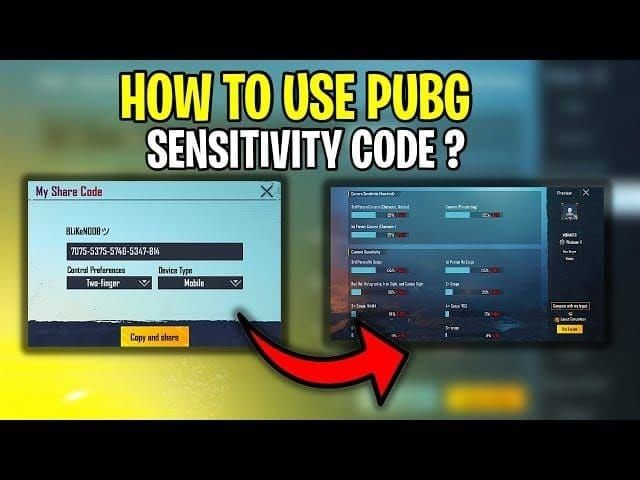
Official path from the PUBG Mobile Help Center: lobby ▲ → Settings → Sensitivity. Exclusive Sensitivity (+Add) uploads as its own cloud pack. A general code does not wipe those rows unless you overwrite that pack.
Screenshot Camera, ADS, and Gyro, or upload from Sensitivity → Cloud Management / Share. Save that string with “iPhone 15 Pro” and the date.
Open Sensitivity. Tap Search Method (magnifying glass). Older guides said “Use Layout or Layout Management.” Current builds use Search Method → Preview → Use Layout.
Paste1-7478-5115-3389-3888-855 with the hyphens, on Wi-Fi. If Preview rejects it, try7120-0143-8549-4140-855.
Read the gyro column in Preview. A gyro code on a gyro-off account looks fine and plays empty.
Tap Use Layout → Confirm.
Set Gyroscope to Activate the scope or Always on on the main Settings tab before you judge the spray.
Open Training: lobby map picker (Change map) → training → TPP or FPP.
Import fails for a missing hyphen, an expired string, or gyro off. Re-copy the line, turn gyro on, then try7307-1085-6780-4282-435.
Graphics that keep the code stable
Lock a flat frame rate before you touch sliders. A code that feels random in Pochinki is often a drop from 120 to 70, not a bad Red Dot value.
Setting | Ranked pick | Drop if the phone heats |
|---|
Graphics Quality | Smooth | Stay on Smooth if you want 120 |
Frame Rate | Ultra Extreme | Extreme (90) |
Auto-adjust Graphics | Off | Off |
Shadows | Off | Off |
Style | Colorful or Classic | Same |
HDR / heavy Style | Off | Off |
iOS Low Power Mode | Off | On only if you accept 60 FPS |
Game Mode | On | On |
Close background apps. Stay off the charger in a fight if the camera module gets hot. Airplane Mode plus Wi-Fi cuts cellular interrupts. In-game brightness around 70–80% of the slider is enough for most rooms. The 120 FPS guide covers the Ultra Extreme menu if your build hides the row.
Training Ground test
Drill | Setup | Pass mark |
|---|
Static spray | M416 + Red Dot + full attachments, 50 m, 3 mags | Most of the mag on the plate. Climb → ADS or gyro +5%. Overshoot → −5% |
180° turn | No scope, one swipe | Stop on the same wall mark |
3x / 4x | 100 m | Group stays on the plate. Burst 8–12 if the last ten walk off |
Scope swap | 6x at 100 m → Red Dot at 25 m | Sight lands without a second swipe |
Edge-touch check | Case on, 90 and 120 | Sight does not jump when a finger sits near the bezel |
Change one slider, then fire the same mag again. Give a new code a week of ranked before you rip it out. Log kills only after 10–15 matches on the same string.
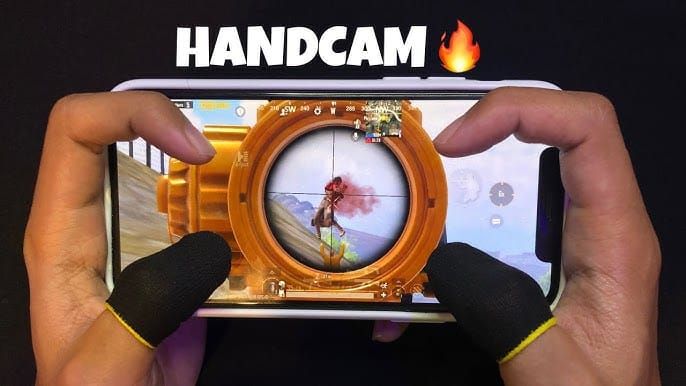
How to get more from the same iPhone 15 Pro code
Copy1-7478-5115-3389-3888-855, then run the 50 m test on this 6.1-inch panel. Pro Max needs more Camera, not a new code.
After 10–15 ranked games, move one value 2–3%. Raise Camera 5% in compounds. Cut 3–5% on open rotations only if first shots miss.
Save a second layout for TDM or Arena: Red Dot ADS +5–10%, 6x / 8x a bit lower.
What is UC in PUBG Mobile covers Pass math. Buy PUBG Mobile UC on BitTopup for the Season 31 track.
FAQ
What sensitivity code works best for iPhone 15 Pro beginners?
1-7435-8846-3421-0303-0728 for a first lock with gyro on. Switch to1-7478-5115-3389-3888-855 once 120 FPS stays flat. Test 15–20 minutes in Training before you edit a row.
How do I fix aim teleporting on iPhone 15 Pro?
Put a case on so your palm misses the bezels. Recalibrate gyro on a desk if the sight still walks. The jump is an extra touch, not a 90 FPS bug.
Should I use gyroscope or touch on iPhone 15 Pro?
Start hybrid: Scope On at 200–300%, thumbs for big turns. Move to Always On near 300–400% no-scope if you play claw. Thumbs-only still works with the 2-thumb code and higher Red Dot ADS.
What graphics settings keep sensitivity stable on iPhone 15 Pro?
Smooth, Ultra Extreme or Extreme, Auto-adjust off, Shadows off. A17 Pro handles that on Version 4.5. Drop to 90 if the back gets hot. Leave Low Power Mode off for 120.
How often should I adjust sensitivity?
Move 5–10% and keep the set for several days. Change a slider after a week of the same miss, not after one death.
What is the difference between Camera and ADS on iPhone 15 Pro?
Camera turns the view when you are not firing. ADS turns the sight while you fire. A working pair on this phone is Camera 120–150% and Red Dot ADS 50–70%, with ADS below Camera so the spray is slower than the peek.
Conclusion
Import1-7478-5115-3389-3888-855 on iPhone 15 Pro, confirm TPP Camera 120–150% and Red Dot ADS 50–70%, then prove the 50 m plate on Version 4.5 at Ultra Extreme or Extreme. Use a case for the bezel jumps. Bookmark this page through the 9 September 4.6 drop. Top up PUBG Mobile UC on BitTopup when you want the Season 31 Pass.