


Hulu Plus Gift Card US Top Up: Instant Streaming Access
A Hulu Plus Gift Card (US) gives you full access to Hulu's on-demand library, award-winning originals, current-season TV episodes, movies, and live television packages without requiring a US-issued credit card. When you purchase a digital code on BitTopup, you receive a direct monetary credit added to your account balance. This balance can be used to start a new subscription or maintain active service on an existing account.
Digital gift cards bypass regional payment barriers, allowing users worldwide to maintain a US Hulu profile securely. Your code is delivered digitally to your account dashboard upon order completion, ready for redemption at any time.
Hulu US Subscription Plans and Pricing Breakdown (2026)
Hulu offers several subscription tiers in 2026. Applying a gift card credits a specific dollar value to your billing balance. Hulu deducts your monthly subscription rate automatically each billing cycle until the balance is exhausted.
| Plan Name | Core Features | Billing Model |
|---|---|---|
| Hulu (With Ads) | Full access to streaming library with commercial breaks | Monthly Recurring |
| Hulu (No Ads) | On-demand streaming with no commercial interruptions | Monthly Recurring |
| Hulu + Live TV (With Ads) | 95+ live channels, Disney+, ESPN+, and Hulu on-demand library | Monthly Recurring |
| Hulu + Live TV (No Ads) | 95+ live channels, live recording, ad-free on-demand library | Monthly Recurring |
| Disney Bundle Duo Basic | Hulu (With Ads) + Disney+ (With Ads) | Monthly Direct Billing |
| Disney Bundle Trio Premium | Hulu (No Ads) + Disney+ (No Ads) + ESPN+ (With Ads) | Monthly Direct Billing |
Note: Exact plan rates depend on active promotions, regional sales taxes, and optional add-ons selected in your account settings. Current top-up product prices are displayed directly on the live checkout screen at BitTopup.
How to Locate Your Account and Redeem a Hulu Plus Gift Card (US)
Hulu accounts do not use a numerical gaming UID. Instead, your account identifier is your registered US email address linked to your Hulu profile. You can verify your active profile details by logging into the official Hulu web portal and reviewing your Account Overview.
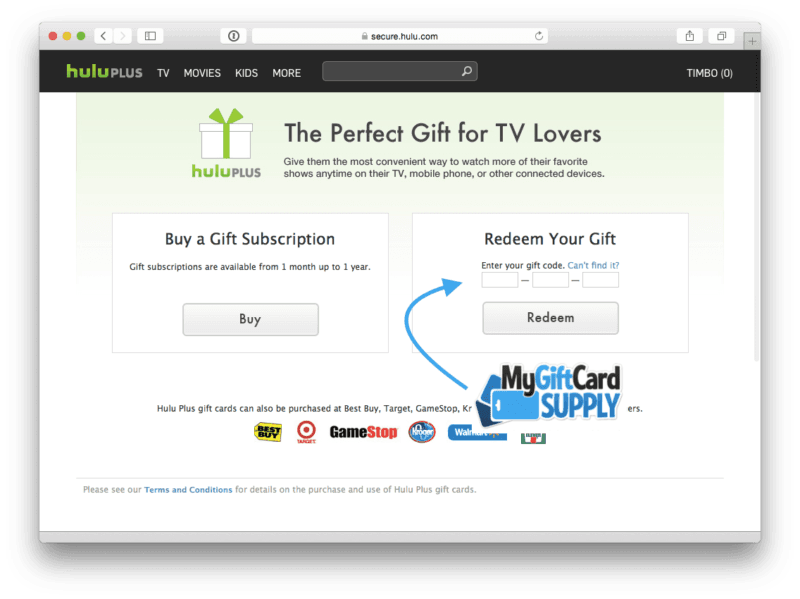
Step-by-Step Redemption Guide
- Obtain Your Code: Copy the digital redemption code from your BitTopup order history.
- Visit the Redemption Page: Open a browser and go directly to
hulu.com/gift. - Enter Your Code: Type or paste your 12-digit redemption code into the input field and click Redeem.
- Log In or Sign Up: - If you have an existing account, log in with your email credentials. - If you are a new customer, complete the registration form with your preferred email and password.
- Provide a US ZIP Code: Enter a valid 5-digit United States postal code (e.g., 90210, 10001, or 30301) when prompted for regional tax calculation.
- Confirm Plan Selection: Choose your desired base plan and premium add-ons. Hulu will apply your gift card credit toward the total amount.
US Region Compatibility, ZIP Code Requirements, and Account Setup
Hulu gift cards sold under the United States catalog are region-locked. They can only be redeemed on US-registered Hulu accounts.
Setting Up a US Account Correctly
- Postal Code Entry: Hulu requires a standard 5-digit US ZIP code to determine local channel availability and state sales tax. You can enter any standard US postal code during registration.
- No US Credit Card Required: If your gift card balance covers at least one billing period of your selected plan, Hulu allows you to complete account creation without entering a secondary credit card or PayPal account.
- Managing Balances from Abroad: International users maintaining a US account can continue replenishing their monthly subscription by applying new gift card codes before their current balance runs out.
Managing Hulu Bundles, Add-ons, and Live TV with Gift Card Balances
Your gift card balance functions as generic account credit on Hulu. This gives you flexibility over how you allocate your funds across services:
- Standalone Hulu Plans: Both ad-supported and ad-free tiers draw directly from your gift credit each month.
- Premium Channel Add-ons: You can add premium networks such as Max, Paramount+ with SHOWTIME, STARZ, or Cinemax directly within your Hulu dashboard. The monthly add-on fees will be deducted from your available credit.
- Hulu + Live TV: Live TV packages can be paid using gift card funds. Because live TV plans have a higher monthly cost, ensure you purchase a sufficient card denomination to cover the full monthly cycle.
- Disney Bundles Billed via Hulu: If you sign up for a Disney Bundle directly through the Hulu website, your gift card credit covers the entire combined bundle price.
What Happens When Your Balance Runs Out?
Hulu tracks your remaining credit on the Payment Information section of your account page. If your balance is insufficient to cover the next billing cycle:1. Hulu sends an automated email notification alerting you that your balance is low.2. If no secondary payment method is linked and no new gift card is redeemed, your subscription pauses automatically at the end of the paid period.3. Your profile data, watch history, and watchlists remain saved. You can reactivate service at any time by redeeming a new gift card on BitTopup.
Fixing Common Hulu Gift Card Redemption and Billing Errors
1. Subscription Billed Through a Third Party (Apple, Roku, Amazon)
- Issue: Hulu displays an error stating that your account is managed by a third-party billing provider (such as Apple App Store, Roku Pay, Amazon Appstore, or Spotify).
- Solution: Hulu cannot apply gift card balances to accounts with active third-party billing subscriptions. To use your gift card: 1. Cancel your subscription inside your Apple, Roku, or Amazon account settings. 2. Wait until the current billing cycle ends and your access expires. 3. Log into
hulu.com/gift, enter your code, and restart your subscription directly through Hulu billing.
2. Invalid or Unrecognized Code
- Issue: The system states the code entered is not valid.
- Solution: Ensure there are no accidental spaces before or after the code. Verify that you have not confused the number
0with the letterOor the number1with the capital letterI.
3. ZIP Code Error During Redemption
- Issue: The redemption form rejects your location data.
- Solution: Ensure you are entering a valid 5-digit US ZIP code format without letters or international postal extensions.
Fast Digital Delivery and Secure Orders on BitTopup
BitTopup provides a straightforward platform for acquiring US digital cards:
- Instant On-Screen Delivery: Code details are generated directly in your order summary upon purchase confirmation, minimizing wait times.
- Account Safety: You never need to share your Hulu login email, streaming password, or private credentials. You receive the raw digital code to redeem yourself.
- Multiple Payment Options: BitTopup supports diverse international payment options, making it simple to fund your account from anywhere.
- Customer Assistance: If you ever experience issues with code verification, the 24/7 customer support team is available to assist you.
Frequently Asked Questions
Can you pay for a Hulu subscription with a gift card?
Yes. Hulu accepts official Hulu gift cards to pay for all base plans, including Hulu (With Ads), Hulu (No Ads), Hulu + Live TV, and select add-on channels billed directly through Hulu.
How do I redeem my Hulu gift card on an existing account?
Go to hulu.com/gift, type in your 12-digit code, and click Redeem. Log in to your existing account when prompted. The dollar value will immediately credit to your upcoming billing cycle under your Account Overview.
Why won't Hulu accept my gift card code?
Common causes include typing errors, attempting to redeem on an account currently billed by a third party (like Roku or Apple), or using an international Hulu regional account instead of a US account. Ensure you enter the exact code on hulu.com/gift while logged into a direct-billed US profile.
Can I use a US Hulu gift card to pay for the Disney+ bundle or Live TV?
Yes, as long as you subscribe to the Disney Bundle or Hulu + Live TV directly through the Hulu website. If your bundle was created through Disney+ directly, you must manage your billing through Disney rather than Hulu gift cards.
Do Hulu Plus gift cards expire or have hidden fees?
No. Hulu gift card balances do not expire, and there are no monthly maintenance or activation fees. The entire face value remains available until spent on subscription services.
Can I redeem a US Hulu gift card if my subscription is billed through Roku or Apple?
No. You cannot apply a gift card to an account actively billed through Roku, Apple/iTunes, Amazon, or other third-party integrators. You must cancel the third-party billing, wait for your remaining time to lapse, and then resubscribe directly on Hulu using your gift card code.