



Palworld Game Account Top Up and Purchase Overview
Getting a dedicated Palworld account gives you direct entry into the Palpagos Islands without the grind. Whether you want a clean base license to begin your survival journey or an endgame-ready profile with automated production lines, a Palworld game account top up provides an immediate solution.
On BitTopup, accounts are delivered directly with full access credentials. You receive the login details, change the security parameters to your personal information, and start playing immediately across your chosen platform.
Types of Palworld Accounts: Fresh Game Licenses vs Maxed Progression Saves
Choosing the right account type depends on how you want to experience the game. Account sellers categorize offerings based on progress, inventory, and unlocked technology.
Fresh License Accounts
- Clean State: Zero playtime, no created characters, and no pre-existing world saves.
- Full Ownership: You configure the profile name, link your personal email, and play through the tutorial naturally.
- Best For: Players wanting a standalone copy of Palworld on Steam or PC platforms at an accessible entry price.
High-Level & Max Progression Accounts
- Character Level 50–55: Maxed player stats, high carry weight, and top-tier stamina points.
- Unlocked Technology Tree: Complete access to late-game crafting stations, ancient technology points, legendary sphere assembly lines, and missile launchers.
- Endgame Pal Collection: Full party and Palbox rosters featuring legendary Pals like Jetragon, Frostallion, Paladius, and Necromus, often with optimal passive traits (Legend, Musclehead, Ferocious, Swift).
- Automated Mega-Bases: Pre-built bases set up for ore extraction, sulfur farming, cake production, and continuous breeding cycles.
| Account Feature | Fresh License Account | Mid-Tier Starter Account | Max Progression Account |
|---|---|---|---|
| Player Level | Level 1 | Level 25–40 | Level 50–55 |
| Pals Included | None | Common to Rare | Legendaries & 4-Star Passives |
| Base Setup | Not Started | Basic Wooden/Stone Base | Multi-Base Ore & Breeding Automation |
| Technology | Level 1 Unlocks | Mid-tier Weaponry & Saddles | Complete Ancient & Late-Game Tech |
| Map Fog | 100% Hidden | Key Fast Travel Points Open | 100% Uncovered Map & Towers Cleared |
Platform Differences: Steam vs Xbox Game Pass vs PlayStation Accounts
Palworld is available across multiple digital ecosystems, each with distinct save storage and network environments.
- Steam Accounts (PC): The primary platform for modding support, dedicated server connections (up to 32 players), and direct Steam Cloud save integration. Steam accounts offer the fastest update cycles and complete file access for custom world configurations.
- Xbox & PC Game Pass Accounts: Connected through the Microsoft ecosystem. These accounts allow seamless play between Xbox Series X/S and PC via the Xbox App. Multiplayer connects via Xbox Live services and official co-op sessions.
- PlayStation Accounts (PS5): Tied directly to the PlayStation Network. Offers trophy tracking, integrated voice chat, and standardized console performance profiles.
Key Account Value Factors: Character Level, Base Automation, and Rare Pals
When evaluating account listings, several core gameplay metrics dictate the practical value of the profile:
- Breeding and Passive Traits: High-value accounts feature Pals bred with tier-4 passives. A Jetragon with Runner and Swift or an Anubis with Artisan and Work Slave saves dozens of hours of selective breeding.
- Ancient Technology Points & Boss Defeats: Tower bosses (Zoe & Grizzbolt, Lily & Lyleen, Victor & Shadowbeak, Marcus & Faleris, Axel & Orserk) grant specific upgrades that cannot be farmed through standard leveling.
- Stockpiled Resources: Accounts loaded with Pal Metal Ingots, High-Quality Pal Oil, Polymer, and Legendary Spheres allow you to jump straight into raid battles without resource gathering delays.
- Base Locations: Optimal base placements on unraidable cliff tops or multi-node ore spawns establish immediate passive resource generation.
How to Safely Receive and Secure Your Palworld Account Credentials
Securing your account immediately upon delivery prevents unauthorized recovery and ensures sole ownership.
[Receive Credentials] ➔ [Login & Verify Details] ➔ [Update Primary Email] ➔ [Change Password] ➔ [Enable 2FA]- Log in from an incognito window or clean client: Verify that the username, password, and game license match your order description.
- Check Game Ownership: Confirm that Palworld is permanently registered in the platform library rather than shared via temporary family links.
- Terminate Active Sessions: Access the platform's security settings and click "Deauthorize all other devices" or "Sign out of all sessions."
Step-by-Step Guide to Changing Associated Email, Password, and Setting up 2FA
Follow these exact steps to complete the security handover on your PC account:
1. Update the Email Address
- Navigate to the platform's Account Settings.
- Select Contact Details or Change Email Address.
- Enter your personal email address.
- Check your personal inbox for the verification code and enter it to confirm the transfer.
2. Set a Strong, Unique Password
- Head to Security Settings > Change Password.
- Generate a 16+ character password using upper and lowercase letters, numbers, and symbols.
- Save the new password in a trusted password manager.
3. Activate Two-Factor Authentication (2FA)
- Enable an authenticator app (such as Google Authenticator or Steam Guard Mobile Authenticator).
- Scan the QR code provided by the platform.
- Save your emergency recovery backup codes in a secure, offline location.
How to Complete Your Palworld Order on BitTopup
- Select your desired Palworld account tier on the BitTopup product page.
- Review the account specifications, region availability (Global), and platform type.
- Proceed to checkout and select your preferred payment method.
- Once payment processes, your credentials will appear in your BitTopup order dashboard.
- Follow the verification and credential transfer steps outlined above to secure the profile.
Locating Your Account ID and Save Details
For multiplayer connectivity and server whitelisting, you will need your in-game Character ID or platform identifier.
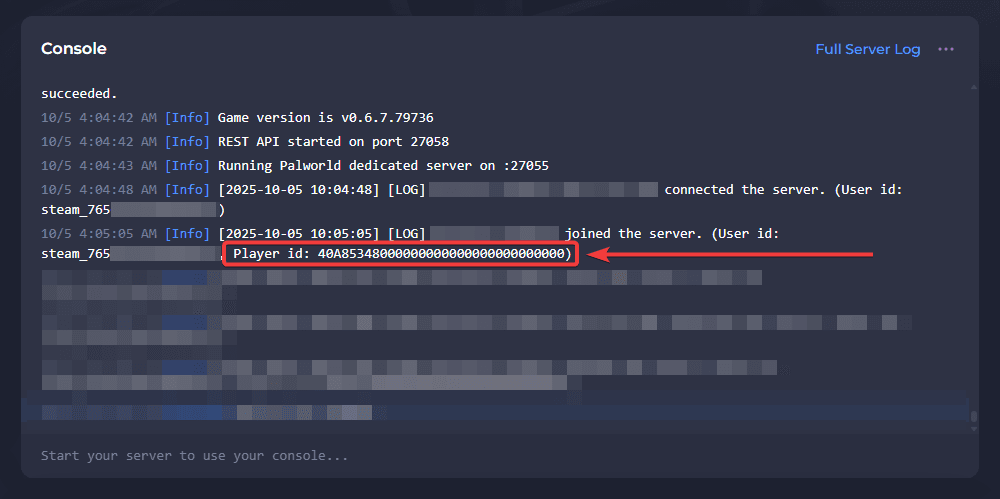
- Launch Palworld and load your world save.
- Press
Esc(PC) or theMenubutton (Controller) to open the main pause menu. - Navigate to the Inventory or Party tab.
- Your Player ID string and guild identification numbers are visible at the bottom of the character information panel.
Common Pitfalls to Avoid When Logging into a New Game Account
- Using a VPN During First Login: Platforms flag sudden geographic jumps. Log into the account using your normal home IP connection without active proxy services.
- Immediate In-Game Store Spending: If the account platform contains a wallet, wait 24–48 hours after updating credentials before adding payment cards to avoid automated fraud triggers.
- Skipping 2FA Setup: Leaving an account protected only by a password leaves it vulnerable to credential stuffing attacks.
- Overwriting Cloud Saves: When launching the game for the first time on a progression account, always select Download from Cloud if prompted about a conflict between local and cloud saves.
Why Choose BitTopup for Your Palworld Game Account
- Instant Order Fulfillment: Account credentials are delivered to your account dashboard without manual delays.
- Guaranteed Full Access: Every account includes complete credentials allowing immediate email, password, and security changes.
- Transparent Checkout: What you see at checkout is what you pay, with no unexpected administrative surcharges.
- 24/7 Dedicated Support: Multilingual support agents are ready around the clock to assist you with order verification and delivery inquiries.
Frequently Asked Questions
Where can I buy a Palworld game account safely in 2026?
You can purchase verified Palworld game accounts directly through BitTopup. The platform offers direct credential delivery, clear account specifications, and comprehensive customer support to ensure a smooth transfer process.
Can I transfer Palworld progress between Steam and PC Game Pass?
Official cross-progression between Steam and Microsoft Game Pass is not natively supported through cloud sync. While third-party save converter tools exist for local PC files, transferring progression across ecosystems requires manual file conversion and is not guaranteed across major patch updates.
What should I do immediately after receiving my Palworld account credentials?
Log in directly to the platform client, verify the game license in the library, change the primary email address to your own, update the account password, deauthorize all previous sessions, and activate two-factor authentication (2FA).
Does Palworld require a recurring subscription to play?
No. Palworld is a buy-to-play title. Once you own a valid game account on Steam or PlayStation, you can play single-player and multiplayer without any recurring game subscriptions. (Console multiplayer on Xbox/PlayStation may require standard platform network passes like Game Pass Core or PlayStation Plus).
Is Steam Family Sharing supported on a purchased Palworld account?
Yes, if the account is a standard Steam license, you can configure Steam Family Sharing in your Steam settings to share your game library with other authorized accounts on your local device.
How do I verify if my new Palworld account is globally accessible?
Global accounts purchased on BitTopup feature no regional activation locks. You can verify this by checking your account store settings under Account Details > Country/Region to ensure connection from your home region functions without restricted access notices.