

Arena Breakout Pass & Packages Top Up: Instant Delivery by Player ID
Equipping your operative with the tools, storage capacity, and exclusive cosmetics needed for successful extractions requires seasonal Battle Pass access and tactical supply packs. A direct Arena Breakout Pass & Packages top up gives you the ability to unlock the premium reward track, secure rare weapon skins, boost your season progression, and acquire high-grade gear bundles.
BitTopup provides a direct-to-account recharge service using your numeric Player ID. You do not need to share your game password or hand over account access. Select your desired pass tier or bundle, enter your Player ID, and receive your items directly in your in-game mailbox.
How to Recharge Arena Breakout Pass & Packages with Player ID
Completing an order on BitTopup takes only a few moments. Follow these steps to submit your recharge:
- Choose Your Product: Browse the available catalog above and pick the seasonal Battle Pass activation card or supply bundle you want to purchase.
- Enter Your Player ID: Input your numeric Arena Breakout Player ID into the designated account field. Double-check your numbers to ensure correct delivery.
- Proceed to Checkout: Select your preferred payment method from the available options. The live total and currency details are displayed directly on the checkout screen.
- Confirm Your Order: Complete the payment. Our automated delivery system processes your request and dispatches the purchased item straight to your in-game mailbox.
- Claim and Activate: Open Arena Breakout, check your system mail, claim the activation card, and activate it from your inventory.
How to Find Your Arena Breakout Player ID
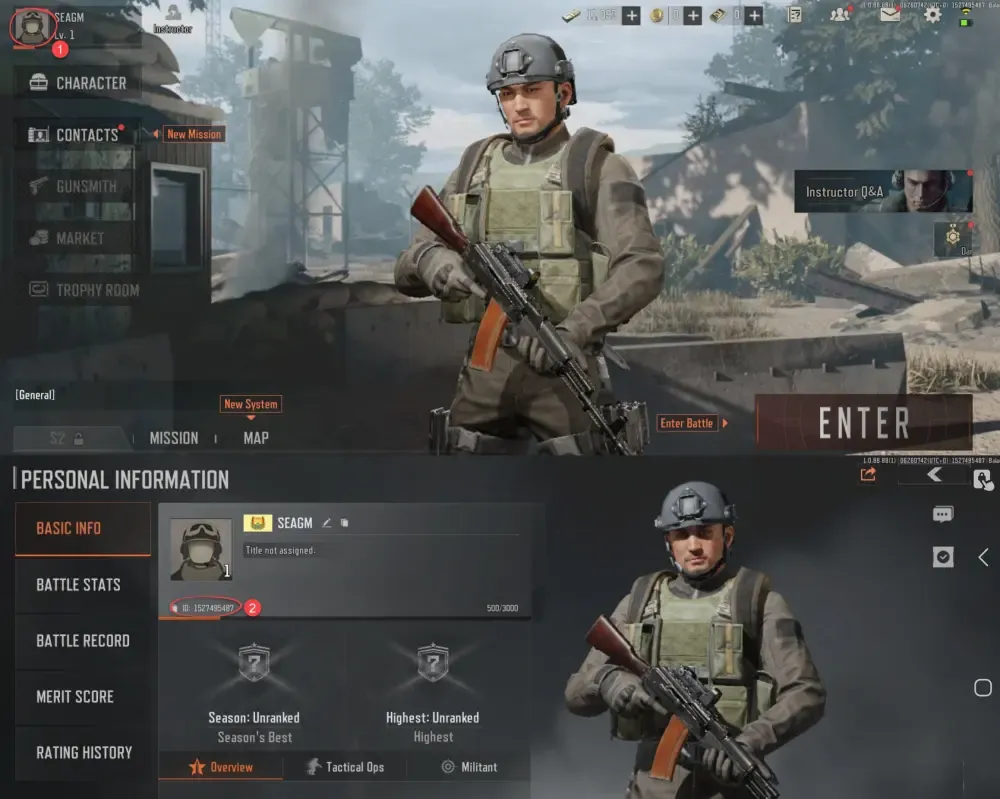
Your numeric Player ID is your unique profile identifier in Arena Breakout. To ensure your pass reaches your character without delay, locate your ID using the in-game client:
- Launch Arena Breakout on your device and log in to your account.
- From the main lobby screen, tap your Profile Avatar located in the top-left corner.
- Stay on the Basic Info tab.
- Locate the numeric string displayed directly under your character nickname.
- Tap the Copy icon next to the number to copy your Player ID to your clipboard.
- Paste this number into the Player ID field on BitTopup before placing your order.
Available Arena Breakout Passes and Package Options in 2026
Arena Breakout features multiple pass tiers and tactical gear bundles designed to match different playstyles and extraction goals. Review the available options below:
| Pass / Package Type | Delivery Format | In-Game Contents & Core Benefits |
|---|---|---|
| Advanced Battle Pass Activation Card | Mail Attachment Item | Unlocks the full premium reward track, exclusive operator outfits, weapon camos, Koen bundles, and season badge progression. |
| Premium Battle Pass Activation Card | Mail Attachment Item | Unlocks the premium reward track plus an instant +30 level progression boost and immediate access to mid-tier seasonal cosmetic rewards. |
| Tactical Supply Bundles | Mail Attachment Item | Delivers pre-packaged combat equipment, body armor sets, weapon crates, and medical kits directly to your character mail. |
| Storage Expansion Packages | In-Game Mail Delivery | Grants specialized containers and temporary or permanent stash expansions to hold high-value extraction loot. |
Note: Current pricing, seasonal bundle variations, and limited-time gear drops are updated in real time on the live BitTopup checkout catalog.
How to Claim and Activate Battle Pass Cards In-Game
Unlike standard currency top-ups that add balances directly to your display total, Battle Pass recharges are delivered as tangible in-game Activation Cards. Understanding how this mechanic works ensures you activate your pass correctly:
- Check Your In-Game Mailbox: Once your BitTopup order shows as completed, open the in-game mail menu (envelope icon) in Arena Breakout.
- Claim the Attachment: Locate the system delivery message containing your Battle Pass Activation Card or Package crate and tap Claim.
- Locate the Card in Storage: The item will move directly into your personal inventory or character backpack stash.
- Activate the Pass: Select the Activation Card inside your inventory and tap Use, or navigate to the Battle Pass menu and select Activate. Your premium track and bonus tier levels will unlock instantly.
Key Rules: Season Deadlines and Pass Upgrade Restrictions
Before completing your purchase, keep the following operational rules in mind:
- Season Expiration: Battle Pass Activation Cards correspond to active seasons. You must claim and use your activation card before the current season concludes. Unused cards do not automatically roll over to subsequent seasons.
- Tier Purchase Limits: You cannot stack an Advanced Pass and a Premium Pass on the same account within a single season. Choose the tier that matches your desired level progression.
- End-of-Season Progression: If you purchase a Battle Pass activation card late in the season, the season timer does not extend. Review the in-game countdown clock to make sure you have sufficient time to finish your milestone missions.
- Inventory Stash Space: Ensure you have enough open slots in your mail or storage before opening large tactical supply packages.
Why Top Up Arena Breakout Passes on BitTopup
BitTopup provides a safe, efficient, and user-friendly platform for purchasing Arena Breakout passes and tactical bundles:
- No Password Required: Your account security is protected. We only require your public numeric Player ID to route purchases. Never share your login credentials or verification codes with anyone.
- Fast Automated Processing: Direct integration with delivery systems ensures your Battle Pass activation cards and packages are dispatched straight to your in-game mailbox promptly.
- Transparent Live Checkout: All package options, local payment methods, and live exchange rates are displayed clearly at checkout without hidden fees.
- 24/7 Customer Assistance: If you ever have a question regarding Player ID formatting, order status, or delivery verification, our support team is available around the clock to assist you.
Frequently Asked Questions
Where can I buy Arena Breakout Pass & Packages top up?
You can buy Arena Breakout Pass & Packages directly on BitTopup. Select your desired pass tier or bundle from the product catalog, enter your Player ID, and complete payment through our secure checkout.
How do I find my Arena Breakout Player ID for recharge?
Open Arena Breakout, tap your profile avatar in the upper-left corner of the lobby screen, and locate the numeric ID beneath your username on the Basic Info tab. Use the copy button to capture the exact number.
How are purchased Battle Passes and Packages delivered to my account?
Passes and packages are sent as claimable item attachments to your in-game mailbox. After claiming the mail, open your inventory, select the Battle Pass Activation Card, and tap Use to activate the premium season track.
Can I buy both the Advanced and Premium Battle Pass in the same season?
No. You can only activate one pass tier per season on a single account. If you want the 30-level head start and instant rewards, choose the Premium Battle Pass Activation Card.
Do I need to provide my account login password to buy packages?
No. BitTopup requires only your public numeric Player ID. We will never ask for your game password, social login details, or verification codes.
What should I do if my recharged pass does not appear immediately?
First, restart the Arena Breakout game client and check your in-game mailbox for new system messages. If your mail has not arrived after a short period, verify that your order status on BitTopup shows as completed, and contact our 24/7 customer support team with your order number for immediate assistance.