

ExitLag Top Up: What is ExitLag and How Traffic Tunneling Works
ExitLag is proprietary routing software engineered specifically for online gamers to minimize latency, eliminate packet loss, and prevent jitter. Unlike standard Virtual Private Networks (VPNs) that encrypt all device traffic and often increase ping due to heavy encryption overhead, ExitLag focuses strictly on gaming connection routes.
Multipath Connection Technology
ExitLag maps and sends game data packets simultaneously across multiple server routes across the globe. If one internet route encounters congestion, packet drops, or high latency spikes, ExitLag instantly prioritizes the packet that arrives first via the fastest secondary route. This multi-route optimization ensures a stable and responsive connection to official game servers.
Traffic Optimization and Traffic Shaper
ExitLag operates at the network protocol layer by optimizing TCP and UDP data transmission. Its built-in Traffic Shaper reallocates bandwidth priority directly to your active game client while suppressing background application interference. It also features operating system optimizations that reduce input delay and stabilize frame pacing on supported PC titles.
ExitLag Subscription Duration Options (1 Month, 3 Months, 6 Months, Annual)
Prepaid subscription codes give players full access to all ExitLag features without forcing a recurring payment profile onto your gaming account. You choose the exact duration you want to use.
| Plan Duration | Account Access | Multi-Device Support | Auto-Renewal Required |
|---|---|---|---|
| 1 Month (30 Days) | Full Global Servers & Features | PC & Mobile Access | No |
| 3 Months (90 Days) | Full Global Servers & Features | PC & Mobile Access | No |
| 6 Months (180 Days) | Full Global Servers & Features | PC & Mobile Access | No |
| 12 Months / Annual (365 Days) | Full Global Servers & Features | PC & Mobile Access | No |
Note: Exact pricing, localized currencies, and promotional bundle rates are displayed directly on the live BitTopup checkout catalog.
How to Recharge and Buy ExitLag Subscription Codes on BitTopup
Acquiring a digital license key on BitTopup is direct and requires no sensitive game passwords.
- Select your desired subscription duration (1 Month, 3 Months, 6 Months, or 12 Months).
- Review your order details and confirm the product region is set to Global.
- Proceed to checkout and select your preferred payment method from the available local and international options.
- Complete your transaction securely.
- Access your prepaid activation key instantly on your BitTopup order confirmation screen and check your registered email inbox for a digital backup copy.
How to Find Your ExitLag Account and Account Details
To apply an ExitLag code, you need an active ExitLag account registered with your personal email address. ExitLag does not use an in-game numeric UID for prepaid top-ups; your primary identifier is your registered account email.
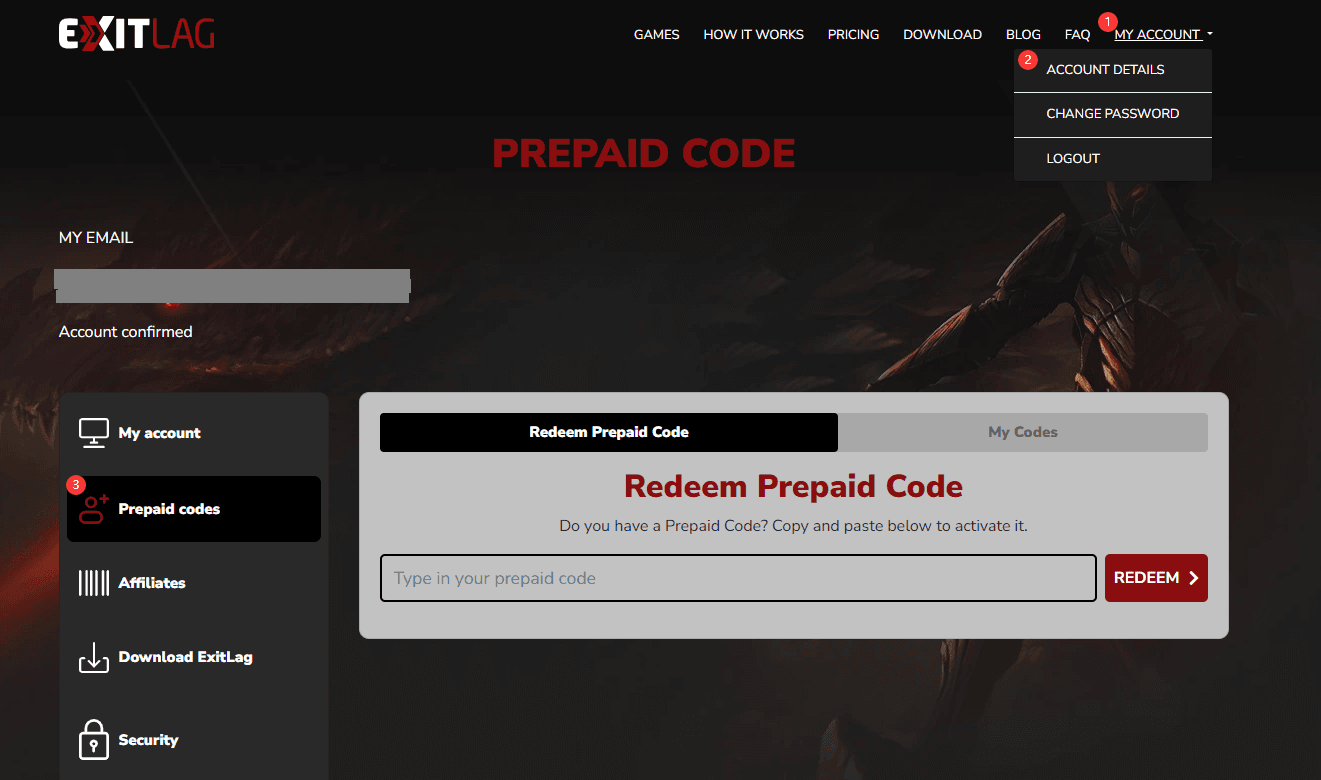
Steps to Locate Your Account Details:
- Open your web browser and visit the official ExitLag website.
- Log in with your email address and password.
- Click on My Account in the upper right-hand corner.
- Your account email and current subscription status will be displayed directly on your main profile overview.
How to Redeem Your ExitLag Prepaid Code on the Official Portal
Redeeming a prepaid license code attaches game time immediately to your account profile without requiring you to enter credit card details for automatic billing.
Step-by-Step Activation Process:
- Open your browser and navigate to the official ExitLag website (
exitlag.com). - Log into your existing account, or click Register to create a free account if you are a new user.
- Once logged in, go to the My Account dashboard.
- Select Prepaid Code or Redeem Code from the sidebar navigation menu.
- Carefully enter or paste the digital license key you received from BitTopup into the redemption field.
- Click Apply Code or Activate.
- Your account balance will update immediately to reflect your new active days.
- Launch or restart the ExitLag software on your PC or mobile device to sync the active license.
Benefits of Prepaid Codes vs Auto-Renewing Subscriptions in 2026
Using digital prepaid gift codes provides several practical advantages over binding a credit card directly to a subscription profile.
- No Unwanted Auto-Billing: Subscribing directly through standard payment portals often activates continuous recurring billing cycles. Prepaid keys expire naturally at the end of the duration without unexpected charges.
- Budget Control: You pay only for the competitive gaming seasons or months you actually plan to play.
- Global Flexibility: Global license keys bought on BitTopup can be redeemed anywhere worldwide, avoiding localized banking restrictions or foreign currency conversion surcharges.
- Safe for Gifting: Prepaid codes can be transferred directly to teammates or friends without sharing account credentials or financial data.
Supported Games, Platforms, and Global Server Compatibility
ExitLag maintains hundreds of dedicated server hubs across North America, South America, Europe, Asia, Oceania, and the Middle East.
Supported Platforms:
- PC (Windows): Full feature set, including Multipath routing, Traffic Shaper, multi-internet bonding, and FPS boost utilities.
- Mobile (Android & iOS): Dedicated mobile app routing tailored for mobile esports and competitive matchmaking.
Major Compatible Titles:
ExitLag officially supports over 1,000 online multiplayer games, including:* Tactical Shooters: Valorant, CS2, Rainbow Six Siege* Battle Royales: Apex Legends, Fortnite, Call of Duty: Warzone, PUBG* MMORPGs: World of Warcraft, Final Fantasy XIV, Lost Ark, Black Desert Online* MOBAs & Strategy: League of Legends, Dota 2* Action RPGs: Path of Exile, Diablo IV
Troubleshooting Common ExitLag Code Activation Issues
If you experience an error while redeeming your digital code on the ExitLag dashboard, use the following troubleshooting solutions:
1. "Invalid Code" or "Code Not Found"
- Ensure there are no accidental spaces before or after the code string when pasting.
- Check for easily confused characters (e.g., number
0vs letterO, number1vs uppercaseI). - Verify that the entire alphanumeric sequence from your BitTopup order was copied completely.
2. "Code Already Redeemed"
- Refresh your ExitLag My Account overview page. In many cases, the subscription time has already updated on the backend.
- Log out of the ExitLag website and log back in to force a profile cache refresh.
- Restart the desktop ExitLag application to check if the subscription status shows as active.
3. Desktop App Not Recognizing Active Days
- If you redeemed your code while the desktop client was running, the software may be reading cached session data. Fully close ExitLag from your Windows system tray, wait 10 seconds, and relaunch the client as an administrator.
Why Buy ExitLag Top Up on BitTopup
BitTopup provides a streamlined checkout environment for gaming software and in-game top-ups:
- Fast Digital Delivery: Codes are generated directly upon payment verification and accessible on your order page.
- Secure Payment Processing: Choose from trusted international and regional payment methods at checkout without risking account data.
- Transparent Pricing: Check out cleanly with clear regional pricing shown before payment.
- Dedicated Support: BitTopup customer support is available around the clock to assist with order tracking and code queries.
Safe Gaming: No Password Sharing Required
Your account security is paramount. Buying an ExitLag top up through BitTopup never requires sharing your ExitLag account password, personal login credentials, or sensitive authentication codes. You receive an independent digital license key that you enter directly on the official ExitLag website yourself.
Frequently Asked Questions
How do I activate my ExitLag prepaid code?
Log into your account at exitlag.com, navigate to the My Account section, select Prepaid Code, paste the key received from BitTopup, and click Apply Code.
Do you have to pay for ExitLag after the trial period?
Yes. ExitLag offers a limited free trial for new users to test network routes. Once the trial ends, routing features pause until you activate an active subscription plan or redeem a prepaid code.
How to get ExitLag cheaper without recurring auto-billing?
Buying multi-month prepaid codes (such as 3-month, 6-month, or 12-month packages) on BitTopup gives you longer access duration with a single one-time payment, avoiding automated credit card renewals and foreign exchange transaction fees.
Can I use ExitLag on both PC and mobile?
Yes. An active ExitLag account subscription allows you to log in on PC and supported mobile devices. Note that account licensing allows one active concurrent PC connection at a time.
Are ExitLag prepaid codes region-locked?
The ExitLag prepaid codes available on BitTopup are Global keys. They can be redeemed on any registered ExitLag account worldwide without regional activation barriers.
Is ExitLag worth buying for online competitive gaming in 2026?
ExitLag is highly effective for players connecting to distant game servers, dealing with ISP routing instability, or experiencing sudden packet loss. Its dynamic Multipath technology provides connection stability that standard VPNs and default internet routing cannot match.