

Mobile Legends Bang Bang Top Up: How to Order with Player ID and Zone ID
To complete a Mobile Legends Bang Bang top up on BitTopup, follow this direct four-step procedure:
- Select Product & Denomination: Choose your diamond package, Weekly Diamond Pass, or Twilight Pass tier. Live pricing is shown directly on the checkout screen.
- Enter Account Identifiers: Type your MLBB Player ID into the designated field, followed by your Zone ID (the 4 to 5 numbers in brackets).
- Confirm Payment: Pick your preferred payment method from the available checkout options and confirm your purchase.
- Verify In-Game Balance: Open Mobile Legends Bang Bang on your mobile device. Your diamonds or pass entitlements credit directly to your account.
BitTopup processes orders through direct server communication. You do not need to log out of your game client during checkout, though restarting the client helps synchronize newly credited balances immediately.
How to Find Your MLBB Player ID and Zone ID
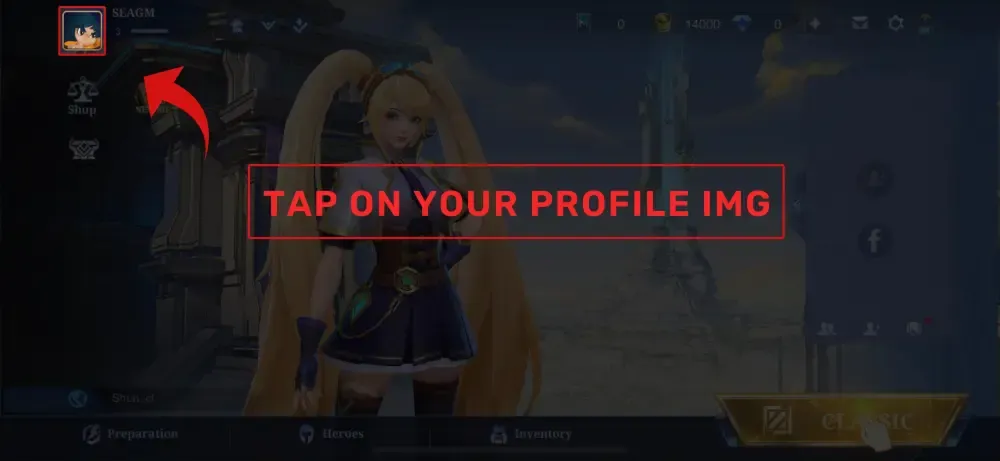
Locating your user identifiers in Mobile Legends Bang Bang takes only a few seconds inside the game client:
- Launch MLBB on your mobile device.
- Tap your user avatar in the top-left corner of the main lobby screen.
- Stay on the default Profile (Basic Info) tab.
- Look beneath your display name on the right side of your avatar.
- You will see an identifier string formatted like: ID: 123456789 (2026).
The primary sequence of 8 to 10 digits before the parentheses is your Player ID. The 4 or 5 digits inside the parentheses represent your Zone ID.
Always verify both numbers before ordering. The Player ID identifies your specific character profile, while the Zone ID identifies the regional server cluster hosting your account data.
MLBB Base vs. Bonus Diamonds Explained: Recharge Benefits and Event Rules
When purchasing diamond packs in Mobile Legends, denominations often list a base value accompanied by bonus diamonds (such as 500 + 50 Diamonds). Understanding how the game server treats these two pools is essential if you participate in time-limited events like Premium Supply, Collector skin draws, or Aspirants events in 2026.
- Base Diamonds: Standard purchased currency units. The game system counts Base Diamonds toward recharge milestones, daily top-up tasks, and event token accumulation quests.
- Bonus Diamonds: Extra complimentary diamonds granted during specific tier promotions. While they spend identically to Base Diamonds in the in-game shop for skins, heroes, and lucky spins, they do NOT contribute to "Recharge X Diamonds" tasks in event interfaces.
| Attribute | Base Diamonds | Bonus Diamonds |
|---|---|---|
| Recharge Event Progress | Counts 100% toward milestone tasks | Does not trigger recharge quests |
| In-Game Purchasing Power | Full value for skins, passes, and draws | Full value for skins, passes, and draws |
| Balance Display | Merged into main diamond balance | Merged into main diamond balance |
| Starlight Progress Points | Accrues Starlight points on top-up | No additional top-up points |
Check the exact Base Diamond count displayed on the BitTopup product menu before placing an order if your primary goal is finishing a specific in-game recharge mission.
Weekly Diamond Pass & Twilight Pass: Perks, Values, and Purchase Limits
Players looking for high resource efficiency often choose passes over raw diamond bundles. BitTopup supports direct UID activation for both major MLBB pass options.
Weekly Diamond Pass Breakdown
The Weekly Diamond Pass provides steady rewards over a 7-day period:* Instant Grant: 80 Base Diamonds delivered immediately upon purchase.* Daily Claims: 20 Diamonds and 10 Starlight Points sent daily for 7 days via in-game check-in.* Total Yield: 220 Diamonds, 70 Starlight Points, and 7 Weekly Diamond Pass Choice Bundles containing rare fragments or dust.* Event Synergy: The initial activation of a Weekly Diamond Pass counts as 80 diamonds toward active recharge task milestones.* Stacking Limits: You can purchase and stack up to 10 Weekly Diamond Passes at one time (maximum remaining duration of 70 days). If your account already has 70 or more days active, additional purchases will fail until your active duration drops below the limit.
Twilight Pass Benefits
The Twilight Pass is a seasonal progression track centered around account leveling:* Unlocks exclusive hero cosmetics and milestone skins.* Grants high volumes of Twilight Tickets, Magic Dust, and Starlight Membership progression tokens.* Delivers immediate access to premium track rewards as you advance through player levels.
Safe MLBB Recharge: Direct UID Delivery Without Sharing Passwords
Account security is critical when purchasing mobile game currencies. BitTopup operates on direct-to-account delivery using public identifiers:
- No Account Passwords: You will never be asked for your Moonton account password, email credentials, or two-factor authentication codes.
- No Social Linking Required: You do not need to link your Google Play, Apple ID, Facebook, TikTok, or VK profiles to third-party platforms.
- Zero Risk of Unauthorized Access: Because no login session is created, your in-game gear, emblem configurations, diamonds, and friend lists remain completely protected.
- Legitimate System Routing: Orders are delivered straight to the target server cluster identified by your Zone ID, preventing account flags or temporary matchmaking locks.
Troubleshooting Delivery Issues, Wrong Zone IDs, and Common Recharge Errors
If you experience a delay with your Mobile Legends Bang Bang top up, use these troubleshooting steps:
Balance Not Updating In-Game:* Exit the MLBB app completely and clear it from your active background applications.* Relaunch the game to force a server synchronization.* Check your in-game system mail. Certain pass items and promotional tokens arrive via system attachments rather than direct wallet addition.
Incorrect Player ID or Zone ID Entered:* If you input a Zone ID that does not exist or does not match your Player ID, the delivery system rejects the transaction before dispatch, preventing loss of funds.* If an incorrect combination happens to belong to another existing active account, the items will deliver to that unintended account. Always double-check your numbers in your profile tab prior to submitting payment on BitTopup.
Weekly Diamond Pass Cap Reached:* If your top-up for a Weekly Diamond Pass fails, confirm whether your account currently has 70 or more active pass days remaining. Wait for your pass countdown to drop below 70 days before ordering another pass.
Contacting BitTopup Support:* If your order status indicates successful completion on BitTopup but your diamonds do not appear after 15 minutes and a client restart, contact BitTopup 24/7 customer support.* Provide your BitTopup Order Number, your Player ID, Zone ID, and a screenshot of your in-game basic info profile screen.
Frequently Asked Questions
How do I find my Mobile Legends Player ID and Zone ID?
Open Mobile Legends Bang Bang and tap your profile avatar in the upper-left corner of the lobby. In the Basic Info tab, locate the ID field next to your character level. Your Player ID is the 8-to-10 digit number, and your Zone ID is the 4-to-5 digit number enclosed in parentheses.
Do bonus diamonds count toward MLBB recharge benefit events?
No. In-game recharge event progression (such as Premium Supply and top-up tasks) counts only Base Diamonds. Bonus diamonds received from bundle promotions are usable for regular in-game purchases but do not add to event task counters.
How many Weekly Diamond Passes can I purchase at one time?
You can stack up to a maximum of 10 Weekly Diamond Passes simultaneously, representing an active duration of 70 days. If your remaining duration is 70 days or higher, wait until days expire before purchasing additional passes on BitTopup.
Do I need to provide my Mobile Legends account password to top up?
No. BitTopup only requires your public Player ID and Zone ID to deliver diamonds. Never share your Moonton password, verification OTPs, or linked social media login details.
What should I do if my MLBB diamonds are not credited after payment?
First, close and restart your Mobile Legends game application to refresh your account data from the server. Check your in-game mail for any claimed vouchers or tokens. If the balance remains unchanged, contact BitTopup customer support with your order number and profile screenshot.
Can I top up Mobile Legends diamonds for a friend?
Yes. Because BitTopup only requires the recipient's Player ID and Zone ID, you can top up diamonds or passes for any friend, guildmate, or family member. Simply obtain their exact ID numbers from their in-game profile and enter them during checkout.