

Fast and Secure ZEPETO ZEMs & Coins Top Up
ZEPETO lets you create unique 3D avatars, design custom fashion pieces, explore virtual worlds, and connect with friends across the globe. To fully customize your avatar, acquire creator-made apparel, and access exclusive in-world experiences, you need in-game currency: ZEMs and Coins.
BitTopup provides a direct ZEPETO ZEMs & Coins top up service that credits your account using only your ZEPETO Player ID. You never have to share passwords, login credentials, or personal verification codes. Select your desired package, submit your Player ID, complete your purchase, and enjoy your new balance directly in the app.
What Are ZEPETO ZEMs and Coins Used For?
ZEPETO operates on a dual-currency economy. Each currency unlocks distinct items and features within the app.
- ZEPETO ZEMs: The premium currency in ZEPETO. ZEMs are required for top-tier creator clothing, luxury brand collaborations, premium facial features, special body proportions, dynamic poses, and custom avatar animations. If you want to purchase limited-edition items created by top community designers or unlock special perks in popular ZEPETO Worlds, ZEMs are essential.
- ZEPETO Coins: The standard in-game currency. Coins let you buy everyday outfits, foundational makeup styles, basic accessories, custom hair colors, and furniture for your personal avatar room. Coins are also used for various interactive mini-games and standard activities across community spaces.
Having a steady balance of both currencies gives you complete creative freedom to style your avatar and support your favorite community creators.
Key Differences Between ZEPETO ZEMs and Coins
| Feature | ZEPETO ZEMs | ZEPETO Coins |
|---|---|---|
| Currency Tier | Premium virtual currency | Standard virtual currency |
| Primary Catalog | Creator fashion, luxury collabs, VIP animations | Standard apparel, basic room furniture, classic accessories |
| Earning Method | Direct top up, select high-tier events | Quests, daily spins, mini-games, direct top up |
| Item Exclusivity | High (exclusive drops and limited runs) | Standard (broad, foundational catalog) |
| Direct UID Recharge | Available on BitTopup | Available on BitTopup |
Step-by-Step Guide: How to Recharge ZEPETO ZEMs & Coins
To top up your ZEPETO account on BitTopup, follow these simple steps:
- Select Your Currency Package: Browse the available ZEMs and Coins denominations displayed on this page. All live prices and item quantities are listed directly on the checkout selector.
- Enter Your Player ID: Type or paste your unique ZEPETO Player ID into the designated input field.
- Confirm Your Account Details: Double-check the Player ID string to make sure your order is delivered to the correct avatar profile.
- Select Your Payment Method: Choose from the available secure checkout options.
- Complete Checkout: Finalize your payment. Your ZEMs or Coins will be sent directly to your ZEPETO account via direct ID transfer.
How to Find Your ZEPETO Player ID
You only need your ZEPETO Player ID to receive your currency. Finding it inside the app takes just a few seconds:
- Launch the ZEPETO app on your mobile device and log in.
- Tap the Profile tab located in the bottom-right corner of the main navigation bar.
- View your profile screen. Your ZEPETO ID (or Player ID) is displayed directly beneath your avatar's display name, prefixed with a code or handle format.
- Alternatively, tap the Settings gear icon in the top-right corner to view your detailed account information and tap the copy icon next to your ID.
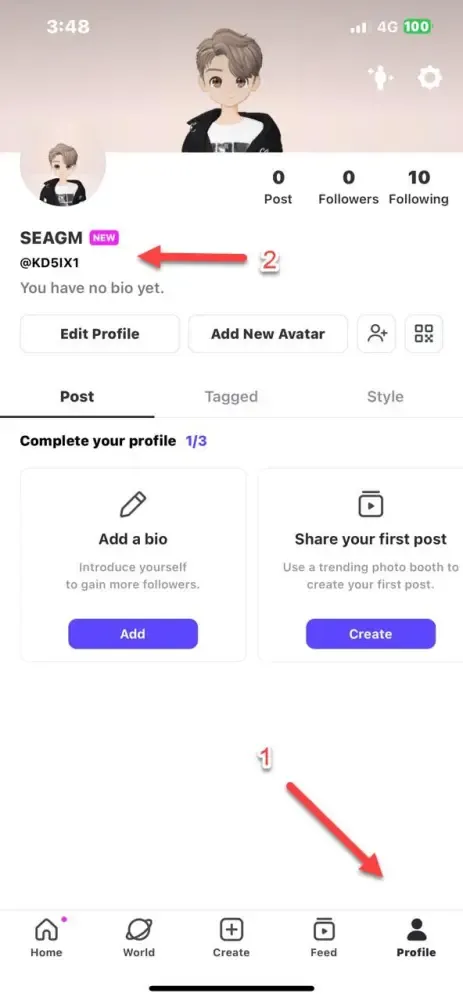
Always copy and paste your ID directly into the BitTopup order form to prevent typing errors.
How to Gift ZEMs & Coins to Friends Using Player ID
Surprising friends and creators with ZEMs or Coins is straightforward on BitTopup. Because the recharge system only requires a valid Player ID, you do not need access to their personal device or account login.
- Ask your friend for their ZEPETO Player ID.
- Choose the ZEMs or Coins package you wish to gift on the BitTopup product page.
- Paste your friend's Player ID into the account field.
- Complete the checkout process.
Once the transaction finishes, the currency is credited straight to your friend's in-game balance. It is an ideal way to sponsor outfit contests, support your favorite world builders, or send a birthday present inside ZEPETO.
Troubleshooting Common ZEPETO Top Up and Delivery Issues
While direct UID deliveries are processed quickly, occasional sync delays can occur. Here is how to resolve the most common situations:
- Balance Not Updating Immediately: After completing your order, fully close the ZEPETO app from your device's background task switcher and reopen it. A fresh restart forces the app to query the game servers for your updated wallet balance.
- Incorrect Player ID Entered: If you realize you entered an incorrect Player ID, check your order status immediately. If the order has already been processed by the automated system, transactions cannot be reversed. Always verify your ID before confirming payment.
- Delayed In-Game Notification: In some app versions, push notifications for external recharges do not trigger a pop-up banner. Check your numerical balance inside the in-app shop or avatar closet to verify the new funds.
- Order Under Review: If your payment is pending verification, keep your order reference number handy. BitTopup's 24/7 customer support team is available via live chat to verify transaction statuses and provide updates.
Why Recharge ZEPETO on BitTopup
- Zero Password Risk: We only ask for your public ZEPETO Player ID. We will never ask for your email login, phone number, password, or two-factor authentication codes.
- Direct and Fast Processing: Orders are routed directly to your ZEPETO account through direct credit systems to minimize wait times.
- Reliable Global Payments: BitTopup supports diverse international and regional payment methods, making transactions smooth wherever you are based.
- 24/7 Customer Support: If you ever have a question about an order, our dedicated customer support team is available around the clock to assist you.
Frequently Asked Questions
What is the difference between ZEPETO ZEMs and Coins?
ZEMs are the premium currency used to purchase exclusive creator-designed apparel, limited-edition brand collaborations, custom animations, and special world items. Coins are the standard currency used for basic everyday clothing, starter makeup, hair options, and standard room decor.
How do I find my ZEPETO Player ID for recharge?
Open the ZEPETO app, tap the Profile icon in the bottom-right corner, and locate your unique ID code displayed right below your display name. You can also view and copy it from the Settings menu.
Do I need to share my ZEPETO account password to top up?
No. BitTopup requires only your ZEPETO Player ID. You never need to share passwords, login credentials, or verification codes.
Can I recharge ZEPETO ZEMs and Coins for a friend?
Yes. You only need your friend's ZEPETO Player ID. Enter their ID at checkout, complete the payment, and the currency will be credited directly to their avatar's balance.
How long does it take for ZEPETO ZEMs to appear in my account?
Deliveries are processed directly via Player ID right after payment confirmation. In most cases, funds reflect in your in-game wallet shortly after completing the transaction.
What should I do if my ZEPETO ZEMs or Coins do not arrive?
First, restart your ZEPETO app to refresh your wallet balance. If your balance does not update, check your BitTopup order history and contact our 24/7 customer support team with your order number for prompt assistance.
Where can I buy cheap ZEPETO ZEMs safely in 2026?
You can buy ZEPETO ZEMs safely on BitTopup in 2026. Enjoy secure UID-only recharges, transparent live pricing, multiple global payment methods, and 24/7 customer service.