Baat Live Top Up Online via Player ID
Baat Live is a dynamic live-streaming and interactive voice chat platform where users connect with broadcasters, join group voice rooms, and participate in lively community events. To support your favorite content creators, send animated gifts, and unlock special room privileges, you need virtual tokens in your account balance.
BitTopup offers a direct Baat Live top up service designed for speed, security, and convenience. By using only your numeric Player ID, you can reload your balance without sharing sensitive account credentials, passwords, or third-party login details. Select your desired token package, complete the checkout process, and receive your balance directly inside the app.
How to Recharge Baat Live Using Player ID
Recharging your Baat Live account on BitTopup is straightforward and requires only a few steps:
- Select Your Package: Review the available token denominations above and choose the amount you wish to purchase. Live rates and options are displayed on the product checkout interface.
- Enter Your Player ID: Type your unique Baat Live Player ID accurately into the required input field.
- Choose a Payment Method: Select from the available payment channels displayed at checkout, including international credit/debit cards, regional e-wallets, and online banking options.
- Complete Payment: Review your order details and confirm the transaction.
- Check Your In-App Balance: Once payment processing finishes, open Baat Live and refresh your profile wallet to view your updated token balance.
Where to Find Your Baat Live Player ID
Your Player ID is a unique numerical identifier assigned to your personal Baat Live account. You must provide this ID during checkout so that your purchased tokens are credited to the correct profile.
Follow these steps inside the app to locate your ID:
- Open the Baat Live app on your mobile device.
- Log in to your account.
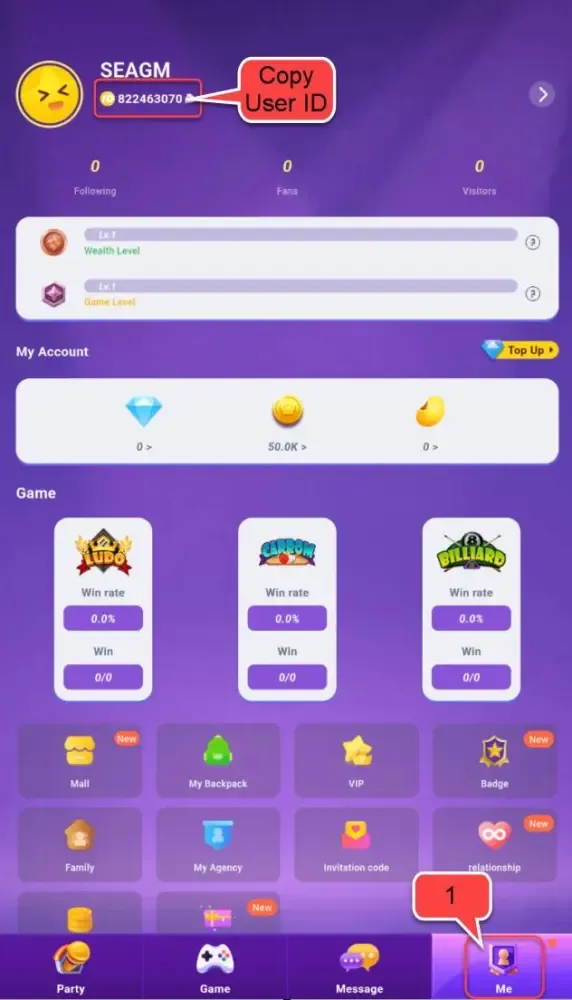
- Tap the Profile or Me icon located in the bottom-right corner of the home screen.
- View your profile card located at the top of the screen.
- Your Player ID is displayed directly beneath your display name and profile picture.
- Tap the copy icon next to the number to copy it to your clipboard.
Make sure to paste the exact numeric ID into the input field on BitTopup to avoid delivery delays.
Uses of Virtual Tokens and Gifts in Baat Live
Virtual tokens act as the primary currency within the Baat Live ecosystem. Having a healthy token balance unlocks multiple social and interactive features:
- Sending Animated Virtual Gifts: Show appreciation to live broadcasters during their streams by sending visual gifts, ranging from casual stickers to full-screen luxury animations.
- Boosting Creator Rankings: Every gift sent contributes to a streamer's daily, weekly, and monthly leaderboard status, helping them earn platform visibility.
- Accessing Exclusive Room Effects: Higher-tier gifting unlocks entrance banners, unique chat bubbles, and personalized profile badges in voice chat rooms.
- Participating in Community PK Battles: Support your favorite host during live PK face-offs against other broadcasters by sending gifts that boost their battle score in real time.
Supported Payment Methods and Secure Checkout
BitTopup ensures that topping up your Baat Live account is accessible from anywhere in the world. The live checkout screen dynamically presents payment methods suitable for your region, including:
- Major credit and debit cards (Visa, Mastercard, and other supported networks)
- Popular regional digital wallets and mobile payment solutions
- Direct online banking and local transfer options
All transactions are protected by standard encryption protocols. Because BitTopup only requires your Baat Live Player ID, your account password, email, and social login credentials remain completely private.
Troubleshooting Common Baat Live Top-Up Issues
If you experience an unexpected delay or issue with your recharge, refer to the troubleshooting overview below:
| Issue | Probable Cause | Recommended Action |
|---|---|---|
| Balance not updating | App cache or temporary network sync delay | Fully close and restart the Baat Live app, then check your profile wallet again. |
| Mistyped Player ID | Incorrect numbers entered during checkout | Contact BitTopup 24/7 customer support immediately with your transaction order number. |
| Payment declined | Card limit, bank security check, or network timeout | Verify available funds with your bank or select an alternate payment method at checkout. |
| Partial balance update | High server load during major platform events | Allow a few minutes for batch processing, then refresh the app. |
If your balance does not appear after completing these checks, reach out to the BitTopup customer support team with your order confirmation details for prompt investigation.
Why Choose BitTopup for Baat Live Recharges
- ID-Only Direct Top-Up: You never have to share passwords, verification codes, or personal account logins. Entering your Player ID is all that is needed.
- Transparent Live Checkout: Review exact product details and real-time prices directly on the page before completing your purchase.
- Broad Payment Flexibility: Access multiple secure international and local payment gateways tailored to your region.
- 24/7 Support Assistance: Our dedicated customer support team is available around the clock to help resolve order inquiries and ensure smooth processing.
Frequently Asked Questions
What is Baat Live and what are virtual gifts used for?
Baat Live is an interactive social live-streaming and voice chat application. Virtual gifts purchased with tokens are used to support live broadcasters, participate in PK stream competitions, raise community leaderboard ranks, and unlock exclusive entrance animations in chat rooms.
Do I need to provide my Baat Live password to top up?
No. BitTopup uses direct Player ID recharge. You only need to provide your numeric Player ID. You will never be asked for your account password, SMS verification codes, or linked social media logins.
Where can I find my Baat Live Player ID?
Open the Baat Live app, navigate to your Profile (Me) tab in the bottom menu, and locate the numeric ID displayed directly beneath your profile name and avatar. Tap the copy icon next to the number to copy it.
How fast will the Baat Live recharge reflect in my account balance?
Orders are processed automatically once your payment is confirmed. In most cases, tokens reflect in your in-app balance shortly after completing checkout. If you do not see the update right away, restart your Baat Live app to refresh the wallet.
What payment methods can I use to recharge Baat Live on BitTopup?
BitTopup supports a wide selection of payment methods, including credit/debit cards, regional digital wallets, and local bank transfers. The available options for your country will appear automatically at checkout.
What should I do if I entered the wrong Player ID during checkout?
If you realize you entered an incorrect Player ID, contact BitTopup customer support immediately with your order ID and the correct Player ID. If the order has not yet been processed by the system, our support agents will assist in correcting the details.