

Binmo Top Up: In-App Coins and Voice Chat Features
Binmo is a global interactive group voice chat and entertainment platform designed for mobile users. The app allows people to create and join live voice rooms, communicate with friends, host audio shows, participate in casual party games, and exchange dynamic virtual gifts. Due to similar naming conventions in app stores, users sometimes confuse the Binmo social voice chat app with online trading or financial platforms. Binmo is exclusively a social audio entertainment application dedicated to voice streaming, interactive games, and community rooms.
Inside the app, coins are the primary currency used to unlock premium features and engage with other creators. Recharging your coin balance allows you to:
- Send animated gifts to your favorite room hosts and speakers.
- Purchase exclusive entrance effects, luxury vehicles, and customized profile frames.
- Unlock premium chat bubbles and distinctive VIP badges.
- Participate in interactive room mini-games and seasonal community events.
Recharging your balance directly ensures that your profile stands out in popular voice rooms and allows you to support room hosts without interruption.
How to Find Your Binmo Player ID in the App
To complete a recharge on BitTopup, you only need to provide your unique Binmo Player ID (UID). This identifier is permanently tied to your profile and ensures your purchased coins are credited to the exact account.
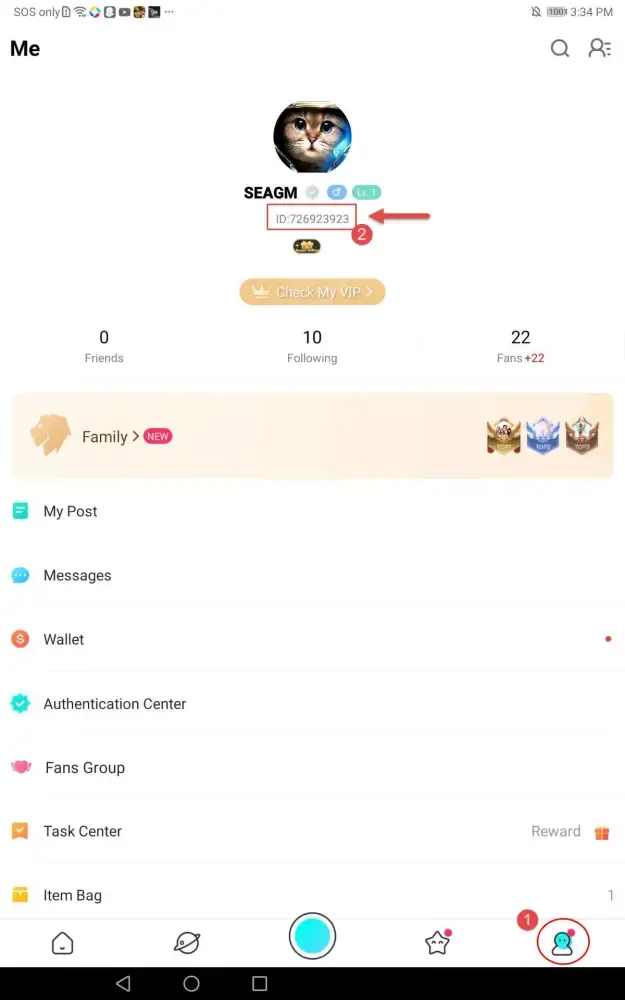
Follow these steps to locate your Player ID:
- Open the Binmo application on your mobile device.
- Tap the Profile icon ("Me") in the bottom-right corner of the main screen.
- Look directly beneath your avatar and display name.
- Find the numeric code labeled ID.
- Tap the small copy icon next to the number to copy your Player ID to your clipboard.
Always copy and paste your Player ID directly into the checkout field instead of typing it manually. This eliminates typographical mistakes and ensures rapid order delivery.
Step-by-Step Guide to Recharge Binmo Securely on BitTopup
Recharging your Binmo balance on BitTopup is quick, direct, and completely safe. Follow the step-by-step process below to refill your account balance.
| Step | Action | Key Detail |
|---|---|---|
| 1 | Select Coin Package | Choose the exact coin denomination required for your gifting and room activities. Live prices are listed on the checkout screen. |
| 2 | Enter Player ID | Paste your numeric Binmo Player ID into the designated account field. |
| 3 | Choose Payment Method | Select from available regional or international payment solutions. |
| 4 | Finalize Payment | Confirm your order; coins will be automatically sent to your Binmo account. |
Once your transaction completes, you do not need to log out of the Binmo application. If your coin balance does not update instantly, simply pull down to refresh the profile wallet page or restart the app to see your new total.
Available Global and Local Payment Options for Binmo
BitTopup accommodates buyers globally by providing an extensive range of secure payment gateways. Depending on your region, you can choose from:
- Major international credit and debit cards.
- Popular localized e-wallets.
- Direct online banking transfers.
- Regional digital payment systems.
All exchange rates, package sizes, and applicable fees are clearly displayed on the live product page before you submit payment. BitTopup maintains clear pricing without hidden processing surcharges, allowing you to select your preferred payment channel and complete checkout with complete confidence.
Account Safety: Why Passwordless Top-Up Protects Your Account
Security is paramount when buying digital goods online. Some third-party sellers request account credentials or social media logins to fulfill orders. Sharing sensitive account data introduces serious security risks, such as unauthorized access, account loss, and compromised personal chat history.
BitTopup uses a direct ID-based fulfillment process that guarantees total account protection:
- No Passwords Required: You never need to reveal your Binmo password or authorization tokens.
- No Linked Accounts: You do not need to grant access to your Google, Apple, or social network credentials.
- Zero Risk of Account Hijacking: Because only your public Player ID is used, your login information remains 100% private.
- Safe Direct Credit: The transaction works as a direct balance transfer to your public account ID, maintaining full compliance with digital safety standards.
Troubleshooting Binmo Recharge Issues and Delivery Support
While most recharges process immediately, occasional delays or user errors can happen. Use the following troubleshooting guidelines if you run into any issues:
- Coins Not Showing in App: Close the Binmo application completely and restart it. Go to your profile and check your in-app wallet balance to see the updated figure.
- Typo in Player ID: If you submitted an incorrect Player ID during checkout, contact BitTopup customer support immediately with your order ID. If the order has not yet been processed by the automated delivery system, the support team can adjust the destination ID. Please note that once an order is delivered to an active account ID, it cannot be recalled.
- Payment Pending: If your payment status shows as pending, your payment provider might be completing routine security verification. Check your bank or wallet app for transaction confirmation.
- 24/7 Customer Assistance: BitTopup offers round-the-clock customer support. If you have questions regarding order tracking, payment processing, or delivery confirmation, submit a support ticket for prompt assistance.
Frequently Asked Questions About Binmo Top Up
What is required to recharge Binmo on BitTopup?
To recharge Binmo, you only need your numeric Binmo Player ID and a valid payment method. You can select your desired coin package and paste your Player ID directly into the input field at checkout.
How do I find my Binmo Player ID?
Open the Binmo app, tap the Profile ("Me") tab in the lower-right corner, and locate the numeric code next to the "ID:" label under your profile picture. Tap the copy icon beside it to copy the ID directly to your clipboard.
Do I need to provide my Binmo password to complete a recharge?
No. BitTopup never asks for your password, verification codes, or login credentials. The top-up is completed entirely using your public Player ID, keeping your account secure.
How fast will the recharged balance be delivered to my Binmo account?
Orders placed on BitTopup are processed automatically upon payment confirmation. In most instances, coins reflect in your in-app balance shortly after checkout finishes.
What payment methods are supported for Binmo top ups?
BitTopup supports a wide selection of international and regional payment methods, including major credit/debit cards, regional e-wallets, and online banking options. The full list of available payment options for your country is displayed at live checkout.
What should I do if I entered an incorrect Player ID during checkout?
If you realize you entered the wrong Player ID, contact BitTopup customer support immediately with your order number. If the order has not yet been sent out, support will assist in correcting the account details before delivery.